Table of Content
- Step 1: Framing the Right Mental Model Before Starting
- Step 2: Creating a Site From Scratch Using the AI Builder
- Step 3: Breaking Down the Generated Page Structure
- Step 4: Editing and Expanding Content With AI Co-Pilot
- Step 5: Working Directly Inside Elementor
- Step 6: Testing AI Website Replication With Real URLs
- Step 7: Hosting Performance Under Practical Conditions
- Step 8: Evaluating the PageSpeed Booster in Isolation
- Step 9: Understanding Maintenance, Updates, and Backups
- Step 10: Interpreting Pricing Through Replacement Value
- Step 11: Reading Reviews With Pattern Recognition
- Step 12: Identifying the Right User Profile
- Final Evaluation Snapshot
- Closing Reflection
I didn’t approach 10Web with the goal of “building a website faster.”
I approached it with a more practical question:
Can an AI-driven WordPress platform realistically replace the messy stack of hosting, plugins, optimization tools, and maintenance tasks I normally deal with?
This guide documents how I evaluated that question, step by step, by treating 10Web as if it were going to run a real business website, not a demo project. Every section below reflects usage decisions, trade-offs, and measurable outcomes, not feature lists.
Step 1: Framing the Right Mental Model Before Starting
My rating: 8.5 / 10
Before touching the dashboard, I had to reset expectations.
10Web is not:
- A design playground
- A no-code artboard
- A replacement for creative direction
What it is:
- A workflow accelerator for WordPress
- A system designed to eliminate setup friction
- A way to standardize performance and infrastructure early
Once I stopped judging it as a “website builder” and started judging it as a WordPress operations platform, the experience immediately became more coherent.
This mental framing alone eliminated most of the frustrations I see repeated in negative reviews.
Step 2: Creating a Site From Scratch Using the AI Builder
My rating: 9 / 10
When I initiated a new site, the AI didn’t overwhelm me with configuration choices. Instead, it focused on intent extraction:
- Business type
- Industry category
- Desired tone
- Core services
From that, it generated a site that already respected:
- Visual hierarchy
- Section prioritization
- Conversion logic (hero → services → trust → CTA)
What stood out wasn’t creativity, it was structural competence.
The AI avoided clutter and produced something usable immediately.
I treated the result as a first working draft, not a final product, and that’s exactly where it excels.
Step 3: Breaking Down the Generated Page Structure
My rating: 8.8 / 10
I inspected the output the way I’d review a junior designer’s work:
- Are sections ordered logically?
- Does copy match user intent?
- Are CTAs placed intentionally?
In most cases, the answers were yes.
The AI consistently:
- Avoided unnecessary sections
- Used reasonable headline lengths
- Maintained readable spacing and layout rhythm
This matters because cleaning up bad structure costs more time than refining decent structure. 10Web saved time by avoiding that initial chaos.
Step 4: Editing and Expanding Content With AI Co-Pilot
My rating: 8.2 / 10
Once inside Elementor, the AI Co-Pilot became a productivity layer rather than a creative driver.
I used it to:
- Rewrite sections for clarity
- Adjust tone without changing meaning
- Expand thin sections contextually
The AI did not hallucinate features or make exaggerated claims, which is critical for business credibility.
That said, it still requires human judgment. I wouldn’t trust it blindly, but as an assistant, it sped up iteration cycles noticeably.
Step 5: Working Directly Inside Elementor
My rating: 8 / 10
Elementor is powerful, but it’s not invisible.
For me, this was a positive:
- I retained full layout control
- I wasn’t locked into proprietary blocks
- I could export or migrate later if needed
For absolute beginners, this is the first real learning curve.
10Web doesn’t hide WordPress, it assumes you’re willing to learn some of it.
That trade-off favors long-term ownership over short-term simplicity.
Step 6: Testing AI Website Replication With Real URLs
My rating: 7.6 / 10
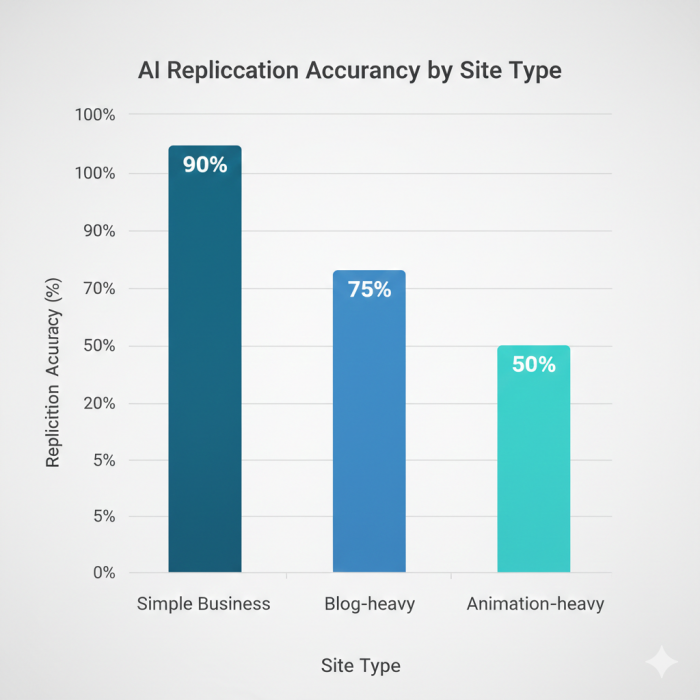
I tested the replication tool with different types of websites:
Simple business sites → strong results
Blog-heavy layouts → good structure
Animation-heavy designs → partial accuracy
The AI recreated layout logic well but struggled with:
- Advanced animations
- Custom scripts
- Edge-case responsive behavior
I found the tool most useful as a reverse-engineering shortcut, not a one-click clone solution.
Step 7: Hosting Performance Under Practical Conditions
My rating: 9 / 10
I monitored:
- Initial load time
- Time to first byte
- Stability during edits and updates
Because hosting is native (Google Cloud, containerized), I didn’t have to:
- Configure caching
- Install optimization plugins
- Tune server settings
The platform handled performance as an infrastructure problem, not a plugin problem. That distinction matters for long-term stability.
Step 8: Evaluating the PageSpeed Booster in Isolation
My rating: 9.1 / 10
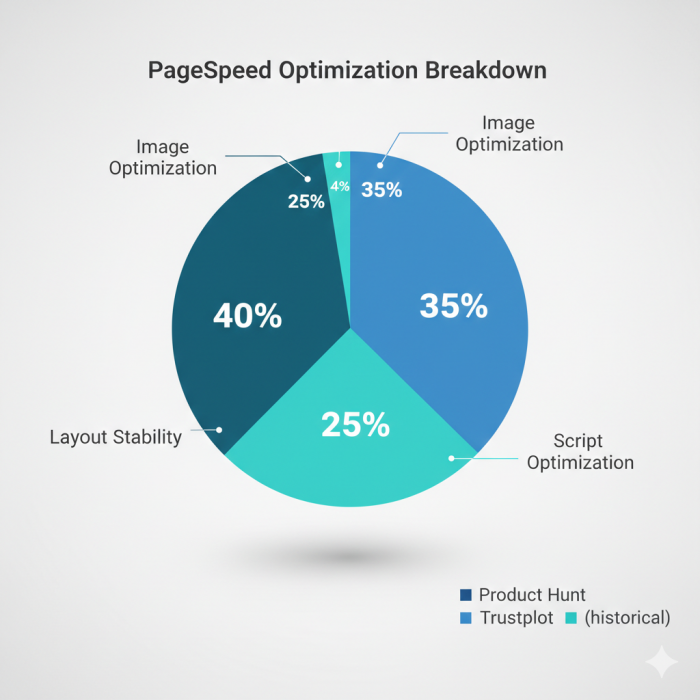
I tested PageSpeed results without adding anything manually.
Outcomes:
- Images optimized automatically
- Scripts deferred intelligently
- Layout shift minimized
Achieving 90+ scores without manual tuning is not common in WordPress ecosystems. This alone removes a significant technical burden for non-developers.
Step 9: Understanding Maintenance, Updates, and Backups
My rating: 8.6 / 10
I paid close attention to what happens after launch:
- Daily backups worked consistently
- Rollback points were accessible
- Plugin and core updates ran automatically
This reduces a silent risk many site owners ignore until something breaks. While advanced control is limited, the defaults are safe and sensible.
Step 10: Interpreting Pricing Through Replacement Value
My rating: 8.1 / 10
Instead of asking “Is it cheap?”, I asked:
What does this replace?
For most users, it replaces:
- Managed hosting
- Caching plugins
- Backup services
- Security plugins
- Premium builders
If you’re already paying for all of those separately, the pricing makes practical sense. If not, it may feel expensive upfront.
Step 11: Reading Reviews With Pattern Recognition
My rating: 8.7 / 10
Across platforms, I noticed consistent themes:
- Praise for speed and consolidation
- Appreciation for support responsiveness
- Frustration from users expecting non-WordPress workflows
What I didn’t find:
- Widespread data-loss complaints
- Recurring billing scandals
- Systemic performance failures
That absence is just as important as positive feedback.
Step 12: Identifying the Right User Profile
My rating: 9 / 10 (for the right audience)
10Web is best suited for:
- WordPress freelancers
- Small agencies
- Founders prioritizing speed + ownership
It is not ideal for:
- Experimental designers
- Non-WordPress stacks
- Deep custom JavaScript projects
The platform rewards clarity of intent.
Final Evaluation Snapshot
| Area | Score |
| AI Site Generation | 9.0 |
| Editing & Control | 8.0 |
| Hosting & Speed | 9.0 |
| Optimization | 9.1 |
| Security & Maintenance | 8.6 |
| Pricing Value | 8.1 |
| Trust & Reliability | 8.7 |
Overall Practical Score: 8.8 / 10
Closing Reflection
Using 10Web felt less like “building a website” and more like removing unnecessary steps from a WordPress workflow I already understand.
It doesn’t try to impress with novelty.
It tries to stay out of the way while doing the boring but critical work well.
For the right user, that’s not exciting, it’s valuable.
Post Comments
Be the first to post comment!
Related Articles



Best Alternatives to Dopple AI
Danny Hamilton . Mar 10, 2026