Table of Content
- What 2short.ai Is, in One Sentence
- How 2short.ai Works End‑to‑End
- Feature Deep‑Dive: What Actually Matters
- Pricing and Plans: Where the Tool Makes Economic Sense
- Trust, Safety, and Reliability
- Real User Reviews: Signals from the Wild
- Where 2short.ai Shines, Where It Struggles
- Comparison with Alternatives
- Who 2short.ai Is Best For
- Verdict: A Practical Engine for Short‑Form Leverage
- FAQs
Short‑form feeds have become the front door of the internet, but most long‑form creators still treat Shorts and Reels as an afterthought. 2short.ai exists for exactly that gap: it watches long videos, detects highlight moments, frames them for vertical viewing, layers animated captions and branding, and hands them back as a batch of potential shorts. Instead of living in a timeline dragging clips by hand, the editor becomes a decision‑maker sitting on top of an AI clipping engine.
What 2short.ai Is, in One Sentence
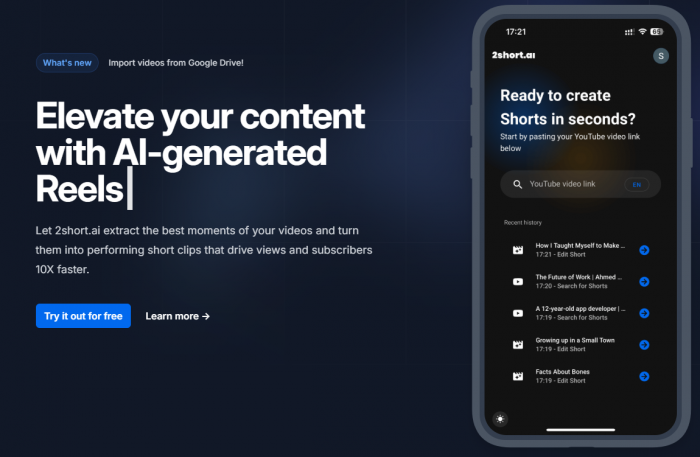
2short.ai is an AI‑powered repurposing platform that takes speech‑driven long‑form videos podcasts, tutorials, interviews, webinars, reviews and converts them into short, platform‑ready clips with captions and branding, optimized for YouTube Shorts, Instagram Reels, TikTok, and similar vertical‑video surfaces.
It is not a cinematic editor and not a “one‑click viral” magic button. It is a high‑volume, highlight‑detection and formatting engine that assumes there is already something worth saying in the original long video and focuses on extracting and packaging those moments.
How 2short.ai Works End‑to‑End
The workflow feels less like classic “editing software” and more like a pipeline. A long video goes in; a batch of candidate shorts comes out, already structured.
At the start, the system ingests content via YouTube URL, direct file upload, or cloud/public link. For best results, the video typically contains clear spoken content: the AI leans heavily on transcripts and speech patterns to understand structure and emphasis. Once analysis begins, the engine parses audio and visuals, segments the video into logical chunks, and estimates which segments could stand alone as short‑form content.
The next phase is where the tool becomes visible. Instead of an empty timeline, a dashboard presents a set of proposed clips. Each one has a defined start and end, an aspect ratio choice (vertical by default, with square and horizontal available), and generated subtitles. The editor’s role shifts from manual discovery “where is the interesting part?” to quality control: tightening a cut, discarding weak segments, and deciding which pieces deserve export. In most reported use, many clips are usable with light adjustment, some are surprisingly strong out of the box, and a minority feel off and are simply deleted.
The final step is export. Clips can be rendered up to 1080p, with watermark‑free output on paid plans, and are ready to be uploaded as Shorts, Reels, TikToks, or feed videos. Multiple aspect ratios mean the same moment can be repurposed across platforms without manually re‑framing each time.
Feature Deep‑Dive: What Actually Matters
AI Highlight Detection
Highlight detection is the heart of 2short.ai. Instead of chopping a video into arbitrary slices, it uses transcripts and audio cues to detect sections that sound like hooks, key insights, or self‑contained arguments. A punchy answer in an interview, a sharp “here’s the trick” in a tutorial, a bold claim in a commentary segment these are the moments that tend to surface as suggested clips.
The quality is not perfect, but it is consistently good enough to save substantial time. Real‑world feedback describes a pattern: the engine reliably surfaces a useful set of candidates, but the creator still decides which ones truly reflect the channel, audience, and message. The AI does the scouting; editorial judgment still does the final selection.
Smart Reframing and Facial Tracking
Repurposing usually means turning horizontal footage into vertical output. 2short.ai tackles this with smart reframing, including facial tracking that tries to keep the primary speaker centered in the frame. Instead of a crude center crop, the system shifts the vertical window to follow faces, which is particularly important in talking‑head videos, interviews, and podcasts.
This approach reduces the number of manual keyframes required. Multi‑speaker setups benefit as well: when the active speaker changes, framing adjusts accordingly. It is not as precise as manual animation in a full editor, but it is far more intelligent than batch cropping and is usually sufficient for social‑first content.
Animated Captions and Style Control
Short‑form platforms are effectively “sound‑off by default,” so captions are not a nice‑to‑have they are central. 2short.ai auto‑transcribes the audio and overlays subtitles as animated text. Font, size, color, and animation style are customizable, allowing channels and agencies to match existing brand guidelines.
The captions can highlight key words or phrases with color and motion. This isn’t just aesthetic: emphasized text acts as a visual hook in the first seconds of a clip, which can be the difference between a scroll and a full view. When combined with decent transcription accuracy, this feature turns otherwise plain talking‑head content into something feed‑friendly without extra design work.
Branding Presets and Visual Consistency
For any channel aiming at recognizability, branding is non‑negotiable. 2short.ai allows a brand kit to be configured once logo placement, brand colors, caption style, overlays and reused across all clips. Each new batch of shorts inherits the same identity without manual re‑design.
This is especially valuable for agencies or multi‑brand teams. Different brand presets can be maintained side by side, so a single workspace can output content for several clients while keeping visuals distinct and on‑brand.
Editor and Workflow Experience
The internal editor is intentionally shallow and fast. It offers trimming, re‑framing, caption tweaking, and format selection, without the deep timeline controls of Premiere, DaVinci, or similar tools. Reviewers describe a learning curve that is present but manageable: once the ingest → analyze → review → export pattern becomes familiar, the interface works like a conveyor belt for clips rather than a sandbox.
For heavy creative editing, compositing, or storytelling, a traditional NLE still sits on top. In many workflows, 2short.ai does the first pass, and select clips then go into a full editor for further refinement when needed.
Pricing and Plans: Where the Tool Makes Economic Sense
The business model ties cost to AI analysis time and export capabilities. That design makes sense for a repurposing engine, because analysis, not rendering, is the most expensive resource.
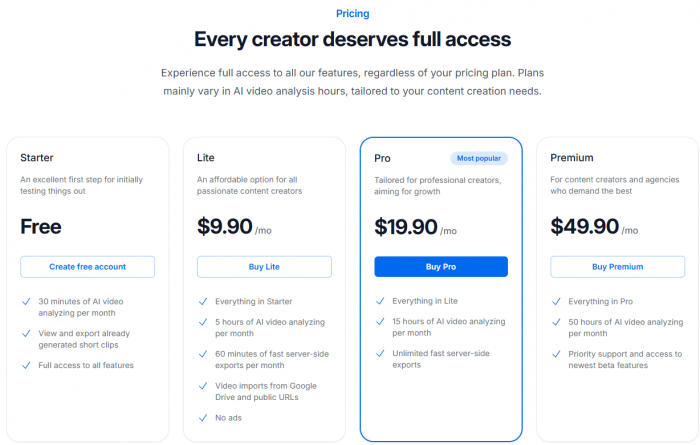
The free Starter plan offers around 30 minutes of AI analysis per month. That is just enough for testing, occasional use, or a very light publishing schedule. It demonstrates the workflow but is not suitable for ongoing, high‑volume repurposing.
The Lite tier, approximately 9.90 USD per month, lifts capacity to about 5 hours of analysis and introduces a pool of fast server‑side exports. This plan suits creators releasing a small but steady stream of long videos such as a weekly podcast or tutorial channel who want a handful of shorts from each upload.
The Pro level, around 19.90 USD per month, expands analysis to roughly 15 hours and removes export limits. At this point, 2short.ai becomes a core production tool for serious channels or small teams repurposing every long video systematically.
The highest standard tier, often near 49.90 USD per month, is designed for agencies and high‑volume creators, offering about 50 hours of analysis, priority support, and early access to new features.
One consistent thread in public feedback is price sensitivity: some users explicitly call the service expensive and mention that it can feel costly relative to their stage or revenue. That reaction is strongest among non‑monetized or early‑stage creators and weaker among teams that already convert reach into income. Economically, the tool makes the most sense where time has a clear monetary value.
Trust, Safety, and Reliability
Data Handling and Privacy Expectations
Like any cloud‑based AI video tool, 2short.ai processes user content on its servers to generate transcripts, clips, and metadata. While detailed internal policies are not reproduced here, tools of this class typically outline in their public documentation how long content is stored, who can access it, and whether it is used for model training. For professional or agency environments, especially when handling client work, it is important to examine:
● Retention periods for uploaded media and generated clips.
● Access controls: who within the company can view or process that content.
● Whether customer data contributes to general model improvement or is isolated.
For brands operating in regulated spaces or working with sensitive footage, contractual clarity around these points is a prerequisite to deep integration.
Platform Safety and Compliance
2short.ai does not override platform rules; it amplifies whatever content is provided. If the source video includes copyrighted material, unlicensed music, or policy‑sensitive segments, the resulting shorts inherit those risks. Responsibility for rights management, copyright clearance, and adherence to YouTube, Instagram, and TikTok policies remains with the creator or organization using the tool.
Used responsibly, the platform is neutral: it accelerates clipping and formatting but does not introduce inherently unsafe or policy‑violating behavior by default.
Operational Reliability
The system is most reliable when source videos have clear speech and reasonable audio quality. In that context, caption accuracy and highlight detection are generally strong, and the majority of proposed clips are at least usable starting points.
Performance drops when dialogue is overlapping, heavily accented without good transcription support, or buried under noise. Long sections that are mostly visual without speech are harder to interpret; the AI has fewer cues for what constitutes a “moment,” so clips can feel arbitrary and require more manual oversight.
For music‑driven or heavily visual storytelling, other tools or manual editing may be more appropriate, and 2short.ai should be seen as a complementary option rather than a primary engine.
Real User Reviews: Signals from the Wild
Public user feedback gives texture to the feature list. On G2, at least one detailed review praises the overall ease of use once the workflow is understood, highlighting how quickly clips can be generated from a simple link and how branding and export options help produce professional‑looking shorts without expert editing skills. Support is described as responsive and helpful, easing onboarding and problem‑solving.
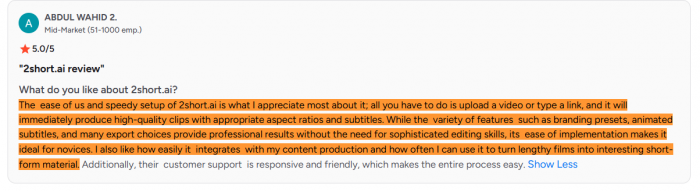
The same reviewer does not hesitate to mention drawbacks: the tool is called expensive, and parts of the experience are described as difficult, pointing to both a real learning curve and sensitivity to subscription costs. That duality matches a pattern seen across editorial summaries: significant time savings and practical automation paired with the need for human judgment and a clear sense of ROI.

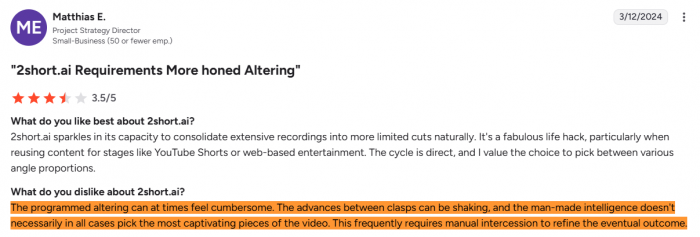
Thematic evidence: strong on speed and branding, weaker on affordability for small creators, not a zero‑effort publishing button.
Where 2short.ai Shines, Where It Struggles
On the strengths side, the platform compresses the most tedious part of repurposing finding highlights and preparing them for vertical platforms into an efficient, mostly automated pipeline. Highlight detection, captioning, smart reframing, branding presets, and multi‑format export combine into a system that can turn each long video into a small catalogue of on‑brand shorts. For channels that produce significant long‑form content, that can mean a much higher utilization rate of each upload.
Its weaknesses are predictable but important. Pricing and quotas limit how far hobbyists and early‑stage creators can push the tool without feeling the cost. Dependence on spoken content leaves music‑first or purely visual channels under‑served; for those formats, manual editing remains king. And while the editor is fast, it is not deep complex storytelling, motion design, or brand campaigns will still rely on full NLEs for polish.
The best fit is therefore clear: talk‑driven long‑form content, produced regularly, with a desire to expand short‑form presence without adding a full‑time editor.
Comparison with Alternatives
No AI shorts tool exists in a vacuum. The space includes well‑known alternatives such as OpusClip, as well as platforms like Vidyo, CapCut’s AI features, and other automated clip generators. Each one approaches the same problem repurposing long videos into short content from a slightly different angle.
OpusClip, for example, tends to emphasize “virality scoring” and detailed AI‑based evaluations of which clips might resonate most, packaging that with its own highlight detection and captioning. Other tools lean heavily into template‑driven editing, giving an extensive library of pre‑designed layouts and transitions but offering less nuanced highlight discovery. Free or freemium editors like CapCut bring strong visual editing and templates but often require more manual effort to actually locate meaningful segments in a long video.
Quick Comparison
| Aspect | 2short.ai | OpusClip | Vidyo / similar tools | CapCut (AI features) |
| Core focus | AI highlights from talks | AI “viral” scoring + highlights | Template‑driven short creation | General editor with some AI |
| Highlights quality | Strong for speech content | Good, adds virality ranking | Mixed; more manual | Mostly manual selection |
| Captions | Animated, brandable captions | Captions + performance focus | Template‑style captions | Strong, but tied to manual edits |
| Reframing | Smart talking‑head reframes | Viral‑style crops | Basic / template‑based | Good but more manual control |
| Branding | Solid presets and consistency | Decent; performance‑first | Via templates | Via templates and manual setup |
| Pricing position | Mid‑range “pro” tool | Similar mid‑range | Varies by platform | Mostly free / freemium |
| Free usage | Small free tier | Limited free / trial | Mixed free options | Generous free, optional paid |
| Best when | Main pain is finding highlights | Main goal is maximizing virality | Main goal is flashy templates | Main goal is saving money, low volume |
In that context, 2short.ai’s positioning looks like this:
● Strong at automated discovery of speech‑based highlights, reducing time spent hunting through timelines.
● Competitive in animated captioning and smart reframing, especially for talking‑head formats.
● Solid in branding presets and consistent visual identity across batches of clips.
● Moderately priced relative to “pro” peers, but not the cheapest option and not designed as a heavily free, template‑only tool.
For creators deciding among these platforms, the practical question is less about minor feature differences and more about primary friction: if highlight discovery is the biggest pain, 2short.ai is a strong candidate; if visual design and transitions matter more than automation, template‑rich editors may win; if budget is tight and volume is low, free tools might be sufficient until long‑form publishing becomes more serious.
Who 2short.ai Is Best For
The profile that matches 2short.ai most closely looks like this:
● Long‑form, talk‑driven content as a core output: podcasts, interviews, commentary, tutorials, lectures, webinars.
● A desire for systematic short‑form distribution across Shorts, Reels, TikTok, and similar feeds.
● Limited appetite for spending hours inside full editing suites, but clear standards for professionalism and brand consistency.
● Either current monetization or a strong growth strategy that justifies investing in tooling.
In that environment, 2short.ai functions as infrastructure: a background system that continuously turns long content into short clips, making it much harder for good moments to die buried inside a single upload.
Verdict: A Practical Engine for Short‑Form Leverage
2short.ai has evolved into more than a novelty AI demo. It is a practical, focused engine for extracting short‑form value from long‑form, especially when speech carries the message. The tool materially reduces time spent on highlight discovery and basic formatting, offers polished outputs with captions and branding, and supports multi‑platform strategies without demanding expertise in traditional editing software.
It does carry trade‑offs: subscription costs that feel heavy for early‑stage creators, reliance on clear spoken content, and shallow editing depth compared with full NLEs. But for channels and agencies that already live on long‑form video and view Shorts and Reels as critical growth levers rather than side experiments, those trade‑offs are often acceptable.
The most honest test is simple. Take one dense, talk‑heavy video, run it through 2short.ai on the free tier, and count: how many resulting clips feel genuinely publishable, and how much time was saved compared with manual discovery and editing? For operations where that answer looks favorable, 2short.ai earns its place as part of the core tool stack rather than just another AI curiosity.
FAQs
1. Does 2short.ai automatically add subtitles?
Yes. It auto‑generates subtitles and lets you style them (font, colors, animations) to match your branding.
2. Does it support vertical formats like YouTube Shorts and Reels?
Yes. It supports vertical, square, and horizontal aspect ratios for Shorts, Reels, TikTok, and more.
3. Which platforms can I paste links from?
Mainly YouTube, plus direct uploads or supported cloud/public links; clips can then be exported for Shorts, Reels, and TikTok.
4. Does 2short.ai support multiple languages?
It can handle more than one language, but quality depends on speech clarity and language support for transcription and captions.
5. Does it watermark exports on paid plans?
No. Paid plans typically offer watermark‑free exports at higher resolutions suited for professional use.
Post Comments
Be the first to post comment!
Related Articles