AI tools for business analytics help companies move from intuition-driven decisions to insight-led strategy by turning raw data into clear, actionable intelligence and predictions. They now combine BI, machine learning, and automation so even non-technical teams can ask questions in plain language and get useful answers in seconds.
Why AI in business analytics matters
AI-powered analytics automates data preparation, anomaly detection, and forecasting, which cuts the time analysts spend on manual work and speeds up decision-making significantly. These platforms also reveal hidden patterns in data, making it easier to identify revenue opportunities, cost leaks, and operational bottlenecks that traditional reporting often misses.
Key benefits include:
1. Faster insights: Natural language search and automated insights reduce dependence on data teams for every ad hoc query.
2. Better decisions: Predictive and prescriptive models help simulate scenarios and quantify impact before committing to a strategy.
3. Wider adoption: Search-driven and conversational interfaces let business users self-serve analytics, increasing data literacy across the organization.
4. Scalability and governance: Enterprise-grade platforms handle large datasets, role-based access, and compliance needs as you grow.
Below are eight strong AI tools for business analytics that cover search-driven BI, enterprise dashboards, and predictive intelligence.
1. ThoughtSpot Sage
ThoughtSpot Sage is a search-driven analytics platform where users type questions in natural language and get AI-generated charts and insights on top of cloud data warehouses. It is designed to make complex analytics accessible to business users while still supporting enterprise governance.
Best for: Mid-size to large enterprises that want self-service, Google-like search over cloud data with strong governance.
Key features:
1. Natural language search for analytics questions.
2. AI-driven automated insights and explanations.
3. Cloud-native architecture with connectors to major warehouses.
4. Embedded analytics to add interactive insights into apps.
Pros:
1. Very friendly for non-technical users due to search-first UX.
2. Strong for ad hoc analysis across billions of rows.
3. Good fit for modern data stack environments.
Cons:
1. Can be overkill for very small teams with simple reporting needs.
2. Requires data modeling and governance setup for best results.
Pricing: Commercial, quote-based enterprise pricing; buyers generally negotiate based on users, usage, and deployment scope.
2. Tableau AI
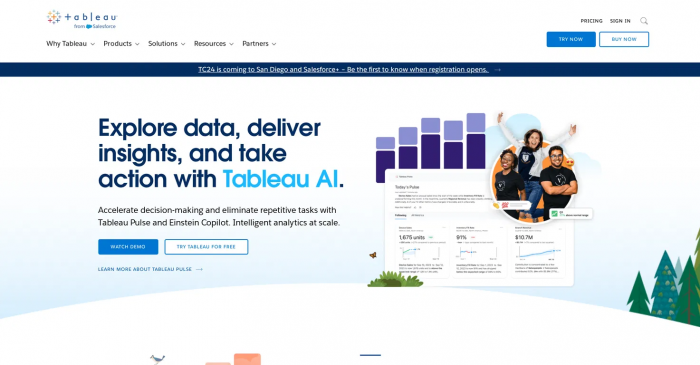
Tableau AI adds machine learning–driven recommendations and intelligent explanations to the popular Tableau visualization platform. It helps users discover patterns and build dashboards with guided analytics rather than manual trial and error.
Best for: Organizations already using Tableau that want to add AI-powered predictions and smart explanations on top of existing dashboards.
Key features:
1. AI-driven data stories and explanation of trends.
2. Recommendations for visualizations and insights.
3. Integration with Salesforce ecosystem and CRM data.
Pros:
1. Familiar Tableau interface with enhanced AI assistants.
2. Strong visualization options and community ecosystem.
3. Works well in mixed technical/non-technical teams.
Cons:
1. Advanced AI features may require add-ons or higher editions.
2. Can become complex to manage at very large scale.
Pricing: Tiered per-user licensing (Viewer, Explorer, Creator) with additional costs for advanced analytics; exact enterprise pricing is quote-based.
3. Qlik Sense AI
Qlik Sense AI blends a unique associative analytics engine with AI-driven insights and augmented intelligence to show relationships across all your data. It excels at exploratory analysis, revealing connections that traditional SQL query models may not surface.
Best for: Enterprises that need flexible, exploratory analytics across many data sources and value a governed self-service environment.
Key features:
1. Associative analytics engine that highlights related and unrelated data points.
2. AI-assisted insights and natural language interaction.
3. Strong data integration and transformation capabilities.
Pros:
1. Excellent for discovering non-obvious patterns and correlations.
2. Robust governance and scalability for enterprise rollouts.
3. Handles complex, multi-source data landscapes well.
Cons:
1. Different mental model vs SQL-based tools; learning curve for teams.
2. Conversational features still evolving compared to AI-native tools.
Pricing: Subscription-based, with SaaS and client-managed options; enterprise pricing typically customized by deployment size and features
4. Google Looker + Vertex AI
Looker combined with Vertex AI gives organizations a cloud-native semantic layer plus powerful ML for predictive analytics. It’s particularly strong for organizations invested in Google Cloud that want governed metrics and embedded AI.
Best for: Enterprises on Google Cloud that need a central semantic model, governed metrics, and integrated ML for cross-domain analytics.
Key features:
1. LookML semantic modeling for consistent metrics.
2. Tight integration with Vertex AI for predictive models.
3. Embedded analytics and data apps built on top of standardized data.
Pros:
1. Strong for building analytics products and internal data apps.
2. Centralized, governed definitions reduce metric conflicts.
3. Scales well with BigQuery and other Google Cloud services.
Cons:
1. LookML learning curve for data teams.
2. Best value when fully committed to Google Cloud stack.
Pricing: Looker and Vertex AI are billed via Google Cloud, typically with a mix of license and consumption-based pricing; quotes vary by usage and seats.
5. IBM Cognos Analytics (with Watson)
IBM Cognos Analytics uses Watson AI to add predictive models and automated insights to a mature BI and reporting platform. It focuses on governance, data integrity, and advanced predictive capabilities for regulated environments.
Best for: Compliance-heavy industries (finance, government, healthcare) that require strict governance, auditability, and robust predictive modeling.
Key features:
1. AI-driven automation for dashboards and report building.
2. Watson-powered predictive insights and driver analysis.
3. Strong data governance, security, and enterprise reporting.
Pros:
1. Reliable, enterprise-grade platform with deep governance.
2. Strong predictive modeling for strategic planning.
3. Good fit for complex, regulated data environments.
Cons:
1. Interface and UX can feel more traditional than newer cloud BI tools.
2. Implementation and tuning often require skilled specialists.
Pricing: Enterprise licensing with user-based tiers; contracts are typically negotiated per organization and deployment scope.
6. SAP Analytics Cloud (SAC)
SAP Analytics Cloud unifies BI, planning, and predictive analytics in a single platform tightly integrated with SAP’s ERP ecosystem. It uses AI to support smart planning and what-if analysis for finance and operations.
Best for: Large global enterprises running SAP ERP or S/4HANA that need end-to-end analytics and planning on a single, integrated platform.
Key features:
1. Smart Predict for automated ML and scenario analysis.
2. Integrated financial and operational planning with BI.
3. Native connectivity to SAP applications and data models.
Pros:
1. Seamless experience for SAP-centric organizations.
2. Strong planning plus analytics in one environment.
3. Good support for global, complex operations.
Cons:
1. Less attractive for companies not already on SAP.
2. Complexity and cost can be high for smaller teams.
Pricing: Subscription licensing via SAP, with editions for BI and planning; final pricing is negotiated based on users and capabilities.
7. Sisense Fusion
Sisense Fusion combines predictive AI with embedded analytics, allowing organizations to bake insights directly into their products and workflows. It’s popular with product and engineering teams that want analytics as part of the customer experience.
Best for: SaaS companies and digital products that need embedded analytics and white-labeled dashboards powered by AI.
Key features:
1. Predictive AI features integrated with BI.
2. Strong embedded analytics and API capabilities.
3. Support for complex, multi-tenant data models.
Pros:
1. Excellent embedded and developer-friendly tooling.
2. Flexible architecture for OEM and product analytics.
3. Good for turning analytics into revenue-generating features.
Cons:
1. May be more complex than needed for simple internal reporting.
2. Requires engineering involvement to fully leverage embedded use cases.
Pricing: Quote-based OEM and enterprise pricing; cost depends heavily on embedding, scale, and customer-facing usage.
8. Zoho Analytics AI

Zoho Analytics is an affordable, cloud-based BI platform that has added AI features to bring predictive insights and conversational analytics to smaller and mid-size businesses. It gives growing companies access to capabilities that used to be enterprise-only.
Best for: Startups and SMBs that want AI-assisted BI, automation, and reporting at a budget-friendly price point.
Key features:
1. AI assistant that answers questions and builds reports.
2. Automated data prep and insight suggestions.
3. Integrations across the Zoho suite and third-party apps.
Pros:
1. Lower cost of entry than many enterprise platforms.
2. Easy to adopt for small teams with limited technical resources.
3. Good all-round feature set for SMB analytics.
Cons:
1. May lack depth of features and governance needed by very large enterprises.
2. Advanced AI capabilities are still growing compared to top-tier platforms.
Pricing: Transparent tiered SaaS pricing with per-user plans, generally more affordable than large enterprise tools.
Tips to choose the right AI analytics tool
When selecting an AI tool for business analytics, consider both current needs and your 2–3 year roadmap. Match the platform’s strengths with your team structure, data stack, and governance requirements.
Key criteria:
1. Data stack alignment: Choose tools that integrate natively with your data warehouse, ERP, and CRM (e.g., Looker for BigQuery, SAC for SAP, Tableau for mixed sources).
2. User profile: For non-technical business users, prioritize search-driven or conversational BI like ThoughtSpot or Zoho Analytics; for data teams, platforms with strong modeling and APIs make more sense.
3. Governance and compliance: Regulated industries should favor tools with strong lineage, auditing, and role-based access, such as IBM Cognos, Qlik, or SAC.
4. Use cases:
● Operational dashboards and self-service: ThoughtSpot, Tableau AI, Zoho Analytics.
● Enterprise planning and financial modeling: SAP Analytics Cloud, IBM Cognos.
● Embedded and product analytics: Sisense Fusion, Looker.
5. Budget and total cost of ownership: Factor in licenses, infrastructure, implementation, and training; SMB-focused tools generally have clearer, lower entry pricing than heavy enterprise suites.
A practical example: A SaaS startup on Google Cloud with a small data team might pair BigQuery with Looker and Vertex AI for governed metrics and product analytics, while a global manufacturer on SAP may get more value from SAC plus Cognos for planning and compliance.
Final verdict
AI has shifted business analytics from static reports to continuous, insight-driven decision-making powered by search, automation, and predictive modeling. The “best” tool depends on your data stack, team skills, compliance needs, and whether your main goal is self-service analytics, planning, or embedded insights.
If you want search-first self-service, ThoughtSpot and Zoho Analytics are strong bets at different price tiers; for established enterprises with complex requirements, Qlik, SAP Analytics Cloud, and IBM Cognos provide depth, governance, and predictive power. Product-led organizations building analytics into their apps should prioritize Looker or Sisense Fusion for their strong modeling and embedding capabilities.
Post Comments
Be the first to post comment!
Related Articles