Table of Content
- When the Background Is the Real Problem
- 1. remove.bg : The Industrial‑Grade Cutout Engine
- 2. Adobe Express : Background Removal Inside a Brand‑First Workflow
- 3. Canva : The Everyday Creator’s Delete‑Background Button
- 4. Photoroom : A Pocket Studio for Marketplace Sellers
- 5. Clipdrop : The AI Fix‑It Drawer for Images
- 6. Pixelcut : Social‑Native Background Removal for Micro‑Brands
- 7. Claid.ai : The API Backbone for Product‑Ready Photos
- 8. LetsEnhance.io : Clean Backgrounds for Images That Also Need a Quality Boost
- Choosing the Right AI Background Removal Stack
- Bottom Line
AI background removal has quietly become one of the most important production steps in visual content. Brands, sellers, and creators are using it to transform rushed, imperfect photos into clean assets that look intentional and on‑brand. Instead of asking whether AI can remove a background (it can, reliably), the real question in 2026 is: which tool fits your workflow, scale, and budget best?
When the Background Is the Real Problem
Most photos are not ruined by the subject; they’re ruined by everything around it.
Messy desks, uneven walls, bad lighting, random strangers walking through the frame, this is what AI background removers quietly fix so brands can pretend their visuals were planned.
The modern stack of background tools can be divided into four “personalities”:
● The infrastructure tools that power ecommerce and SaaS.
● The design suites that wrap cutouts in templates and branding.
● The mobile apps that live in the pockets of resellers and influencers.
● The experimental labs that mix cutouts with AI enhancement and generation.
The eight tools below are not just “top 8”; they are eight different answers to the same problem.
1. remove.bg : The Industrial‑Grade Cutout Engine

If there is a “default” name in AI background removal, it is remove.bg. For many ecommerce teams and agencies, it is the invisible engine that turns raw shots into transparent PNGs and marketplace‑ready photos, day after day.
remove.bg focuses on doing one job with obsessive consistency: isolate the subject and drop the rest, particularly for portraits and standard product images. Its models are tuned for edges that usually cause trouble with hair, fur, semi‑transparent objects and it plugs into a long list of tools, including Photoshop, Figma, content management systems, no‑code automation platforms, and custom software through an API.
On the downside, it is more of a specialist than a playground. You will not find wild AI scene generation or deep creative controls; this is a surgical tool, not a concept lab. And because it uses a credit‑based pricing model, high‑volume teams need to keep an eye on consumption or costs can climb quickly.
remove.bg typically offers low‑resolution previews and at least one full‑quality trial credit so you can evaluate the output. Paid plans usually start in the single‑digit USD range per month with a bundle of credits, while heavy usage and API access are billed at higher tiers and pay‑as‑you‑go packages.
2. Adobe Express : Background Removal Inside a Brand‑First Workflow
_1775739832.jpg)
Adobe Express is built for marketers and brand teams who care as much about templates and consistency as they do about background removal itself. Instead of treating cutouts as a final step, Express treats them as one station on a production line.
You remove the background, then immediately drop the subject into branded templates, add type using Adobe Fonts, apply consistent color palettes, and export the result for social, web, or print. This makes the tool especially attractive to teams already invested in Adobe Creative Cloud, because assets, fonts, and libraries can flow between tools with minimal friction.
The trade‑off is that Express can feel heavy if you only need a barebones cutout. For simple tasks, opening a full design environment can feel like using a cinema rig to film a selfie. And for advanced retouching, full Photoshop still provides more control and more mature AI features, so Express does not fully replace it for high‑end retouchers.
Adobe Express generally comes with a restricted free tier and a paid plan around the 10 USD/month mark, and it is frequently bundled inside broader Creative Cloud subscriptions, which changes the value equation for existing Adobe users.
3. Canva : The Everyday Creator’s Delete‑Background Button
_1775739840.jpg)
Canva has become the default design app for non‑designers, and its background remover is one of the features that makes average photos look presentation‑ready in a few clicks. The feature is not marketed as a standalone product; it is treated as one of the essential tools inside a larger visual storytelling environment.
In a typical flow, you upload a selfie, product photo, or mockup, remove the background, and then immediately place the subject into a slide, poster, Instagram post, or thumbnail template. The strength here is not microscopic edge perfection but the speed of going from “raw asset” to “ready‑to‑publish visual” without switching tools.
There are, however, limits. The background remover is primarily a Canva Pro benefit, which means many free users encounter a paywall precisely at the moment they try to clean up their photos. And for extremely demanding use cases, fine hair detail, complex transparency dedicated matting engines still deliver slightly more precision.
Canva Pro, which unlocks the background remover for most users, is typically priced in the low‑ to mid‑teens USD per month, with additional collaboration features and team plans on higher tiers.
4. Photoroom : A Pocket Studio for Marketplace Sellers

Photoroom is built with one scenario in mind: you take a product photo on your phone, probably in less‑than‑ideal conditions, and you need it to look like a clean, professionally shot listing image a minute later. It has become a favorite among marketplace sellers and resellers for exactly this reason.
The app goes beyond simply deleting the background. It offers AI‑generated backgrounds, presets tailored to platforms like Amazon and Etsy, and batch tools that make it easier to process entire catalogs. Its models are tuned for products such as shoes, clothing, accessories, electronics so the cutouts and compositions look natural in ecommerce contexts.
Free usage usually comes with serious strings attached: watermarks, reduced resolution, or strict limits. For any serious commercial work, a subscription is almost mandatory. And while there is a web presence, the overall experience is very mobile‑first, which can be less comfortable for teams that prefer large screens and keyboard‑centric workflows.
Photoroom generally uses a freemium approach, with a limited free tier and paid plans in the low‑USD to under‑10‑USD‑per‑month range for individuals, varying by platform, geography, and in‑app offers. Higher tiers unlock more templates, HD exports, and better batch capabilities.
5. Clipdrop : The AI Fix‑It Drawer for Images

Clipdrop feels like a drawer full of AI‑powered visual tools: remove backgrounds, clean up unwanted objects, relight subjects, upscale images, and even generate new scenes. Background removal is one tool among many, which makes it especially useful when your images have multiple problems at once.
A typical workflow might start with a quick background removal, followed by removal of distracting objects, relighting to fix bad illumination, and upscaling to make the final image sharp enough for high‑resolution use. This makes Clipdrop attractive to small studios, indie designers, and creators who want to salvage imperfect photos rather than reshoot.
There are trade‑offs. Free access usually comes with strict daily limits or reduced output quality, so heavy experimentation quickly nudges you toward a subscription. And because Clipdrop packs so many features into one interface, new users can feel a mild learning curve before they understand which tool to use when.
Pricing usually follows the familiar pattern: constrained free usage, then paid plans around 9–15 USD/month for higher resolutions and more generous limits, plus separate options for teams that want API‑level integration.
6. Pixelcut : Social‑Native Background Removal for Micro‑Brands
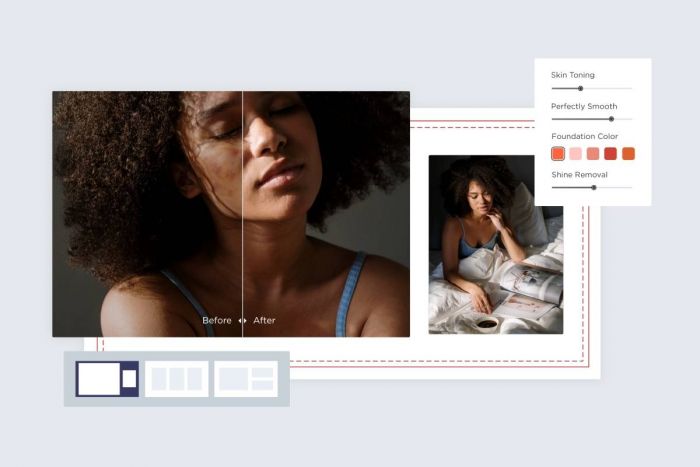
Pixelcut is built for the kind of business that lives on Instagram, TikTok, and short‑form video: small shops, influencers, and solo entrepreneurs who run their entire brand from a phone. Its background removal is layered into a workflow that is unapologetically social‑first.
Users typically shoot a product or flat lay, remove the background, drop the subject onto gradients or colorful shapes, add price tags and stickers, and export in the right size for Reels, Stories, or posts. The app doubles as a lightweight product photography studio and a basic layout tool.
As with many mobile‑first apps, the free tier is essentially a gateway. Most serious features include higher resolution, watermark‑free exports, advanced layouts sit behind a subscription. And unlike infrastructure‑oriented tools, Pixelcut does not aim to support massive automated pipelines or enterprise integrations.
Subscriptions usually hover around the 10 USD/month range for individual users, with differences across platforms and occasional discounts for annual commitments.
7. Claid.ai : The API Backbone for Product‑Ready Photos

Claid.ai is not primarily aimed at individual creators. Its real audience is developers, marketplaces, and SaaS platforms that need to automate photo cleanup and standardization at scale through an API. Background removal is one stage in a pipeline that also adjusts lighting, framing, and backgrounds for product consistency.
Where manual tools focus on single images, Claid.ai is built to handle thousands. Teams integrate its API into their own apps, allowing sellers or users to upload messy photos and receive clean, standardized product images automatically, often with white or brand‑specific backgrounds and consistent zoom levels.
The trade‑off is clear: the user experience is oriented around documentation, SDKs, and dashboards rather than drag‑and‑drop editing. For a freelancer who edits a handful of photos a week, this is overkill. For a platform processing constant streams of images, it becomes a foundational layer.
Claid.ai typically offers trial credits so teams can evaluate the quality and API integration. Paid usage then moves into subscription or volume‑based tiers, often starting in the single‑ to low‑double‑digit USD per month range and scaling with the number of processed images and feature depth.
8. LetsEnhance.io : Clean Backgrounds for Images That Also Need a Quality Boost
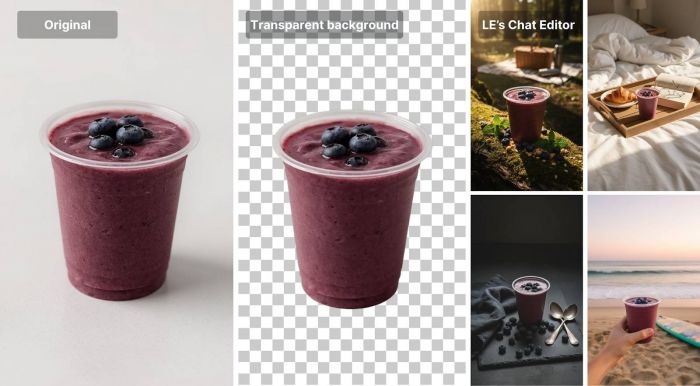
LetsEnhance.io began as an upscaling and enhancement tool, and background removal is layered into that original mission. The core idea is simple: many older or low‑quality images do not just need a new background, they need better resolution, detail, and compression for modern platforms.
With this tool, a typical workflow combines multiple steps: remove the background, enhance detail, and upscale the image, often using ecommerce‑oriented presets for size and compression. This makes it particularly useful for brands that are modernizing legacy product catalogs or working with assets that were never shot for today’s standards.
The main drawbacks relate to speed and cost at scale. When you stack background removal, enhancement, and upscaling on large batches of images, processing can take longer than single‑purpose removers. And for very high volumes where enhancement is not required, a simpler, narrowly focused API might be more economical.
LetsEnhance.io usually adopts a credits‑plus‑subscription approach, with a small free pool to test, entry‑level plans in the single‑digit to low‑double‑digit USD range per month, and higher tiers or pay‑as‑you‑go for teams with thousands of images to process regularly.
Quick Snapshot: Which Tool Fits Which User?
| Tool | Ideal user type | Free option notes | Typical entry price (approx) | Key strength highlight |
| remove.bg | Agencies, ecommerce ops teams | Low‑res previews, trial credit | ~8–9 USD/month | Mature API and plugin ecosystem |
| Adobe Express | Marketers, brand designers | Limited free tier | ~9.99 USD/month | Deep design integration |
| Canva | Social and presentation‑heavy teams | Editor free; remover in Pro | ~12–15 USD/month | Non‑designer friendly templates |
| Photoroom | Marketplace and ecommerce sellers | Watermarked/basic free | ~2.99–9.99 USD/month | Marketplace‑ready templates |
| Clipdrop | Multi‑tool creative professionals | Daily‑limited free | ~9–15 USD/month | Versatile AI toolkit |
| Pixelcut | Social‑first solo creators | Free + paid plans | ~9.99–10 USD/month | Mobile‑first workflow |
| Claid.ai | Developers, SaaS, large catalogs | Trial credits | ~9–29 USD/month+ | API‑first scaling |
| LetsEnhance | Ecommerce with upscaling needs | Limited free credits | ~9–12 USD/month | Cutout + enhancement pipeline |
Choosing the Right AI Background Removal Stack
Instead of searching for a single “winner,” it is more practical to think in terms of roles and combinations.
For ecommerce teams and marketplaces, tools like remove.bg and Claid.ai serve as the backbone: precise, automatable, and designed for scale. LetsEnhance.io becomes especially valuable when those same teams have to deal with low‑res or legacy photography that must be upgraded as well as cleaned.
Marketing and design teams tend to benefit more from Adobe Express and Canva, where background removal is deeply integrated with templates, brand assets, and multi‑channel exports. This reduces context switching and keeps teams inside a single, controlled environment from brief to final creative.
Creators, resellers, and micro‑brands operating primarily on mobile will often move fastest with Photoroom, Pixelcut, or Clipdrop. These tools compress the entire journey from phone snapshot to polished, social‑ready or marketplace‑ready visual into a handful of taps, which matters more than shaving off a few pixels of edge error.
Bottom Line
By 2026, background removal is a solved problem in principle. The real differentiation lies in how each tool fits into the rest of your workflow. For many businesses, the most effective setup is a hybrid: an industrial‑grade API for production assets, plus a creator‑friendly design or mobile tool for campaign experiments and day‑to‑day posts. Once you know where your volume sits and how your team prefers to work, choosing the “best” AI background remover stops being guesswork and starts looking like deliberate system design.
Post Comments
Be the first to post comment!
Related Articles