Table of Content
- What Is Aisle Planner?
- Who Is Aisle Planner Best For?
- Core Features and Workflows
- Aisle Planner Pricing and Plans
- What Planners Love About Aisle Planner
- Limitations and Pain Points
- G2 User Reviews: What Real Planners Say
- Aisle Planner vs Alternatives
- Is Aisle Planner Worth It? Scenario‑Based Verdict
- Should You Use Aisle Planner?
- Bottom Line
If your planning business currently runs on Google Sheets, email threads, and scattered PDFs, Aisle Planner promises to replace the chaos with one login, one dashboard, and one client portal. In this in‑depth review, we’ll walk through what Aisle Planner actually does, how it fits into a real wedding planning workflow, what it costs at different business stages, and whether it truly earns a place at the center of your operations.
What Is Aisle Planner?
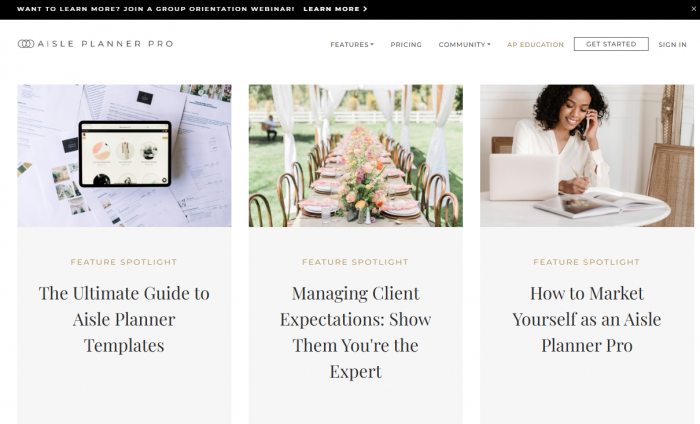
Aisle Planner is a cloud‑based, all‑in‑one platform built specifically for wedding and event professionals. It combines project management, CRM, design tools, guest and seating management, and invoicing into a single workspace where planners, teams, and clients collaborate. Instead of juggling multiple tools for inquiry tracking, timelines, contracts, and payments, Aisle Planner aims to be the operating system for your planning business.
Who Is Aisle Planner Best For?
Aisle Planner is designed first and foremost for professional planners rather than DIY couples. It especially suits:
● Solo or boutique wedding planners who want a polished, professional portal for clients.
● Multi‑planner studios and agencies managing dozens of events at once.
● Venues and coordination teams that need consistent workflows across all events.
New planners often look at it as their first “hub” instead of building a duct‑taped stack of spreadsheets, generic CRMs, and invoicing tools. Established planners tend to consider it when the admin chaos and manual follow‑ups start costing them time, reputation, or both.
Core Features and Workflows
Instead of thinking of Aisle Planner as a list of tools, it’s more useful to see how it supports the lifecycle of a wedding or event: from the first inquiry through planning, design, logistics, the wedding day itself, and post‑event follow‑up.
1. Project and Task Management
Every event or wedding in Aisle Planner becomes its own project workspace. Inside each project, you’ll typically find:
● Task lists and checklists tailored to different planning phases.
● Timelines with due dates and dependencies.
● Calendars that aggregate deadlines and key dates across all projects.
In practice, this means you can set up templates for “Full Planning”, “Partial Planning”, or “Month‑of Coordination” and re‑use them instead of reinventing the wheel each time. When you assign dates and owners to tasks, the system can surface what’s due today, what’s overdue, and what’s coming up, so your day doesn’t begin with guessing what to work on.
2. Guest List, RSVPs, and Seating
Aisle Planner includes dedicated tools for guest management, which is something generic CRMs usually ignore:
● Centralized guest list with contact details and relationships.
● RSVP management with response status, meal choices, plus‑ones, and special notes.
● Seating and layout tools that help you build tables and assign guests visually.
For a planner, this reduces the need for separate spreadsheets that clients constantly edit and break. Instead, you can invite the couple into the client portal to update or review guest details, while you maintain control over structure and accuracy.
3. Design, Inspiration, and Layouts
Beyond logistics, Aisle Planner supports creative work:
● Mood boards and inspiration boards to collect images and refine the visual direction.
● Color palette tools so you can keep a shared reference for all vendors.
● Floor plans and layout tools to map out ceremony and reception spaces.
This is helpful in client meetings: you’re not just describing a concept verbally but showing a cohesive visual direction that links directly to the event’s logistics and vendor notes.
4. CRM and Client Portal
Aisle Planner doubles as a lightweight CRM tailored to wedding and event work:
● Lead capture from your website via forms that feed directly into your pipeline.
● Contact profiles with event details, notes, and history.
● Questionnaires to gather preferences, style, budget, and priorities.
The client portal is where couples actually experience your organization: they can see timelines, tasks assigned to them, design elements, and sometimes invoices and contracts depending on how you set it up. It looks far more professional than ad‑hoc Google Drive folders and scattered email chains, which can be a differentiator when prospects compare you to other planners.
5. Contracts, Invoices, and Payments
One of Aisle Planner’s biggest value propositions is reducing admin around money and paperwork:
● Contract templates that you can customize and send for e‑signature.
● Invoices tied to each project, with payment schedules and due dates.
● Online payment support (commonly via a payment processor integration) so clients can pay directly from the invoice.
When you set up a payment schedule (e.g., deposit, milestone, final payment), those due dates appear in your calendar and can trigger reminders. Keeping your legal and financial workflows in the same system as your project tasks means fewer opportunities for something to slip through.
6. Collaboration and Team Use
If you work with assistants or other planners, Aisle Planner lets you:
● Assign tasks to team members.
● Keep internal notes separate from client‑visible notes.
● Maintain a shared view of the event timeline and responsibilities.
For studios and agencies, this becomes the central hub where everyone sees what’s happening across all events. For solo planners, it still helps by keeping a clean separation between what’s for your eyes only and what’s safe to show clients.
Aisle Planner Pricing and Plans
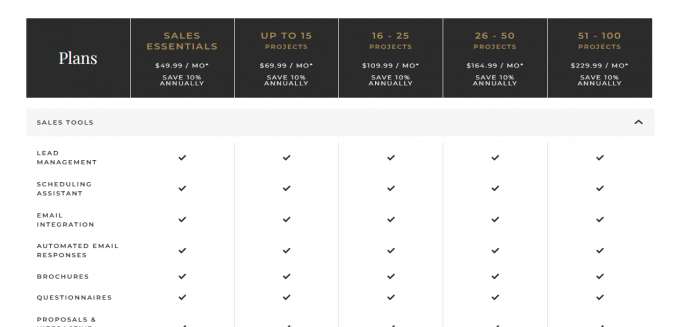
Pricing is based on the number of active projects rather than number of users. The structure typically scales like this:
● An entry‑level tier that covers a smaller number of active projects at a lower monthly price.
● Mid‑range tiers as you handle more concurrent weddings or events.
● Higher tiers for agencies and teams managing a large portfolio of events.
Instead of paying per seat, you’re effectively paying for capacity. For a solo planner doing a manageable number of weddings per year, the lower tiers can feel reasonably priced relative to the hours saved. As your business scales into dozens of active events at once, the monthly cost rises but is offset by the increased revenue and the necessity of not dropping details.
Aisle Planner is a subscription product and typically offers a free trial, but not a forever‑free plan. That makes it a tool you’ll want to test during a period when you can realistically set up a few projects and see how it blends into your workflow.
Pricing vs Business Stage: How It Feels
The important question isn’t just “what is the monthly price?” but “what does that price feel like at your current stage?”
● New planner (a handful of weddings): You’re price‑sensitive, but you also need structure and professionalism to impress clients. At this stage, the platform might feel like a significant investment, but it can also help you avoid costly mistakes and look more established than your portfolio alone suggests.
● Growing planner (10–30 weddings a year): Admin time begins to crush your schedule: follow‑ups, chasing payments, remembering who approved which detail. Here, Aisle Planner’s automations, templates, and centralized information can pay for itself in hours saved and stress reduced.
● Multi‑planner team or venue coordinator: When multiple people touch the same event, miscommunication and version confusion can be expensive. The cost of the software becomes negligible compared to the risk of errors or poor client experience. At this point, you’re likely using higher tiers, but your revenue per project also tends to be higher.
What Planners Love About Aisle Planner
Looking across user sentiment and typical feedback patterns, some strengths show up repeatedly.
1. Everything in One Place: Aisle Planner brings checklists, timelines, notes, documents, contracts, invoices, guest lists, RSVPs, and layouts into one unified system. Instead of juggling email, spreadsheets, PDFs, and separate invoicing tools, planners can manage the entire event from a single dashboard reducing context-switching, errors, and lost information.
2. Professional Client Experience: The client portal feels polished and high-end compared to DIY workflows. Couples can view dashboards, timelines, and assigned tasks in a clear, organized way, while vendor details and design elements are easy to share. Many planners use this as a sales advantage by screen-sharing the portal to show prospects exactly what working together will look like.
3. Time Savings and Automation: Once templates are set up, much of the repetitive admin work disappears. Projects can be duplicated quickly, automated reminders keep everyone on schedule, and invoice/payment workflows reduce manual follow-ups. This frees planners to spend more time on creative direction and client relationships instead of managing spreadsheets.
Limitations and Pain Points
1. Initial Learning Curve: Because Aisle Planner is comprehensive, it can feel overwhelming at first. New planners may struggle with structuring templates and workflows, and migrating from spreadsheets or multiple tools takes time. The setup phase can feel like a second job for a week or two. However, this is largely an upfront investment—once your templates are built, managing future projects becomes much faster and smoother.
2. Cost as You Scale: The project-based pricing model makes sense, but your subscription cost increases as your number of active events grows. If you manage many lower-budget events at once, the per-project cost can start to feel high. Planners working with tight margins should evaluate whether the time savings, reduced errors, and improved client experience justify the added expense compared to more manual or lower-cost tools.
3. Limited Integrations vs. Generalist CRMs: Aisle Planner’s specialization is a strength, but it can also mean fewer deep integrations with accounting, marketing, or advanced automation platforms compared to general-purpose CRMs. If you rely on a complex tech stack, you may feel some constraints. Many planners solve this by using Aisle Planner as their central planning hub while pairing it with separate email marketing or accounting tools when needed.
G2 User Reviews: What Real Planners Say
Main praises points
● Many planners say Aisle Planner is an “almost one‑stop shop,” centralizing timelines, checklists, client details, and documents in one place.
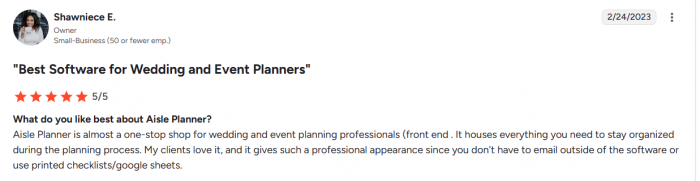
● Reviewers report that clients “love it” and feel the experience is more professional than relying on emails, printed checklists, or basic spreadsheets.
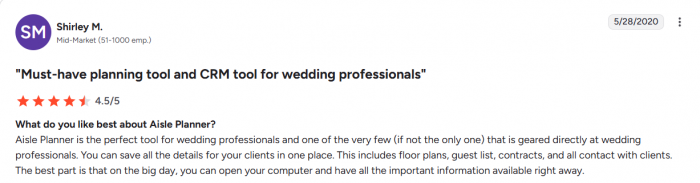
● Several users note that Aisle Planner effectively works as their main CRM, holding most of their event and client information in a single system.
Pain points
● Users often request stronger communication features, such as batch email capabilities and more flexible calendar/appointment tools.

● Some reviewers want richer internal messaging and collaboration options for teams working on the same event.
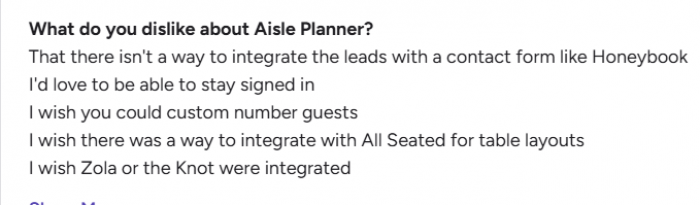
● Others mention they still need external tools for deeper accounting and more robust wedding websites/RSVP pages, and would like Aisle Planner to cover more of those needs.
Aisle Planner vs Alternatives
You’ll likely evaluate Aisle Planner against three main categories: general creative CRMs, DIY stacks (Sheets + Docs + e‑sign + invoicing), and other event or wedding‑specific tools.
| Aspect | Aisle Planner | General CRMs (HoneyBook‑type) | DIY Stack (Sheets + Docs + e‑sign + invoicing) |
| Main focus | Wedding/event planning hub | Broad service‑business CRM | Custom, low‑cost setup from separate tools |
| Best for | Planners doing mostly weddings/events | Mixed creatives (photo, design, coaching, etc.) | Very early‑stage or ultra budget‑conscious users |
| Event‑specific tools | Strong: guests, seating, design boards, checklists | Limited; generic project stages | None built‑in, all manual |
| Client experience | Polished, wedding‑specific client portal | Professional but generic portal | Shared folders, emails, no real portal |
| Contracts & invoicing | Built‑in, tailored to events and payment schedules | Built‑in, general‑purpose | Separate apps; more manual work |
| Scalability | Scales well for multi‑event planners and teams | Scales for varied creative businesses | Becomes messy as events and files multiply |
| Flexibility across niches | Narrow but deep for weddings/events | High across many service industries | Very high, but high maintenance |
| Cost vs time trade‑off | Mid‑priced, saves significant admin time | Subscription, good balance for multi‑niche pros | Cheapest cash cost, highest time and error risk |
Is Aisle Planner Worth It? Scenario‑Based Verdict
A generic yes/no doesn’t help much, so let’s look at different planner profiles.
For New and Emerging Planners
If you’re just starting and taking on a limited number of weddings:
● Pros: Makes you look established from day one; gives structure to your process; reduces the chance of missing critical steps.
● Cons: The monthly cost may feel heavy until your pipeline is more stable.
If you’re serious about building a long‑term business rather than treating planning as a short‑term side gig, Aisle Planner can be a solid foundation. But if you’re still “testing the waters” or doing very occasional events, a simpler setup may suffice for now.
For Growing Planners and Small Agencies
This is where Aisle Planner tends to deliver the best value:
● Your time is more valuable than the subscription fee.
● You need consistent experiences across multiple clients and events.
● Hiring assistants or associate planners is easier when you can plug them into an existing process.
In this stage, the platform often pays for itself in reduced admin stress, lower error rates, and a higher perceived level of professionalism.
For Venues and Coordination Teams
For venues that offer in‑house planning or coordination:
● Aisle Planner gives you a standardized process across all events.
● It lets multiple staff members access the same event information without version confusion.
If your venue runs many weddings and events per year, having a central platform can directly impact your reputation and reviews, because fewer details fall through the cracks.
Getting Started: Practical Onboarding Tips
To get real value out of a trial period, avoid just “clicking around.” Instead:
1. Start with one real client or a realistic dummy project.
2. Create or import a basic checklist for that project type (full planning, partial, coordination).
3. Build a simple contract and invoice template, even if you refine it later.
4. Set up at least one questionnaire to experience the client intake flow.
5. Invite the client (or a test email account) into the portal to see the experience from their side.
Within a couple of weeks, you’ll know if the platform reduces your mental load or adds friction. That’s far more informative than a superficial trial.
Should You Use Aisle Planner?
Aisle Planner is best thought of as an operating system for professional wedding and event planners, not just another app on your phone. It centralizes your projects, clients, designs, guest lists, and finances into a single environment that supports both the backend of your business and the front‑of‑house client experience.
You’re likely to get the most from Aisle Planner if:
● Weddings and events are your main business, not a minor side offering.
● You want to replace a messy tool stack with a coherent, client‑friendly system.
● You’re willing to invest some upfront time in templates, checklists, and workflows.
On the other hand, if you only plan a handful of events per year, are extremely price‑conscious, or rely heavily on a complex marketing/automation stack that demands deep integrations, you may find a lighter or more generalist setup more appropriate.
Bottom Line
Aisle Planner is best viewed as a dedicated operating system for wedding and event professionals, not just a generic CRM. Its event-specific tools (guest lists, seating, design boards, checklists, contracts, and invoicing) provide a level of control and client experience that DIY setups and broad creative CRMs usually can’t match.
While general CRMs offer more cross-industry flexibility and DIY stacks are cheaper upfront, both require more manual work and lack a cohesive client portal. For planners running a serious events business, Aisle Planner is often worth the subscription and initial learning curve in exchange for a more structured, scalable workflow.
Post Comments
Be the first to post comment!
Related Articles