Autodraft AI is one of those tools that makes you sit back and ask a simple, uncomfortable question:
If a browser tab can storyboard, draw, and animate your idea in an evening… what exactly is an “animation pipeline” in 2026?
For thousands of creators from AppSumo deal hunters to Product Hunt early adopters, the answer has been messy: part miracle, part migraine.
Scene 1: Meet the “browser studio” that draws, paints, and talks
Autodraft AI markets itself as a free AI animation and online cartoon maker, a full 2D studio in your browser that can turn text prompts, storyboards, sketches, and simple images into cartoons, comics, and short videos.
Under the hood, it blends four big capabilities into one interface:
● Text-to-image and image-to-image generation for backgrounds, props, and characters.
● Comic/webtoon creation flows that preserve panel consistency.
● 2D animation tools with 1000+ actions and 100+ expressions for characters.
● AI voiceovers, cloning, and audio tools to narrate your scenes.
On a good day, it feels like a junior studio assistant who never gets tired: give it a script, break it into scenes, and watch it churn out storyboards, character frames, and simple animations in hours instead of weeks. On a bad day, it feels like that assistant called in sick, lost your files, and stopped replying to email.
Scene 2: Four people who meet Autodraft for the first time
To understand Autodraft, it helps to walk through four archetypal users and what the platform actually offers them.
The solo YouTuber with three unfinished pilots
You’ve got scripts for kids’ stories, explainer episodes, or lo-fi web series sitting in a folder. No budget for a studio, no time to learn After Effects.
Autodraft’s pitch to you:
● Generate your recurring characters once, train models on them, and reuse them across every episode.
● Use text prompts to generate backgrounds and props in a consistent style.
● Use the action/expression library to make characters move, talk, and react without frame-by-frame work.
As long as you can live with the occasional outage and are mindful about credits, you can realistically ship more episodes in a month than you would have drafted in a quarter.
The teacher tired of lifeless slide decks
Your slides explain photosynthesis just fine—your students don’t care.
Autodraft’s pitch:
● Turn lesson points into short animated explainers with characters walking through examples.
● Use simple, repeatable characters and scenes to build a recognizable “classroom universe.”
● Stay mostly on the free or Base tier and still get better engagement than static slides.
For a classroom or small edtech team, Autodraft is less a toy and more a practical, budget-friendly upgrade for visual storytelling.
The agency squeezed between deadlines and budgets
You’re pitching explainer videos, brand stories, or course content. You need speed, but you also need reliability.
Autodraft’s pitch:
● Use it as a pre-vis engine: generate style frames, early storyboards, and rough animatics to help clients visualize concepts.
● Train mascot characters and reusable visual languages across campaigns.
Reality check:
● User complaints about outages, long waits, and “abandoned” support are a serious red flag for client-critical timelines.
● AI voices will rarely pass for premium brand work without external audio work.
For agencies, Autodraft is a powerful sketchbook, not yet a dependable factory.
The student or hobbyist who just wants to make cool stuff
Here Autodraft is almost overkill in the best way.
● Free access, around 20 credits per month, and a very gentle learning curve.
● A playful sandbox for comics, posters, backgrounds, and short clips.
If something breaks, there’s annoyance but rarely real damage. For this persona, Autodraft is easily a 4+ out of 5 experience.
Scene 3: What Autodraft actually does, step by step
Strip away the marketing, and Autodraft is a pipeline:
1. Idea and script.
2. Visual asset generation.
3. Animation and timing.
4. Voice and sound.
5. Export and distribution.
1. From idea to prompts
You start with a script or outline for YouTube episode, lesson, or story. You break it into scenes or comic panels and convert each into prompts:
● “Two kids in a classroom, bright colors, chalkboard behind them, teacher pointing at a plant.”
● “Close-up of main character, worried expression, night-time city lights in background.”
Each prompt anchors a frame or scene that Autodraft will generate.
2. Drawing the world: backgrounds, props, and characters
Here’s where the AI art engine kicks in:
● Text-to-image: Create backgrounds, props, and visual concepts directly from prompts, with control over style and aspect ratios.
● Image-to-image: Upload rough visuals or previous frames and refine them into a more polished, style-consistent look.
● Inpainting and sketch refinement: Erase and regenerate parts of an image, clean up hand-drawn sketches, and upscale outputs without starting from zero.
For many users, the “wow” moment happens here: “I typed a scene, and a usable frame appeared in seconds.”
3. Teaching the system who your characters are
Autodraft’s signature move is character consistency.
You can:
● Upload reference images of your character (or brand mascot).
● Train a custom model so that every new prompt using that character name keeps their face, clothing, and style consistent.
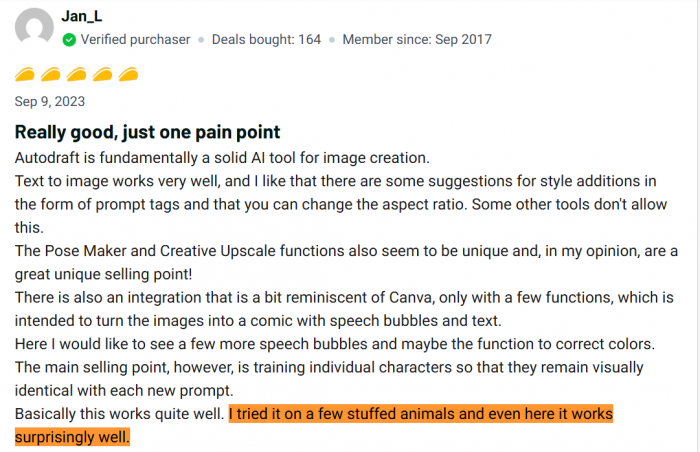
One user describes this as Autodraft’s main selling point: different prompts still keep the character visually identical, which is essential for comics and long-running story series. Another calls it “one of the best tools” for webtoon and background creation, even while criticizing animation quality.
4. Moving everything: 1000+ actions, 100+ expressions
Once your characters and scenes exist, you make them move.
Instead of manual keyframes, you get:
● A library of 1000+ actions (walking, waving, sitting, pointing, reacting, etc.).
● Over 100 facial expressions to convey emotion.
● A pose feature that lets you dial in very specific body positions, which graphic designers especially love.
You combine these with basic camera moves (pans, zooms) and timing controls to avoid static, slide-like scenes.
5. Giving your scenes a voice
Autodraft then layers audio on top:
● AI voiceovers in multiple languages and voices, with optional voice cloning on higher plans.
● Background music and sound effects for simple sound design.
For internal training videos, YouTube experiments, and classroom lessons, these voices are usually “good enough.” For TV commercials or luxury brands, they still sound unmistakably synthetic.
6. Hitting export (and watching credits disappear)
Finally, you:
● Preview in lower resolution to check flow and lip-sync while saving credits.
● Render a full 1080p or 4K version on paid tiers.
This is where Autodraft’s credit system becomes very real: every generation, every iteration, every render costs credits. If a render fails or the system glitches, you lose time and sometimes credits trying again.
Scene 4: Pricing, credits, and the real cost of “one video”
Autodraft has a freemium model and pricing is simple at the top level and tricky in practice.
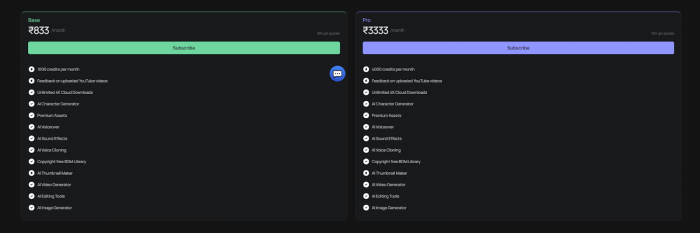
What one “proper” video really costs
A realistic 60–90 second animated piece might include:
● 5–10 scenes.
● 2–4 main characters.
● Multiple background generations.
● Several iterations to nail style.
● Final 4K render.
Independent analyses and user experiences make one thing clear: once you factor in iteration and corrections, a “serious” video can chew through a noticeable slice of a 1,000-credit pool. If you are loose with prompts and regenerate often, your effective cost per video climbs fast.
For disciplined creators who reuse assets and plan carefully, Base can cover a steady output; for agencies and heavy YouTubers, Pro or a hybrid stack is more realistic.
Scene 5: What real users actually say
This is where Autodraft stops being a spec sheet and becomes a case study in expectations.
The love letters
From AppSumo and Product Hunt, there are genuinely glowing reviews:
● “Fundamentally a solid AI tool for image creation” with strong text-to-image quality, useful style suggestions, and flexible aspect ratios.
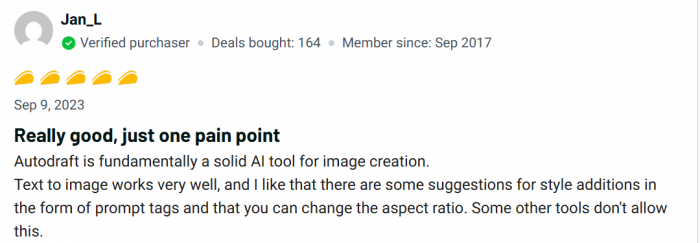
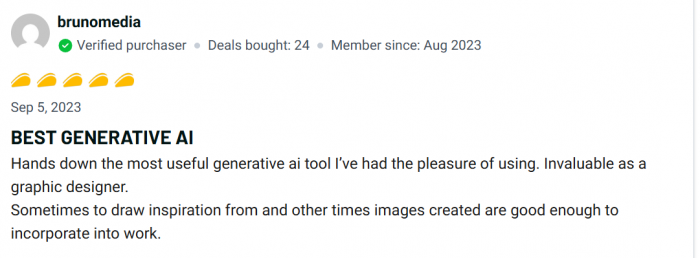
● “BEST GENERATIVE AI,” as one graphic designer calls it, praising the pose feature, creative enhancements, refined UI, and even giving “tons of points” for 1-on-1 support from the team.
● Another reviewer highlights how well it works for training stuffed animal characters and keeping them consistent across prompts, something most general image models don’t excel at.
These users treat Autodraft as a reliable daily driver for design and concept work and clearly feel they got more than their money’s worth.
The horror stories
There is also a very different set of stories:
● Buyers who saw Autodraft working for a while, then watched it stop generating images at all, with constant errors.
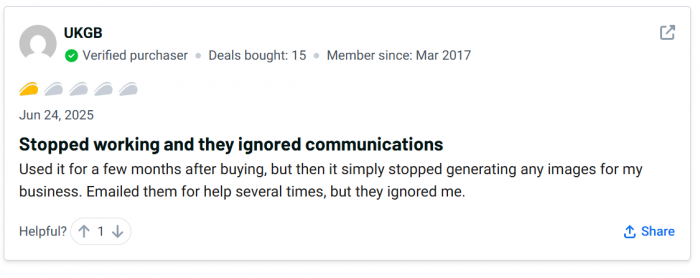
● Users who waited 20+ minutes for a single prompt, compared it to cheaper or free tools that responded in under a minute, and concluded that the product was effectively abandoned.
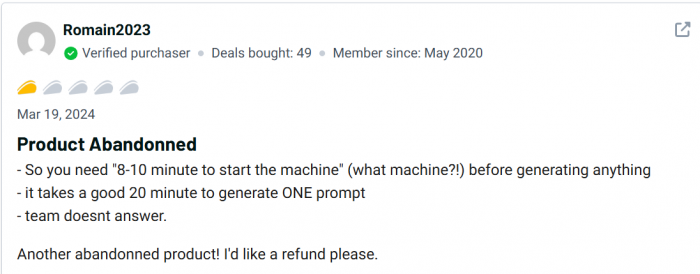
● Reports of multiple emails to support with no responses, reinforcing that “abandoned” feeling.
The nuanced middle
Finally, there are balanced takes:
● A Product Hunt reviewer who calls Autodraft “one of the best AI platforms” for backgrounds and webtoons but criticizes its animation tools as “too complicated” and time-consuming, with poor animation quality compared with expectations.

● Detailed reviews noting that the UX is excellent, features are ambitious, but the business reality—stability, scalability, and support—has not consistently kept up.
In short: it’s possible to love Autodraft, and it’s possible to regret it. Which side you land on depends heavily on when you joined, how you use it, and how much downtime you can tolerate.
Scene 6: UX, learning curve, and living with Autodraft day to day
The good news: UX and onboarding
Almost everyone agrees on this: the interface is genuinely good.
● Clean, intuitive layout that feels designed for creators rather than engineers.
● Pose tools, style suggestions, and aspect ratio controls that feel like a well-thought-out toolbox rather than a gimmick.
● Easy onboarding: many users report getting valuable results within their first session.
For newcomers to animation or AI art, Autodraft is less intimidating than many competitor tools.
The hard part: reliability and support
This is where the mood shifts:
● Verified buyers report periods where the platform was barely usable—generation errors, extreme slowness, and no clear communication.
● Long-form critical reviews note a sense in 2025–2026 that Autodraft was struggling operationally, with users perceiving it as neglected or abandoned for stretches.
● These are directly at odds with reviewers who praise responsive, personal support and frequent feature updates.
The best way to reconcile this is to treat Autodraft’s reliability as inconsistent over time, with some cohorts getting a very different experience from others. For mission-critical workflows, that inconsistency matters more than any one rating.
Scene 7: Where Autodraft sits in the wider tool ecosystem
Autodraft doesn’t exist in a vacuum. It’s surrounded by competing tools and overlapping categories:
● AI art models (Midjourney, DALL·E, etc.) that excel at still images but don’t handle animation or comic continuity.
● Animation SaaS like Vyond, Animaker, and Renderforest that prioritize stability, templates, and business use cases rather than experimental AI-first pipelines.
● Heavy-duty creative tools like Adobe After Effects, Toon Boom, or Unity, which demand expertise but deliver unmatched control and reliability.
One way to think about Autodraft:
● Compared to generic image generators, it wins on character consistency, comic flows, and pose/scene control.
● Compared to Vyond or Animaker, it wins on creative flexibility and AI-native workflows but loses on uptime, governance, and enterprise trust.
● Compared to professional creative suites, it wins on accessibility and speed, but can’t match depth or integration.
It is, essentially, a very talented intern sitting between Canva and Toon Boom: brilliant ideas, experimental energy, but not yet someone you’d let run the studio alone.
Scene 8: Can Autodraft actually make you money?
Autodraft is not just about aesthetics; it’s about whether the time you save turns into revenue.
YouTube and content channels
For YouTubers, especially in kids’ content, storytelling, or education, Autodraft can:
● Slash the time needed to turn scripts into watchable episodes.
● Enable visual experimentation (styles, characters, formats) at low marginal cost.
If you accept the occasional disruption and plan around credit usage, it can easily pay for itself through increased output and experimentation.
Courses, academies, and edtech
For course creators and trainers, Autodraft:
● Upgrades static lessons into animated explanations and scenarios.
● Makes it feasible to have a “visual language” for your course—consistent characters and recurrent motifs—without a design team.
Here, the ROI is measured in learner engagement and perceived production value rather than direct ad revenue, but the payoff is still meaningful.
Agencies and freelancers
For agencies and freelancers:
● Autodraft is excellent at generating style frames, concept art, and early animatics that help clients say “yes” faster.
● It can dramatically cut pre-production time and make revisions cheaper at the concept stage.
But:
● You will likely still want more stable, higher-fidelity tools for final deliverables.
● You must factor reliability risks into your project planning and contracts.
Scene 9: The red flags you should not ignore
● Operational stability: Multiple verified reviews and critical overviews highlight outages, long generation times, and periods of almost complete non-functionality. For professionals, this is not a footnote, it’s a central risk.
● Credit-based friction: The credit model makes perfect economic sense for Autodraft but can punish creators who rely on trial-and-error or who are hit by failed generations. Unlike flat-fee competitors, your monthly output is tightly coupled to how efficient and lucky you are.
● Animation maturity vs. promise: At least one Product Hunt reviewer notes that while Autodraft is outstanding for background and webtoon creation, its animation tools feel too complex and time-consuming, with results that don’t yet beat traditional methods.
● Voice and polish: AI voices still sound like AI voices. For many internal or low-stakes videos, that’s fine; for high-end campaigns, it is a non-starter without additional audio work.
If you ignore these issues, you are not using Autodraft; you are betting on it.
Final scene: How to think about Autodraft AI
Put everything together, and Autodraft AI looks less like a “yes or no” decision and more like a tool you deliberately place in a specific role.
For educators and course creators
● Practical rating: about 4.2/5.
● Reason: Huge boost in visual quality and engagement, affordable plans, reliability issues are annoying but rarely catastrophic.
For new YouTubers and indie storytellers
● Practical rating: around 4/5.
● Reason: Excellent for fast character-based stories and experiments; credit burn and downtime can hurt if you’re scaling aggressively.
For agencies, brands, and studios
● Practical rating: roughly 3.0–3.3/5.
● Reason: Great pre-vis engine and concept factory, but too inconsistent to be your only production pipeline.
For hobbyists and students
● Practical rating: around 4.3/5.
● Reason: High creative upside on the free tier, strong learning tool, and manageable downsides for non-critical work.
Bottom Line
Autodraft AI, in 2026, is best understood as a powerful, slightly unpredictable collaborator: brilliant at helping you imagine and prototype visual stories, less reliable as the sole architect of your final work. Treat it as a lab, not a factory and you’ll unlock much more value than frustration.
Post Comments
Be the first to post comment!
Related Articles



Table of Content
- Scene 1: Meet the “browser studio” that draws, paints, and talks
- Scene 2: Four people who meet Autodraft for the first time
- Scene 3: What Autodraft actually does, step by step
- Scene 4: Pricing, credits, and the real cost of “one video”
- Scene 5: What real users actually say
- Scene 6: UX, learning curve, and living with Autodraft day to day
- Scene 7: Where Autodraft sits in the wider tool ecosystem
- Scene 8: Can Autodraft actually make you money?
- Scene 9: The red flags you should not ignore
- Final scene: How to think about Autodraft AI