Unlucid AI is a creative, “uncensored” AI content suite focused mainly on image-to-video effects, AI video generation, AI image generation, and AI image editing. Its positioning is clear: it’s built for people who want fast, entertaining, stylized results (often “viral short” friendly), with fewer content restrictions than most mainstream tools.
What kind of AI is Unlucid AI?
Unlucid AI is primarily a consumer creative AI platform for:
● Short video generation and animation (especially from images)
● Video “effects” transformations (e.g., comedic/flashy motion effects)
● Text-to-image generation
● AI image editing (generative edits)
It is not an “AI chatbot” or a business automation tool. It’s a creator-focused visual generator designed to turn prompts + images into quick outputs for social posts, reels, edits, and experiments.
Tools & services Unlucid AI provides
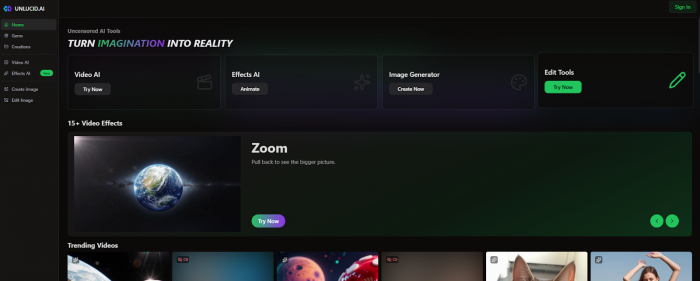
1) Video AI (image-to-video + prompt-driven video)
Unlucid emphasizes transforming images into short videos with a few clicks, aimed at non-technical users.
2) Effects AI (video effects library)
Unlucid highlights a library of “video effects” (the site mentions 15+ video effects). These are usually pre-baked transformations like “dance,” “squish,” “zoom,” etc., where your input image becomes the subject of an animated effect.
3) AI Image Generator (text-to-image)
Unlucid includes an image generator and explicitly documents multiple styles in its tutorial content (they describe “distinct artistic styles”).
4) Edit Tools (AI image editing)
Unlucid also provides AI editing modes (think “generative fill”-style workflows). Their tutorial documentation lists remove objects, add/replace objects, and change clothing as supported edit modes.
5) Tutorials / prompting guidance
Unlucid publishes short “how-to” pages (prompting tips, editing guides, effects tips). These are useful because they reveal what the tool does well: clean subject images, simple backgrounds, etc.
Key features
Here are the features that typically matter in daily use:
● Fast creative turnaround: upload → pick effect → prompt → render (minimal learning curve).
● Effect-driven creation: a menu of visual transformations designed for short-form entertainment.
● Generative image editing modes: remove/add/replace objects and clothing changes (useful for quick iterations).
● Freemium access + daily free Gems: encourages casual use without immediate payment.
● No watermark on paid bundles (explicitly stated in gem bundle details).
Pricing structure:
Unlucid uses a credit system called Gems (not a typical monthly subscription in the usual sense). You can claim free Gems daily, then pay for bundles when you need more.

Top Praises
● Good for quick social clips: multiple Reddit users say it works well for 3–4 second TikTok/Instagram transitions and playful micro-animations.

● Low barrier to entry: web-based, no setup, daily free gems and simple effects make it accessible to non-technical creators experimenting with AI visuals.
● Creative freedom / uncensored: reviewers highlight flexible, less-filtered generation compared to Canva, DALL·E, or other heavily moderated tools, especially for edgy or surreal content.
Top Complaints
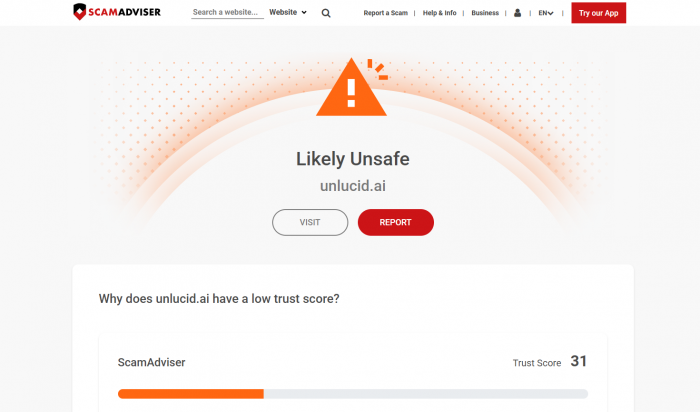
● Trust and safety risks: independent scanners assign very low trust scores and classify the site as potentially suspicious or “might be a scam,” raising concerns about payments and data handling.
● Ambiguous privacy/ownership: reviewers note unclear answers around whether uploads are stored and who owns outputs, making it “not trustworthy for sensitive projects.”
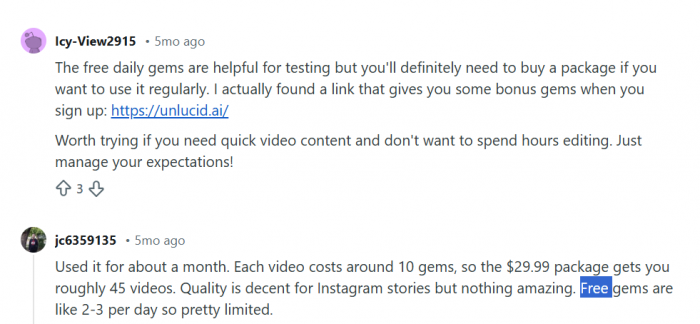
● Credit/gem wall and costs: free gems are seen as too limited; frequent users feel forced into buying packs and note that costs add up quickly for heavy usage.
● Only “good enough” quality: generally fine for memes and stories, but not consistently suitable for client work or high-end production; polish and control lag behind pro tools.
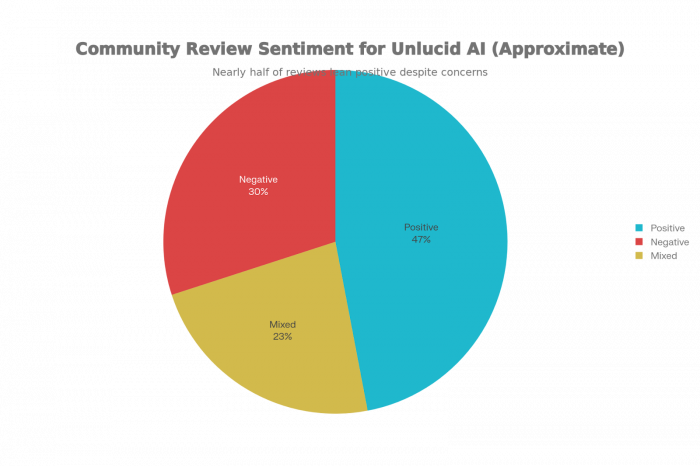
Community Review Sentiment for Unlucid AI
Here is a clear pie chart visualizing the approximate distribution of community sentiment toward Unlucid AI, using three segments: Positive (47%), Mixed (23%), and Negative (30%).
Who Should / Shouldn’t Use It
Likely a fit for
● Creators wanting a low-effort way to make short, eye-catching video snippets or animated effects for TikTok, Reels, and stories, where long-term safety and IP concerns are minimal.
● Hobbyist users experimenting with uncensored image/video generations, memes, or playful content, who are comfortable treating it as a disposable sandbox.
Probably not a fit for
● Professionals needing reliable IP, clear licensing, or client-safe workflows (agencies, brands, enterprise teams); reviews lean strongly toward alternatives like Runway or open-source pipelines for these cases.
● Privacy‑sensitive users, or anyone uploading real-person/NSFW or confidential material, given low trust scores, unclear data retention, and user reports of anxiety around potential misuse.
● Heavy-volume creators on tight budgets, as gem-based pricing becomes expensive for frequent use versus more transparent subscriptions on competing platforms.
Nearest alternatives
If you want image-to-video and cinematic motion:
● Runway (stronger for film-style generations and editing workflows)
If you mainly want short-form effects and quick social edits
● CapCut (not the same “AI generation,” but often the better tool for shipping social content fast)
If you want the best text-to-image generation
● Leonardo AI (creator-friendly UI + strong image tooling)

Overall verdict
For casual, low‑risk play-memes, short TikTok/Reels clips, surreal image/video ideas—Unlucid delivers decent results with a simple interface and daily free gems, and many creators enjoy the creative freedom compared with heavily filtered tools. However, multiple independent reviews and trust‑scoring sites highlight weak transparency, low domain trust scores, unclear data practices, and spotty support, which make it a poor choice for client work, NSFW involving real people, or anything requiring robust IP, compliance, or payment confidence.
In practice, it fits best as a side sandbox you use with throwaway assets and tight spending caps, while relying on more established platforms (Runway, Stable Diffusion setups, HeyGen, etc.) for serious or commercial projects.
Post Comments
Be the first to post comment!
Related Articles



Best Alternatives to Dopple AI
Danny Hamilton . Mar 10, 2026