Table of Content
- The Double Life of VidMate
- A Day in the Life With VidMate
- Under the Hood: What It Actually Does
- How to Download and Use VidMate (Safely)
- Why People Fall in Love With It
- Where the Shine Starts to Crack
- Safety, Privacy and That Gut Feeling
- What Real Users Actually Complain About
- The Neighbourhood: Who Else Lives in This Space?
- Is VidMate “Worth It”?
Imagine a friend who never gets tired of grabbing videos and songs for you, from almost anywhere on the internet, in whatever quality you like, and quietly stacks them into neat folders on your phone so you can enjoy them offline. That, in spirit, is what VidMate tries to be a hyper‑active media butler for Android, with a slightly shady passport and a long list of people who question whether you should really be hanging out with it.
The Double Life of VidMate
On the surface, VidMate has a simple story: it’s a free Android app that lets you download videos, music, and even live TV streams from YouTube, Facebook, Instagram, TikTok, and more than a thousand other sites. Under the surface, it’s a classic “third‑party downloader” that lives outside the Google Play Store, moves only as an APK file, and depends on you flipping the “install from unknown sources” switch on your phone.
You don’t go to Play Store, tap “Install,” and forget it. Instead, you hunt down the APK (often from domains like vidmateapk.com.in), download a ~30‑ish MB package, and manually install it on an Android 5.0+ device. One day it’s just a file in your Downloads folder; the next, it’s a full browser‑plus‑downloader sitting at the centre of your entertainment habits.
A Day in the Life With VidMate
Picture a typical heavy‑user day:
● Morning commute: you paste a YouTube link into VidMate, select 1080p MP4 for a tutorial, and an MP3 version for a podcast episode, same video, two outputs.
● Lunch break: you hop into Instagram and TikTok inside VidMate’s built‑in browser, queue a batch of short videos, and let the multi‑threaded engine chew through them in the background.
● Evening: your network is spotty, but it doesn’t matter. You open VidMate’s media library, hit play on an offline 4K movie you downloaded earlier, or switch to one of 200+ live TV channels streaming directly inside the app.
In between, the download manager quietly tracks progress, lets you pause and resume, and files everything into folders on internal storage or an SD card. It feels way more like a Swiss‑army knife than a single‑purpose “YouTube downloader.”
Under the Hood: What It Actually Does
If you strip away the marketing, VidMate is basically a convergence of four tools jammed into one interface:
1. A mini browser and search hub: You can search across supported platforms, tap icons for YouTube, Facebook, Instagram, TikTok, Reddit and others, then browse exactly as you would in a normal browser, except every media page comes with a bright “download” option attached.
2. A format and quality selector: Each time you choose to download, VidMate offers a menu of resolutions (from low SD up to HD and, where the source allows, full 4K) and formats (MP4, MKV, sometimes AVI or 3GP). On the audio side, it offers MP3, AAC, and other formats, turning any video into a de‑facto “song” file.
3. A high‑speed, multi‑thread downloader: Instead of pulling a video as one long stream, VidMate splits it into pieces, fetches them in parallel, and stitches them back together, making large files noticeably faster to grab—especially over shaky mobile data.
4. A basic file and media manager: Finished files show up in an internal library where you can rename, move to SD card, or delete. A built‑in player handles most mainstream video and audio formats, so you don’t even need a separate media app.
Individually, none of these ideas is new. Together, they create what feels like a “download‑first internet” wrapped in a single Android app.
How to Download and Use VidMate (Safely)
If you decide to proceed anyway, basic operational steps look like this:
1. Enable unknown sources: In Android settings, temporarily enable installation from “Unknown Sources” or allow your browser/file manager to install unknown apps.
2. Download the APK from a trusted site: Visit the official VidMate site or a reputable APK host (such as the vidmateapk.com.in domain), then download the latest version.
3. Install and grant permissions: Locate the APK in your Downloads folder and tap Install; accept requested permissions (typically storage, network, perhaps media access).
4. Search or paste a URL: Open VidMate, select a platform logo or paste a video URL, then use the built‑in search bar if needed.
5. Select format and quality: Choose MP4 vs MP3 (or other formats) and pick the desired resolution (from low quality up to HD/4K).
6. Download and manage files: Tap Download; monitor progress in the download manager, pause/resume as needed, and organise completed files in folders.
7. Re‑secure your device: Disable “Unknown Sources” again after installation to reduce risk from other APKs.
Why People Fall in Love With It
People who like VidMate rarely talk about it in abstract bullet points, they talk about problems it quietly solves:
● No Wi‑Fi on long train journeys? Download in advance at home in 720p, and your commute becomes a private cinema.
● Have a favourite music video but hate the video part? Grab only the MP3 and save both data and battery.
● Struggling with an older phone? Pick lower resolutions and still watch without buffering.
● Collecting tutorials, lectures, or language lessons? Batch‑download entire playlists, then play them offline like a personal “course library.”
User comments across blogs and review pages repeatedly praise the “all sites, one app” convenience, the speed boost from multi‑threaded downloads, and the simplicity of tapping one big download button instead of juggling extensions or desktop tools.
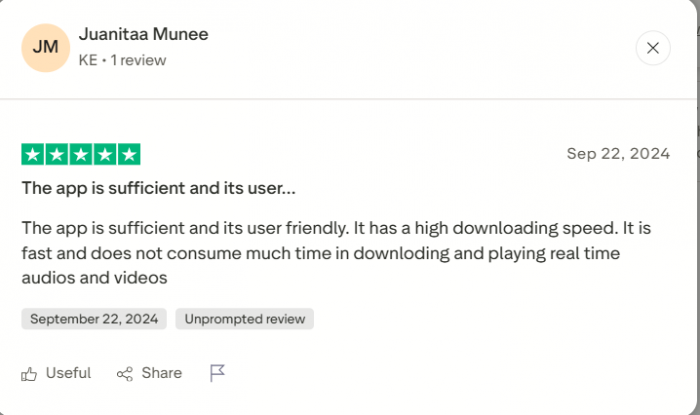
For many, it becomes the default way they interact with online video, not just a side utility.
Where the Shine Starts to Crack
But VidMate also has the kind of resume that makes security enthusiasts frown.
First, it lives entirely outside official app stores. That means:
● You must enable installation from unknown sources.
● You must trust that the site hosting your APK hasn’t slipped in adware, trackers, or worse.
There are “official”‑looking domains and branding, and some versions advertise being ad‑free and malware‑scanned, but there’s no single app store‑backed chain of trust. If you accidentally grab a clone from an aggressive APK mirror, you may get extra ads or unwanted behaviour bundled in.
Second, VidMate’s main trick—downloading from YouTube, Instagram, Facebook and friends, collides head‑on with what those platforms’ terms of service say. Most of them explicitly forbid downloading content outside their own tools, especially copyrighted material. That’s not a vague “maybe”; it’s written into their rules.
So VidMate itself is not necessarily “illegal software,” but a lot of the ways people actually use it create a legal and policy mess:
● You can easily download copyrighted music, movies, or shows without permission.
● You can redistribute them, intentionally or not.
● You can violate both local copyright law and the source site’s terms.
Legal blog posts and regional analyses frequently class this behaviour as infringement, even when users say “it’s just for personal use.”
Safety, Privacy and That Gut Feeling
VidMate’s own messaging leans on reassurance: claims of virus‑free builds, secure connections, and respect for user privacy. It positions itself as a safe, practical tool unfairly sidelined by Google’s policies.
Yet from a cautious user’s perspective, some questions remain:
● There’s no widely cited, independent privacy audit.
● The app is closed‑source, so you can’t verify what it does with your data.
● Distribution relies on trust in whichever “official” website you choose to believe.
Security‑focused guides typically give blunt advice: if you insist on using apps like this, download only from the most authoritative sources, double‑check the URL, scan the APK, install, then immediately turn “unknown sources” back off. In other words, treat it like handling chemicals in a lab—useful, but you don’t leave the bottle open.
What Real Users Actually Complain About
Beyond big‑picture debates, everyday users grumble about more mundane things:
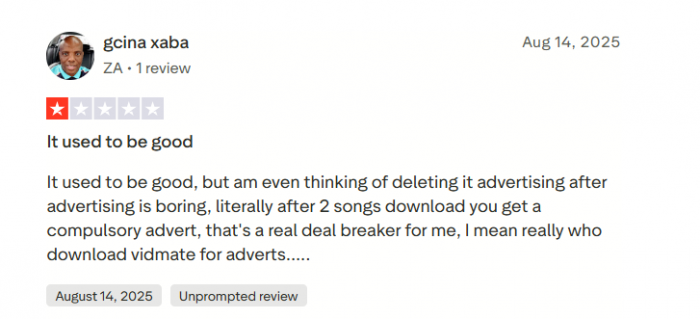
● In some versions, ads and pop‑ups show up more than they’d like, especially in builds obtained from generic APK repositories.
● Storage fills up quickly when people get carried away with HD/4K downloads and forget to clean up.
● Some experience occasional crashes, especially during file conversions or with massive downloads on low‑end phones—though recent updates do work on performance and bug fixes.
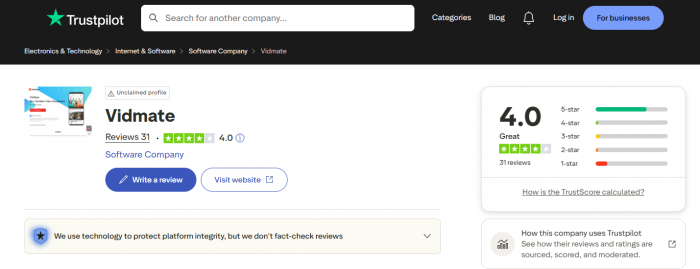
On the other hand, a lot of reviews still read like “does exactly what I need and does it fast,” with ratings often hovering around “good but not flawless.” VidMate, in practice, lives in that messy middle ground between “fantastic utility” and “risky habit.”
Trustpilot Rating Snapshot
The Neighbourhood: Who Else Lives in This Space?
VidMate isn’t alone. It has neighbours—some more respectable, some more underground:
● SnapTube – Very similar vibe: multi‑site support, HD/4K downloads, Android APK distribution. Also off the Play Store and also sitting in a legal grey zone, but often marketed with a more polished, mainstream feel.
● TubeMate – One of the older names for YouTube downloads on Android. Focuses mostly on YouTube, with fewer bells and whistles than VidMate but a long‑time user base.

● NewPipe – The “open‑source rebel” of the group. It’s a privacy‑focused YouTube front‑end and downloader available via F‑Droid, with no Google libraries, and transparent code you can audit. It still faces the same ToS questions, but privacy‑conscious users appreciate the transparency.
● Desktop tools (4K Video Downloader, youtube‑dl / yt‑dlp) – Installed on PCs rather than phones, often updated quickly and better controlled from a security standpoint (if you know what you’re doing), but less convenient on mobile.
Compared to these, VidMate is the most “everything‑in‑one‑Android‑app” option: more sources than TubeMate, more features than many single‑site tools, but less transparency than open‑source options like NewPipe.
Is VidMate “Worth It”?
The answer depends less on technology and more on your personal risk tolerance and ethics.
If you value:
● Maximum convenience on Android.
● One app that talks to nearly every major video and social site.
● HD/4K downloads, MP3 extraction, live TV, batch and background downloads, all tucked into a simple interface.
then VidMate is incredibly hard to beat on pure capability. It really can reshape how you consume video and audio, especially if your internet is unreliable or expensive.
But if you:
● Care a lot about staying firmly within platform terms of service.
● Worry about sideloading apps from the open web.
● Want transparent, independently auditable privacy practices.
then VidMate is exactly the sort of app you should approach with extreme caution—or avoid entirely.
A pragmatic way to think about it is this:
● As a tool, VidMate is impressive, polished, and powerful.
● As a habit, using it recklessly (to hoard copyrighted content from everywhere) is both risky and, in many places, plainly unlawful.
● As a decision, it’s only “worth it” if you’re willing to do the work: download from trustworthy sources, lock down your Android settings again afterwards, and limit your usage to content you actually have rights to.
Used carefully and ethically, VidMate can be a brilliant offline media companion. Used casually, it can be a quiet liability sitting in your app drawer.
Post Comments
Be the first to post comment!
Related Articles