Table of Content
- So, What Exactly Is Blooket?
- How Blooket Actually Works (From Teacher To Game Screen)
- Blooket Pricing: What’s Free And What’s Paid?
- Game Modes Features: Where Blooket Really Shines
- What Users Say: Highlights From Public Reviews
- How Blooket Stacks Up Against Other Classroom Favorites
- Who Will Get The Most Out Of Blooket?
- Is Blooket A Legit Website Or Something To Worry About?
- Contact, Support, And How To Reach The Team
- Who’s Behind Blooket?
- Final Take: Where it Fits In A Modern Classroom
In a world where students can barely sit through a worksheet without checking out mentally, tools like Blooket promise to turn review time into something that actually feels fun. Instead of giving kids a plain list of questions, it wraps quizzes inside fast-paced games, rewards, and friendly competition.
Below is a deep dive into how Blooket works, what it does well (and where it falls short), how much it costs, and whether it’s a legit platform teachers and parents can trust.
So, What Exactly Is Blooket?
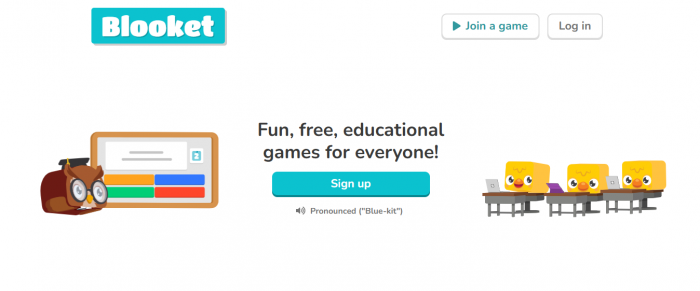
Blooket is a web-based learning platform where teachers turn question sets into interactive games that students join with a simple game code on any device, no app download needed.
It’s mainly used for:
- Classroom revision and test prep
- Reinforcing concepts after lessons
- Low-stakes quizzes and informal checks
- Homework and self-paced practice sessions
The twist is the gameplay layer. Instead of “question, answer, next,” students earn points, unlock power-ups, pick avatars (called “Blooks”), and compete in different game modes while still answering curriculum-based questions. That’s the hook that keeps them involved, even when they’re drilling the same topics over and over.
How Blooket Actually Works (From Teacher To Game Screen)
Here’s how a typical Blooket session flows in real classrooms:
1. Building Or Picking Question Sets
Teachers can:
- Create their own question sets from scratch around topics like math, science, history, languages, and more.
- Or grab ready-made sets from a large public library made by other educators.
- This means you don’t have to start from zero every time, you can tweak existing sets or quickly clone and edit them to fit your lesson.
2. Picking A Game Style
What makes Blooket feel different is that the same set of questions can be used across multiple game types. Some modes reward speed, others reward strategy, some feel more like mini RPGs or tower defense games. The content doesn’t change—but the way students experience it does.
3. Hosting Live Or Assigning For Later
- Live sessions: Perfect for in-class reviews, warm-ups, or exit tickets. The teacher hosts, students join via code, and the game runs in real time.
- Homework / self-paced: Games can also be assigned so students can play on their own time, which works well for remote learning or revision.
4. Reviewing How Students Did
Once the game wraps up, teachers get basic performance insights:
- How many questions were answered correctly
- Overall participation
- Which sets work well or need adjusting
The setup is intentionally fast. That’s why many teachers slot Blooket in as a 10–15 minute activity at the start or end of class instead of planning entire lessons around it.
Blooket Pricing: What’s Free And What’s Paid?
Blooket runs on a freemium model. There’s a solid free tier and optional upgrades for heavier users and bigger classes.
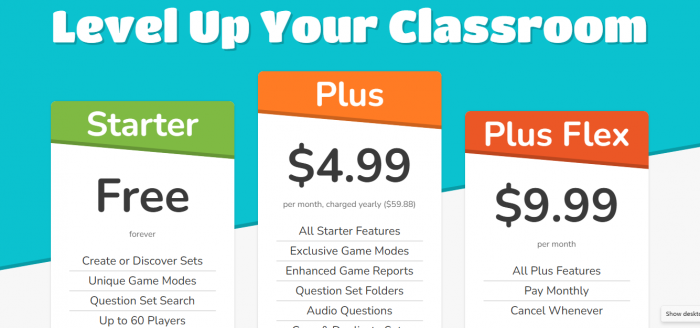
Free Plan: What You Get Without Paying
The free plan typically includes:
- Unlimited question sets
- Access to core game modes
- Hosting games for around 60 players per session
- Basic results and performance overview
For small to medium classrooms and more casual use, this is usually enough. Many teachers never move beyond the free version and still use it regularly.
Paid Plans: Blooket Plus & Plus Flex
The paid tiers unlock more power-user features. These usually include:
- Higher player limits (often up to ~300 students per game)
- Extra or enhanced game settings
- Better reporting and more detailed data
- Some additional perks designed to keep students hooked
Pricing is typically structured as:
- Plus: Lower monthly rate when billed annually
- Plus Flex: Slightly higher, but monthly and cancellable, for teachers who don’t want long commitments
These plans make the most sense for:
- Larger schools or grade teams running frequent Blooket games
- Teachers who want more control, capacity, and data rather than just casual use
Game Modes Features: Where Blooket Really Shines
The biggest selling point of Blooket is how dramatically the same set of questions can feel different depending on the game mode you choose. Here are some of the popular styles, rephrased in plain language:
- Café Mode: Students answer questions to earn food they serve to virtual customers. The better they answer, the smoother their café runs.
- Tower Defense: Correct answers help students place or upgrade defenses to keep enemies from breaking through their tower.
- Tower of Doom: Learners pick characters with different stats and face off in battles, powered by answering questions correctly.
- Gold Quest: Players compete to collect as much gold as possible, with some luck-based events thrown in to keep things unpredictable.
- Beyond that, Blooket adds a few extra layers:
- Question sets can be created inside the Blooket dashboard or pulled from the massive shared pool of teacher-made content.
- Blooks (avatars), power-ups, and leaderboards give it more of a “mini game” feel than a straight quiz tool.
- Fairness controls let teachers adjust scoring so speed isn’t the only factor, which helps quieter or more cautious students stay competitive.
Because the content doesn’t change, just the mode, teachers can reuse question sets again and again without students immediately getting bored.
What Users Say: Highlights From Public Reviews
This breakdown is based on patterns that pop up across public reviews on platforms like G2, Trustpilot, and teacher blogs, not just one-off comments.
What Users Like About Blooket
Across multiple software review sites and educator feedback spaces, Blooket gets a lot of love for how it changes the vibe of review time. Many teachers say it helps them:
- Turn “boring review” into something students actually look forward to, thanks to the game formats and light competition.
- Fit it into their routine every week because it’s quick to set up and doesn’t require a steep learning curve.
- Create fun, low-pressure learning experiences where even quieter students are more willing to participate.
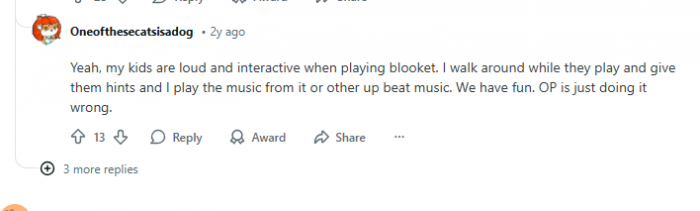
- A recurring theme in positive feedback is that Blooket is best when used as a supplement: short bursts for practice, warm‑ups, and revision, rather than as the backbone of an entire course.
Common Frustrations And Feature Requests
On the flip side, there are some consistent criticisms that show up in user comments:
- Technical reliability: People report occasional login issues, loading problems, or game sessions dropping when the internet connection isn’t stable. That’s especially painful during longer games.
- Shallow reporting: Educators who want detailed analytics, such as per-skill tracking or long‑term progress dashboards, often feel the built‑in reports are too basic.
- Game balance: Some users feel that chance-based elements can overshadow pure knowledge, which can frustrate high‑performing students who want scores to directly reflect understanding.
- Workflow limitations: A number of reviewers wish for more automation, like being able to upload a document and have questions auto-generated from it.
These complaints mostly come from people trying to push Blooket beyond “engagement tool” into full assessment or data-analysis territory.
How Blooket Stacks Up Against Other Classroom Favorites
When you put Blooket next to some of the usual suspects, Kahoot, Quizlet, and Gimkit, it carves out a clear niche:
- Blooket: Leans hardest into game variety, collectibles, and replay value. Great when the main goal is “get them excited to practice.”
- Kahoot: Best known for fast-paced, live quiz-show style games with everyone answering together in real time.
- Quizlet: Stronger for structured study, flashcards, and memorization, especially for vocab and definitions.
- Gimkit: Offers deeper strategy and more complex economic-style game mechanics, but often comes with a steeper learning curve and more setup thought.
Blooket fits particularly well into classrooms where participation and energy are priority number one, and where teachers are okay using something else to handle heavy-duty assessment.
Who Will Get The Most Out Of Blooket?
Blooket tends to be a great fit for:
- Teachers who want quick, low-prep engagement activities
- Tutors working with younger learners who respond well to games
- Classrooms that need a fun boost before tests or as lesson warm-ups
- Informal practice, review, or end-of-week recap sessions
It’s less ideal when:
- You’re running high-stakes or graded assessments
- You need detailed, long-term performance analytics
- You’re trying to track individual progress deeply across standards
- Used in the right context—as a sidekick, not the main engine. Blooket usually delivers far better results.
Is Blooket A Legit Website Or Something To Worry About?
From a legitimacy standpoint, Blooket is a genuine edtech platform, not some shady pop-up site.
It has:
- A long-standing presence in classrooms across multiple countries
- Coverage and listings on well-known software and edtech review platforms
- A clear business model (freemium with paid upgrades), not suspicious “too good to be true” promises
- Like any tool dealing with student data, the privacy angle matters. Schools should:
- Check the platform’s privacy policy and data practices
- Ensure parental or institutional consent when needed
- Align usage with local COPPA/FERPA or equivalent regulations
Overall, Blooket is widely treated as a legitimate, mainstream classroom tool rather than a risky or fly-by-night website.
Contact, Support, And How To Reach The Team
Blooket provides a few standard ways for users to get help:
- A help or support center with articles, guides, and FAQs that walk through common tasks and issues
- Direct email-based support for things like account problems, billing questions, or bug reports
- Response times can vary, but many users mention getting decent support via email, especially when they contact the team using the same address linked to their Blooket account.
Who’s Behind Blooket?
Blooket operates like a typical education-focused SaaS product backed by a relatively small but dedicated team. While the front-facing branding leans more toward students and teachers rather than individual founders, a few things are clear:
The team’s focus is on making classroom review more fun without demanding heavy technical skills from teachers. New modes, tweaks, and updates roll out over time, which shows ongoing development rather than a “launch and abandon” product.
Final Take: Where it Fits In A Modern Classroom
Blooket does what it promises: it makes learning feel more like a game without completely losing the academic purpose behind the questions. When it’s treated as a supplementary engagement tool, it can seriously lift participation and make revision more bearable, sometimes even genuinely fun.
It is not a one-stop replacement for formal assessments, in-depth analytics, or long-term progress tracking. But for warm-ups, quick checks, test review, and keeping students awake and involved, it absolutely has a place in a teacher’s toolbox.
Used with clear expectations, “this is for practice and engagement, not your final grade”.
Post Comments
Be the first to post comment!
Related Articles