Table of Content
- The core idea: outsource the boring part of studying
- How Flashka thinks about your study material
- The secret weapon for visual learners: image occlusion
- What happens after the cards exist: the spaced‑repetition rhythm
- The in‑app “professor”: when you need more than right/wrong
- Daily life with Flashka: what it actually feels like
- Money, credits, and the fine print
- Flashka’s imperfect side: bugs, quirks, and rough edges
- What the crowd is saying
- Against the usual suspects: where Flashka stands in the pack
- The quiet but important piece: who owns your study trail?
- Pros, cons, and the “should I actually use this?” moment
- The bottom line
Imagine if a flashcard app walked into your study routine like a transfer student who already knows the entire syllabus, organizes your notes, and still lets you take the credit for topping the exam. That, in spirit, is where Flashka tries to sit: not as a “yet another flashcard app,” but as an AI‑powered factory that digests your PDFs, notes, slides, and even textbook photos, and spits out flashcards, quizzes, and spaced‑repetition sessions before you’ve finished your coffee. It wants to move you from “I should make cards” to “I’m already reviewing” in a single evening.
But the real question isn’t “Is it smart?”, it’s “Does it actually reduce the friction between having messy study material and remembering what matters on exam day?” To answer that, let’s walk through Flashka not as a feature checklist, but a story: where it fits in your life as a learner, how it behaves when you’re under pressure, and where it quietly gets in its own way.
The core idea: outsource the boring part of studying
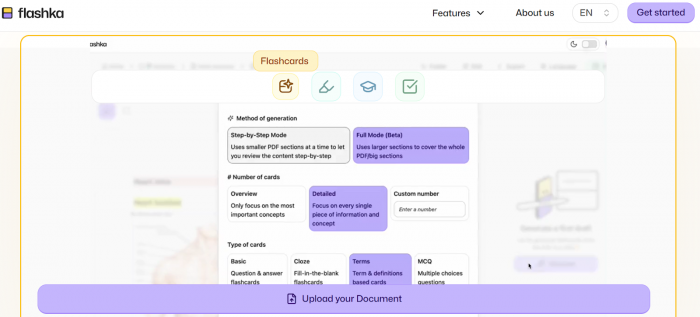
At its heart, Flashka is built around one thesis: the bottleneck in flashcard‑based learning isn’t the method, it’s the manual labour. You know that spaced repetition works; you’ve seen Anki screenshots; maybe you even tried building decks and gave up after card 37. Flashka’s job is to stand between you and that grind.
You feed it what you already have PDF lecture notes, textbook pages, your typed notes, screenshots, slides and it tries to do three things for you:
● Turn that mess into structured flashcards automatically.
● Wrap those cards in a spaced‑repetition engine so review becomes systematic.
● Add an AI “professor” layer on top to explain, quiz, and simulate exams when needed.
Unlike a generic note‑taking app, it doesn’t want to store your entire brain; it wants to weaponize the parts that matter for recall.
Who actually feels the benefit?
Picture three people:
1. A medical student with 400 pages of slides, some of them being terrifying, multi‑labelled anatomical diagrams.
2. A law student with dry, definition‑heavy PDFs, drowning in “must remember” sections.
3. A working professional prepping for a certification, squeezing study time into commutes and late nights.
All three have the same underlying problem: material is abundant, time is scarce, and the energy to build beautiful decks from scratch is close to zero. This is the learner Flashka quietly designs for.
If you have more PDFs than patience, want to use SRS but never get past the “creating cards” phase and learn well from Q&A, definitions, and image‑based prompts, then Flashka fits you surprisingly well. If, on the other hand, your idea of a good evening is hand‑crafting card templates in Anki, writing custom scripts, and fine‑tuning intervals, Flashka may feel too guided and opinionated.
How Flashka thinks about your study material
Most tools ask, “What cards do you want to make?” Flashka asks, “What material already matters to you?” and works backward.
Step 1: Ingest what you already own
Flashka’s universe starts with the stuff lying around on your hard drive and in your photos:
● PDF lecture notes and course packs.
● Typed notes from class or self‑study.
● Slides, screenshots, and whiteboard photos.
● Textbook pages you snapped at 1:30 AM in the library.
You don’t dump everything blindly. Instead, you open a document and highlight the parts you want turned into cards. That simple design choice matters: it means you remain the editor‑in‑chief of what is “fair game” for the AI, instead of letting it spin junk from every margin note.
Step 2: Hand off the heavy lifting to AI
Once you’ve highlighted, Flashka’s AI steps in and does the job your tired 2 AM self doesn’t want to do:
● It turns definitions into question–answer cards.
● It breaks dense paragraphs into multiple prompts.
● It picks out key ideas and structures them as recall items.
You can and should edit these outputs. Think of Flashka not as an oracle, but as a very fast intern: it drafts the cards; you skim and say “keep, tweak, delete.” You still decide what goes into your brain, but you’ve cut 70–80% of the input work.
The secret weapon for visual learners: image occlusion
If your brain lights up more for diagrams than for text, Flashka has a trick up its sleeve: image occlusion.
You upload a labelled diagram—anatomy, circuitry, a complex chart, a map—and you literally hide parts of it with masks. Each mask turns into a separate card where the “question” is “What’s under this blur?” and the “answer” is the hidden label.
Use cases include:
● Anatomy: blank out muscles, nerves, vessels, bones.
● Engineering: hide component names or values.
● Geography: mask countries, regions, cities.
● Data interpretation: cover axes, labels, or key values on charts.
For these subjects, the difference is dramatic. You’re no longer forcing text‑only cards to represent visual knowledge; you’re training yourself on the actual image you’ll recognise later.
What happens after the cards exist: the spaced‑repetition rhythm
Flashka doesn’t stop at generation. It needs you to actually see the cards again, at the right times, until they stick.
Every review session revolves around a simple loop:
1. You see a prompt (text or image).
2. You try to answer before revealing it (active recall).
3. You rate how well you remembered it (again, hard, good, easy).
4. Flashka schedules the card’s next appearance based on your response.
This is the same core philosophy that powers Anki and other SRS tools: show you the right card at the right time, prioritising what you’re weak at. The difference is that in Flashka, there’s less ceremony and more immediacy. You don’t configure algorithms; you just show up and tap.
The real magic is how it changes your bottleneck. Before: you’re stuck building cards. After: your problem becomes consistency, can you show up for 20–30 minutes a day? That’s a much nicer problem to have.
The in‑app “professor”: when you need more than right/wrong
Correct/incorrect is useful, but it doesn’t always explain why you’re wrong. This is where Flashka’s AI tutor persona—let’s call it Professor Ka—enters.
Behind every answer button, there’s a chance to ask:
● “Explain this like I’m 14.”
● “Give me an example.”
● “Why is this option correct and that one wrong?”
Instead of leaving the card and diving into Google or your textbook, you can stay inside the study environment and get an immediate explanation. Is it as deep as a real human tutor? Not always. But in the middle of a 30‑card session, it’s often “good enough” to unblock confusion and keep you moving.
For exam preparation, you can amplify this by running full quiz or exam modes. Your flashcards become the question bank; Flashka arranges them into timed, test‑style sequences. Suddenly you’re not just flipping cards; you’re rehearsing the real performance.
Daily life with Flashka: what it actually feels like
Let’s do a short narrative.
Day 1: You sign up, open Flashka’s web app, and drop in your first PDF. You highlight a handful of sections from this week’s lectures, watch 40–60 cards appear, delete a few clunky ones, tweak wording on a couple more, and then sync to your phone. On the commute, you run through a quick session. At this stage, the magic is mostly emotional: “Oh, I actually have a deck now.”
Day 2: You snap a photo of an anatomy diagram, add masks on the labels, and generate image occlusion cards. You run an image‑only session and realise how different it feels to recall against the actual diagram instead of a text description.
Day 3: You hit “quiz mode” using your existing deck. Under time pressure, you suddenly see where your confidence was inflated. You use Professor Ka on a couple of problem cards, get a clearer explanation, and then mark those for higher priority review.
Within a week, the pattern is clear: Flashka’s UX is designed to minimise friction getting into sessions on both web and iOS and to keep you in a tight loop of generate → review → quiz.
Money, credits, and the fine print
Flashka lives in the familiar modern ecosystem: free to start, paid to go hard.
Free, but not infinite
On the free tier, you typically get a limited daily pool of AI credits. Every time the AI generates cards or answers a tutor query, it taps that pool. For light or occasional use one class, one chapter that’s enough to feel out the product.
You can upload a few documents, create starter decks, and run meaningful review sessions. It’s great for trying things out, but if you’re preparing for something serious, you’ll quickly reach its limits.
When paid plans make sense
On the paid side, you step into:
● Web subscriptions that increase or effectively remove AI credit constraints.
● iOS subscriptions (“Wizard”‑type tiers) at various price points, unlocking more intensive usage.
This makes sense : If you’re in a high-stakes exam period like finals, boards, the bar, or certifications—juggling multiple demanding subjects at once, and planning to create hundreds or even thousands of cards in short bursts, you’ll need something built for serious volume and intensity.
The exact numbers differ by region and time, but the economic logic doesn’t change: the more your exam result is worth to you, the more reasonable it looks to pay a monthly fee to automate the slowest part of your workflow.
The weak spot is that credit systems and plan structures can feel abstract. If you hate thinking in “credits” and want ultra‑clear “X cards per month” guarantees, you may find this model a bit opaque and wish for more explicit, transparent caps.
Flashka’s imperfect side: bugs, quirks, and rough edges
No AI tool is as flawless as its landing page.
You will encounter, or at least see reported:
● Language oddities – occasionally, cards or parts of the interface can show in an unexpected language for some users, which breaks flow and trust.
● Image issues – photo‑based cards may suffer from small, cramped text or less‑than‑ideal formatting, especially when the source images are already noisy.
● Audio gaps – if you’re an audio‑first learner who wants to hear cards read aloud or practice listening skills, Flashka is not yet a fully‑fledged audio companion.
The saving grace is responsiveness: users often mention that updates roll out addressing specific bugs and requested features. But if you’re in a do‑or‑die exam season, even small glitches can feel big—so it’s better to integrate Flashka well before the crunch period rather than installing it the night before an exam.
What the crowd is saying
If you zoom out to public ratings and reviews, a pattern emerges.
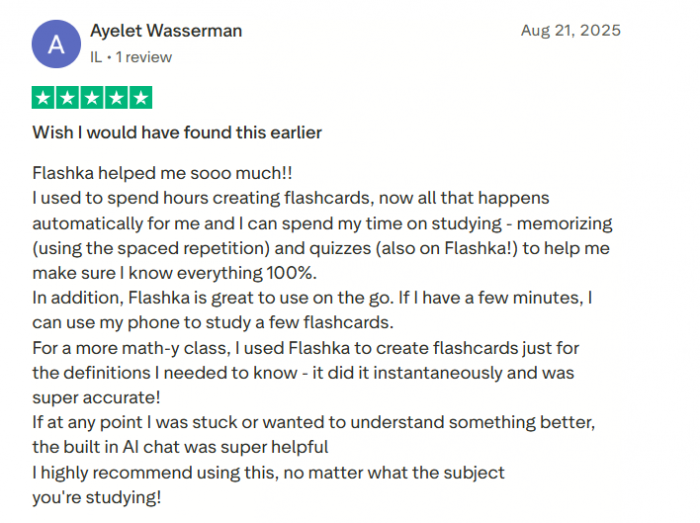
The love letters usually say:
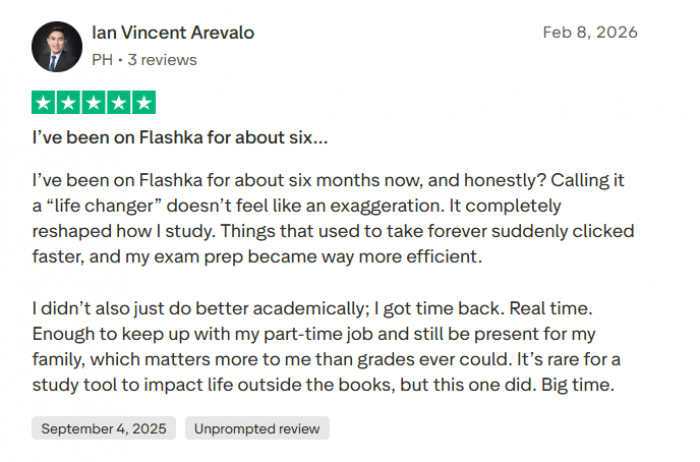
● “It saved me hours turning notes into flashcards.”
● “The UI feels modern and is pleasant to use.”
● “I got higher grades because I finally reviewed consistently.”
● “It’s the first time SRS felt realistic for my workload.”
The complaints usually say:
● “This bug with photos/text formatting is driving me crazy.”
● “Why is a card suddenly in another language?”
● “I wish there were audio features.”
● “Explain the credits and limits more clearly.”
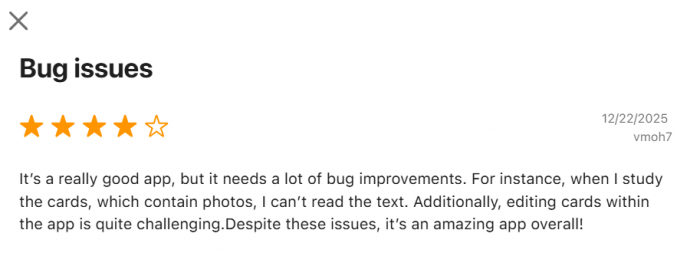
In other words: people like what Flashka is trying to be and what it already does well; they’re hard on the parts where execution hasn’t caught up with ambition yet.
Against the usual suspects: where Flashka stands in the pack
Flashka vs Anki vs Quizlet (quick view)
| Dimension | Flashka | Anki | Quizlet |
| Core idea | Fast, AI‑generated decks from your own materials | Max control, manual/SRS powerhouse | Learn from millions of shared sets |
| Best for | Students who hate setup but want SRS and visuals | Tinkerers and power users who enjoy configuring everything | School/college learners using class or community decks |
| Card creation | Upload PDFs/notes/images → AI makes cards | Mostly manual (or scripted with add‑ons) | Simple manual sets, often reused from others |
| Visual learning | Strong: built‑in image occlusion | Strong with add‑ons, but more setup | Basic images, less focus on complex diagrams |
| UX & learning curve | Modern, guided, low friction | Steep learning curve, “old‑school” UI | Very easy, classroom‑friendly interface |
| Customisation | Limited but convenient; presets over knobs | Extremely deep templates, fields, SRS tuning | Moderate; enough for most casual users |
| Stand‑out strengths | Speed, AI workflow, visual support, SRS baked‑in | Precision, flexibility, long‑term memory projects | Ready‑made decks, sharing, games and simple modes |
| Main trade‑offs | Less control, depends on AI and credits | Time‑consuming setup, less friendly for beginners | Weaker long‑term SRS, quality varies by user‑made sets |
The quiet but important piece: who owns your study trail?
Any tool that swallows your notes and textbooks deserves a quick privacy check.
Flashka’s model is straightforward: you upload content; its AI processes that content to generate flashcards, quizzes, and explanations; and your decks and sessions live on its servers so you can access them across devices. That implies:
● Your documents are stored at least for as long as you want to keep using them in decks.
● AI providers and infrastructure services may see some part of your data, depending on how the backend is architected.
● How long your data sticks around, and how deletions are handled, depends on backend policy, not just the delete button you tap.
For the average student uploading lecture slides and textbook fragments, this is an acceptable trade‑off. If you’re handling sensitive or proprietary material, it’s worth reading the privacy policy closely and sanitising documents before upload—remove names, personal data, or confidential details where possible.
Pros, cons, and the “should I actually use this?” moment
After all the nuance, you still have to decide: install it, invest in it, or let it pass.
Where Flashka shines
1. It annihilates the setup tax. You get from raw material to usable decks in a fraction of the time.
2. It respects visual learners. Image occlusion built in is a huge win in diagram‑heavy fields.
3. It bakes in good habits. Spaced repetition and active recall aren’t optional; they are the default experience.
4. It feels like a 2020s app. Modern, approachable UX on web and iOS instead of an old‑school academic tool.
5. It gives you an on‑demand explainer. Professor Ka means you’re rarely stuck with “I still don’t get this.”
Where it stumbles
1. You still need to supervise the AI. Generated cards can be shallow, occasionally wrong, or just stylistically off.
2. Bugs and language quirks break immersion. Photo presentation, text clarity, and language mishaps can be jarring.
3. Audio‑centric learners are underserved. If you learn with your ears, you’ll likely want another tool alongside it.
4. The credit/subscription framing isn’t everyone’s cup of tea. If you hate thinking in “credits,” you may find the model mentally taxing.
The bottom line
If your biggest study pain is “I don’t have the time to build flashcards, even though I know they work,” Flashka is one of the few tools that directly attacks that problem instead of just promising “AI for studying.” Used properly where you curate inputs, sanity‑check outputs, and let the SRS schedule guide your daily reviews, it can lift a massive weight off your shoulders and make consistent, high‑quality revision realistic.
If you’re already happily married to a deeply customised Anki setup, or if you rely heavily on audio and community decks, Flashka is more likely to become a sidekick than a replacement.
Either way, it’s worth at least a trial run with one serious subject: give it your real notes, run through the full loop (upload → generate → edit → review → quiz), and ask a simple question at the end of a week: “Did this reduce my friction enough that I actually studied more?” If the answer is yes, then the subscription is paying for something more valuable than features: it’s paying for momentum.
Post Comments
Be the first to post comment!
Related Articles