Table of Content
- The problem Coding Rooms is trying to fix
- What Coding Rooms actually is
- Core feature stack: from live class to analytics
- Who it’s really for: teachers, learners, and programs
- Pricing, plans, and how to think about value
- How it compares conceptually to other approaches
- Real user opinions: strengths and frustrations
- Safety, privacy, and compliance
- Risks, limitations, and what to test
- Final verdict: infrastructure for serious coding programs
- FAQs
Coding Rooms wants to be more than “yet another coding site.” It aims to be the control room for how an entire programming course runs live teaching, labs, grading, analytics, and even student safety inside a single browser tab. In this review, I’ll walk through what it actually does, who it’s really for, how it performs in the real world, and whether it deserves to be the backbone of your coding classroom.
The problem Coding Rooms is trying to fix
Most programming classes today run on a fragile stack of disconnected tools: a video platform for live sessions, a local or online IDE on student machines, an LMS for content, and some mix of scripts or spreadsheets for grading and analytics. At a small scale this is tolerable; at bootcamp or university scale it becomes chaotic. Students get stuck in an environment setup, instructors have no clear view of what anyone is typing, and grading basic assignments eats days of time that should have gone into improving the course.
Coding Rooms starts from that operational chaos. The proposition is straightforward: instead of juggling four or five tools and praying they all behave, you run your entire course from lecture to lab to grading and tracking inside a single platform designed specifically for teaching programming. That ambition shapes everything about its architecture and target audience.
What Coding Rooms actually is
At its core, Coding Rooms is a developer training and enablement platform for creating and delivering interactive coding education from beginner courses to reskilling programs for cohorts that can range from a small class to thousands of learners. It isn’t a course marketplace; it’s infrastructure for institutions and training teams.
In practical terms, we can think of it as three tightly coupled layers:
First, there is a browser‑based, professional IDE where students write and run code without installing anything locally. Learners open a link, land inside a workspace, and start typing, no compiler downloads, no “it worked on my machine” excuses.
Second, there is a live classroom engine layered directly on top of that IDE. Video, audio, chat, and collaborative editing all live in the same interface as the code editor. The class doesn’t hop between a video call, a separate IDE, and an LMS; the code space is the classroom.
Third, there is the operations and assessment layer. Instructors build assignments, attach tests, run automated grading, monitor activity, and review analytics from the same system. Course content can be created, reused, and organized into full curricula, so the platform can support not just one course, but a program.
Once you see Coding Rooms as this three‑part stack, you stop comparing it to a random practice site and start comparing it to the bundle of tools you currently need to run a serious coding course.
Core feature stack: from live class to analytics
Browser‑based IDE and integrated content
Every learner experience begins in the browser. Coding Rooms provides a full coding workspace where students can write, run, and debug code with no local setup. That dramatically reduces technical friction in managed labs, BYOD classrooms, and remote cohorts.
Content designers and instructors can build lessons that combine embedded video, explanatory text, multiple‑choice questions, and coding tasks on a single page. Students don’t have to juggle a video site, a PDF, and an external IDE; they watch, read, and practice in one place. For asynchronous paths and apprenticeships, that “single page” learning flow is crucial.
Activities are authored in a structured editor where you define instructions, starter code, and tests. The same content can be used in live sessions or self‑paced modules, so you’re not maintaining two versions of every lab.
Live classroom and real‑time visibility
The live teaching experience is where Coding Rooms feels fundamentally different from generic learning tools.
When you start a session, the platform centers your view on student workspaces rather than just faces in a video grid. From a unified dashboard, you can see which students are active, what file they are working on, and where their cursor is. You can click into any student’s code, highlight lines, leave comments, or even type alongside them essentially remote pair programming without screen‑share.
The video call, audio, and group chat live inside that same interface. You’re not managing a standalone conferencing app plus a separate code tool; the call happens in the coding environment. For remote and hybrid teaching, this eliminates a lot of cognitive overhead for both teachers and students.
The result is a class where the default unit of attention is code, not slides. You can quietly spot learners who have been idle for several minutes, see who is stuck on a particular step, and intervene before frustration hardens into disengagement. It’s the difference between asking “any questions?” and actually seeing where questions are needed.
Assignments, auto‑grading, and feedback
Beyond live sessions, Coding Rooms leans heavily into structured assignments and automated assessment.
Instructors define tasks, starter code, and test cases inside the platform. When students submit solutions, the system runs automated code testing and assigns scores based on the defined criteria. Learners get immediate feedback; instructors get a first‑pass evaluation without manually running every submission.
For large cohorts, this is a major shift. Instead of spending nights executing scripts and checking outputs for hundreds of almost‑identical programs, staff can let the platform handle routine validation and invest their time in reviewing conceptual mistakes, style, and design decisions.
Because assignments are authored within Coding Rooms, you can build multi‑step exercises and sequence them across a course. Over time, your curriculum becomes a structured pipeline of labs and assessments rather than a loose folder of tasks.
Analytics, monitoring, and program operations
On top of day‑to‑day teaching, Coding Rooms provides analytics that make your course behave more like a product.
Activity logs and dashboards show who logged in, how long they spent in specific activities, where they dropped off, and which exercises consistently cause trouble. You can use this to spot concepts that need re‑teaching, identify learners who are quietly falling behind, and refine your curriculum based on actual behavior instead of gut feeling.
Classroom management features let you organize sections, groups, and permissions; content and curricula can be reused across cohorts and terms. For a department head or bootcamp director, this means you can standardize labs, track performance across intakes, and build a repeatable system rather than reinventing delivery every semester.
Taken together, the IDE, live classroom, assignment engine, and analytics give Coding Rooms the feel of an operating system for a coding program rather than a single‑purpose app.
Who it’s really for: teachers, learners, and programs
Coding Rooms is not “only for teachers,” but it is very clearly teacher‑centric in its feature philosophy.
The platform is built around the realities of people who run courses: school CS teachers, university instructors, bootcamp trainers, and corporate learning teams. Features like the real‑time code dashboard, activity monitoring, auto‑grading, and course analytics are all designed from their vantage point. The instructor is the primary operator.
Learners, however, are not an afterthought. Students benefit from:
● Zero‑setup access: they start coding by opening a browser, which is a big win for beginners and mixed‑device cohorts.
● Integrated lessons: videos, questions, and exercises live together, guiding them step by step.
● Fast feedback: auto‑graded tasks and teacher interventions make the learning loop much tighter than email‑based or upload‑based workflows.
You can also run both live and asynchronous models. In live classes, students join sessions, code in real time, and interact via integrated video and chat. In asynchronous setups, they follow structured modules at their own pace while instructors or coaches monitor analytics and step in when needed.
The important distinction is this: Coding Rooms make the most sense in structured programs, schools, universities, bootcamps, corporate academies where there is always someone on the teaching side designing content, monitoring progress, and owning outcomes. It is not primarily a tool for lone self‑learners browsing for random coding problems.
Pricing, plans, and how to think about value
Coding Rooms follows an institutional, quote‑based pricing model rather than a simple consumer subscription. It is positioned for organizations, educational institutions and training providers rather than individual hobbyists.
This has two implications:
First, it is not the kind of platform where a student swipes a card for a low monthly fee and starts exploring on their own. Adoption usually runs through departments, training teams, or management, and involves a conversation about cohorts, support, and deployment.
Second, evaluating value is less about comparing it to a single cheap tool and more about comparing it to the entire stack it can replace. When you factor in the costs (and headaches) of running separate conferencing, IDE, auto‑gradering, and analytics solutions and maintaining the glue code between them, Coding Rooms is effectively asking: “Is it worth paying for one integrated system that does all of this in a coherent way?”
For institutions running serious cohorts, the answer often depends on scale and pain points. If grading time, environment issues, and lack of visibility are major bottlenecks, a unified platform can pay for itself in reduced friction and saved staff hours. For very small groups or casual classes, maintaining a lightweight patchwork of free or cheap tools may still be the more pragmatic choice.
How it compares conceptually to other approaches
There are many platforms in the broader “learn to code” space MOOCs, skill platforms, kid‑centric coding tools, online IDEs but most of them optimize for content delivery or individual practice.
By contrast, Coding Rooms optimizes for classroom operations:
● Instead of maximizing the number of courses available, it maximizes the instructor’s control over a specific course.
● Instead of focusing primarily on video lectures, it centers live or interactive coding.
● Instead of leaving institutions to stitch together grading and analytics, it builds them in.
The real comparison is not between Coding Rooms and one specific brand, but between Coding Rooms and the do‑it‑yourself bundle most schools already use. If that bundle is working and the pain is manageable, a platform like this feels optional. If that bundle is holding your program back, Coding Rooms starts to look like a serious alternative.
Real user opinions: strengths and frustrations
Looking at how real instructors and teams describe their experience gives a useful reality check.
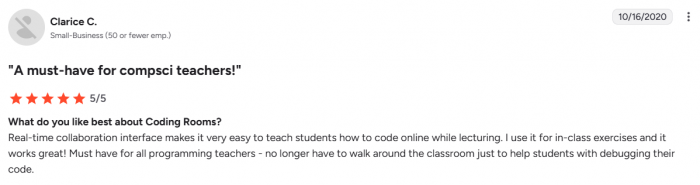
On the strengths side, the live teaching model consistently stands out. Teachers talk about the ability to see every student’s code in real time from a single dashboard and to jump directly into individual workspaces when someone is stuck. That visibility is a game‑changer in remote and hybrid classrooms where screen‑sharing alone is too slow and awkward.
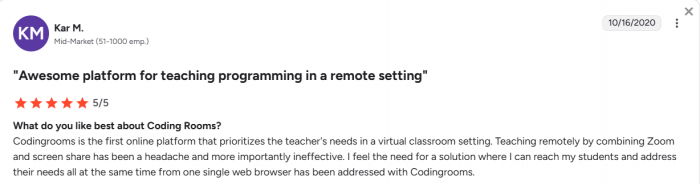
The automated grading and activity tracking also draw a lot of appreciation. Once assignments and tests are set up, instructors find that they can handle much larger cohorts without drowning in manual checks. The platform’s emphasis on teacher workflows rather than just content hosting is often described as its defining feature.
On the frustration side, performance issues do show up in user feedback. Under certain conditions like heavy live sessions, more demanding exercises, users report lag and occasional instability. That doesn’t make it unusable, but it does mean any institution should pilot it under realistic conditions before betting a high‑stakes exam or major live event on it.
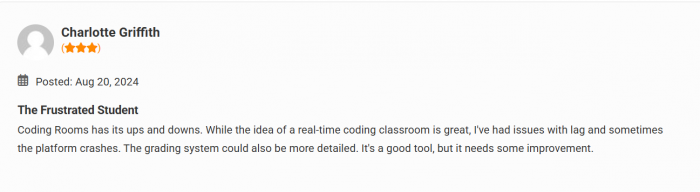
There are also requests for deeper assessment tooling and more flexible collaboration mechanisms, such as richer support for breakout‑style group work and more advanced feedback options. In other words, the core teaching loop is strong, but some surrounding workflows are still maturing.

Safety, privacy, and compliance
Because Coding Rooms handles learner data, code, and classroom interactions, safety and privacy are integral to any serious evaluation.
The platform positions itself as privacy‑by‑design and aligns its practices with education‑sector expectations. It describes controls such as infrastructure monitoring, regular security testing, careful evaluation of third‑party vendors, and structured incident response. If an incident affects personal information, the process includes investigating, mitigating, and notifying affected customers with details about what happened and what is being done next.
There is explicit awareness of regulations around student data (for example, in the context of educational records), and the language acknowledges that no system can be 100% secure. That honesty is important: the right way to read it is that Coding Rooms takes security seriously, but institutions still need to perform their own due diligence reviewing policies, asking for technical specifics, and ensuring that contractual terms align with local and sector‑specific requirements.
The fair statement is that Coding Rooms treats safety and privacy as first‑class concerns rather than fine print, but it is not a magic shield. Any adoption decision should include your usual legal and infosec checks.
Risks, limitations, and what to test
Operationally, performance is the obvious risk. If your program plans to run very large live cohorts or graphics‑heavy assignments, you should stress‑test the platform with representative class sizes and network conditions. Don’t rely purely on demos or small‑scale trials.
Feature‑wise, you should examine your teaching model against the current platform capabilities. If your pedagogy leans heavily on complex group workflows, unusual assessment formats, or very specialized integrations, you need to confirm that Coding Rooms can support them or that you have acceptable workarounds.
From an adoption perspective, the platform’s power comes with a learning curve. Instructors who expect a minimal tool may feel overwhelmed at first. Successful rollouts usually involve training, internal champions, and a clear decision to standardize, not treat it as an optional side utility.
Finally, the institutional pricing and commitment model mean it is not a casual choice. If you cannot secure buy‑in at the department or organization level, it will be hard to unlock the platform’s full potential.
Final verdict: infrastructure for serious coding programs
When you put all of this together, Coding Rooms looks less like a single app and more like classroom infrastructure.
For K‑12 schools, universities, bootcamps, and corporate academies that treat coding education as a strategic asset, it offers a compelling answer to a very specific question: “How do we run live and asynchronous programming courses at scale without drowning in operational complexity?” In those settings, its combination of browser IDE, live classroom engine, automated grading, analytics, and safety‑conscious design can transform how courses are delivered day to day.
For casual, small‑scale teaching and for individual self‑learners, it is likely to feel too heavy and too institution‑oriented. A simple stack of free tools may remain the better fit there.
The most accurate way to think about Coding Rooms is this: it is not about adding a neat feature to your course; it is about deciding that your coding program deserves a single backbone for teaching, monitoring, grading, and learning. If you are ready to treat your program that seriously and you are willing to pilot, performance‑test, and do proper privacy checks, Coding Rooms is absolutely worth a hard look as the operating system of your programming classroom.
FAQs
1. Is Coding Rooms only for teachers?
No. It’s teacher‑centric in design, but learners use it to watch lessons, practice coding in the browser, complete assignments, and get instant feedback.
2. Can students use Coding Rooms for self‑study?
Students can learn asynchronously with videos, quizzes, and coding exercises, but Coding Rooms works best inside structured programs with an instructor or coach overseeing progress.
3. Is there a free plan for Coding Rooms?
Coding Rooms mainly targets institutions and training teams with quote‑based pricing, so it’s not positioned as a typical free or cheap self‑serve tool for individuals.
4. Is Coding Rooms safe for student data?
Coding Rooms follows privacy‑by‑design principles and documents its data protection and incident response practices, but institutions should still do their own compliance checks.
5. What are the main downsides of Coding Rooms?
There is a learning curve for instructors, performance should be tested under load, and institutional pricing can feel heavy for very small or informal classes.
Post Comments
Be the first to post comment!
Related Articles