Table of Content
- When Creative Tools Became Too Loud
- The Quiet Confidence of a Tool That Knows Its Place
- AI Editing for People Who Don’t Like Editing
- One Platform, Too Many Roles (in a Good Way)
- The Credit System That Actually Feels Fair
- Imperfect, Honest, and Built for Work — Not Wow
- The Clone Confusion: Same Name, Different Apps
- When AI Stops Being a Feature and Becomes Infrastructure
- The Verdict: Predictable, Practical, and Surprisingly Human
- The Bigger Truth: Boring Tools Build the Future
When Creative Tools Became Too Loud
There was a time when software quietly helped you work. Then came the age of AI flash.
Suddenly, every editing tool wanted to impress you, animated dashboards, “pro mode” toggles, social integrations, and monthly updates that fixed what wasn’t broken.
That’s what makes Cutout.Pro feels refreshing.
It doesn’t scream innovation. It just sits there, steady, functional, and surprisingly good at the unglamorous side of creativity, removing, retouching, restoring, and resizing.
In short: it’s the kind of AI that remembers what tools were supposed to be invisible assistants, not attention seekers.
The Quiet Confidence of a Tool That Knows Its Place
Open Cutout.Pro, and you’ll notice something odd: there’s no onboarding tutorial, no pop-up ad for “premium credits,” no gamified dashboard.
Just a clean upload box that asks, “What do you want to fix today?”
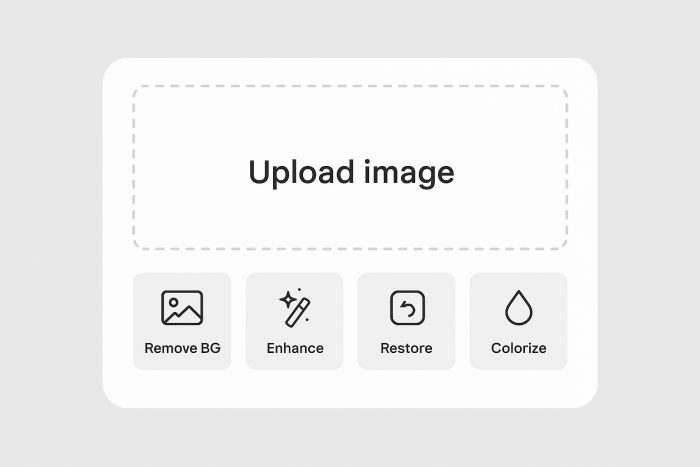
From there, it feels more like a utility than a product.
Need to remove a background? It’s instant.
Want to colorize an old photo? Two clicks.
Restoring a faded image? Already done before you blink.
There’s a quiet rhythm to it one that feels built for people who don’t have time to “learn” another AI tool.
AI Editing for People Who Don’t Like Editing
Not everyone loves post-production. For many, it’s a necessary evil, especially in e-commerce, marketing, or social media management, where deadlines matter more than perfect composition.
Cutout.Pro seems to understand that mindset.
Its tools aren’t about artistic control; they’re about output speed and accuracy. You don’t adjust 12 sliders. You don’t train custom models. You just upload, tweak, and export.
That may sound oversimplified, but for people drowning in image volume it’s freedom.
One Platform, Too Many Roles (in a Good Way)
Cutout.Pro isn’t a single-purpose background remover. It’s a modular AI hub for visual work:
- Background & Object Removal (images, portraits, products)
- Video Cutout (AI segmentation in 4K, up to 30 fps)
- Image Enhancer, Colorizer & Restorer
- Anime & Cartoon Avatars
- Passport/ID Photo Maker
- API for Automation & Bulk Integration
Instead of pushing creative reinvention, it focuses on the unglamorous but essential parts of digital production.
The result? A tool that quietly underpins thousands of creative workflows without demanding attention.
The Credit System That Actually Feels Fair
Cutout.Pro’s pricing is refreshingly transparent and almost old-school in its honesty.
You buy credits, and you spend them. That’s it.
- 1 credit → standard edits (background removal, enhance, colorize)
- ¼ credit → preview before full download
- 2 credits → specialized or high-res tasks (anime portraits, video clips)
Plans start at $5 for 40 credits, scale to enterprise levels, and include credit rollover (up to 5× months).
For occasional users, Pay-as-you-Go makes more sense than subscriptions.
For heavy users, batch credit packs are a godsend.
And the best part? It tells you exactly what you’re spending —no hidden “processing” deductions, no sudden upgrade prompts.
Imperfect, Honest, and Built for Work — Not Wow
Let’s be real: Cutout.Pro isn’t flawless.
It has the digital equivalent of scuffed shoes reliable, just not polished.
The Trustpilot rating (1.8/5) reveals a mix of frustrations: billing confusion, unclear refund communication, and credit-count mismatches.
Some Shopify users complain of bulk-edit failures or incomplete exports during heavy server load.
But none of these are deal-breakers.
If anything, they’re signs of a product scaling faster than its marketing team the kind of growing pains you see in tools that actually get used.
It feels more like a factory floor than an art studio: practical, noisy, and surprisingly productive.
The Clone Confusion: Same Name, Different Apps
Here’s where it gets murky.
On app stores, several apps share the “Cutout Pro” name from Ion Danilov and AI Apps SRL offering passport photo features under the same branding.
They’re not all from the Winroad Holdings Ltd. team behind the official website.
That’s not necessarily malicious, but it’s confusing.
Users searching for “Cutout Pro” often download lookalikes, leading to mismatched experiences and more negative reviews that weren’t even about the real platform.
Moral of the story? Always verify the developer or go straight to cutout.pro before installing anything.
When AI Stops Being a Feature and Becomes Infrastructure
The best tools don’t talk about AI anymore — they use it quietly.
Cutout.Pro embodies that philosophy. Its API lets developers automate background removal, retouching, and resizing within other systems.
A Shopify store owner could upload 5,000 images overnight and wake up to a fully processed catalog.
A social automation app could use its API for real-time visual cleanup before posting.
No brand filters, no “AI signature styles,” just clean data throughputs.
This is where Cutout.Pro shines invisible productivity through silent intelligence.
The Verdict: Predictable, Practical, and Surprisingly Human
So, should you use it?
If you need an AI that feels more like a dependable colleague than a flashy intern, yes.
Cutout.Pro won’t thrill you with novelty. It won’t trend on social media.
But it will deliver every time, on time for tasks that most other AI tools overcomplicate.
It’s the kind of reliability that hides behind quiet competence.
The kind we often overlook until we realize the work just… gets done.
The Bigger Truth: Boring Tools Build the Future
Not every innovation has to sparkle. Some build the foundation others stand on.
Cutout.Pro belongs to that invisible generation of AI utilities that keep creative industries running behind the scenes cleaning, enhancing, automating, and archiving.
In a world obsessed with creative chaos, it reminds us that there’s value in predictability.
Because sometimes, the most human technology isn’t the one that tries to be human it’s the one that simply helps us be more effective humans.
Post Comments
Be the first to post comment!
Related Articles




Grubby AI vs WriteHuman: Which One Should You Use?
Ridge Harper . Jun 30, 2026