Table of Content
- Understanding Dezgo
- Who Is Dezgo Designed For?
- The Feature Stack: From Raw Prompt To Production Asset
- Image Quality, Speed, And The Learning Curve
- User Experience: Functional, Minimal, Work‑First
- Pricing And Value: Free Tier, Power Mode, And API
- Dezgo’s API: From Tool To Infrastructure
- Safety, NSFW, And Licensing: Where Dezgo Draws Its Lines
- Real‑World Use Cases: How Dezgo Fits Into A Workday
- Strengths, Limitations, And The Trade‑Offs You Should Know
- Dezgo vs Midjourney vs DALL·E
- Final Verdict: Is Dezgo Worth Your Time In 2026?
If most AI art tools are glossy showrooms, Dezgo is the workshop around the corner, the place where things actually get built. It doesn’t bombard you with social feeds or trending prompts. Instead, it quietly hands you models, parameters, and an API, and asks a simple question: “What do you want to make, and how much control do you want over it?”
Understanding Dezgo
At its core, Dezgo is a browser‑based AI image and early‑stage video studio built on Stable Diffusion–style and Flux models, wrapped in a simple interface and backed by a production‑ready API. You don’t install anything or manage GPUs; you visit a web page, write prompts, choose models and settings, and Dezgo generates images or short clips on demand.
The tool is split into clear modules—text‑to‑image, image‑to‑image, inpainting, upscaling, background removal, and a text‑to‑video beta each targeting a distinct step in a visual workflow. On top of this, the same engines are exposed through HTTP endpoints so developers can embed Dezgo’s capabilities into their own products or internal tools.
Unlike closed, style‑opinionated platforms, Dezgo leans into transparency: you see the model choices, the sampling steps, and the guidance parameters that shape your results. It expects you to learn them—and rewards you when you do.
Who Is Dezgo Designed For?
Dezgo’s marketing talks broadly to “anyone,” but its design clearly favors people who build things for a living. It suits solo creators, agencies, and dev teams who care more about repeatability and control than about being spoon‑fed presets.
● Creators and marketers who need a steady flow of images for posts, blogs, ads, and thumbnails without committing to big monthly costs from day one.
● Designers and illustrators who want a fast ideation engine to generate compositions, styles, and references they’ll later refine in their main design tools.
● Developers and product teams who want to embed AI image generation, editing, or background removal into software without running GPU infrastructure.
● Students and hobbyists who want an honest, no‑nonsense way to learn modern AI art workflows with a usable free tier.
If you want everything templated and “one click then done,” Dezgo can feel demanding. If you like having your hands on the controls, it feels like home.
The Feature Stack: From Raw Prompt To Production Asset
Dezgo doesn’t pretend one button can solve every visual need. It splits your workflow into specific tools, each deep enough to stand on its own and flexible enough to chain together.
Text‑To‑Image: The Engine Room
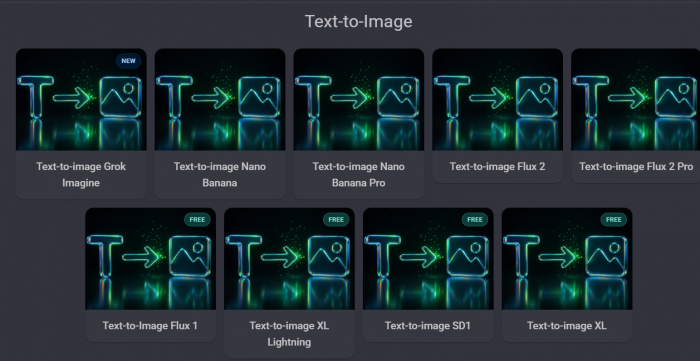
This is the mode most users hit first: you type a prompt, optionally add a negative prompt, pick a model and resolution, adjust steps and guidance, and generate. Dezgo supports multiple model families, including Stable Diffusion 1.5 and 2.x, SDXL‑class models, Flux variants, and tuned checkpoints optimized for realism, anime, or stylized art.
What makes this compelling is not just the output quality but the “recipe” feeling. Once you find a combination of model, steps, and guidance that works for a given style—say, moody portraits or clean product renders, you can apply that pattern repeatedly, tweak it gradually, and even port it directly into API calls.
Negative prompts matter here. Dezgo expects you to actively tell it what to avoid—blur, extra limbs, distorted faces so you’re not just hoping the model behaves but actively steering its mistakes.
Image‑To‑Image: Structured Reinvention
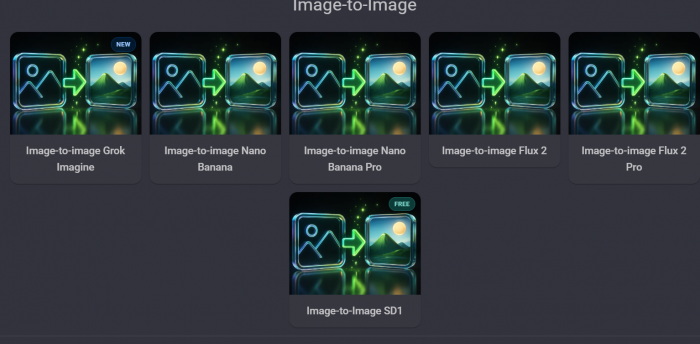
Image‑to‑image is where Dezgo starts feeling more like a collaborator than a generator. You upload an existing image, choose a model and prompt, and then control how aggressively Dezgo should reinterpret it via a strength parameter. At low strength, results stay close to the original; at high strength, the uploaded image becomes more of a rough structural guide.
This is ideal for workflows where the concept is already there but the execution needs exploration. A hand sketch can become a detailed illustration, a basic 3D render can become stylized box art, and a rough AI image can be reworked into multiple directions for a client to choose from.
Inpainting: Language‑Driven Retouching
With inpainting, you don’t regenerate the whole image; you surgically fix parts of it. You paint a mask over the area you want to change, describe the change in text, and let Dezgo blend the new elements into the old scene.
This workflow is particularly powerful for product shots, portraits, and concept art: removing clutter, changing outfits, repairing faces or hands, altering props, or aligning details with new branding without throwing away an otherwise strong image. It turns language into a retouching tool, which is easier for many creators than manual pixel‑level editing.
Upscaling And Background Removal: From Draft To Deliverable
Dezgo knows that “nice” images aren’t enough; they need to survive real‑world usage. Its upscaling tools increase resolution and sharpness so images stand up on landing pages, print light materials, or higher‑density displays. Background removal strips subjects from their context, giving you clean, cut‑out assets for websites, catalogs, ads, and composite designs.
A typical production flow in Dezgo might look like this: generate a set of concepts, refine the best with image‑to‑image and inpainting, upscale the final picks, and remove backgrounds for design integration. That end‑to‑end path is where the platform starts to feel less like a toy and more like a simple asset pipeline.
Text‑To‑Video (Beta): Early Motion Experiments
Dezgo’s text‑to‑video features are in active development, providing short, lower‑resolution clips that are useful for moodboarding, storyboarding, or early experiments rather than polished campaigns. Quality and consistency lag behind dedicated video models, but it’s an early signal of where the platform is headed rather than a core reason to adopt it today.
Image Quality, Speed, And The Learning Curve
Dezgo’s image quality is competitive if you put in some effort. With good prompts and the right models, you can produce sharp, detailed, and commercially usable images, especially for product visuals, stylized art, and environment concepts. Free‑tier outputs are usually fine for social content and drafts; paid usage and smart post‑processing can take them into professional territory.
On performance, Dezgo tends to work in seconds rather than minutes. Free users may see queues or slightly slower responses under heavy load, but paying users and API calls typically get faster and more stable turnaround. That makes it usable both as a creative tool and as a backend service.
There is a genuine learning curve:
● If you’ve only used ultra‑simple generators, the number of options can feel intimidating at first.
● Once you learn basic prompt hygiene and a few parameter patterns, the extra complexity pays off in consistency and control.
Dezgo feels less like a “magic button” and more like a system you learn, tune, and eventually trust.
User Experience: Functional, Minimal, Work‑First
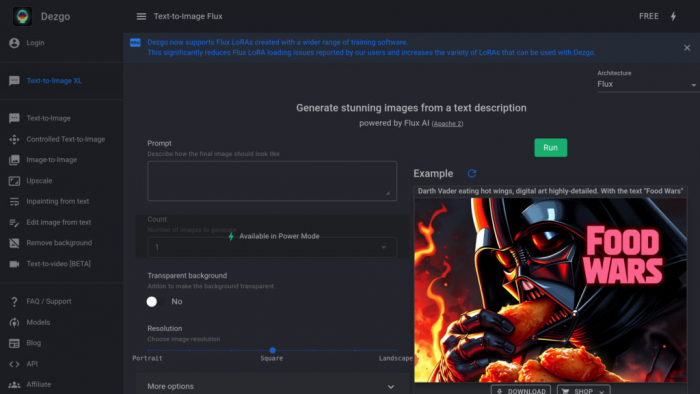
The Dezgo interface is simple and functional: different tools live on different pages, with clearly labeled fields and sliders. You get a prompt area, negative prompt area, model selector, and parameter controls, along with a gallery of results.
A few UX characteristics stand out:
● The UI favors clarity over flash—no busy social feeds or overly decorative layouts.
● Most controls are visible instead of hidden behind “advanced” menus.
● The navigation mirrors real tasks: generate, refine, upscale, export.
This makes the tool feel more like a studio or control panel than a social platform. It’s less about “what others made” and more about “what you’re making right now.”
Pricing And Value: Free Tier, Power Mode, And API
Dezgo’s value proposition rests on three pillars: an actually usable free tier, a flexible “Power Mode” for heavier use, and a separate credit system for its API.
The free web tier opens most of the core experience: text‑to‑image, image‑to‑image, editing, and some upscaling, with limits on resolution, speed, and concurrency. You may encounter queues or reduced settings during peak usage, but it is possible to run real experiments and even produce smaller campaign assets without paying.
Power Mode is essentially a pay‑as‑you‑go upgrade that unlocks higher resolutions, faster processing, richer parameter controls, and priority access during busy periods. Instead of forcing you into a fixed subscription, Dezgo lets you purchase credits and burn through them as needed, which suits freelancers, agencies, and teams with fluctuating demand.
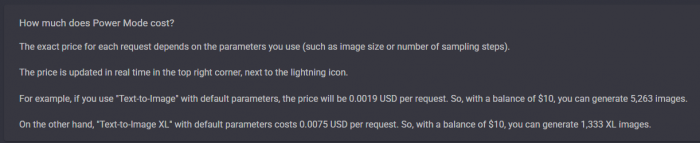
The API follows similar credit‑based logic but is tuned for programmatic use: you pay for the compute behind the images you generate via your app or service. For products that incorporate AI image generation as a feature, that predictable, metered model is easier to integrate into forecasts than a vague “unlimited” subscription.
Dezgo’s API: From Tool To Infrastructure
For developers, Dezgo’s most interesting face lives behind the scenes. Its API exposes the same core capabilities like text‑to‑image, image‑to‑image, inpainting, background removal through HTTP endpoints you can call from virtually any backend or frontend environment.
This means the prompts and parameter combinations you refine in the browser can be translated directly into JSON payloads. You can then:
● Generate thumbnails, covers, or character art inside your own web app.
● Offer AI‑assisted illustration features in a note‑taking, design, or writing tool.
● Create dynamic visuals in games or educational software.
Dezgo’s own documentation emphasizes that the platform runs on scalable GPU infrastructure with automated scaling and rate‑limiting, freeing teams from operating their own inference clusters while still giving them fine‑grained control over what’s generated.
Safety, NSFW, And Licensing: Where Dezgo Draws Its Lines
In 2026, image generators are judged as much by what they refuse to do as by what they can. Dezgo adopts a deliberately conservative stance aimed at general‑audience and business users. Its policies forbid explicit sexual content, depictions of minors in sexual contexts, and content that promotes hate, abuse, or certain types of violence, and the service reserves the right to restrict accounts that repeatedly attempt to bypass those rules.
From a licensing perspective, Dezgo relies on model licenses inspired by frameworks like OpenRAIL, which generally allow broad, often commercial use of generated images while restricting explicitly harmful applications. Users are still responsible for ensuring their usage complies with copyright, trademarks, and local law, but for typical marketing, blogging, product, and UI work, Dezgo positions itself as a safe, commercially viable choice.
For brands, agencies, and developers, this mixture of guardrails and permissive everyday use is appealing: it reduces the risk of obviously problematic outputs without shutting down normal creative or commercial workflows.
Real‑World Use Cases: How Dezgo Fits Into A Workday
The strongest argument for Dezgo isn’t its feature list, it’s how smoothly it fits into different workflows. A social media marketer might start the day generating fresh visuals in batches, refining key images with inpainting and upscaling before exporting them to a scheduler. A content writer can replace generic stock art by quickly visualizing abstract ideas or product benefits tailored to an article’s tone.
Indie authors and game developers can build full visual bibles inside Dezgo, moving from text-to-image concepts to image-to-image tweaks and detailed inpainting. E-commerce sellers can elevate simple product photos with background removal and AI-generated lifestyle scenes, no studio required.
On the technical side, small SaaS teams can plug into Dezgo’s API to generate cover art or simple graphics directly inside their apps, letting Dezgo handle the heavy lifting. In each case, Dezgo isn’t the headline, it’s the quiet engine that expands what small teams can realistically create.
Strengths, Limitations, And The Trade‑Offs You Should Know
Dezgo’s strengths are clear once you’ve spent some time with it:
● It gives you serious control over models and parameters without demanding local hardware.
● It offers a genuinely usable free tier rather than a superficial teaser.
● It connects creators and developers via the same underlying engines and logic.
● It bundles generation, editing, upscaling, and background removal into one coherent environment.
At the same time, it comes with trade‑offs you should know:
● The interface is practical, not shiny—great for focused users, less enticing for people who want a flashy experience.
● There’s a learning curve; if you never engage with prompts and sliders, you won’t get the best results.
● Consistent, brand‑grade visual systems still require design judgment and external tools on top of Dezgo’s outputs.
● Text‑to‑video is still an extra, not a full replacement for dedicated video generators.
These are not deal‑breaking flaws so much as deliberate choices. Dezgo chooses to be a strong engine and a flexible toolkit rather than an all‑inclusive, heavily curated ecosystem.
Dezgo vs Midjourney vs DALL·E
| Aspect | Midjourney | DALL·E | Dezgo |
| Core “role” | Virtuoso artist | Polished corporate designer | Workshop engine |
| Visual style | Breathtaking, highly stylized, curated | Clean, safe, broadly appealing | Flexible, depends on model and settings |
| Openness / ecosystem | Closed, opinionated environment | Closed but integrated into larger platform | More open, model‑oriented “tool room” |
| Access model | Subscription‑first | Pay‑per‑use / bundled with assistant access | Free tier + pay‑as‑you‑go power/API |
| Best at | Spectacular, artistic images with a “wow” | Quick, safe visuals for business use | Custom workflows, experimentation, APIs |
| User effort vs output | Less control, more “magic” | Moderate control, strong defaults | More control, more learning required |
| Metaphor | Gallery with a star artist on stage | Corporate design studio in a glass tower | Workshop with shelves of tools and parts |
| Who it suits | Artists, aesthetes, visual trend lovers | Businesses, marketers, general professionals | Tinkerers, power users, devs, builders |
Final Verdict: Is Dezgo Worth Your Time In 2026?
If your work involves creating, editing, or serving images and especially if you balance creative experimentation with practical constraints, Dezgo is worth the learning curve. It behaves less like a flashy toy and more like a dependable piece of infrastructure: a web‑first, API‑ready engine that can live behind your campaigns, content, prototypes, and products.
For solo creators, it offers a rare combination of power and affordability. For agencies and small teams, it can quietly replace parts of the stock‑photo, concept art, and mockup process. For developers, it is a straightforward way to bring AI‑driven visuals into apps without assembling an entire diffusion stack from scratch.
Dezgo doesn’t try to be the loudest voice in the AI art world. It is content being the workshop down the hall, the one you keep coming back to whenever it’s time to actually build something.
Post Comments
Be the first to post comment!
Related Articles

When Automation Enters Public Safety Rulemaking
Davis Hopkins . Feb 25, 2026