Table of Content
- What Fliki does and how you actually use it
- The voice engine: still the strongest reason to use Fliki
- AI avatars and visual generation
- Editing: designed for speed, not surgical control
- The credit system: understand this before you pay
- What real users say
- Fliki pricing: what you actually get at each tier
- Fliki vs other AI video tools
- Who Fliki actually works for
- Pros and cons
- Final verdict
Fliki was built for a very specific kind of pressure: needing real videos on a real deadline with almost none of the usual resources. Think one person running marketing, multiple product videos due, several languages to cover, no camera, and no in house editor. That is the gap the founders set out to close when they launched Fliki.
Today, Fliki is widely used by individual creators, startups and large teams, and it has earned a strong reputation in creator communities and review platforms. That alone makes it worth more than a quick feature rundown.
I ran a range of real projects through Fliki: repurposing blog posts into videos, testing multilingual dubbing, experimenting with AI avatars and voice cloning, and building product explainers. This review focuses on what actually worked, where the platform felt genuinely impressive, and the specific friction points that made me look for how other users were dealing with the same issues.
What Fliki does and how you actually use it
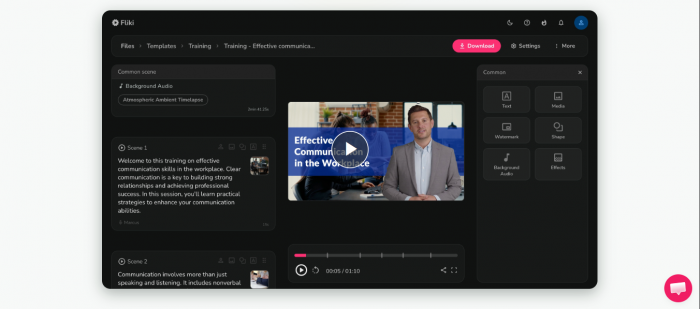
Fliki is less “type a prompt, get magic” and more “well-organized AI workshop.” It gives you multiple entry points depending on what you already have:
- Text-to-video / Idea-to-video
Paste a script or describe an idea in plain language and Fliki turns it into a scene-based video, assigning visuals, voiceover, and background music automatically. A 60-second video can be in previewable shape in under five minutes. The idea-to-video mode uses a built-in ChatGPT layer to draft your script first, then builds the video from that. - Blog-to-video
Paste a URL and Fliki extracts the key points, creates a storyboard, and generates a complete video. If you’ve been publishing written content for months without turning any of it into video, this workflow is one of the most practical reasons to pay for the tool. - PPT-to-video
Upload a PowerPoint deck and each slide becomes a narrated scene. It is not designed to win awards, but it does turn “ignored internal deck” into “watchable recap” with minimal extra work. - Product-to-video
Paste a product URL and Fliki pulls images and descriptions to generate promo clips. For e‑commerce teams with big catalogs and small teams, this is a very usable way to generate simple product videos at volume.
In practice, you pick the input closest to what you already have, then edit your way to a final cut instead of starting from a blank timeline.
The voice engine: still the strongest reason to use Fliki
If you use Fliki for one thing, use it for its voices.
- Library scale and quality
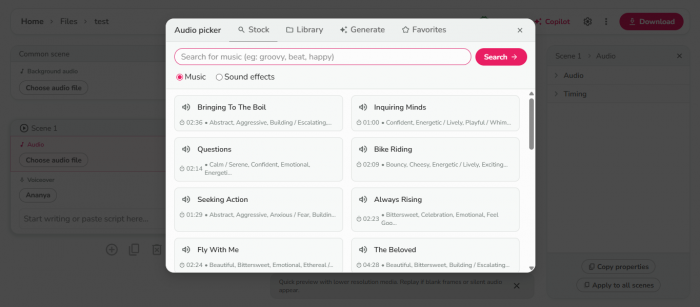
Fliki offers more than 2,000 voices across 80+ languages and 100+ dialects. The raw number would not matter if they sounded flat, but the ultra‑realistic tier is genuinely strong: pacing, emphasis, and emotion land close enough to human that most viewers won’t question that it’s AI. - Voice cloning
You can train Fliki on your own voice, then have that cloned voice speak in 30+ languages while keeping your sound. For YouTubers, educators, and course creators building a personal brand, that is not a gimmick-it is a way to stay recognizable across languages without hiring multiple narrators. - Magic Record
If you prefer to record your own voice, Magic Record cleans up those recordings automatically by removing background noise and evening out levels. It pushes you closer to “good enough to publish” without needing a DAW.
User sentiment lines up with that experience. Many reviewers call voice quality the main reason they stuck with Fliki, specifically mentioning the range of accents and how “real” the better voices sound for YouTube videos and tutorials.
AI avatars and visual generation
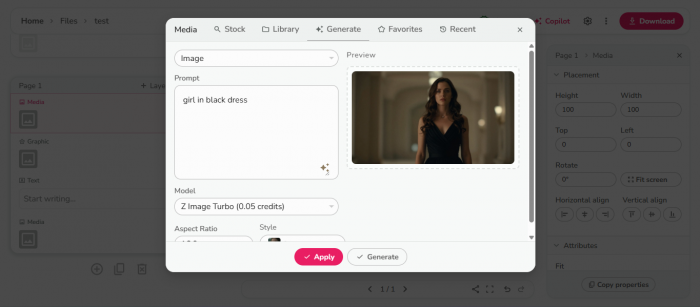
Fliki’s visual layer is good enough for a lot of marketing work, but this is also where its biggest issues live.
- Stock AI avatars
You get 70+ ready-made AI presenters, plus the option to build custom and photo-based avatars. They lip-sync, move naturally enough for internal training, explainer videos, and social content, and cover a fairly diverse visual range. They are clearly synthetic, but no longer distractingly so. - AI video clips
A newer feature generates short, original 5‑second clips instead of always falling back on stock footage. When it works, it breaks that “everything looks like B‑roll” feeling common to many text‑to‑video tools. - Visual artifacts you need to know about
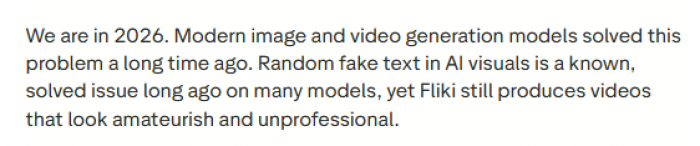
Multiple detailed reviews, especially on Capterra and Trustpilot, describe a recurring problem: gibberish text baked into AI-generated visuals, often enough to make otherwise solid videos unusable for professional work. One user reported that every AI visual in their projects contained this kind of artifact, and that support responses were slow and generic.
That pattern matters. It does not mean Fliki’s visual generator is useless; it does mean you should assume manual review of every AI visual is mandatory before you publish anything client-facing.
Editing: designed for speed, not surgical control
Fliki’s editor is built to be approachable, not to replace a professional NLE.
What you get:
- Magic Edit for auto scene timing and transitions.
- Per‑scene control to swap visuals, change voice, adjust pacing.
- Auto captions for accessibility and social feeds.
- Brand kits for fonts, colors, and logos.
- An AI Copilot that surfaces suggestions and issues.
- An AI Playground where you can test combinations without committing to a full render.
- Series and direct YouTube publishing for regular shows or playlists.
- Make/Zapier hooks for pipeline automation.
What you do not get:
- Keyframes, granular color grading, or motion design tools.
- Multi‑track audio mixing beyond basic levels.
- The level of control a professional editor expects from Premiere, Resolve, or Final Cut.
That is a deliberate trade-off. If you want to work quickly without learning a complex editor, Fliki’s middle-ground approach feels like a feature. If you are already comfortable in a pro tool, you will notice the ceiling fast.
The credit system: understand this before you pay
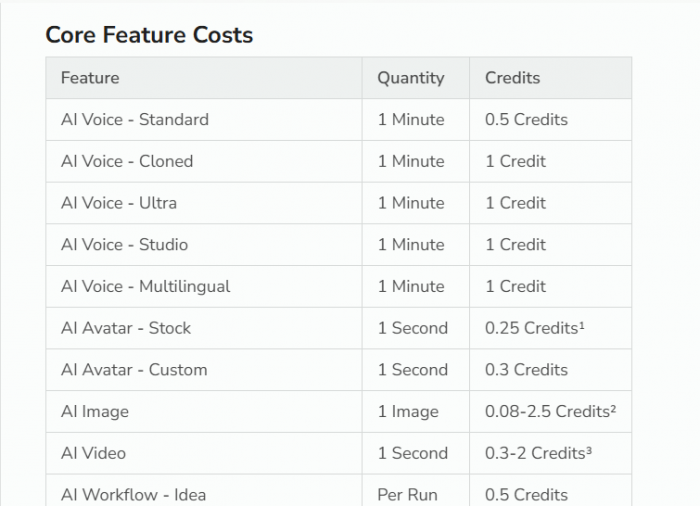
The single most common complaint in Fliki reviews is not voice quality or avatar realism-it is the credit system.
What consumes credits
Credits are burned by almost every action:
- generating audio
- rendering videos
- running previews
- sometimes even switching voice styles before export
- using extra AI features like avatars or video clips
Some users report that failed generations still consume credits.
How that feels in practice
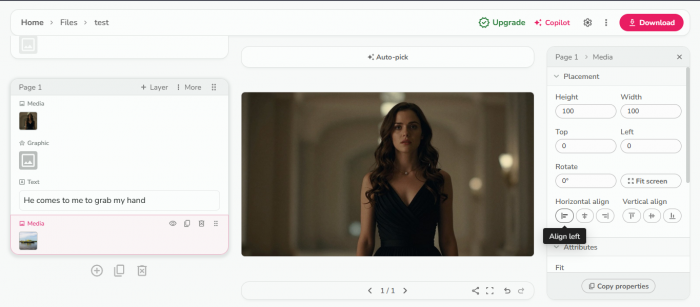
On paper, 5 minutes per month on the free plan sounds fair. In reality, by the time you preview a few versions, regenerate a scene that glitched, and test alternative voices, you can hit that ceiling before you have even one video you are proud of.
Reviewers mention 1.5‑minute videos costing 6 credits, and having costs multiply when they apply multiple voices to the same script.
The compounding frustration
The most frustrating reports are situations where the AI mispronounces or skips words, or generates a faulty scene, and fixing that error costs extra credits. There is no automatic credit refund when the system itself clearly failed. That product decision shows up again and again in negative feedback.
If you decide to use Fliki seriously, treat the credit guide as required reading, not optional documentation.
What real users say
Across review platforms, the pattern is consistent: strong praise on output speed and voices, recurring frustration around credits and some visual glitches.
G2
- Praised for ease of use and how fast first drafts get produced.
- Voice variety and realism called out often.
- Credits and limits mentioned as the main pain point; several reviewers specifically argue that previews should not consume credits.


Trustpilot
- Many users highlight how quickly they were able to create social videos and explainers.
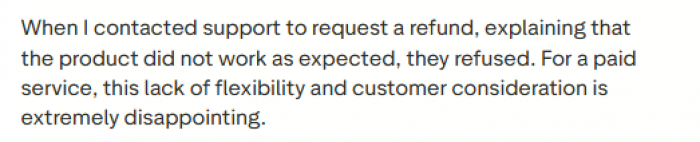
- Negative reviews focus on credit consumption, voice glitches requiring paid regenerations, artifact issues in visuals, and slower than expected support.
Capterra / Software Advice / Genius firm / Techraisal
- Voice quality and interface are the leading positives.
- One standout 2026 review describes every AI visual containing gibberish text and unhelpful support responses; others report no such extreme issues, which suggests the AI visual system is inconsistent across use cases and prompts.
Overall, user sentiment supports the idea that Fliki is good at what it prioritizes-but you need to be comfortable with its billing model and its “check everything before you publish” reality.
Fliki pricing: what you actually get at each tier
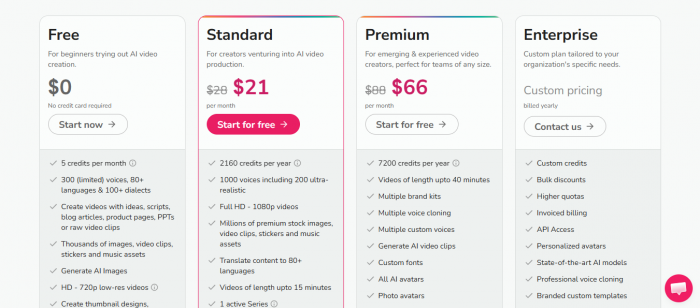
| Plan | Price / month | Credits / year | Max length | Resolution | Key extras |
| Free | $0 | 60 | 10 min | 720p | Watermark, no commercial rights |
| Standard | $21 | 2,160 | 15 min | 1080p | 1 voice clone, limited avatars, 1 brand kit |
| Premium | $66 | 7,200 | 40 min | 1080p+ | 3 voice clones, all avatars, AI video clips, 3 brand kits |
| Enterprise | Custom | Custom | 40+ min | 1080p+ | API, teams, dedicated support, custom avatars |
On monthly billing, Standard jumps to around $21/month and Premium to around $66/month. The annual discount is meaningful-roughly 25%-if you are sure you will use it regularly.
- For solo creators making a few videos per week, Standard is the sensible starting point.
- For YouTubers, agencies, and daily content teams, Premium is easier to live with from a credit perspective.
The free plan is best treated as a test environment, not as a real production tier.
Fliki vs other AI video tools
A rough comparison against the tools people most often consider alongside Fliki:
| Tool | Starting price | Core strength | Voices | Languages | Voice cloning | Avatars | Best for |
| Fliki | ~$21/mo | Text‑to‑video + voices | 2,000+ | 80+ | Yes | Yes | Repurposing + multilingual |
| Synthesia | ~$22/mo | Enterprise avatars | Limited | 130+ | No | 230+ | Corporate training |
| HeyGen | $29/mo | Avatars + lip sync | Multiple | 40+ | Yes | 100+ | Avatar‑led marketing |
| InVideo AI | $25/mo | Prompt‑to‑video | Limited | 50+ | No | No | Fast idea‑to‑video |
| Pictory | $19/mo | Blog‑to‑video | Limited | 25+ | No | No | Blog repurposing |
Fliki’s differentiator is not being the best at any single one of these categories, but combining:
- a very large voice library
- voice cloning
- AI avatars
- multiple repurposing workflows
- multilingual dubbing
- in one subscription at this price.
If you only care about avatars, Synthesia or HeyGen are stronger. If you only care about voice, other tools like ElevenLabs are deeper. But for a single-tool stack that covers “turn text into voiced video in many languages,” Fliki has a credible edge.
Who Fliki actually works for

Fliki is a good fit when your core problems look like this:
- Social media managers
You need multiple short videos per week, for multiple platforms, and you do not have time or skill for a full NLE. Fliki’s templates, text‑to‑video, and series features support that cadence. - Faceless YouTube channels
Especially in finance, tech, and educational niches. High‑quality voices plus blog‑to‑video workflows make it easy to keep publishing content without showing up on camera. - Educators and trainers
You have decks, course notes, and internal documentation that would work better as video. PPT‑to‑video and avatars give you a straightforward path there. - Marketers running multilingual campaigns
One master video, many languages. Dubbing and translation features reduce localization costs dramatically. - Small business owners and bloggers
You already have written content and know you should be on video but haven’t made the jump. Fliki drops the friction to the point where “finally doing it” becomes realistic.
On the other hand, Fliki is not ideal for:
- Professional video editors who need granular timeline control.
- Filmmakers or creatives aiming for cinematic aesthetics.
People who only need audio and want the deepest possible TTS/voice‑only capabilities at the lowest cost.
Pros and cons
What works well
- Strong ultra‑realistic voice tier for AI audio.
- Fast path from text to publishable video.
- Wide multilingual coverage (80+ languages, 100+ dialects).
- Voice cloning with cross‑language narration.
- All‑in‑one coverage for most solo creator workflows.
- Blog‑to‑video and PPT‑to‑video are genuinely useful.
- Pricing is competitive at the Standard tier.
Where it falls short
- Credit system feels opaque and punishing, especially when experiments and retries all cost extra.
- AI visuals can include gibberish text artifacts that ruin otherwise good scenes.
- Support response times lag behind expectations for the Premium price point.
- No dedicated mobile app; everything is browser‑based.
- Editing tools are intentionally limited compared to pro editors.
- Some stock footage can trigger YouTube Content ID.
- Free plan is strictly a preview tool.
Regenerating glitched audio or visuals costs more credits, even when the error clearly isn’t user‑caused.
Final verdict
Fliki is a strong fit for creators and teams who need to ship video regularly, care more about speed, reach, and voice quality than about cinematic polish, and do not want to juggle three different tools to get there.
Its biggest weaknesses-credit friction, visual artifacts, and slower support are real, but they do not erase its value if you go in with eyes open and structure your workflow around what the platform is best at.
On balance, a fair rating is 3.9/5:
excellent for voice-led, multilingual, repurposed video; weaker for precision editing and perfectionists who expect flawless AI visuals out of the box.
Post Comments
Be the first to post comment!
Related Articles