Table of Content
- Why Look Beyond CapCut AI?
- 1. Runway ML – Experimental AI Video Lab
- 2. VEED.io – Collaborative Browser Studio
- 3. Vizard AI – Long‑Form to Short‑Form Machine
- 4. Opus Clip – Virality‑Focused Shorts Generator
- 5. InVideo AI – Script‑To‑Screen Automation
- 6. Canva – Design Hub With Surprisingly Capable Video
- 7. Clipchamp – Windows‑Friendly, No‑Stress Editor
- 8. DaVinci Resolve – Professional Editor With AI Boosters
- Which CapCut Alternative Should You Pick?
- Bottom Line
CapCut AI is great for quick, template‑driven edits, but creators increasingly want more control, better privacy, and smarter automation without being locked into one ecosystem. Below is a rounded, article‑style look at the best alternatives worth recommending in 2026.
Why Look Beyond CapCut AI?
CapCut’s rise was powered by TikTok‑ready templates, auto‑captions, and free cross‑platform access, but it comes with trade‑offs around data, content rights, and scalability for serious brands. Many creators now want:
● Stronger content ownership and clearer licensing
● Deeper AI automation (automatic clip generation, text‑to‑video, repurposing)
● Better collaboration, brand control, and multi‑platform workflows
The eight tools below cover everyone from shorts creators to agencies and indie filmmakers.
1. Runway ML – Experimental AI Video Lab

What Runway brings to the table
Runway ML offers text‑to‑video generation, smart background removal, in‑painting, AI rotoscoping, and motion tracking, all inside a web‑based editor. You can create new scenes from prompts, edit existing footage, and seamlessly combine AI‑generated material with camera shots.
Where Runway really shines
Its biggest advantage is open‑ended creativity. Runway lets you produce surreal, cinematic, or stylized visuals that feel closer to VFX work than standard mobile edits, making it perfect for music videos, art films, and bold commercial pieces.
Where you’ll feel the friction
Because it leans so heavily on AI and cloud processing, weaker hardware and slow internet can make complex generations laggy. The interface is more demanding than CapCut’s, so absolute beginners may find it a bit intimidating.
How much it typically costs
You can generally start on a free tier with limited credits, then move to paid plans that usually begin around 15–20 USD per month for individual creators, with higher tiers for heavier usage and teams.
Who should seriously consider Runway
Runway is a strong fit for indie filmmakers, music artists, creative studios, and any creator who wants to treat AI as a visual effects partner rather than just a shortcut to memes.
2. VEED.io – Collaborative Browser Studio
_1775739300.jpg)
Standout capabilities
VEED.io packs AI avatars, auto‑subtitles and translations, brand templates, stock libraries, and an intuitive timeline that runs in the browser. It also supports brand kits, shared workspaces, and easy link‑based reviews.
Why teams love it
Its real strength is collaboration. Multiple people can work on or comment on the same project, and brand kits keep fonts, logos, and colors locked in, so every clip stays on‑brand without endless manual checks.
Things to keep in mind
If you’re doing intricate multi‑track edits, heavy grading, or feature‑length work, VEED won’t replace a full desktop NLE. Performance and export speed also depend on your connection and machine because everything runs online.
Entry‑level pricing
There’s usually a free plan with watermarks and export limits, while paid tiers for individuals often start around 12–20 USD per month, with team and business plans higher depending on seats and features.
Ideal users
VEED is tailor‑made for social media teams, agencies, and small marketing departments that need to turn around captioned, branded social clips multiple times per week.
3. Vizard AI – Long‑Form to Short‑Form Machine

What it can do for your content
Vizard AI ingests long videos, podcasts, webinars, interviews and automatically generates highlight clips. It transcribes, identifies promising segments, adds captions, and lets you edit by manipulating the transcript rather than fiddling with tiny timeline handles.
Its strongest advantage
The platform’s biggest win is efficiency. Instead of manually scrubbing through an hour‑long recording, Vizard surfaces the moments most likely to work as stand‑alone clips, so you can publish more frequently with less manual labour.
Where it falls short
Vizard isn’t built for fine‑tuned, cinematic storytelling or heavy visual polish. You’ll often use it as a first pass to create lots of clips, then rely on another editor if you want elaborate B‑roll, motion graphics, or advanced sound design.
What you’ll pay to get started
Expect a limited free tier and paid subscriptions that tend to start around 15–25 USD per month, increasing with the number of processing minutes and additional export or branding options.
Best‑fit scenarios
Vizard is ideal for podcasters, B2B marketers, educators, coaches, and anyone who regularly records long sessions and wants to turn them into a steady stream of short‑form content.
4. Opus Clip – Virality‑Focused Shorts Generator
Capabilities at a glance
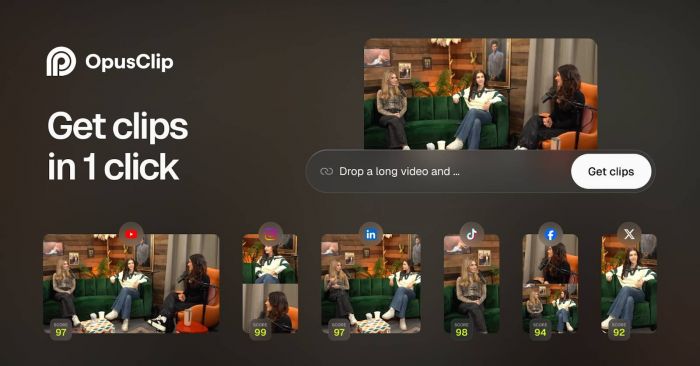
Opus Clip analyzes your long‑form videos and automatically chops them into short clips tailored for platforms like TikTok, YouTube Shorts, and Reels. It adds jump cuts, subtitles, and formatting, and scores segments for their viral potential.
What makes it stand out
Its key advantage is the “viral‑aware” logic. By rating segments based on structure, hooks, and engagement cues, it nudges you toward clips that are more likely to catch attention in feed‑based environments.
Where you might feel limited
You’re handing some editorial decisions to the algorithm, so not every suggested clip will align perfectly with your message. For nuanced storytelling or brand‑critical content, you may still need manual curation and extra polishing.
Typical starting price
You can generally test it with a limited free option, then upgrade to paid plans that often begin around 15–25 USD per month, with tiers scaling by monthly minutes and features.
Who gets the most out of Opus Clip
Opus Clip works best for YouTubers, educators, coaches, and content entrepreneurs who post long videos and want to flood their short‑form channels with lots of testable clips.
5. InVideo AI – Script‑To‑Screen Automation
_1775739327.jpg)
What it offers creators
InVideo AI lets you start from a topic or a script and automatically assembles a video using stock footage, transitions, AI voiceovers, and captions. You can then refine scenes, adjust timings, and swap visuals in a web‑based editor.
Its key strength
The standout benefit is end‑to‑end automation for faceless content. You can go from idea to publishable explainer, listicle, or news‑style video without ever stepping in front of a camera, which is perfect for niche information channels and marketers.
Trade‑offs to be aware of
If you rely only on the default outputs, videos can look generic heavy on stock footage with similar pacing and AI voices may sound less authentic than real presenters. To build a strong brand, you still need to invest time customizing scripts and visuals.
How pricing usually starts
InVideo AI typically has a free plan with watermarked or limited exports. Paid plans for individuals often start around 15–20 USD per month on annual billing, with higher tiers unlocking more exports, resolutions, and brand presets.
Best use cases
It’s particularly useful for faceless YouTube channels, affiliate marketers, blog‑to‑video workflows, and small businesses that want regular explainer or promo videos without on‑camera talent.
6. Canva – Design Hub With Surprisingly Capable Video
_1775739336.jpg)
Video tools you get inside Canva
Canva’s video editor includes drag‑and‑drop timelines, transitions, stock footage and music, plus an enormous library of templates for Reels, stories, ads, intros, and outros. AI‑driven “Magic” features help with layouts, resizing, and quick design suggestions.
Why Canva is compelling
The major strength is having all brand assets under one roof. You can design your logo, social posts, presentations, PDF lead magnets, and videos using the same brand kit, which keeps everything visually consistent with minimal effort.
Where it feels constrained
Canva isn’t built for advanced post‑production. It lacks the deep color controls, multi‑track complexity, and audio tools of a full NLE, so it’s not the right home for complex documentaries or cinematic long‑form projects.
Entry pricing for serious use
The free plan covers a lot of basics but limits premium assets. Canva Pro for individuals typically starts around 12–15 USD per month when billed annually, while Teams plans add collaboration features at a per‑user rate.
Who it’s best suited for
Canva is perfect for small businesses, solopreneurs, and social media managers who already live in Canva for their design work and want to produce on‑brand short videos without learning a new tool.
7. Clipchamp – Windows‑Friendly, No‑Stress Editor
What you can do with it
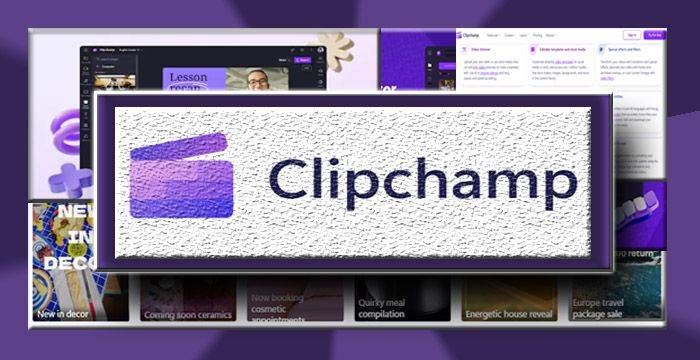
Clipchamp offers a straightforward timeline editor, templates, stock media, basic effects, screen and webcam recording, plus a few AI helpers such as audio cleanup and smart composition. It ties neatly into Windows and OneDrive for file management.
Its main advantage
Ease of use is the big win here. For many Windows users, Clipchamp is either bundled or just a click away, and the interface is simple enough for students, teachers, and office users who just need to cut, caption, and export without drama.
Where it shows its limits
Compared to specialized AI editors, its automation is modest, and large, complex projects can feel heavy in a browser environment. You also don’t get sophisticated collaboration or high‑end color and audio controls.
What you’re likely to pay
Clipchamp usually includes a free version with basic exports. Paid offerings tend to start around 10–15 USD per month, adding premium stock, higher‑quality exports, or being bundled within certain Microsoft 365 subscriptions.
When Clipchamp makes sense
It’s a good match for beginners, educators, corporate users, and casual creators who want something CapCut‑like on desktop without committing to pro software.
8. DaVinci Resolve – Professional Editor With AI Boosters
The toolkit it provides
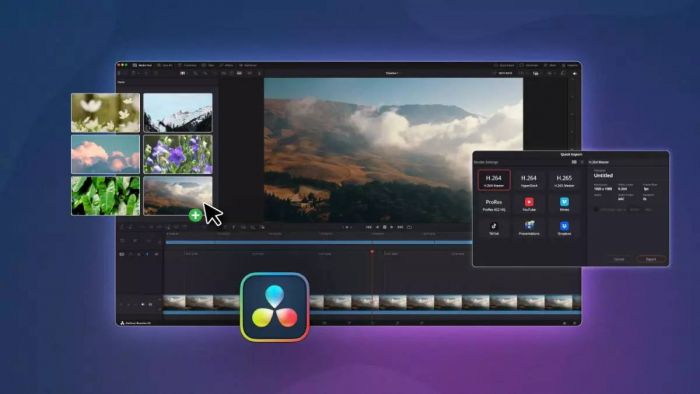
DaVinci Resolve combines four major areas in one app: editing, industry‑leading color grading, Fairlight audio post, and Fusion VFX. AI features such as Magic Mask, smart reframing, speech‑to‑text, and voice isolation help speed up complex tasks.
Why professionals swear by it
The defining strength is depth and scalability. You can cut YouTube vlogs, grade brand films, mix podcasts, or finish indie features all in the same environment, with a free version that already rivals many paid tools.
Challenges you might face
Resolve comes with a steeper learning curve than mobile apps and demands reasonably powerful hardware, especially a good GPU. For quick, disposable clips, the overhead of opening a full NLE can feel like overkill.
How pricing is structured
The standard edition is completely free. The Studio version is sold as a one‑time purchase, usually around 295 USD, unlocking extra AI features, higher resolutions, and some advanced capabilities, no ongoing subscription.
Who should upgrade to Resolve
DaVinci Resolve is ideal for serious YouTubers, filmmakers, production‑minded brands, and editors who want a long‑term, professional environment rather than hopping between lightweight mobile tools.
Snapshot: How These Tools Compare
| Tool | Standout strength | Platform focus | Typical pricing model | Best suited for |
| Runway ML | Generative AI + VFX creativity | Web | Freemium + subscriptions | Experimental, cinematic content |
| VEED.io | Team collaboration & branding | Web | Free + tiered plans | Social teams, agencies |
| Vizard AI | Automated clip extraction | Web | Free minutes + subscriptions | Podcasters, B2B marketers |
| Opus Clip | Virality‑driven clip scoring | Web | Limited free + paid tiers | Long‑form to Shorts creators |
| InVideo AI | Script‑to‑video automation | Web | Freemium + subscriptions | Faceless channels, marketers |
| Canva | Unified design + video | Web, desktop, mobile | Free, Pro, Teams | SMBs, social managers |
| Clipchamp | Ease of use on Windows | Web, Windows desktop | Free + premium options | Beginners, office users |
| DaVinci Resolve | Full pro post‑production suite | Windows, macOS, Linux | Free + one‑time Studio | Pro‑leaning creators |
Which CapCut Alternative Should You Pick?
Instead of chasing a single “best” CapCut AI alternative, think in terms of workflow: quick social edits, long‑form repurposing, or full‑scale production. For shorts‑first creators, VEED.io, Opus Clip, and Vizard AI offer the fastest path from recording to viral‑ready content, while Canva and Clipchamp cover everyday branded videos and beginner needs.
If you are building a serious, long‑term content engine or moving into film‑style production, pairing Runway ML for AI‑driven visuals with DaVinci Resolve for final polish gives you a future‑proof stack far beyond what CapCut can deliver.
Bottom Line
CapCut is great for getting started, but it shouldn’t be where you stop. If your priority is speed and volume, let tools like Vizard AI or Opus Clip handle the repetitive clipping work, and layer in VEED.io or Canva when you need clean, branded outputs. When quality and creative control matter more than raw speed, moving up to Runway ML for concept visuals and DaVinci Resolve for final edits gives you a production pipeline that feels more like a studio than a phone app.
Post Comments
Be the first to post comment!
Related Articles