AI-powered speech-to-text has quietly become one of the most useful “everyday” AI categories fueling meeting notes, podcasts, YouTube captions, call analytics, and hands-free writing. Below is a blog-ready breakdown of 10 of the best AI tools for speech-to-text, with descriptions, key features, pros, cons, pricing snapshots and ideal use cases for each.
1. Otter.ai
Otter.ai is a popular AI meeting assistant that records conversations, transcribes them in real time, and turns them into searchable notes. It’s built primarily for knowledge workers who live in Zoom, Google Meet, and Teams.
Features
● Real-time transcription with live captions for meetings.
● Speaker identification, searchable transcripts, and AI summaries.
● Calendar integration, live collaboration, file import, and mobile apps.
Pros
● Strong meeting-focused workflows and collaboration features.
● Good accuracy for clear speech and standard accents.
● Solid free tier for light users (300 minutes/month).
Cons
● Hard caps on minutes per month (1,200 min Pro, 6,000 min Business).
● Subscription-only, no true pay-as-you-go usage model.
● Some advanced features gated at higher tiers and enterprise plans.
Pricing overview (2026)
● Basic: Free, 300 minutes/month.
● Pro: About 8.33 USD/month (annual) or 16.99 USD/month (monthly) with 1,200 minutes.
● Business: Around 20–30 USD/user/month (annual vs monthly) with 6,000 minutes.
Best for
Teams that want a plug-and-play meeting transcription assistant with collaboration and summaries built in.
2. OpenAI Whisper (API)
OpenAI’s Whisper is a state-of-the-art speech recognition model optimized for accurate, multilingual transcription and translation. It powers many modern transcription products and can be used via API or self-hosted.
Features
● High-accuracy transcription across noisy audio, accents, and technical jargon.
● Supports 50+ languages and speech translation.
● API-based batch transcription; real-time requires a separate Realtime API.
Pros
● Excellent accuracy, especially for multilingual and challenging audio.
● Very competitive per-minute pricing for developers.
● Flexible: can be integrated into any product or pipeline.
Cons
● API-first: not a turnkey app for non-technical users.
● Speaker diarization and some extras require additional services.
● Real-time use cases need additional integration work.
Pricing overview (2026)
● Whisper API: about 0.006 USD per minute (~0.36 USD/hour).
● GPT‑4o Mini audio transcription: ~0.003 USD/minute (~0.18 USD/hour).
Best for
Developers and SaaS products that need scalable, multilingual transcription at low per-minute cost.
3. Google Cloud Speech-to-Text
Google Cloud Speech-to-Text is an enterprise-grade API for live and batch transcription, optimized for contact centers, media, and large-scale applications.
Features
● Real-time and batch transcription with word-level timestamps.
● Over 125–140 languages and variants, with custom vocabularies.
● Call center and media-focused features like diarization and phrase hints.
Pros
● Strong ecosystem integration with other Google Cloud services.
● Good accuracy on phone audio and long-form content.
● Commitment-based pricing options for high-volume users.
Cons
● Pricing and SKUs can be complex for smaller teams.
● Requires cloud setup and development resources.
Pricing overview (high level)
● Pay-as-you-go per minute with different rates for standard vs enhanced models and real-time vs batch.
Best for
Enterprises building transcription into products or analytics pipelines, especially contact centers and media platforms.
4. Deepgram
Deepgram is a developer-focused speech-to-text platform offering real-time and batch APIs with custom models and competitive pricing.
Features
● Real-time and batch transcription with multiple model families (Nova, Aura, etc.).
● Custom models for domain-specific vocabulary and accents.
● Built-in diarization and word-level timestamps.
Pros
● Highly optimized for low-latency real-time use cases.
● Volume discounts and commitment pricing for large workloads.
● Good docs and SDKs for developers.
Cons
● More technical than consumer apps, code integration required.
● Feature set and pricing best leveraged at scale.
Pricing overview (directional)
● Per-minute pricing for models; real-time tends to cost more than batch, with discounts at higher committed volumes.
Best for
Companies building real-time transcription into products (voice assistants, live captioning, call analytics) at scale.
5. IBM Watson Speech to Text
IBM Watson Speech to Text is a cloud-based service that supports real-time and batch transcription with enterprise-grade deployment options.
Features
● Live and offline transcription with multiple language models.
● Speaker diarization, word timestamps, and customization options.
● Flexible deployment on IBM Cloud or on-premises for regulated industries.
Pros
● Strong security and compliance story for enterprises.
● Integrates well with Watson Assistant and other IBM services.
● Suitable for both media and call center scenarios.
Cons
● Less “trendy” ecosystem and fewer community examples than newer APIs.
● Pricing often oriented toward enterprise contracts.
Pricing overview (high level)
● Pay-per-minute usage with tiered models; specific 2026 rates vary by region and model type.
Best for
Large organizations needing secure, compliant speech-to-text with on-prem or hybrid deployment options.
6. Speechmatics
Speechmatics offers an AI-driven ASR engine focused on accurate, global English and multilingual support, with both real-time and batch capabilities.
Features
● Automatic speech recognition for live and file-based audio.
● Strong support for varied accents and dialects.
● Tools for media captioning and keyword triggers.
Pros
● Known for accent robustness and media captioning quality.
● API-based and suitable for integration into workflows.
Cons
● Less consumer-facing UI; more of an engine than a full product.
● Pricing information is often via sales for higher tiers.
Pricing overview (high level)
● Usage-based pricing per minute; custom quotes for large or specialized deployments.
Best for
Media companies and platforms that need accurate captions across diverse speakers and accents.
7. Verbit

Verbit combines AI speech recognition with human review to deliver high-accuracy transcription and captioning for enterprise and education.
Features
● AI-generated transcripts with optional human editing.
● Designed for lectures, events, court reporting, and corporate training.
● Collaboration features and accessibility-compliant captions.
Pros
● Very high accuracy due to the human-in-the-loop approach.
● Strong alignment with accessibility and compliance standards in education and enterprise.
Cons
● Typically more expensive than pure-API automated tools.
● Not meant as a generic “dictation” app for individuals.
Pricing overview (high level)
● Custom quotes based on volume, turnaround time, and human review needs.
Best for
Universities, corporations, and legal/education organizations needing near-perfect captions and transcripts with compliance requirements.
8. Braina Pro
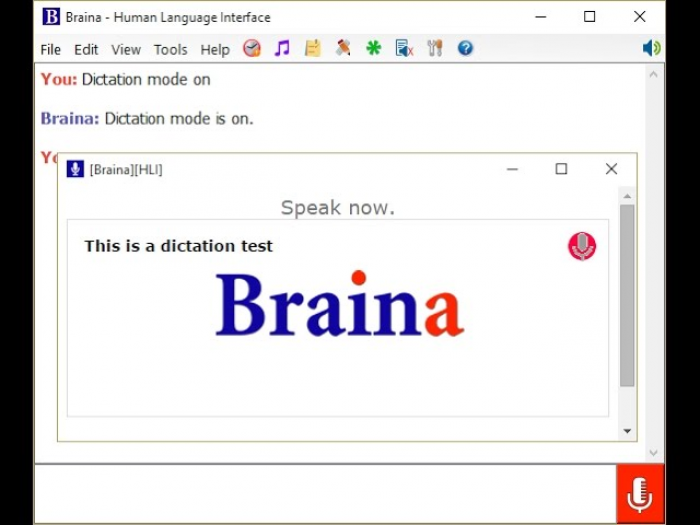
Braina Pro is a Windows-based AI assistant that focuses on voice dictation and basic automation rather than meeting-specific workflows.
Features
● Dictation in over 90 languages.
● Voice commands for tasks like opening apps, searching the web, and setting reminders.
● Adaptive AI that improves with use.
Pros
● Strong multilingual dictation support.
● Doubles as a personal desktop assistant beyond transcription.
Cons
● Desktop-centric; not ideal for team-based meeting workflows.
● Interface and UX feel more “utility” than modern SaaS product.
Pricing overview (high level)
● Paid license model; specific 2026 pricing depends on edition and promo offers.
Best for
Individual power users who want fast dictation plus voice control on Windows.
9. Dragon (Dragon NaturallySpeaking / Dragon Professional)
Dragon remains one of the most established dictation tools, focused on highly accurate, continuous speech recognition for professionals.
Features
● On-device or PC-based dictation with strong medical/legal vocabulary options in some editions.
● Voice commands for text editing and navigation.
● Custom vocabularies and macros.
Pros
● Very strong accuracy for long-form dictation when properly trained.
● Works across most desktop applications.
Cons
● Higher upfront cost than many cloud tools.
● Setup and training can be time-consuming.
Pricing overview (high level)
● Per-license pricing for professional editions; often significantly higher than SaaS subscriptions but paid once or in larger chunks.
Best for
Professionals (doctors, lawyers, writers) who dictate heavily and want a mature, offline-capable tool.
10. Willow Voice (Voice-In Style Universal Dictation)
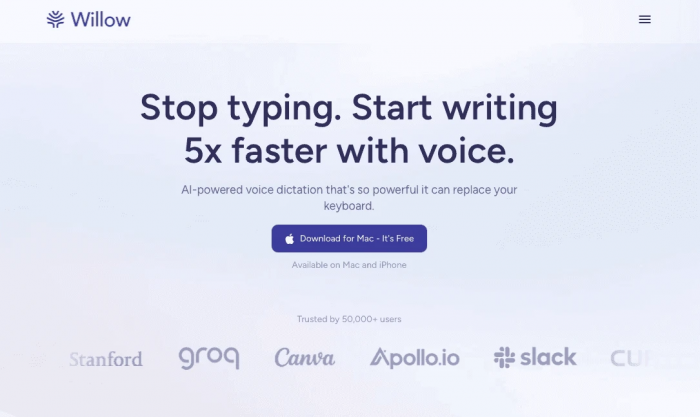
Willow (and similar “universal dictation” tools such as Voice In) focuses on speech-to-text that works in any app via browser or desktop overlays.
Features
● Universal dictation that works across apps and websites.
● Real-time processing with claimed high accuracy.
● Keyboard shortcuts, punctuation handling, and customization.
Pros
● One tool that works everywhere, so you’re not locked to specific apps.
● Lightweight and simple for day-to-day writing.
Cons
● Not designed for team meeting management or AI summaries.
● Deep analytics and diarization features are limited or absent.
Pricing overview (high level)
● Freemium or subscription tiers; exact 2026 pricing varies by plan and region.
Best for
Individuals who want a “voice keyboard” that follows them across Google Docs, email, and web apps.
Quick “Best Fit” Snapshot
Final Verdict
A smart way to choose a speech-to-text tool in 2026 is to match it to your workflow, not rankings. If your day is full of meetings, assistants like Otter.ai are quick wins because they plug straight into Zoom, Meet, and Teams and turn calls into usable notes with almost no setup. For product teams or data-heavy use cases, API-based engines such as OpenAI Whisper, Deepgram, Google Cloud Speech-to-Text, or IBM Watson offer more control over accuracy, languages, and cost assuming you have developer resources.
In accessibility-focused or regulated environments, specialist platforms like Verbit and Speechmatics justify their higher price with stronger accuracy and compliance. For individuals who just want to stop typing, personal dictation tools such as Dragon or Braina still work well across everyday apps. The safest approach is to test two or three tools, a meeting assistant, an API engine, and a dictation app and keep the one that performs best on your own audio and real-world cost.
Post Comments
Be the first to post comment!
Related Articles
Table of Content
- 1. Otter.ai
- 2. OpenAI Whisper (API)
- 3. Google Cloud Speech-to-Text
- 4. Deepgram
- 5. IBM Watson Speech to Text
- 6. Speechmatics
- 7. Verbit
- 8. Braina Pro
- 9. Dragon (Dragon NaturallySpeaking / Dragon Professional)
- 10. Willow Voice (Voice-In Style Universal Dictation)
- Quick “Best Fit” Snapshot
- Final Verdict
- Comments
- Related Articles