Table of Content
- Introducing Gizmo AI
- How Gizmo AI Works (Under the Hood)
- Key Features and Real‑World Use Cases
- My Hands‑On Experience Using Gizmo AI
- Pricing, Plans, and Value for Money
- User Interface, Learning Curve, and Reliability
- Safety, Privacy, and Data Handling
- Real User Reviews and Sentiment
- Gizmo AI vs Anki vs Quizlet
- Who Should Use Gizmo AI (and Who Should Avoid It)
- Final Verdict and Scorecard
I started using Gizmo AI the way most people try new study tools: not out of curiosity, but out of mild panic.
Two important exams were around the corner, and my study system was pure chaos: PDFs from coaching, slides in different folders, formula screenshots in my gallery, and a “watch later” playlist I never touched. I knew spaced repetition worked from trying Anki and Quizlet, but I also knew I wouldn’t sit and type hundreds of flashcards again.
That’s the gap Gizmo AI claims to fill: give it your messy materials—PDFs, slides, videos, notes and it converts them into structured flashcards and quizzes while reminding you exactly when to revise. Instead of being just another flashcard app, Gizmo positions itself as the engine behind your entire revision routine.
Introducing Gizmo AI
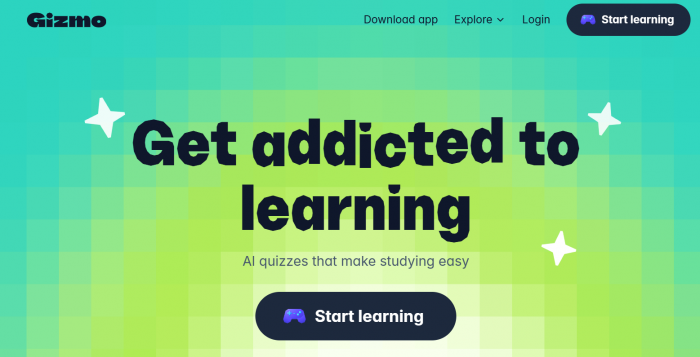
Gizmo AI is an AI‑powered learning platform that converts your existing study material—PDFs, lecture slides, typed notes, web pages, and even YouTube videos—into flashcards and quizzes, then uses spaced repetition and gamification to help you remember more with less manual effort. At its core, it’s built around the idea that students and professionals already have enough content; what they lack is a system that can turn that messy content into structured, repeatable practice.
Instead of manually writing every flashcard, you upload or link material to Gizmo, let its AI generate question‑answer pairs, then review those cards through short, focused sessions on web or mobile. The platform then tracks your performance and schedules future reviews based on how well you recall each card.
You can access Gizmo AI via a web interface and dedicated mobile apps on iOS and Android, which means you can start a deck on your laptop and continue revising on your phone when you’re commuting or waiting in a queue. On top of that, it adds layers of streaks, progress graphs, and shared decks so that revision doesn’t feel like a lonely grind.
In simple terms: if Anki is the hardcore, manual, power‑user flashcard lab, Gizmo AI is the more modern, AI‑augmented study companion that tries to automate the boring parts while nudging you to show up every day.
How Gizmo AI Works (Under the Hood)
Gizmo’s workflow is simple on the surface, but there’s a lot going on behind the scenes.
1. Content ingestion: You start by feeding the tool your learning material. Gizmo accepts:
a. PDFs (textbooks, coaching notes, research papers)
b. PowerPoint/slide decks
c. Typed notes or copy‑pasted text from web pages and documents
d. YouTube video URLs (it uses the transcript to generate cards)
e. Images or scanned notes in some workflows, which it can try to OCR and process
2. For a typical chapter PDF, you drag and drop it into Gizmo or use the upload button in the dashboard.
3. Flashcard generation: Once the file is uploaded, Gizmo uses generative AI to identify key concepts, definitions, formulas, and relationships and converts them into question‑answer flashcards. These are usually in a Q&A format, but it can also create multiple‑choice questions from your material.
You then get an editable list of cards. This is where you can:
a. Delete cards that look trivial or irrelevant
b. Edit or correct any AI mistakes
c. Merge or split cards if the AI compressed too much or too little
4. Quiz and practice modes: Gizmo doesn’t stop at basic card flipping. It creates quizzes mixing multiple‑choice questions, short answers, and active recall prompts from your cards and notes. You can run quick sessions before class, on breaks, or before sleep.
5. Spaced repetition and scheduling: Every time you review a card, you rate how easy or hard it was. Gizmo uses that feedback to space out the next review: tough cards come back sooner, easy ones get pushed further. Over time, this builds a personalised schedule that focuses your time on weak areas instead of re‑showing everything equally.
6. Gamification and analytics: To keep you coming back, it tracks streaks, total cards reviewed, time spent, and accuracy, often showing all this in graphs inside your dashboard. You can also see which topics are consistently weak, which is especially useful when preparing for large competitive exams where you need to cover an entire syllabus.
7. Collaboration and sharing: Gizmo allows shared decks, group study, and access to public decks created by others. This is essential if you’re preparing with classmates or want to reuse a trusted deck rather than starting from scratch.
All of this is wrapped inside a modern, clean interface that aims to feel more approachable than older tools like Anki while offering more automation than Quizlet.
Key Features and Real‑World Use Cases
Major feature buckets
Instead of listing features randomly, it’s easier to think of Gizmo in four big buckets:
1. AI-powered content to card conversion: Gizmo can turn messy study material into flashcards in seconds. You upload PDFs, slides, notes, or paste text, and it builds a full deck automatically. You can even drop a YouTube link and it will pull the transcript to create cards from key points. It also works like a prompt-based assistant—just ask it to turn a chapter into flashcards or generate a quiz on a topic.
2. Learning engine and practice modes: The app offers classic flashcards with show-answer and difficulty ratings, plus auto-generated quizzes (MCQs and short answers) for active recall. Its spaced repetition system adapts based on your performance, similar in concept to Anki’s SRS but with far less manual setup required.
3. AI tutor and explanations: When a card feels unclear, you can ask Gizmo follow-up questions like simplifying a concept or giving another example. This is useful when the flashcard is technically correct but your conceptual understanding still feels shaky.
4. Gamification, analytics, and collaboration: Gizmo adds motivation through streaks, streak freezes, and badges that encourage daily practice. You also get analytics on accuracy, time spent, and cards due by topic. Plus, shared decks, class groups, and public libraries make it easy to reuse or contribute study material.
Practical use cases
● Competitive exams (e.g., medical, law, entrance tests): Heavy theory, long syllabi, and years‑long preparation cycles are where Gizmo makes the biggest difference. You can convert entire coaching PDFs into cards over a few days instead of months.
● University courses: For semester‑long subjects, each lecture’s slides or notes can become a deck by the end of the day, turning finals revision into repeating decks you already have instead of starting from zero.
● Professional certifications: For tech, finance, or other professional certifications, uploading vendor documentation or course PDFs into Gizmo can give you a structured revision workflow without manually building everything.
My Hands‑On Experience Using Gizmo AI
To understand how much Gizmo actually changes your learning, you need to live with it for at least 10–14 days, not just play with it for 10 minutes. A short test only reveals the UI; a longer test reveals whether it becomes a habit.
Week 1: From chaos to first decks
My starting point was a typical run, I gathered a 180-page exam coaching PDF, two PowerPoint slide decks, and a YouTube playlist with five long lectures. In Gizmo, I uploaded the PDF and both slide decks, then pasted the YouTube URLs for the two lectures I cared about most to see how well it could turn all that material into usable study content.
Within minutes, I had a large deck auto‑generated from the PDF and separate decks from each of the slide decks and videos. The AI was surprisingly good at pulling out definitions, terms, and high‑level conceptual questions. However, I quickly realised two things:
● Some flashcards were too shallow (“X is Y”) when I wanted multi‑step reasoning.
● A handful of cards had slightly off details or ambiguous phrasing, especially where the source material itself had dense or tricky wording.
I spent an hour cleaning up the most important decks: deleting obvious junk, rephrasing a few questions, and combining overly fragmented cards. This is where Gizmo feels like a partner: it gives you 80% of the raw work, but you still need to sanity‑check the content.
Week 2: Daily revision, spaced repetition, and friction points
Once my decks were ready, I committed to at least two sessions per day (morning and night) and minimum of 30–50 cards per session.
By day 4–5, the spaced repetition system kicked in. I started seeing more of the cards I kept marking as “hard” and fewer of the easy ones. The daily “cards due” number became a simple, actionable target: clear this number, and you’re done.
Some observations from this period:
● Time saved: Compared to manually creating 100 cards in Anki, Gizmo’s AI generation plus light editing cut my card-creation time by more than half, especially for theory-heavy material. It removed most of the repetitive setup work.
● Consistency: The streak system and “cards due” counter made daily revision very clear and manageable. Instead of feeling overwhelmed by piles of PDFs, I always knew exactly what to study each day.
● Friction: The lack of an offline mode meant I couldn’t revise on flights or in weak network areas. The web app also felt a bit sluggish with very large decks, and I still had to stay mentally engaged if I just tapped through cards passively, the learning benefits dropped.
Overall impression from real use
After two weeks, Gizmo had become the backbone of my revision routine, not because it was perfect, but because it reliably turned raw material into something I could act on daily. It felt less like a shiny new app and more like an infrastructure layer I was willing to build my exam prep on.
Pricing, Plans, and Value for Money
Pricing details can change, but the current model generally looks like this pattern:
● Free tier: The free plan gives you a limited number of AI-generated cards or decks per month along with basic practice modes. However, access to advanced analytics and some collaboration features is restricted.
● Paid plans (monthly/annual): Paid tiers unlock higher or unlimited AI card generation, full spaced-repetition controls, and detailed analytics. You also get priority support, earlier access to new features, and more generous limits on deck size, file uploads, and collaboration.
The important question isn’t “How much does it cost?” but “What do you get for that price compared to alternatives?” Anki is effectively free but requires massive manual effort and a steeper learning curve; Quizlet is freemium with a paid tier for more advanced features and offline access.
If you’re a serious exam candidate handling multiple heavy subjects, the time you save by not manually creating every card can be enormous. Even a couple of hours saved per week, over several months, can make a subscription feel justified—especially if you’re paying for coaching classes anyway. For casual learners or those with very light content, the free tier might be enough to test whether the workflow suits your style.
User Interface, Learning Curve, and Reliability
Interface and experience
Gizmo’s interface feels modern and friendly. The dashboard surfaces:
● Cards due today
● Active decks
● Basic performance stats (accuracy, streaks, time spent)
Creating and editing cards is straightforward: click into a deck, scroll the card list, and adjust questions/answers in place. Compared to Anki’s more technical interface, Gizmo feels far more approachable for non‑techy students.
On mobile, the layout is optimised for quick sessions: swipe or tap through cards, mark difficulty, and keep an eye on your remaining due cards. The experience is clearly designed around short bursts of study.
Learning curve
For anyone who has used Quizlet or Duolingo-style apps, the learning curve is very gentle. Anki power users might initially miss the deep configurability, but many will appreciate how little setup is needed to get started.
In short, Gizmo deliberately trades some advanced customization for simplicity, speed, and a smoother beginner-friendly experience.
Performance and reliability
From a reliability standpoint, basic reviewing is generally smooth. However, very large decks or long documents can sometimes introduce lag or slower processing.
Because Gizmo is fully cloud-based, a stable internet connection is essential, and the lack of a true offline mode is a common complaint. For most everyday use with decent connectivity the experience is fine, but frequent offline users will likely find this a significant limitation.
Accuracy, Limitations, and Common Issues
No AI study tool is perfect, and Gizmo is no exception. Understanding its weaknesses helps you decide how to use it wisely.
AI card quality
Strengths: Gizmo is very effective at extracting definitions, key terms, and clear conceptual questions from well-structured material. It’s especially useful for quickly generating a solid first-pass deck from a chapter or lecture.
Weaknesses: The AI can sometimes produce cards that are too shallow or vague, particularly when the source notes are dense or poorly organized. It may also oversimplify complex ideas into one-line answers, so spot-checking is important for high-stakes exam prep.
The workaround is simple but important: treat AI‑generated decks as drafts, not gospel. Spend time cleaning up your most critical topics.
Structural and technical limitations
There’s no true offline mode, which makes Gizmo unusable in no-network environments. Some users also report occasional bugs, sync delays, or UI glitches especially when importing very large files.
Additionally, power users may find the fine-grained control limited compared to tools like Anki, particularly if they enjoy deeply tweaking spaced-repetition settings.
Cognitive risks
An underrated risk with AI‑generated decks is passivity: if you rely entirely on the AI to decide what’s important, you may stop actively processing the material yourself. This can turn revision into a mechanical activity rather than a thoughtful one. The best use of Gizmo is as a force multiplier for your own thinking, not a replacement for it.
Safety, Privacy, and Data Handling
Whenever a tool asks you to upload notes, slides, and exam content, privacy becomes a key concern.
According to its published information, Gizmo collects typical platform data: account details, usage data, device information, and the content you upload (PDFs, notes, etc.), which is necessary to provide the service. Data is transmitted and stored using industry‑standard security practices, and the platform sets out terms for how information is processed and retained.
Key questions to check (and mention explicitly to readers):
● Does the platform use your uploaded content to train its models, or only to serve your account?
● Can you delete your data and account completely?
● Are there any age restrictions or special conditions for students under a certain age?
Independent evaluations that look at student privacy (where available) provide an additional angle and suggest that users should read policies carefully before uploading sensitive material. For most adult learners and typical exam notes, the risk profile is similar to other mainstream ed‑tech platforms, but extra‑cautious users and parents should still treat privacy as a serious selection factor.
Real User Reviews and Sentiment
Looking beyond my experience, user sentiment around Gizmo tends to converge on a few themes.
What users like
● Time saving: Many reviewers highlight how fast they can go from raw PDF or lecture video to an initial deck, especially compared to Anki.

● Motivation and consistency: Streaks, progress charts, and decks that feel “alive” make it easier to maintain daily habits than static notes or manual flashcards.

● Modern interface: Users appreciate the clean, mobile‑friendly UI and simpler onboarding compared to older tools.
On forums where Anki power users hang out, some still prefer Anki’s control and plugin ecosystem, but even there, you see people acknowledging that AI‑assisted card creation solves a real pain point for newcomers.
What users complain about
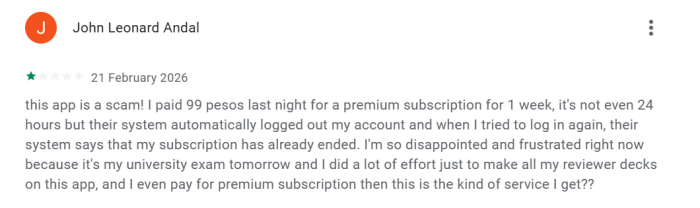
● Pricing pressure: Students in particular often feel the pinch of subscription costs, especially if they already pay for coaching and other tools and complain about subscription and said it is a scam.
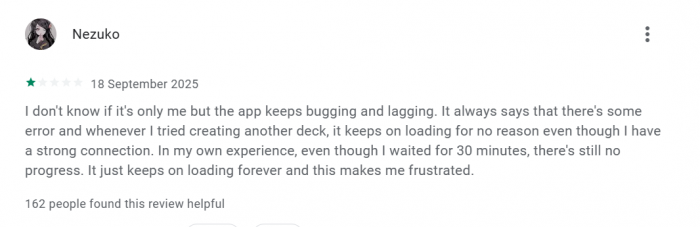
● Bugs and stability issues: A minority report glitches, slow performance on large decks, or occasional sync quirks.
● No offline mode: This comes up repeatedly in feedback—if your internet is unreliable, your study routine becomes fragile.
● AI inaccuracies: Some users report cards that misinterpret content or turn nuanced ideas into simplistic statements, requiring manual cleanup.
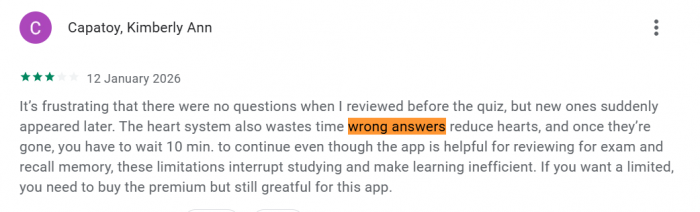
Overall, the sentiment is that Gizmo is extremely helpful when used thoughtfully, but not something you can trust blindly without checking the generated content.
Gizmo AI vs Anki vs Quizlet
Here’s a focused comparison to put Gizmo in context.
| Factor | Gizmo AI | Anki | Quizlet |
| Card creation | AI generates from PDFs, notes, videos | Manual creation, highly flexible. | Templates, public decks, some automation. |
| Learning engine | Spaced repetition + gamified practice | Very advanced SRS with deep configuration | Good SRS, less configurable |
| Ease of use | Modern, intuitive UI. | Steep learning curve, technical UI. | Beginner‑friendly, especially for students |
| Offline mode | No full offline mode currently. | Yes via local apps and sync options. | Offline largely tied to paid features |
| Pricing | Free + subscription tiers. | Mostly free, optional add‑ons/donations | Freemium + Plus subscription. |
| Best for | Busy exam takers, AI‑first learners. | Power users who love control | School/university casual and group use. |
If you want maximum control and don’t mind manual work, Anki still wins. If you want convenience, large existing decks, and simple class sharing, Quizlet is solid. If you want AI to handle the heavy lifting of card creation while you focus on consistent practice, Gizmo earns its place.
Who Should Use Gizmo AI (and Who Should Avoid It)
Ideal users
Gizmo AI is a strong fit if:
● You’re preparing for competitive exams with huge syllabi and limited time.
● You understand that spaced repetition and active recall matter but hate building massive decks by hand.
● You’re comfortable with cloud tools and want cross‑device access to your study routine.
● You like having graphs, streaks, and progress dashboards reminding you what to do each day.
It’s also a good fit for professionals preparing for certifications where documentation and course PDFs can be fed directly into the system.
Who should think twice
You might want to avoid or look for alternatives if:
● Your internet is unreliable or you often study offline; the lack of offline support will hurt your consistency.
● You are extremely privacy‑sensitive and prefer not to upload your notes anywhere, even to reputable platforms.
● You’re an SRS purist who loves advanced custom scheduling, add‑ons, and fine‑tuned workflows; Anki will still suit you better.
Final Verdict and Scorecard
Gizmo AI is not magic, but it is genuinely high‑leverage. It takes one of the most painful parts of serious study turning sprawling material into structured practice—and automates enough of it that you can finally focus on learning, not formatting.
If you treat AI‑generated cards as a starting point, actively refine your decks, and commit to daily sessions, Gizmo can become the backbone of your revision workflow. If you expect it to replace thought entirely or to work perfectly offline, you’ll be frustrated.
A realistic scorecard would look something like this (for exam‑focused learners):
● Learning effectiveness: 8.5/10 – Strong impact if used properly with active editing and honest difficulty ratings.
● Ease of use: 9/10 – Friendly UI and low friction compared to older tools.
● Speed/time saved: 9/10 – Massive time savings in card creation for large syllabi.
● Pricing and value: 7.5/10 – Great value for serious exam takers; can feel expensive for casual users.
● Safety and transparency: 7/10 – Standard practices, but privacy‑sensitive users should still read policies and limits closely.
Overall: around 8.2/10 for serious students and professionals who want to turn messy study material into a daily, AI‑assisted memory system.
Post Comments
Be the first to post comment!
Related Articles