Table of Content
- 1. Why Do Whiteboard Animation Videos Matter Today?
- 2. Before vs After AI: What Actually Changed?
- 3. The AI-Driven Whiteboard Animation Workflow :
- 4. Types of AI Tools Involved :
- 5. Evidence of Engagement Improvement :
- 6. Comparison Tables :
- 7. AI Whiteboard Animation Pipeline :
- 8. Real-World Scenarios Where Speed Matters :
- 9. Constraints and Trade-Offs :
- 10. Commercial Considerations :
- 11. Ethical and Originality Considerations :
- 12. Why “Minutes, Not Days” Is a Meaningful Shift?
1. Why Do Whiteboard Animation Videos Matter Today?
Whiteboard animation videos are visual explainers where ideas are drawn step by step on a blank canvas, typically synchronized with narration. They are widely used because they combine storytelling, motion, and visual reinforcement, which aligns closely with how people process information.
Where they are used today-
● Education & e-learning: explaining abstract concepts, processes, or theories
● Corporate training: onboarding, compliance, SOPs
● Marketing & sales: product explainers, landing-page videos
● Internal communication: strategy rollouts, change management
● Content creation: YouTube explainers, social media education
Why engagement matters-
Whiteboard videos perform well because:
● Progressive drawing creates curiosity and anticipation
● Visual + audio pairing improves memory retention
● Simple visuals reduce cognitive overload
Studies in multimedia learning consistently show that dual-channel learning (visual + verbal) improves comprehension and recall compared to text alone.
2. Before vs After AI: What Actually Changed?
Traditional whiteboard animation (pre-AI)-
Creating a single 2–3 minute whiteboard video typically required:
● Scriptwriter
● Illustrator
● Animator
● Voiceover artist
● Video editor
Timeline: days to weeks
Cost: hundreds to thousands of dollars
Skill barrier: high (animation, timing, audio syncing)
AI-powered whiteboard animation-
AI compresses most of this pipeline into software-driven automation:
● Text generation replaces manual scripting
● AI visuals replace custom illustration
● Procedural animation replaces frame-by-frame drawing
● AI voices replace studio recording
● Automated syncing replaces manual editing
Timeline: minutes to hours
Cost: subscription-level pricing
Skill barrier: low to moderate
The key shift is not better animation quality per se, but radical reduction in coordination, iteration time, and technical effort.
3. The AI-Driven Whiteboard Animation Workflow :
3.1 Script generation and refinement-
AI language models:
● Draft explainer scripts from prompts or outlines
● Adjust tone (educational, persuasive, conversational)
● Optimize length for video pacing
This removes the need for a dedicated scriptwriter for most use cases.
3.2 Visual scene creation and sequencing-
AI systems:
● Break scripts into scenes automatically
● Map concepts to icons, symbols, or drawings
● Maintain visual continuity across scenes
Instead of designing every frame, users approve or tweak pre-generated visual sequences.
3.3 Hand-drawn animation simulation-
AI simulates:
● Stroke order
● Drawing speed
● Hand movement paths
This creates the illusion of real-time drawing without manual animation. The system uses procedural rules rather than true drawing intelligence, but the result is convincing for explainer use.
3.4 Voiceover generation and syncing-
AI voice systems:
● Generate natural-sounding narration
● Match pacing to animation length
● Support multiple accents, tones, and languages
Automatic alignment ensures visuals appear exactly when concepts are spoken.
3.5 Final rendering and customization-
AI-assisted rendering:
● Adjusts timing automatically
● Applies branding (colors, fonts, logos)
● Outputs multiple aspect ratios (YouTube, LMS, social)
What used to require video-editing expertise becomes a configuration task.
4. Types of AI Tools Involved :
No single AI “does everything.” Value comes from tight integration across stages.
| Tool Category | What AI Automates or Accelerates |
| Script AI | Drafting, summarization, tone control |
| Scene planners | Script-to-scene conversion |
| Visual generators | Icon/drawing selection |
| Animation engines | Stroke animation & transitions |
| Voice AI | Narration, multilingual output |
| Sync & timing AI | Auto-alignment of audio and visuals |
| Rendering systems | Fast export, format adaptation |
5. Evidence of Engagement Improvement :
Across education and marketing research:
● Explainer videos increase completion rates vs text
● Visual explanations improve concept recall
● Short animated videos outperform static slides in attention retention
Whiteboard-style videos specifically benefit from:
● Sequential reveal (reduces distraction)
● Simplified visuals (focus on concept, not aesthetics)
AI doesn’t inherently increase engagement — it makes it feasible to use a proven format at scale.
6. Comparison Tables :
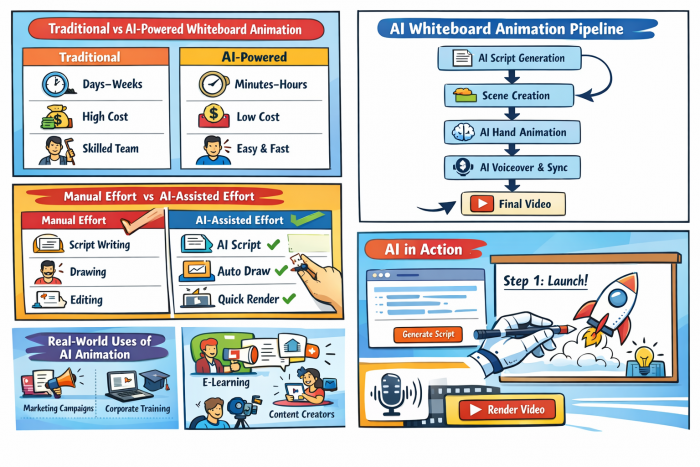
Traditional vs AI-powered whiteboard animation-
| Dimension | Traditional | AI-powered |
| Production time | Days–weeks | Minutes–hours |
| Cost per video | High | Low |
| Iteration speed | Slow | Near-instant |
| Required skills | Animation, audio, editing | Content judgment |
| Scalability | Limited | High |
Manual effort vs AI-assisted effort-
| Task | Manual Effort | AI-Assisted Effort |
| Script writing | High | Low |
| Scene planning | High | Low |
| Drawing | Very high | None |
| Audio recording | Medium–high | None |
| Editing | High | Minimal |
7. AI Whiteboard Animation Pipeline :
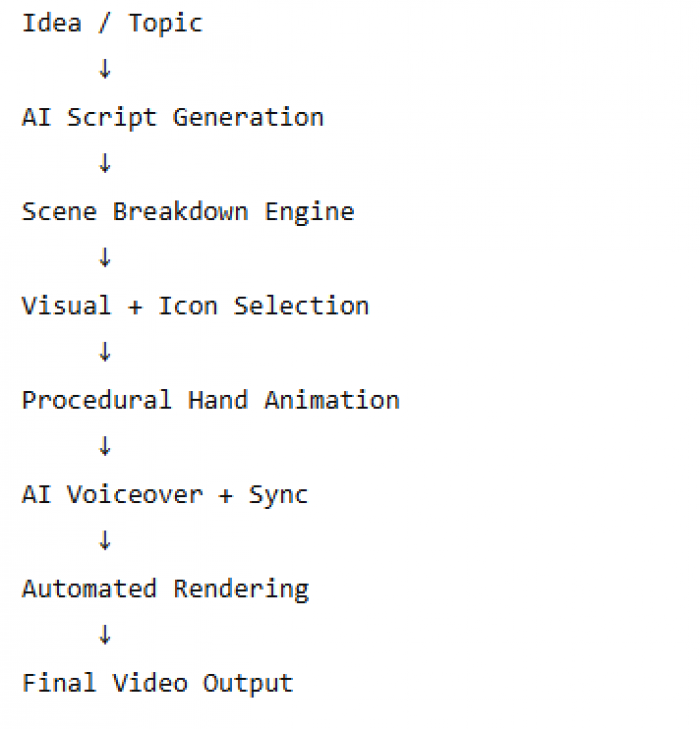
The key insight: linear manual workflows become parallel, automated systems.
8. Real-World Scenarios Where Speed Matters :
● Marketing campaigns: rapid A/B testing of explainer messages
● Internal training: updating content when policies change
● Educators: creating lesson-specific visuals on demand
● Content creators: maintaining frequent publishing schedules
● Startups: explaining products before full UI exists
Speed enables experimentation, not just efficiency.
9. Constraints and Trade-Offs :
Despite the speed gains, limitations remain:
● Visual styles can feel template-driven
● Fine-grained artistic control is limited
● Overuse leads to visual sameness
● Complex storytelling still benefits from human design
AI optimizes for clarity and speed, not originality.
10. Commercial Considerations :
From a business perspective:
● Subscription pricing lowers entry cost
● One team can produce content previously requiring vendors
● Easy localization enables global reuse
● ROI improves when videos replace repetitive human explanation
However, differentiation requires intentional branding and scripting, not automation alone.
11. Ethical and Originality Considerations :
Key risks:
● Over-reliance on templates reduces creative diversity
● AI-generated scripts may homogenize messaging
● Users may mistake speed for quality
Responsible use means treating AI as a production accelerator, not a creative substitute.
12. Why “Minutes, Not Days” Is a Meaningful Shift?
This is not just about convenience.
When creation time drops from days to minutes:
● Ideas can be tested immediately
● Communication becomes iterative
● Visual explanation becomes routine, not exceptional
Whiteboard animation shifts from a special project to a standard communication tool.
That structural change — not animation novelty — is why AI-powered whiteboard video creation matters.
Bottom line:
AI doesn’t make whiteboard animation magically better. It makes a proven, high-engagement format fast enough, cheap enough, and accessible enough to be used everywhere.
Post Comments
Be the first to post comment!