Table of Content
- What Is Careerwill and Why Login Matters
- Careerwill Login: Step-by-Step Process
- Careerwill Login Platforms
- Forgot Careerwill Password? Reset Process Explained
- What You Get After Logging In (Dashboard Features)
- Common Careerwill Login Problems (And Solutions)
- Careerwill Official Contact and Support Details
- Important Login Rules Students Should Know
- Is Careerwill Login Safe?
- Final Thoughts
Careerwill is one of India’s most widely used online learning platforms for government exam preparation, especially among aspirants of SSC, Banking, Railways, UPSC, and State-level competitive exams. With millions of students relying on it daily, login-related queries such as “How to log in?”, “Why is my account blocked?”, “How to reset password?” are extremely common.
This guide explains everything about Careerwill login, from step-by-step access to troubleshooting, device rules, features after login, and official support channel.
What Is Careerwill and Why Login Matters
Careerwill operates as a centralized learning ecosystem. Once you log in, your account becomes the gateway to:
- Live and recorded classes
- Purchased batches and subscriptions
- Mock tests and PDFs
- Performance tracking and exam updates
Without logging in, access is limited to previews only. That’s why understanding the correct login process is important, especially during live classes or exams.
Careerwill Login: Step-by-Step Process
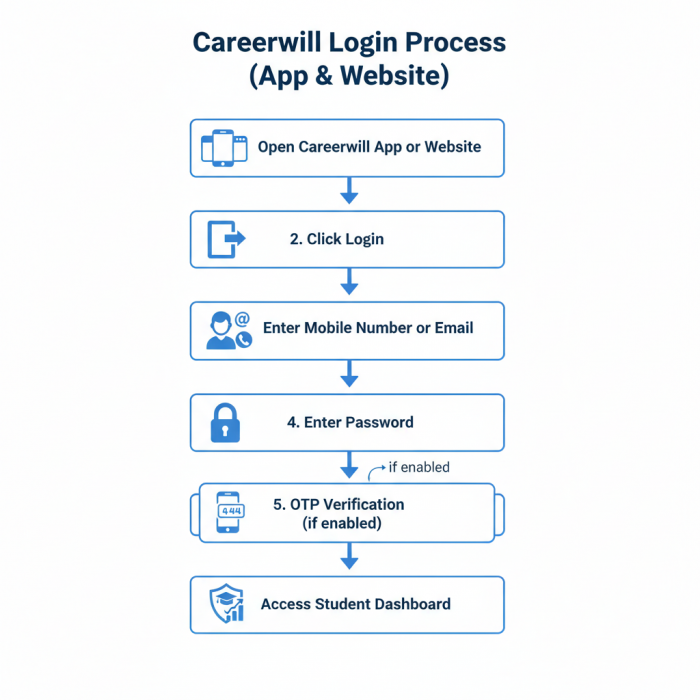
You can log in to Careerwill using either your registered mobile number or email ID.
Step 1: Open Careerwill
Visit careerwill.com (website)
Or open the Careerwill App on Android or iOS
Step 2: Click on “Login”
On the website: Top-right corner
On the app: Splash or home screen
Step 3: Enter Login Details
Registered Mobile Number or Email ID
Your Password
Step 4: Complete Verification
If OTP / 2-factor authentication is enabled, enter the OTP sent to your phone
Step 5: Sign In
Click Sign In to access your dashboard
Once logged in successfully, you’ll be redirected to your student dashboard.
Careerwill Login Platforms
Careerwill is accessible across almost all commonly used devices.
1. Android App
Available on Google Play Store
Most widely used platform
Best optimized for live classes
2. iOS App
Available on Apple App Store
Similar features as Android
Slightly limited downloads compared to Android
3. Web / Desktop Login
Login at online.careerwill.com
Works on Chrome, Safari, Firefox, Edge
Ideal for laptop or PC users
4. PC / Laptop “App” Option
No native .exe software
Users can create a Chrome Desktop Shortcut for an app-like experience
Forgot Careerwill Password? Reset Process Explained
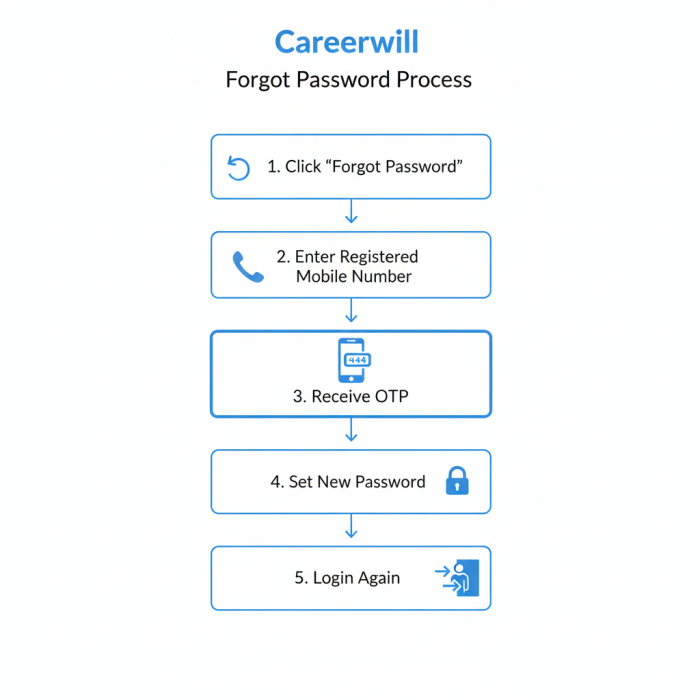
If you can’t log in because you forgot your password, follow these steps:
- Click “Forgot Password?” on the login page
- Enter your registered mobile number
- Receive an OTP via SMS
- Verify OTP and set a new password
- Log in again using updated credentials
Tip: Always use a password you can remember, frequent resets may temporarily lock your account.
What You Get After Logging In (Dashboard Features)
Once logged in, Careerwill unlocks its full learning ecosystem.
Live Classes
- Real-time classes with top educators
- Interactive doubt-solving sessions
- Timed schedules aligned with exams
My Courses / Batches
- All purchased or enrolled batches
- Subject-wise navigation
- Validity and expiry tracking
PDF Notes & Study Material
- Downloadable PDFs
- Handwritten notes from classes
- Subject-wise organization
Mock Tests & Practice Sets
- Full-length mocks
- Sectional tests
- Performance analytics
Recorded Classes
- Access recordings if you miss live sessions
- Pause, rewind, and revise anytime
Common Careerwill Login Problems (And Solutions)
1. Account Blocked / Login Limit Reached
Careerwill usually allows only one active device login
Logging in on a second device may log you out of the first
Solution:
Log out from the previous device or wait for auto-logout.
2. OTP Not Received
Check network signal
Wait 1–2 minutes
Use “Resend OTP” option
3. Password Incorrect Error
Use Forgot Password instead of repeated attempts
Too many wrong attempts may trigger a temporary block
4. App Not Opening / Stuck on Login Screen
Clear app cache (Android)
Update the app
Try web login as backup
Careerwill Official Contact and Support Details
If login issues persist, use only official support channels.
| Support Method | Details |
| Official Website | www.careerwill.com |
| Helpline Numbers | +91-7082189797 / +91-1294914295 |
| WhatsApp Support | +91-9311775205 |
| Support Email | [email protected] |
| Head Office | Mukherjee Nagar, New Delhi |
Pro-Tip: Always contact support from your registered mobile number for faster resolution.
Important Login Rules Students Should Know
One account = one device at a time
Account sharing can lead to suspension
Avoid repeated password resets
Always log out from shared/public devices
These rules are enforced to protect content and prevent misuse.
Is Careerwill Login Safe?
Careerwill uses:
- OTP verification
- Encrypted credentials
- Device-based login control
As long as you:
- Don’t share credentials
- Use official apps/sites
- Avoid third-party links
The login process is generally safe for students.
Final Thoughts
Careerwill’s login system is designed to be simple, mobile-first, and exam-oriented. While device restrictions can feel strict, they exist to protect paid content and ensure fair usage.
For students preparing for competitive exams, mastering the Careerwill login process ensures uninterrupted access to classes, tests, and study material, especially during peak exam seasons
Post Comments
Be the first to post comment!