Table of Content
- Night Before the Test: A Realistic Goth AI Scenario
- So What Exactly Is Goth AI?
- Subjects Goth AI Tries to Cover
- From Photo to Reasoning: How Goth AI Actually Works
- DeepThinking Mode: Goth AI’s “Tutor Brain”
- The All‑in‑One Study Toolbox You Notice After a Week
- Pricing: Free vs Premium – Where Does Goth AI Fit?
- What Real Students Actually Say About Goth AI
- Safety, Data, and the Parent Question
- Who Goth AI Is Perfect For (and Who It Isn’t)
- The Real Question: How Should You Use Goth AI?
- Final Verdict: Is Goth AI Worth Your Time (and Money)?
You don’t usually think of your camera as a teacher.
It’s the thing you use for selfies, lecture slides, maybe the occasional snap of the whiteboard before a teacher erases it. With Goth AI: AI Study Companion, that same camera quietly turns into something else: a private, always‑awake tutor that lives in your iPhone, waiting for you to point it at the one problem that’s making your evening miserable.
Let’s unpack what that actually feels like, not in theory, but as a study companion you might genuinely depend on.
Night Before the Test: A Realistic Goth AI Scenario
It’s 10:47 p.m.
Your math exam is tomorrow. You’ve revised most of the syllabus, but this one chapter word problems with quadratics and a couple of physics equations still feels like quicksand. There’s no teacher online, no friend available, and your parents bowed out around question three.
So you do what your future self might call obvious:
You open Goth AI, tap the camera, and aim it at the question.
The app auto‑detects the problem, crops exactly the right area, and then within a few seconds it starts walking you through the steps: isolate variables, translate the word problem into equations, apply the right formula, simplify, solve. It’s not just “x = 3.2”. It’s “here is why we did this, and here is what changes from one line to the next.”
That’s Goth AI’s pitch in one scene: your camera replaces “Sir, one last doubt?” at 10:47 p.m.
So What Exactly Is Goth AI?
Goth AI: AI Study Companion is a subject‑focused AI homework helper built specifically for students grappling with math and science problems.
It’s not a general‑purpose chatbot. It is:
● A camera‑based solver that lets you scan printed or handwritten questions to get worked‑out solutions.
● A step‑by‑step explainer for math, physics, chemistry, and biology questions, not just a final‑answer machine.
● A mini study hub with a Reading tool, Writing help, Focus Mode, and a standard Calculator, so you’re not juggling four different apps.
It runs on iPhone and other Apple devices (iPad, Apple Silicon Mac, even Apple Vision in some regions), targeting school and early college students who live inside the Apple ecosystem.
Subjects Goth AI Tries to Cover
The official listings position Goth AI as a multi‑subject companion.
Math
● Arithmetic and basic operations
● Algebra (equations, inequalities, polynomials, factoring)
● Functions and graphing
● Geometry and trigonometry
● Calculus (limits, derivatives, integrals)
● Statistics and probability
● Matrices, logic, and word problems
Science
● Physics numericals and concepts
● Chemistry equations and basic problem solving
● Biology conceptual and short‑answer‑style questions
On top of that you get tools for reading, writing, and general homework, so it’s meant to be more than a “math only” app.
Here’s a quick snapshot of how Goth AI positions itself:
| Area | What Goth AI Offers | Who Benefits |
| Math solving | Camera scan + detailed, step‑by‑step animated solutions | Students stuck in the middle of a problem |
| Science help | Physics, chemistry, biology explanations and numericals | High‑school and early college learners |
| Study toolbox | Reading simplification, Writing help, Focus Mode, Calculator | Students who want an all‑in‑one study environment |
From Photo to Reasoning: How Goth AI Actually Works
Let’s slow down the “magic trick”.
The core experience in Goth AI looks like this:
1. Scan
● Open Goth AI, choose the camera, and point it at the problem in a book, notebook, or on a screen.
● The app auto‑detects and crops the question area so you don’t waste time adjusting boxes.
2. Solve
● Goth AI reads the question and generates a full solution.
● Solutions are presented step by step, often with animated transitions from one line to the next, so you can visually track the progression.
3. Understand
● Instead of just giving “the answer”, Goth AI shows intermediate steps and reasoning, especially for algebra, calculus, and word problems.
For a quadratic equation, for example, you might see: identify coefficients → write the quadratic formula → substitute values → simplify under the square root → compute the roots. For physics, you might see: list known quantities → pick the relevant formula → plug in numbers → derive the final value.
For students who only “get it” after seeing a worked example, that structure is the main value.
DeepThinking Mode: Goth AI’s “Tutor Brain”
Almost every AI homework app promises instant solutions. Goth AI tries to go one level deeper with its DeepThinking mode.
DeepThinking is described as a smarter mode that combines multiple AI models or reasoning passes to produce more detailed, insight‑driven explanations. In practice, that means:
● More intermediate steps on complex algebra or calculus problems, instead of jumping directly from step 1 to step 4.
● Short justifications like “we differentiate both sides with respect to x because…” or “we use Pythagoras theorem here because the triangle is right‑angled.”
● Clearer breakdown of word problems into knowns, unknowns, equations, and final result.
DeepThinking mode is what makes Goth AI feel less like a one‑shot calculator and more like a patient tutor:
● You see why a particular method is being used.
● You see how each small transformation connects to the next.
If you’re a serious learner, this is the mode you’ll lean on most, especially in subjects like calculus or physics where “just the answer” is almost useless without understanding the process.
The All‑in‑One Study Toolbox You Notice After a Week
The camera and math solver are what sell the download. The extra tools are what keep Goth AI installed.
Goth AI bundles a set of study utilities under one roof:
● Reading : Helps you simplify dense text, explain complex terms, or understand passages faster.
● Writing : Supports grammar, clarity, and structure for short answers, lab write‑ups, and basic assignments.
● Focus Mode : Encourages distraction‑free study sessions so you can stay in one app, with a minimal interface tuned for study, not entertainment.
● Calculator : Handles quick calculations without leaving Goth AI or switching to another app.
Combined, they reduce friction:
● You can scan a math question, read a simplified explanation of a theory paragraph, draft a short answer, and check a calculation inside one environment.
● Fewer app switches means fewer excuses to wander into social media mid‑study.
It’s not a full learning management system, but it’s deliberately designed to be a study companion, not just a question solver.
Pricing: Free vs Premium – Where Does Goth AI Fit?
Goth AI is free to download, but runs on a freemium model with in‑app purchases for more serious usage.
Free Tier
● Access to core camera‑based solving.
● Limited number of questions you can solve per day or per time window.
● Partial access to some advanced modes/features.
Short‑Term / Weekly Premium
● Unlocks higher or near‑unlimited question limits for a week.
● Full access to features like DeepThinking and the complete toolbox.
● Designed for exam weeks or intense revision periods.
Annual Premium
● Long‑term access for the entire academic year.
● Aimed at heavy users who plan to rely on Goth AI throughout school or college.
The exact prices vary by region and currency, but the pattern is clear: Goth AI wants to be a daily study utility, not a one‑off toy.
How you decide:
● If you’re only stuck once in a while, the free plan is the safest starting point.
● If you’re using Goth AI several times a day in the run‑up to exams, a weekly or yearly premium plan can begin to feel like a cheaper, flexible cousin of extra tuition hours.
What Real Students Actually Say About Goth AI
Feature lists are one thing. How real students talk about Goth‑style solvers is another.
User feedback around Goth AI and its closely related ecosystem paints a fairly consistent picture: they call it a lifesaver, but they’re not blind to its limits.
The Love: “Lifesaver”, “Grade Saver”
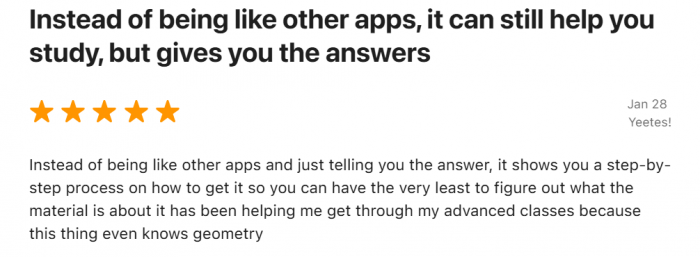
● “This app saved my grade” : Students repeatedly call it a lifesaver for nights when homework stacks up and there’s no one around to help. They describe going from piles of unsolved problems to steadily clearing backlogs by scanning and studying step‑by‑step solutions.
● Better than answer keys : A lot of praise focuses on the quality of explanations. Reviews note that it’s more useful than a textbook answer key because it doesn’t just say “42”; it shows each intermediate step in a way that finally makes sense.
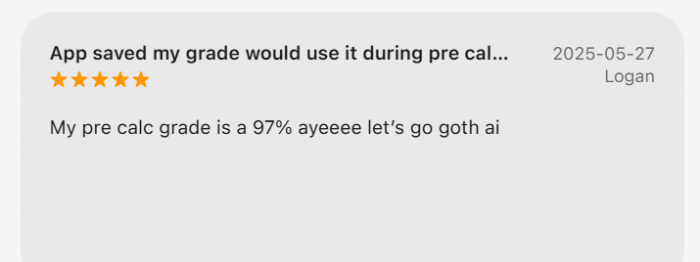
● Visible grade improvements : One user proudly mentions hitting a 97% in pre‑calculus after using the app regularly during prep, calling it essential for understanding tricky topics.
● Relief for struggling learners : For students who have long described math as “hellish,” reviews say Goth‑style study apps turned impossible homework into something they could actually work through, sometimes for the first time without constant adult supervision.
The pattern is clear: students don’t just like it they start to structure their study around it.
The Frustrations: Limits, Misreads, and Mistakes
The same users also point out where Goth‑type tools fall short.
Occasional wrong or imperfect answers
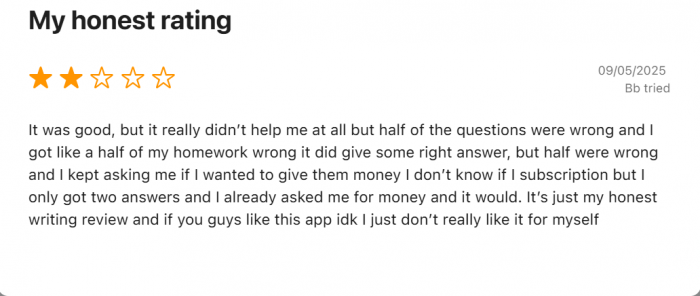
● Students note that while accuracy is generally strong, the app can still get certain questions wrong especially edge cases or tricky prompts. They advise others to treat it as a powerful helper but to double‑check high‑stakes answers.
Camera and recognition quirks
● Some complain about scanning issues: misreading poorly lit photos, confusing messy handwriting, or cropping the wrong part of a problem. This is still a camera‑and‑OCR‑driven workflow; garbage in can mean garbage out.
Free plan limits
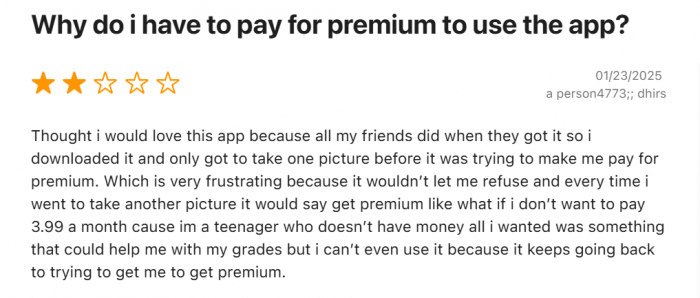
● A common frustration: the free daily question limit feels too low. Several reviewers explicitly say they’d rate the app higher if the free quota were more generous, because they hit the cap too quickly during heavy homework days.
Speed vs depth
● A few users hint that hammering the app with many questions in a row can lead to slower responses or less robust reasoning compared to more deliberate, one‑by‑one usage.
Taken together, real feedback suggests Goth AI is widely appreciated but not infallible. Students who get the most from it use it as a second pair of eyes, not as a replacement for all thinking.
Safety, Data, and the Parent Question
Any app that sits between children and their homework raises a different kind of concern: What is it doing with all this data?
The Goth AI App Store pages show that the developer may collect and link several categories of data to your identity, including:
● Usage data (how often and how you use the app)
● Identifiers (device or account identifiers)
● User content (questions and content you input)
● Diagnostics (crash reports, performance metrics)
This is fairly standard for mainstream education apps, but it has implications:
● Homework questions and study patterns may feed into analytics and product improvement.
● The app can get a sense of which features you lean on the most and when you study.
● Goth AI is not marketed as an end‑to‑end encrypted, zero‑knowledge notebook, so extremely sensitive content is better kept off any such platform.
For most families already comfortable with modern learning apps, this won’t be shocking, but it’s still wise to:
● Read the privacy section on the App Store carefully.
● Limit permissions sensibly (e.g., only allow camera access when needed).
● Talk to younger students about not pasting unrelated personal information into any AI app.
Goth AI is built as a study companion, not a data vault; treating it that way keeps expectations realistic.
Who Goth AI Is Perfect For (and Who It Isn’t)
Goth AI is powerful, but it’s not for everyone in the same way.
Ideal Users
Goth AI is a strong fit if you:
● Are a high‑school or early college student regularly stuck midway through math or physics questions.
● Learn best from worked examples with every intermediate step visible.
● Want a single app that can handle math, physics, chemistry, biology, and basic reading/writing tasks, instead of three separate tools.
● Are heading into exams and need a fast way to verify your methods and final answers late at night.
● Are a parent who wants something between “no help” and “full private tuition” for everyday homework doubts.
Not‑So‑Ideal Users
You might want to skip or only lightly rely on Goth AI if you:
● Use only Android devices and don’t have access to an iPhone, iPad, or Mac—Goth AI is currently focused on Apple’s ecosystem.
● Already have strong teacher support and a system that works well for you without extra apps.
● Tend to take shortcuts and know you’ll be tempted to scan entire worksheets without attempting any question on your own.
● Need deep, long‑form essay writing, coding help, or niche advanced subjects far beyond the standard school syllabus.
Goth AI is excellent at amplifying good study habits and just as good at amplifying bad ones if you let it.
The Real Question: How Should You Use Goth AI?
The key decision isn’t “Should I install Goth AI?”
It’s “What role will Goth AI play in my study routine?”
Used badly, it becomes a homework‑copying machine with a friendly interface.
Used well, it’s a quiet, patient explainer for the exact moment you’re stuck.
A healthy pattern looks like this:
1. Attempt the question on your own first.
2. When you’re stuck, open Goth AI and scan the problem.
3. Compare your steps with the app’s steps where did you diverge?
4. Use DeepThinking mode when you need more than a quick fix, especially for word problems and calculus.
5. Treat the app as a second tutor whose explanations you still check against class notes and teacher feedback.
This keeps you in charge of the learning process instead of outsourcing it entirely to an algorithm.
Final Verdict: Is Goth AI Worth Your Time (and Money)?
Goth AI: AI Study Companion is what happens when a camera, a smart calculator, and a study guide quietly merge into one app. It doesn’t just solve; it explains provided you’re willing to meet it halfway.
If you’re a student who has ever stared at a problem thinking, “If someone just showed me one full worked example, I’d finally get it,” then Goth AI is absolutely worth downloading on the free tier and using seriously for a week.
If you realise you’re opening it daily during exam season, that’s the moment premium plans start to look less like “another subscription” and more like a flexible, on‑demand tutor you can carry in your pocket.
Goth AI won’t magically turn you into a topper.
But it can, very quietly, turn those 10:47 p.m. panic moments into something different: one more chance to understand the problem before the exam paper lands on your desk and that’s often the difference that matters.
Post Comments
Be the first to post comment!
Related Articles