After actually using Linkello for client calls, quick internal check‑ins, and even a small teleconsultation demo, it stopped feeling like “just another Zoom alternative” and started feeling like a pop‑up room that appears in my browser whenever I need to talk, then disappears without leaving a heavy footprint. I’m not looking at it as a full meeting platform anymore, but as a deliberately lightweight, privacy‑conscious way to get people into a secure call with as little friction as possible.
Why I Tried Linkello in the First Place
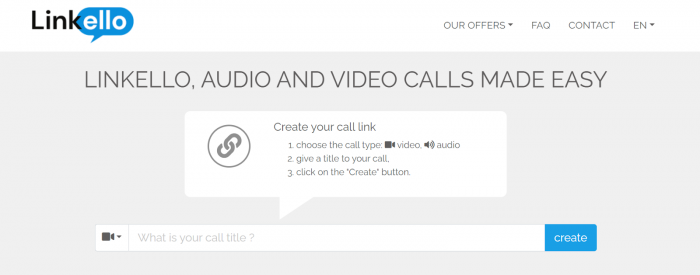
My trigger to test Linkello was simple: I was tired of sending Zoom/Meet links to non‑tech clients and then spending the first five minutes of every call on “Can you install the app?”, “No, click that other button,” and “Yes, you have to sign in.” I wanted a tool where the mental model was: open browser → get link → send link → talk.
On paper, Linkello promised exactly that:
● Browser‑only, no apps to install.
● No mandatory account creation for basic calls.
● Encrypted communication with a strong privacy posture, especially for EU users.
Once I started using it, I realized that promise is mostly true but only if you accept its limitations.
First Call: How Linkello Actually Feels to Use
Here’s what my first real‑world call looked like from my side as the host:
1. I went to the website in Chrome.
2. Chose whether I wanted audio‑only or video and gave the room a simple name.
3. Linkello generated a unique URL instantly.
4. I dropped that URL into a WhatsApp chat with the client.
5. They clicked, allowed their mic and camera, and they were in—no registration, no download, no “create an account” detour.
From a user perspective, this is where Linkello shines. Compared to the usual “please download the app, log in, update it, and then find the meeting code,” it felt almost too easy. My client literally said, “That’s it?”
On desktop (Chrome/Edge) and on mobile browsers, the experience has been consistent for me:
● It loads fast.
● Permissions are clear.
● There’s no cluttered dashboard or complicated layout.
The UI is minimal enough that I’ve never had to explain where the mic, camera, or hang‑up button is. For non‑technical clients, that’s a big deal.
Call Quality: Great for 1:1, Average for Groups
Once we were inside the call, video and audio quality were more than fine for one‑on‑one conversations. On a normal home broadband connection, I got:
● Clean, stable HD video.
● Audio that rarely glitched once the call settled.
For my typical use—1:1 client calls and small collaborations, Linkello felt smooth and fast. It doesn’t feel “fancy,” but it doesn’t feel cheap either.
Where I started to feel the strain was when I pushed it beyond its comfort zone:
● In a small three‑person call, it still worked, but I began to notice occasional lag.
● Anything beyond that, especially if someone had weak internet, felt more fragile than what I’m used to with Zoom or Teams.
So from a user perspective, I now mentally file Linkello under:
● “Perfectly fine” for 1:1 and tiny groups.
● “Use with caution” if you’re planning anything that resembles a mini‑webinar.
Everyday Features: Enough for Simple Workflows
Inside a typical Linkello room, I had access to the basics I expect from a modern calling tool:
● Audio/video controls: Straightforward mute/unmute and camera toggles.
● Screen sharing: Once I moved onto the right tiers/browsers, I could share my screen to walk clients through slides, dashboards, or live website edits.
● Chat: A simple text chat window for dropping links, quick comments, or small notes.
● File exchange: The ability to send files inside the room instead of running back to email.
For my day‑to‑day, this was enough to run:
● Strategy calls with clients.
● Quick “can you see this?” walkthroughs of websites and analytics.
● Short training sessions with one or two people.
But the moment I tried to treat it like a full‑blown collaboration suite, the gaps showed:
● No deep whiteboards or fancy interactive canvases.
● No advanced webinar features like polls, Q&A modules, or breakout rooms.
● Recording is not a given in basic usage, you have to move into higher‑tier options and even then it doesn’t feel as mature as dedicated webinar platforms.
So in practice, I’ve stopped expecting Linkello to be my “do everything” meeting platform. I use it for what it’s good at: quick, focused calls where the friction of joining matters more than flashy features.
Security and Privacy: How It Feels as a Host
One of the reasons I kept Linkello in my stack is its security and privacy posture. From a user’s point of view, here’s what stands out:
● I’m not asking clients to install software from app stores or download random executables. Everything runs in the browser, which already feels safer to many people.
● The product leans heavily on encryption and a privacy‑forward narrative, especially for European users and healthcare contexts.
If you work with sensitive topics, you know how often clients ask “Is this secure?” or “Where is this hosted?”. With Linkello, I feel comfortable saying:
● It’s built around encrypted communications.
● It’s clearly targeting GDPR‑aligned use.
● There’s even a specialized telehealth version designed for doctor–patient calls.
That doesn’t automatically make it your perfect compliance tool, but it’s a far better story than “please download this random client and hope it’s fine.”
Linkello Office: When I Needed Something More Persistent
Once I moved from “testing” to “actually using this in my workflow,” I quickly hit a practical question: what happens when I want to reuse the same room with the same client, or I don’t want links to expire?
That’s where Linkello Office comes in. From my hands‑on experience and research, Office effectively upgrades Linkello from:
● A disposable link room → to
● A repeatable, branded communication channel for your business.
The key differences I noticed and cared about:
● Longer or unlimited link lifespans: No more “sorry, that link expired, here’s a new one.” Perfect for ongoing projects with the same client.
● No time pressure: The “no hard limit on communication time” means I don’t stress about calls running long.
● Branding: Being able to align the room visuals with my brand is subtle but useful when you want the experience to feel more professional.
● Extra controls like recording and more advanced features on higher tiers: Good enough for simple documentation, even if it’s not as robust as dedicated webinar tools.
For me, Office is what makes Linkello viable as part of a serious client workflow, rather than just a one‑off “nice little tool I tried once.”
A Quick Note on Linkello Medical
Even though I’m not a doctor, I did test Linkello Medical from the perspective of “could this actually work for teleconsultations?”
From what I saw and tested:
● The join flow on mobile browsers (Safari on iOS, Chrome/Firefox on Android) is just as simple.
● The sessions feel as secure and private as the regular version, but the branding and positioning clearly target medical use.
● It’s designed to be integrated into clinic systems and healthcare platforms, so doctors can send video‑consult links without reinventing the wheel.
If I were writing for healthcare professionals, I’d say: it feels like a focused, secure video layer you can plug into your telehealth setup rather than a full EMR/telemedicine platform.
Integrations and API: My Take as a Power User
As someone who cares about workflows, I did look at Linkello’s integration story. It goes in two directions:
● For regular users like me, there aren’t tons of plug‑and‑play integrations with Google Calendar, Outlook, Slack, CRMs, etc. This is a clear weakness if you live inside those ecosystems and want everything to sync automatically.
● For developers and product teams, the API side is more interesting: you can programmatically create rooms and embed video into your own SaaS or medical platform.
So from my perspective:
● If you’re a solo consultant or small agency, you probably won’t miss integrations too much, you just generate a link and drop it into email or your project tools manually.
● If you’re an enterprise that expects deep calendar and productivity‑suite integration out of the box, you’ll likely find Linkello too isolated.
Pricing: How It Feels Compared to Big Names
Pricing around video tools is messy in general, and Linkello is no exception. What I’ve noticed:
● It doesn’t follow the typical “here’s a super generous freemium tier” pattern.
● The Office plans are relatively affordable when you compare them to the usual 9–15 USD per month range many video platforms start at.
From a user standpoint, my mental summary is:
● If most of your work is 1:1 and small‑group calls, and you just want low‑friction, encrypted, browser‑based rooms, the Office plans feel fairly priced for what you get.
● If you’re expecting all the bells and whistles of a big suite—recording, analytics, webinar tools, integrations baked into that price, you’ll get disappointed fast.
I personally see Linkello’s value not in “price per feature” but in “price for the friction it removes.”
What I Loved (And Why I Still Use It)
After using Linkello in real client work, here’s what keeps me coming back:
● The join experience: Clients who hate tech don’t complain. That alone is priceless.
● The clean interface: No one has ever asked me “Where is the mute button?” or “How do I hang up?”
● The privacy‑forward story: Especially for European clients and more sensitive conversations, it feels like a responsible choice.
● The Office upgrade path: Persistent, branded rooms made it feel like a part of my stack, not a random link generator.
If I had to rate it for my typical use case (1:1 calls, micro‑team check‑ins):
● Simplicity: 9/10
● Small‑call quality: 8/10
● Privacy and footprint: 9/10
Where It Frustrated Me (And Why I Still Keep Zoom/Meet Around)
It wouldn’t be an honest user review if I didn’t admit where Linkello falls short for me:
● Group calls: For anything beyond a tiny group, I just trust Zoom/Meet more in terms of stability and features.
● Advanced collaboration: No proper whiteboards, breakout rooms, or structured webinar tools means I can’t run serious workshops or training on it.
● Integrations: I still need my calendar, CRM, and project tools to talk to my meeting platform. Linkello doesn’t compete well there.
● Recording and analytics: These exist in some form on higher tiers, but they don’t feel like the core of the product the way they do on big platforms.
So in my real life, Linkello hasn’t replaced Zoom or Google Meet—it sits next to them as my “low‑friction, privacy‑friendly pop‑up room” for specific scenarios.
Who I Think Linkello Is Really For
After living with it for a while, here’s my honest take on who should seriously consider using Linkello:
You should use Linkello as a primary tool if:
● Most of your calls are 1:1 or very small groups.
● You work with clients or patients who resist installing apps or creating accounts.
● Privacy and browser‑only access matter more to you than deep collaboration features.
● You want a simple Office or Medical layer to turn those calls into a consistent, branded experience.
You should keep Linkello as a backup/secondary option if:
● Your team lives inside Zoom/Teams/Meet but often needs “one quick link” for external people who can’t or won’t use those tools.
You probably shouldn’t rely on Linkello as your main platform if:
● You run large internal meetings, webinars, or trainings.
● You need strong integrations with calendars, CRM, project management, or LMS tools.
● You depend heavily on built‑in recording, analytics, and post‑call workflows.
My Verdict After Actually Using Linkello
If I had to summarize my experience in one line, it would be this:
Linkello is not my “meeting platform”; it’s my pop‑up room, the tool I reach for when I want a secure, browser‑based call that just works, especially for people who hate tech.
It’s not a Zoom killer, and it doesn’t try to be. It’s a focused, privacy‑conscious, low‑friction way to get two (or a few) people talking without making them jump through hoops. For freelancers, small teams, and telehealth scenarios that live in that world, it absolutely deserves a spot in the stack. For large, complex organizations that need a feature‑stuffed meeting universe, it’s better viewed as a complementary shortcut than a replacement.
Post Comments
Be the first to post comment!
Related Articles




Table of Content
- Why I Tried Linkello in the First Place
- First Call: How Linkello Actually Feels to Use
- Call Quality: Great for 1:1, Average for Groups
- Everyday Features: Enough for Simple Workflows
- Security and Privacy: How It Feels as a Host
- Linkello Office: When I Needed Something More Persistent
- A Quick Note on Linkello Medical
- Integrations and API: My Take as a Power User
- Pricing: How It Feels Compared to Big Names
- What I Loved (And Why I Still Use It)
- Where It Frustrated Me (And Why I Still Keep Zoom/Meet Around)
- Who I Think Linkello Is Really For
- My Verdict After Actually Using Linkello