Table of Content
- What exactly is Knowt : The Big Picture
- Student Experience: Learning With AI on Tap
- Teacher Experience: From Blank Page to Full Assessment
- Plans and Pricing: Capability Tiers, Not Just “Free vs Paid”
- Performance, Accuracy, and Reliability
- Strengths and Limitations: The Real Trade‑Offs
- Knowt vs Quizlet vs Anki: Where It Really Fits
- Classroom and Institutional Readiness
- Real User Reviews: What Students and Teachers Actually Say
- Final Verdict: Who Should Seriously Consider Knowt?
Knowt feels less like a “flashcard app” and more like a full AI‑powered learning system that tries to handle everything from raw PDFs to classroom‑level assessments. To do it justice, you have to look at it through multiple lenses: student, teacher, school, pricing, performance, and competition.
What exactly is Knowt : The Big Picture
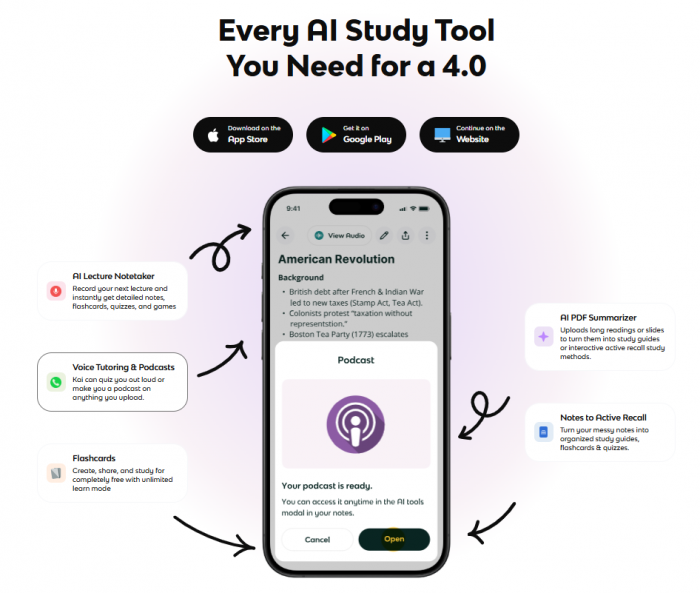
Knowt positions itself as an AI‑first study and teaching platform that turns unstructured learning content into structured study and assessment workflows. At a high level, it covers four layers: you feed it content, it transforms that content into learning objects, you use those to study or teach, and then it reports back on how learning is going.
Instead of living in one narrow slice (like “flashcards only” or “quizzes only”), Knowt straddles note‑to‑card conversion, practice modes, AI tutoring, teacher assessment tools, and analytics.
Who Knowt Is Aimed At
Knowt serves three overlapping audiences.
1. Students use it to turn messy PDFs, notes, and lecture materials into flashcards, summaries, and practice tests for exam prep.
2. Teachers use it as an AI assistant for creating assessments, tracking progress, and structuring safe AI use in the classroom.
3. Schools and departments explore it as a layer that boosts teacher productivity and adds AI capabilities on top of existing LMS setups.
Student Experience: Learning With AI on Tap
Content Ingestion: What You Can Feed Knowt
For students, everything begins with the content they already have lying around: PDF chapters, exported slide decks, typed class notes, and recorded lectures or certain online videos. Knowt’s engine ingests these inputs and produces structured outputs summaries, notes, flashcards, and draft practice questions that mirror the source material.
This step removes the classic “blank page” friction. Instead of spending hours converting lectures into cards, you get a usable study kit almost immediately and can spend your effort editing and prioritizing rather than authoring from scratch.
Study Modes: How You Actually Revise
Once content is converted, Knowt offers a set of familiar study modes. Flashcards let you flip through concepts in the classic front–back format, while Learn mode walks you through material until you can reliably answer it. Test and quiz modes turn your cards into mini‑exams with mixed question types, and matching or typing activities add variety so you’re not just passively flipping.
Behind the scenes, a spaced‑repetition system tracks which items you’ve seen and when to resurface them, so older concepts pop up again right before you forget them. Unlike deep SRS tools such as Anki, Knowt keeps the algorithm hidden and opts for sensible defaults, which makes it more approachable for students who want smart repetition without configuration work.
Kai, the AI Tutor: Turning Static Notes Into Dialogue
Kai is Knowt’s built‑in AI tutor and the heart of its “AI on tap” experience. Instead of only flipping cards, you can ask why an answer is wrong, request a step‑by‑step explanation of a concept, or have complex paragraphs from an uploaded PDF rephrased in simpler language with examples.
Because Kai is aware of your uploaded materials, it explains things within the context of your own notes, slides, and readings rather than offering random generic answers. On higher‑tier plans, it can also quiz you conversationally and generate audio‑style explanations, turning dense content into more accessible, podcast‑like study sessions.
Cross‑Platform Study: Web and Mobile in Sync
Knowt is available on the web, iOS, and Android, and the cross‑platform story is a big part of its appeal. Heavy tasks like uploading PDFs or creating large sets feel most natural on the web, while the mobile apps are tuned for short, frequent sessions between classes or on commutes.
Sync keeps cards, progress, and analytics aligned across devices, so you can upload on a laptop in the morning and review on your phone throughout the day without extra management. This makes it easier to break studying into smaller, more sustainable chunks without losing track of where you left off.
Teacher Experience: From Blank Page to Full Assessment
Assessment Generator: From Notes to Quizzes
On the teacher side, the same AI capabilities are pointed at the hardest parts of planning and assessment design. Teachers can upload unit outlines, lesson notes, slides, or textbook excerpts and have Knowt generate quizzes, tests, exit tickets, and bell‑ringer questions aligned with that material.
The system can produce different question types and difficulty levels, effectively building a question bank that can be reused across classes and terms. Instead of spending evenings drafting every item by hand, teachers start from AI‑generated drafts and refine them.
Rubrics and Performance Tasks: Beyond Multiple Choice
Knowt also helps with more open‑ended assessment. Teachers can ask the AI to generate rubrics for projects or essays and to propose performance tasks that require application and reasoning rather than mere recall.
These tasks can be aligned to specific standards or learning objectives, and teachers remain free to adjust criteria, weightings, and wording to match their own expectations. In practice, this shifts the cognitive load from drafting everything to reviewing and customizing.
Auto‑Grading and Analytics: Seeing Where Students Struggle
Once students complete assessments, Knowt’s auto‑grading handles objective questions and feeds the results into dashboards. Teachers can see overall class performance, dig into individual student results, identify which questions caused the most trouble, and track how mastery develops over time.
Analytics can also be aligned to standards, so teachers can quickly see which learning goals may need revisiting. The goal isn’t just to save time grading, but to make data‑informed decisions about instruction.
Monitored AI Chats: Safe AI Use in Class
AI in the classroom raises obvious concerns about safety and academic integrity. Knowt addresses this with monitored AI chat activities. Teachers define the scope of the activity, the content it draws on, and the kinds of questions students are expected to ask, then students interact with Kai within those boundaries.
Transcripts and controls let teachers review how AI was used, ensuring that the technology supports learning objectives rather than undermining them. This structure helps schools integrate AI into lessons without losing oversight.
Plans and Pricing: Capability Tiers, Not Just “Free vs Paid”
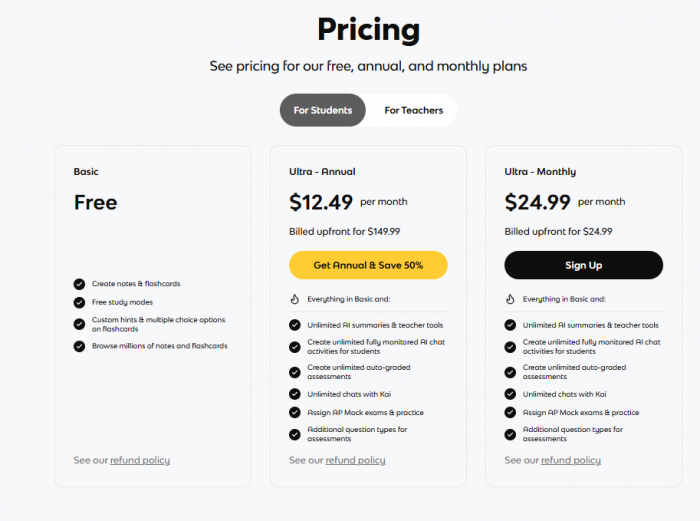
Student Plans: From Free to Ultra
For students, Knowt’s pricing is best seen as a ladder of capabilities.
Free/Basic offers unlimited flashcards, core study modes (Learn, Test), community sets, and limited AI usage. It’s strong enough for most students, especially if they combine automated tools with manual creation.
Plus plans increase AI limits, reduce ads, and add useful features, making daily studying smoother for regular users who use AI often but not heavily.
Ultra plans provide near-unlimited AI, full access to advanced tools, and complete use of Kai, turning Knowt into a fully AI-driven study system.
Teacher and School Plans: Scaling AI in the Classroom
Teachers and schools have their own tiers that mirror this structure.
Entry‑level or trial offerings let teachers experiment with the assessment generator, basic analytics, and limited AI interactions in a few classes. Higher‑tier teacher plans provide more generous AI quotas, full access to the assessment suite, richer dashboards, and all monitored AI‑chat capabilities.
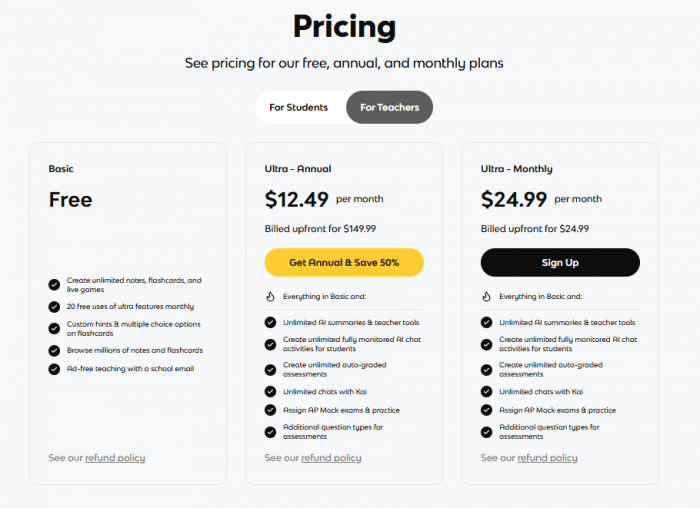
For departments or schools, licensing at the top levels essentially turns Knowt into a shared infrastructure layer for assessments and AI‑guided learning. Exact prices and quotas vary by region and evolve over time, so any article should nudge readers to confirm current details on the official site.
Performance, Accuracy, and Reliability
Speed and Responsiveness: From Upload to Usable Material
Knowt feels fast in the ways that matter for adoption. Uploading a typical PDF chapter or set of notes and getting back summaries, flashcards, and draft questions usually happens within seconds to about a minute. This responsiveness lowers the barrier to trying multiple documents and encourages students and teachers to iterate.
The apps themselves are generally responsive on both web and mobile, with smooth navigation between sets and modes. That combination fast AI output and snappy UI helps the platform feel like a natural part of the study routine rather than a slow side tool.
AI Quality: Useful Drafts, Not Perfect Answers
As with all LLM‑based systems, Knowt’s AI is very good at generating structured drafts but not infallible. Summaries typically capture main ideas, but deep technical nuance or very ambiguous text can be flattened or partially misinterpreted. Flashcards are usually on point but sometimes need refining for precision or emphasis, especially in specialized subjects.
Practice questions tend to align well with the source material, but may occasionally choose less important details or word things awkwardly. The best practice both for students and teachers is to treat AI output as a strong first draft to edit and approve, not as a final source of truth.
Stability and UX: Mature but Still Evolving
Most recent usage reports and reviews highlight solid reliability: sync works, sets save correctly, and the core experiences on web and mobile are stable. Rapid feature growth, however, means the interface can feel dense at times, with occasional UI clutter or minor glitches that reflect a fast‑moving product.
For everyday users, these issues are typically annoyances rather than deal‑breakers, but they’re worth mentioning in any honest review.
Strengths and Limitations: The Real Trade‑Offs
Where Knowt Clearly Excels
Knowt’s biggest win is time. Students save hours by having AI convert notes, PDFs, and lectures into structured learning resources, and teachers save prep time and grading effort with the assessment generator and dashboards. The free tier is genuinely capable, with unlimited flashcards and strong study modes, making Knowt one of the more generous options in its category right now.
The combination of content ingestion, multiple study modes, AI tutoring, and teacher tools under one roof gives it a breadth that most competitors do not match.
Where You Need to Be Careful
The most important limitation is AI dependence. Because Knowt leans heavily on generative models, students and teachers must still verify and adjust output, especially for high‑stakes exams or official assessments. Power users who want full control over spaced‑repetition settings and plugins may find Knowt restrictive compared with tools like Anki.
Heavy AI use also pushes you into paid tiers quickly; while the free plan is strong, it is not designed for unlimited AI usage. And on the teacher side, the richness of the platform means onboarding is non‑trivial schools should expect a learning curve and plan for training.
Knowt vs Quizlet vs Anki: Where It Really Fits
Comparative Roles: Library, Framework, Factory
To really place Knowt in the ecosystem, it helps to compare it directly to Quizlet and Anki.
Quizlet acts as a huge library of public sets: you search, pick a deck, and start studying with familiar modes. It’s fantastic for quick, low‑effort revision but offers less automation for turning your own materials into structured content, and some advanced features are increasingly paywalled.
Anki is a customizable spaced‑repetition framework: you define card types, tune intervals, and leverage plugins to build a highly tailored memory system. It’s unmatched for long‑term retention and serious exam prep but demands significant manual setup and content creation.
Knowt behaves like a factory that takes your raw learning inputs and manufactures flashcards, notes, quizzes, and AI‑guided practice from them. It cares less about public libraries or extreme configurability and more about speed and integration.
A quick table makes the roles clear:
| Tool | Core identity | Best for |
| Knowt | AI‑native study and assessment engine. | Students & teachers with lots of raw content and little time. |
| Quizlet | Massive shared deck library. | Casual learners and quick, one‑off revision. |
| Anki | Highly tunable SRS framework. | Power users and long‑term, high‑stakes learning. |
Classroom and Institutional Readiness
Safety, Policy, and Practical Rollout
For schools and departments, the question is not just “Is this powerful?” but “Can we adopt this safely and sustainably?”. Knowt’s monitored AI chat, teacher‑defined activities, and content‑anchored AI help address safety and academic integrity concerns by keeping AI usage structured and visible.
Institutions still need to examine privacy policies, data handling, and compliance with local regulations before large‑scale adoption. Best practice is to start with pilots in a few classes, collect feedback, and then invest in training so teachers understand both what the platform can do and where human judgment must remain central.
Real User Reviews: What Students and Teachers Actually Say
What Happy Users Love
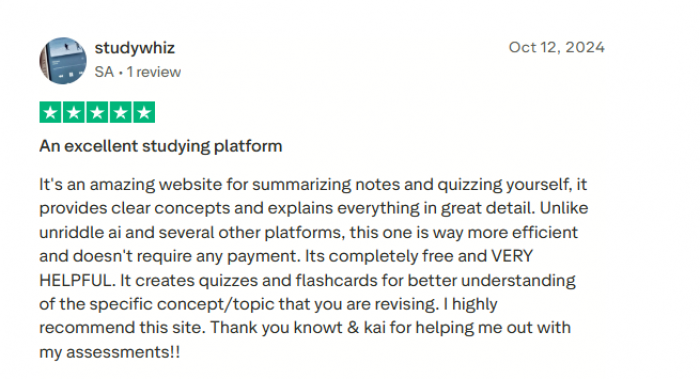
The most positive reviews consistently focus on three things: time saved, easy transition from Quizlet, and the value of AI features on the free or basic paid plans. Several students mention that Knowt “replaced Quizlet easily and for free” and praise the ability to take notes and then let AI turn those into flashcards without extra work. Others emphasise that being able to upload notes or AP study material and get instant flashcards and study guides “made reviewing all the material so much easier,” especially for standardized tests and AP subjects.
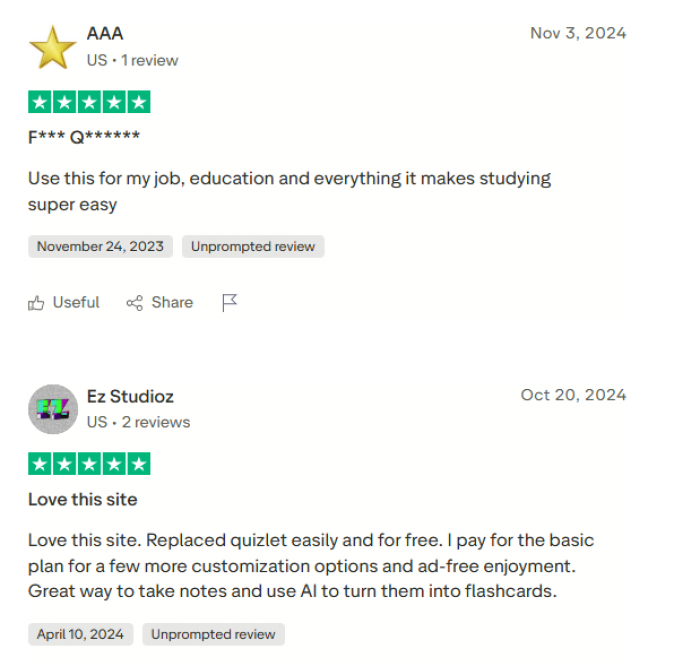
Users who pay for entry‑level plans often point out that the ad‑free experience plus a bit more customization and AI capacity feels reasonably priced compared with trying to piece together multiple tools. Some also mention that when subscription issues did occur, customer support resolved them cleanly, which they treat as a positive signal about the team.
What Frustrated Users Complain About
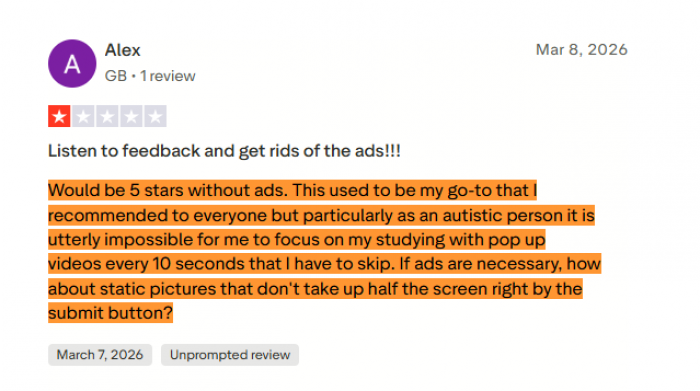
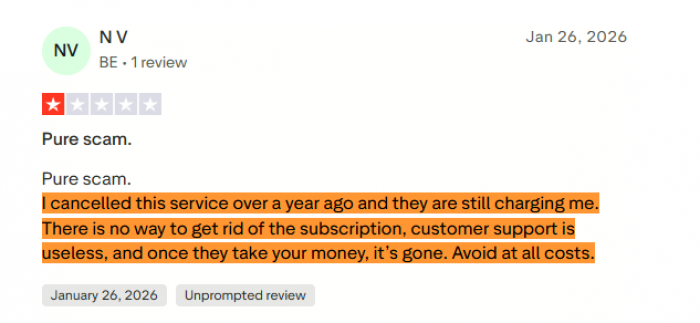
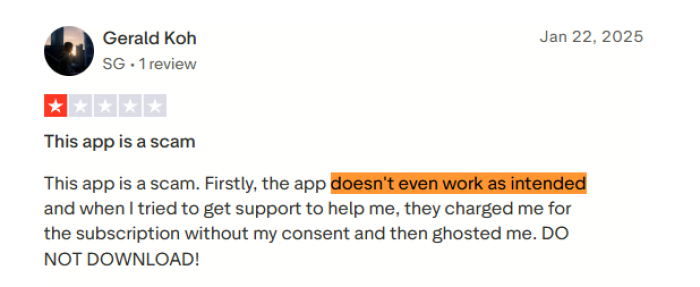
Negative Trustpilot reviews cluster around three themes: intrusive ads in the free version, subscription/billing problems, and technical issues with the product itself.
Ads are a recurring sore point. Several users complain that on the free tier, ads can be “distracting” and in some cases even appear over key buttons such as the X/checkmark area during flashcards, making it harder to submit answers. For students who are already stressed about grades, having moving ads covering controls is perceived as actively harmful to the study experience.
Billing and support are the second big issue. A few users claim they cancelled their subscription yet “they are still charging me,” describing the service as a “pure scam” or saying there was “no way to get rid of the subscription” and that support “ghosted” them after charging. These experiences are not universal, but they are severe enough that they stand out strongly in the review feed.
On the technical side, some reviewers say their saved sets were deleted or that the app “doesn’t even work as intended,” leading to accusations that it is “a waste of time” or “completely paid” and not worth the trouble. Complaints also mention AI inaccuracies (e.g., written‑answer AI giving wrong answers) and quiz writing modes that require exact wording rather than idea‑level correctness, which can frustrate users who feel they understand the concept but still get marked wrong.
Balanced Takeaways
If you blend these real‑world reviews with the product’s feature set, a clear pattern emerges: Knowt delivers substantial value for many students as a Quizlet alternative with powerful AI flashcard generation, but the free tier’s ad experience, occasional glitches, and some billing disputes drag down its public ratings. For teachers and heavy users, the subscription tiers unlock a smoother, ad‑free experience and more AI capacity, yet it becomes crucial to manage subscriptions carefully and keep an eye on automated renewals.
Final Verdict: Who Should Seriously Consider Knowt?
Taken as a whole, Knowt is one of the most rounded AI‑native learning platforms available, especially for people whose learning lives are dominated by PDFs, slides, notes, and constant assessment demands.
Students who struggle most with turning raw materials into study‑ready content stand to gain the most; for them, the free tier alone is a strong reason to switch from more restrictive tools, with paid plans available when AI usage becomes central to their workflow. Teachers who lean into the assessment generator, rubrics, monitored AI chats, and analytics can reclaim significant time and gain deeper insight into how their classes are really learning.
Power users who crave granular SRS control may still prefer Anki, and anyone using Knowt for high‑stakes contexts must remain vigilant about checking AI‑generated content. But if your biggest pain points are time, organization, and the cognitive cost of “starting”, Knowt offers one of the most compelling, end‑to‑end solutions on the market right now.
Post Comments
Be the first to post comment!
Related Articles