I didn’t go into LensGo AI expecting to be impressed. Tools that promise “AI animation” often end up producing jittery clips that look cool for five seconds and then fall apart. So when I uploaded my first image, my expectations were modest at best. I was mainly curious whether it would feel usable or just another flashy demo.
What surprised me was how approachable the whole process felt. I didn’t need to understand animation timelines or motion curves. I uploaded an image, chose a style, waited a bit—and suddenly I had a short animated clip that actually looked intentional. Not perfect, but far better than I expected from a browser-based AI tool.
LensGo AI feels like it’s built for creators who want movement without mastering animation. And once you realize that, the experience makes much more sense.
Official website: https://ailensgo.com/
Why Creators Are Playing With It
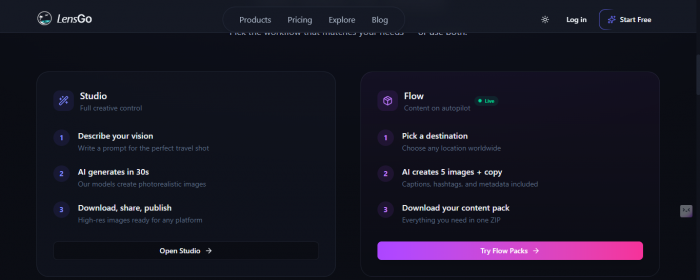
LensGo AI is an AI image-to-video and animation platform that focuses heavily on anime-style motion and stylized visuals. Instead of creating videos from scratch, it works best when you already have an image and want to bring it to life with subtle motion, expressions, or animated effects.
You don’t need animation experience. You don’t need editing software. LensGo AI handles the motion generation for you, which is both exciting and limiting at the same time. It’s exciting because results come fast. It’s limiting because you don’t get deep control over how things move.
From my experience, LensGo AI shines when you treat it like a creative enhancer rather than a full animation studio.
Evaluation: How LensGo AI Performs Against Practical Standards
After testing LensGo AI with different images and styles, it becomes clear that this tool is designed more for creative motion experiments than for precision animation work. The experience heavily depends on the quality of the input image and the style chosen.
| What Was Evaluated | How LensGo AI Performed in Practice | Rating |
| Best Use Case | Works best for image-to-video animation, especially anime-style visuals and short animated clips. | ⭐⭐⭐⭐☆ |
| Ease of Use | The workflow is simple enough for beginners. Uploading an image and choosing a style feels straightforward. | ⭐⭐⭐⭐☆ |
| Output Quality | The results often look stylized and visually appealing, but quality can vary from one generation to another. | ⭐⭐⭐☆ |
| Control Over Motion | Most of the animation is handled automatically. There’s little control over how specific movements play out. | ⭐⭐☆☆☆ |
| Processing Speed | Generation times are reasonable, though not instant somewhat around 30 sec - 1 minute | ⭐⭐⭐☆ |
| Consistency of Results | Animations change noticeably depending on image clarity, lighting, and subject positioning. | ⭐⭐⭐☆ |
| Editing After Generation | Once the video is generated, there’s very limited room to refine or edit the animation further. | ⭐⭐☆☆☆ |
Pricing: Is LensGo AI Worth Paying For?

LensGo AI typically follows a freemium-style model, where you can experiment with basic features before committing. Free usage is enough to understand the tool, but more frequent generation or higher-quality outputs usually require a paid plan.
Is it worth paying? That depends on your use case. If you’re a casual creator making short clips or experimenting with AI animation, the pricing can feel reasonable. If you’re looking for professional animation tools with full control, LensGo AI won’t replace that—and paying won’t change those limitations.
What Real Users Are Saying About LensGo AI
Looking through user discussions and feedback around LensGo AI, there’s a fairly consistent theme. Many users are impressed by how quickly they can generate animated content without animation skills. The anime-style motion, in particular, gets a lot of praise for looking expressive and social-media-ready.
At the same time, users often mention that control is limited. If the AI chooses an odd motion or expression, there’s usually no easy way to correct it without regenerating the clip. Some users also note that results can feel repetitive across different images, especially when using the same style presets.
Overall sentiment suggests LensGo AI is fun, visually appealing, and accessible—but not designed for precision animation work.
Pros and Cons: The Fun Parts and the Frustrations
| Pros | Cons |
| Very easy to use, even for first-time users with no animation background | Limited control over motion, facial expressions, and movement details |
| Anime-style animations look visually appealing with the right images | Results become inconsistent when images are complex or poorly lit |
| Great for short social media clips and creative experiments | Fixing mistakes usually requires regenerating the entire animation |
| No animation or video-editing skills required | Not suitable for long-form or professional animation projects |
| Performs best with clean, high-quality, front-facing images | Very limited editing options once the video is generated |
My Verdict: Honest Thoughts After Using LensGo AI
After spending time with LensGo AI, I see it as a tool that’s more about creative fun than creative control. I genuinely enjoyed how quickly static images turned into animated clips, and some results looked surprisingly expressive. But I also ran into moments where the AI made choices I couldn’t fix without starting over.
LensGo AI works best for creators who want fast, stylized motion without learning animation software. It’s not a professional animation platform, and it doesn’t try to be one. If you go in with that mindset, it can be a very enjoyable tool. If you expect precision and deep customization, you’ll probably feel constrained.
Post Comments
Be the first to post comment!
Related Articles

When Automation Enters Public Safety Rulemaking
Davis Hopkins . Feb 25, 2026
10 Best AI Video Generator Tools in 2026
Saul Hodgson . Feb 24, 2026