Table of Content
- Positioning and Ideal Users
- Input Types and Workflow Differences
- AI Capabilities and Automation Style
- Templates, Design Flexibility, and Branding
- Editing Experience and Learning Curve
- Performance, Speed, and Reliability
- Stock Media, Audio, and Voiceovers
- Collaboration and Team Scenarios
- Pricing Structures
- Support, Learning Resources, and Ecosystem
- Final Verdict: Content Repurposing Engine vs Creative Studio
AI video tools are now central to how creators, marketers, and brands produce content at scale. Among the most popular options, Pictory and InVideo AI stand out because they both promise fast, AI‑powered video creation but they are built around very different workflows.
At a high level, Pictory works best as a long‑form content repurposing engine, turning blogs, scripts, webinars, and podcasts into short, social‑ready videos with minimal effort. InVideo AI, by contrast, is closer to an AI‑assisted video studio for marketers and brands, combining text‑to‑video generation with a powerful, template‑driven editor that gives you deeper creative control.
Positioning and Ideal Users
Pictory targets creators who already produce long‑form content and want to convert it into short, engaging videos without touching a traditional editing timeline. Typical users include bloggers, YouTubers, podcasters, educators, and course creators. Their common pain point is not a lack of ideas but a lack of time and editing skill to turn those ideas into consistent video output.
InVideo AI is positioned for marketers, social media teams, agencies, and brands that think in terms of campaigns rather than single posts. These users want AI to speed up scripting and scene creation, but they still care about composition, pacing, and brand‑level visual polish. The priority is not just “more video,” but “better, on‑brand video” in multiple formats and placements.
Overview Table: Who Each Tool Suits Best
| Dimension | Pictory | InVideo AI |
| Core philosophy | Long‑form content repurposing | AI‑assisted creative studio |
| Primary users | Bloggers, educators, podcasters, solo creators | Marketers, agencies, social media teams |
| Typical content | Shorts from blogs, webinars, transcripts | Ads, promos, explainers, branded social videos |
| Key value | Automation and speed | Control, design flexibility, and branding |
| Learning curve | Very beginner‑friendly | Moderate, closer to a simplified video editor |
Input Types and Workflow Differences
The way you start a project defines how each platform feels in everyday use.
Pictory is content‑first. You bring in existing assets URLs, scripts, video recordings, webinars and the AI transforms them into a structured video project. It summarizes long‑form text, breaks it into scenes, selects B‑roll, and adds captions in one flow. Your job is to review, trim, replace the occasional clip, tweak text, and export. This suits operations where there is already a pipeline of blogs, newsletters, and long videos that need to be repurposed.
InVideo AI is idea‑ or campaign‑first. You typically start with a prompt or script that describes the type of video you want. The AI generates scenes and a rough storyboard, and then you refine it in a richer editor with multiple layers, text overlays, transitions, and a wide range of templates. It still saves time, but assumes you want to actively direct the creative process rather than completely hand it over.
Workflow Table: How You Start and Finish Videos
| Step | Pictory | InVideo AI |
| Typical starting point | Blog URL, script, transcript, webinar recording | Prompt or script describing the desired video |
| AI’s main job | Summarize, auto‑clip, choose B‑roll, add captions | Build scenes, suggest layouts, generate first cut |
| Your role | Light tweaking and approvals | Creative direction, detailed scene and design refinement |
| Best suited workflow | Repurposing existing content library | Designing campaign and ad‑style videos from concepts |
AI Capabilities and Automation Style
Both tools lean heavily on AI, but the emphasis differs.
Pictory focuses on summarization and automation. It shines when fed long‑form text or transcripts, extracting key points and turning them into short, coherent scenes. Automatic subtitles and AI voiceovers are central to the experience. The AI does most of the structural work, so the human role becomes more about quality control than construction.
InVideo AI treats AI as a creative collaborator. Text‑to‑video, AI voiceovers, and tone adjustments are all built around iterative refinement. You can ask it to change style, pacing, or mood, then manually polish the result inside the editor. AI is part of a bigger studio workflow, not the entire workflow by itself.
Templates, Design Flexibility, and Branding
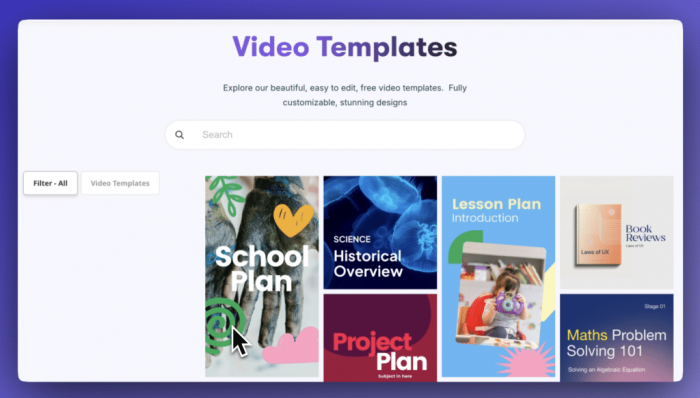
In template depth and visual variety, InVideo AI has a clear advantage for marketing and brand‑heavy scenarios. Its library spans thousands of templates for YouTube intros, Instagram and TikTok reels, Facebook ads, product promos, event announcements, and more. These templates include modern motion graphics and platform‑native layouts designed to look like they came from an agency. Brand kits let you lock in logos, color palettes, and fonts so everything stays consistent.

Pictory’s templates lean toward clarity and readability. They are excellent for text‑centric and educational content, where the main goal is to highlight key ideas, captions, and quotes rather than dazzle with animation. You still get brand controls, but the overall style range is narrower, which in many informational contexts is actually a benefit rather than a limitation.
Editing Experience and Learning Curve
The editing environments feel very different.
Pictory’s interface is intentionally minimal. You move through scenes one by one, see the AI’s decisions for visuals and text, and make small adjustments in a simple timeline. This keeps the learning curve extremely low. Non‑technical users—coaches, subject‑matter experts, founders—can be productive in a single sitting, because the tool hides complexity rather than exposing it.
InVideo AI offers a more traditional editor. There is a layered timeline, with separate tracks for video, text, overlays, and audio. You can fine‑tune timing, transitions, and layout at a much deeper level. This gives you more expressive power, but also means you invest more time per project and accept a steeper learning curve. For marketers and designers, that trade‑off is often worth it.
Performance, Speed, and Reliability
On everyday projects, Pictory’s narrower feature set often results in a faster and smoother experience, especially on mid‑range hardware. Generating a draft from an article or transcript and previewing short videos tends to feel quick and predictable. For high‑volume production of similar short‑form content, this consistency is valuable.
InVideo AI, because of its richer editor and heavier templates, can feel more demanding when projects become complex. AI generation remains reasonably quick, but large timelines with many layers and effects can introduce lag on weaker machines. Creators who prioritize high‑impact, polished campaigns are usually willing to accept this cost in exchange for better control.
Stock Media, Audio, and Voiceovers
Both platforms include integrated stock libraries and audio, but they use them differently.
Pictory integrates stock assets tightly into its automation. When you provide text or a URL, the AI not only creates scenes but also automatically chooses relevant B‑roll and images. You start from a visually complete draft rather than a blank media browser. Subtitles and AI voiceovers (with multiple accents and styles) are a core part of this pipeline, making it possible to output videos quickly without recording yourself.
InVideo AI gives you a large stock catalog as well, but expects more intentional curation. Templates ship with default visuals which you can keep or replace, and the editor lets you search for specific types of footage to match brand tone or campaign narrative. AI voiceovers are included, and higher plans often introduce voice cloning to keep a consistent brand voice across all your videos.
Collaboration and Team Scenarios
For teams, the collaboration options matter as much as raw features.
Pictory’s team‑oriented plans are built around shared workspaces and pooled usage. Multiple team members can access projects, reuse brand settings, and keep output consistent across a high volume of repurposed clips. This model aligns well with content operations in which one side of the team produces long‑form assets and another side converts them into shorts for every channel.
InVideo AI’s collaboration model fits creative and marketing teams that work in stages. Scripts can be written by one person, visuals and templates chosen by another, and final polishing done by someone else. Brand kits and shared templates support multi‑brand or agency scenarios, where a team juggles many clients and campaigns simultaneously.
Pricing Structures
Pricing changes over time, so you should verify current numbers before publishing, but the underlying logic of how each platform prices usage stays relatively stable. Pictory generally charges based on video minutes and export quality, while InVideo AI focuses on AI minutes/credits, quality, and storage.
Pricing and Value Table (Indicative)
| Aspect | Pictory | InVideo AI |
| Free access | Limited trial accounts with usage caps | Free plan with watermark and caps |
| Main billing metric | Monthly video minutes and resolution (e.g. 720p/1080p) | AI generation minutes/credits, storage, and export quality |
| Entry paid tier focus | Enough minutes for consistent short‑form repurposing | Unlocks 1080p, removes watermark, adds basic AI minutes |
| Mid‑tier focus | Higher minutes, 1080p, more brand and asset flexibility | More AI minutes, premium stock, larger storage |
| Team/agency tiers | Shared workspace and larger minute pool | More AI credits, multi‑brand support, enhanced branding |
| Best value for | Many short clips from long‑form content each month | Fewer but more complex, high‑impact campaign videos |
For a solo blogger or educator repurposing several articles and occasional webinars into dozens of shorts every month, Pictory’s minute‑based pricing tends to deliver strong value when the allowance is fully used. For marketers and agencies producing fewer but far more polished ads, explainers, and promotional videos, InVideo AI’s credit‑based structure often makes more sense because each finished video carries higher production value and revenue potential.
Support, Learning Resources, and Ecosystem
Pictory’s learning resources focus on teaching non‑video‑experts how to turn long‑form content into video assets systematically. Tutorials and webinars explain workflows like “blog to YouTube shorts,” “webinar to clips,” and “podcast to social snippets.” This directly supports creators who lead with writing or teaching rather than design.
InVideo AI’s educational content focuses on campaigns, social media best practices, and visual storytelling. You will find more examples of reels, ads, intros, and multi‑platform campaigns, along with guidance on how to adapt templates for specific industries and goals. This resonates more with marketers responsible for performance metrics and brand perception.
In terms of ecosystem fit, Pictory sits naturally next to blogging platforms, email newsletters, learning management systems, and webinar tools. InVideo AI slots into social scheduling, ad managers, and marketing automation platforms, often as the main creative engine for video assets.
Final Verdict: Content Repurposing Engine vs Creative Studio
Choosing between Pictory and InVideo AI ultimately comes down to your dominant workflow and what you value more: automation or control.
If your world revolves around long‑form content blog posts, newsletters, podcasts, webinars and your main objective is to turn every piece into a steady stream of shorts, reels, and educational videos with minimal friction, Pictory behaves like a dedicated repurposing engine. It trades away some fine‑grained control in exchange for speed, consistency, and ease of use.
If your world revolves around campaigns, product launches, funnels, and brand storytelling, InVideo AI functions more like an AI‑powered creative studio. It expects you to stay involved creatively, but rewards that involvement with richer visuals, better branding tools, and more control over how each scene looks and feels.
For many mature content operations, the ideal setup is to use Pictory for routine repurposing and InVideo AI for flagship campaign videos. But if you need to choose one, anchor your decision to your primary workflow: long‑form repurposing points to Pictory, while campaign‑driven marketing points to InVideo AI.
Post Comments
Be the first to post comment!
Related Articles