Table of Content
- How the Tools “Feel” When You Create
- Where Pika Labs Shines
- Where Runway ML Wins
- Feature Differences That Actually Matter
- What It Means for Workflow Depth
- Output Differences & “Failure Modes”
- Pricing: The Practical Side
- So Who Should Choose What?
- What the Internet Seems to Think
- Pika Labs vs Runway ML: User Reviews and Feedback Comparison
- A More Honest Bottom Line
- My Take
AI video tools are evolving fast, and two names consistently show up in creator conversations: Pika Labs and Runway ML. They both turn prompts into videos, they both support multiple input modes, and they’re both improving every month. Yet the experience of using them couldn’t feel more different.
A lot of comparisons online ask: “Which one is better?”
But that’s not the real question. The more helpful lens is:
➡ Pika Labs → fast, expressive, trend-driven, effects-heavy content
➡ Runway ML → cinematic control, structured workflows, and production tools
Your choice depends less on raw capability and more on how you like to build.
How the Tools “Feel” When You Create
When you open Pika, the focus is on speed and playfulness. You type a prompt, attach an image if needed, pick a style, and hit generate. The platform embraces creativity that’s loud, stylized, and social-friendly, the kind of content that ends up on TikTok, Reels, YouTube Shorts, or creative demos shared on Discord and X.
Runway feels more like stepping into a lightweight film studio. Instead of just throwing effects at your video, you can keyframe motion, use video-to-video, apply camera movements, upscale, mask, composite, color-treat, and export all within the same ecosystem. It encourages shot planning, consistency, and polish.
Where Pika Labs Shines
Pika thrives when the priority is speed + experimentation. You get fast generations, fun transformations, and a low learning barrier. You don’t need a timeline or a workflow pipeline you just iterate until something hits.
Creators often use Pika for:
● stylized short-form clips
● meme-style edits
● effect swaps and object morphs
● quick concept sketches
● social content with personality
Its recent model updates (such as Pika 2.5) push toward more realism and improved physics, but Pika still embraces the idea that reality is optional. If you want to turn a donut into a fighter jet or make a dog play drums in neon vaporwave lighting, Pika says “sure, let’s go.”
Where Runway ML Wins
Runway is built for creators who need control, fidelity, and workflows, the stuff that matters when clients, deadlines, or brand consistency enter the picture.
Professional users often lean on Runway for:
● ad concepts
● cinematic shots
● trailers and teasers
● branded content
● agency workflows
● film-style scenes
Its newer models (Gen-4, Gen-4.5 and onward) are publicly positioned around realism, consistent characters, and camera direction. Runway also supports modes like image-to-video, keyframes, and video-to-video, which let you guide motion instead of just hoping the prompt figures it out.
If Pika is a creative sandbox, Runway is a creative suite.
Feature Differences That Actually Matter
On a feature level, the gap between Pika and Runway isn’t about what they can generate, but about what happens after generation.
Runway treats video as part of a pipeline. Once a clip exists, it can be refined, masked, color-treated, versioned, resized, and exported for multiple platforms without leaving the tool. This significantly reduces tool switching and production friction.
Pika treats video as an output. The moment the clip feels right, it’s ready to export and post or to be polished elsewhere. That simplicity is intentional and well-liked by creators who don’t want to manage timelines or layers.
Reviews reflect this clearly:
● Pika users accept external editing as normal
● Runway users expect to finish most of the job in one place
What It Means for Workflow Depth
When people compare AI video tools, they often focus on the output “which one looks better?” or “which one handles realism?” But experienced creators know that output quality is only half the story. The other half is workflow: how the tool fits into your creative process from idea → iteration → revision → delivery.
This is where Pika and Runway diverge in meaningful ways.
Runway: Built Like a Creative Environment
Runway behaves less like a generator and more like a nimble production studio. Once you generate a clip, you don’t have to leave the platform to refine it. You can keyframe motion, adjust camera paths, mask out objects, track elements, add captions, apply color grading, composite layers, upscale, and export all inside the same interface.
This matters in real life because professional content rarely comes out “perfect on the first render.” Especially with AI, it often requires:refinements, re-timing, editing, clean-up and versioning for different platforms (16:9, 9:16, 1:1, etc.)
Runway supports this type of iterative loop because it treats video as a pipeline, not as an output. This makes it easier for:
● creative agencies
● film teams
● marketing studios
● brand content departments
● collaborative environments
These users need traceability, consistency, and toolchains that support teamwork. For them, Runway is not just a generator, it's infrastructure.
Pika: Designed as a Creation Engine
Pika takes the opposite approach. Instead of building a suite around post-production, it focuses on the moment of creation. You describe an idea, tweak the style, run a few variations, add an effect, and boom you have a video.
Its power isn’t in editing or pipeline control; it’s in:
● speed of iteration
● playfulness
● low cognitive friction
● immediate visual transformation
For many creators, especially solo social creators that’s the win. If you’re making Shorts or Reels, you often don’t need node-based editing or masking. You need something that delivers expressive visuals fast so you can publish or remix.
Pika feels optimized for creators who work like this:
Idea → Generate → Export → Post
No overhead. No pipelines. No timelines. No committees.
A Practical Example
Imagine two scenarios to make it more concrete:
Scenario A: TikTok Creator
You want to make a surreal clip where a skateboard turns into a jellyfish mid-air in neon colors. You’ll add music, text overlays, and captions later in CapCut or TikTok’s own editor.
In that case:
● you don’t need cinematic fidelity
● you don’t need camera path control
● you don’t need color grading
● you don’t need collaborative review
Here Pika is a better fit. Its “sandbox” model and fast play loops make it harmless to try eight weird variations until one hits.
Scenario B: Agency Delivering a Brand Campaign
Say a sneaker brand wants a promo shot that morphs through multiple environments, with locked camera motion, consistent branding elements, sound design, color treatment, multiple export ratios, and client revisions.
Here Runway shines because:
● the camera must be controlled
● the character/object should stay consistent
● revisions are expected
● brand colors can’t be off
● the output may require 16:9, 9:16, 4:5, 1:1 formats
● multiple stakeholders must give feedback
Runway supports that multi-stage process without needing to jump platforms five times.
Collaboration is Part of Workflow Depth Too
Runway also supports workflows that exist beyond the single-user paradigm:
● asset libraries
● version naming
● shared projects
● review cycles
These features seem small, but they’re the difference between:
“I made a cool clip”
and
“We delivered a campaign”
Pika doesn’t try to solve collaboration because its users often aren’t working in groups they’re publishing directly to audiences.
The Quiet Cost: Tool Switching
Workflow depth also impacts how often you need to jump tools.
● With Pika, users frequently export to CapCut, Premiere, After Effects, Resolve, or even TikTok’s internal editor.
● With Runway, users often finish inside Runway or get much closer before jumping to final polish.
Reducing tool-switching saves:
● Time
● cognitive overhead
● QA errors
● Rendering
● media management
For teams, these savings add up
A Good Analogy
If we were comparing in other creative industries:
Pika is like Procreate for iPad: fast, expressive, incredible for ideation and personal work.
Runway is like DaVinci Resolve + After Effects built for finalized deliverables and production workflows.
Both are powerful, but they imply different user needs and different stages of the creative funnel.
Output Differences & “Failure Modes”
Both tools produce impressive videos, and both occasionally break just differently.
Runway tends to fail in subtle ways: flicker, character inconsistencies, hand artifacts, or motion glitches. Pika sometimes leans into surrealism in ways that feel intentional, which, depending on your style, is either a feature or a headache.
If you’re after cinematic realism, Runway generally gives you a higher batting average. If you want expressive stylization that doesn’t need to obey physics, Pika is rarely boring.
Pricing: The Practical Side
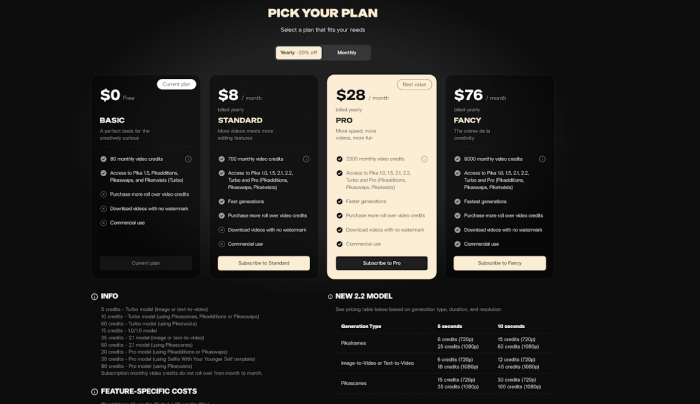
Both use similar credit-based tiering models and both offer free entry points. The main real-world takeaway is:
● Pika is often cheaper to experiment with for short-form content
● Runway can get expensive if you’re generating long clips or working at higher resolutions
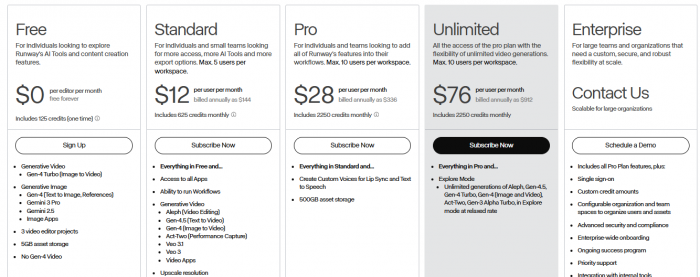
This is why indie creators tend to start with Pika and agencies tend to justify Runway.
So Who Should Choose What?
Pick Pika Labs if you:
● make short-form social content
● like rapid iteration and stylized looks
● don’t need a full editing pipeline
● value creativity over perfect realism
Pick Runway ML if you:
● create ads, promos, narrative scenes or brand videos
● need compositing, masking, keyframing or collaboration
● care about cinematic consistency and character control
● work with teams or clients who expect polish
There’s also a hybrid reality emerging:
Pika for idea-generation + play → Runway for refinement and delivery.
A surprising number of studios are already doing exactly that.
What the Internet Seems to Think
Review platforms and tool roundups generally reflect this same split:
● Runway shows up heavily on professional review sites like G2 and Capterra, where teams evaluate tools for production use.
● Pika pops up more in creator tool roundups, Product Hunt reviews, and short-form communities where experimentation and fun matter more than pipelines.
Not every rating system is rigorous, but the pattern is consistent.
Pika Labs vs Runway ML: User Reviews and Feedback Comparison
When it comes to real-world user experiences, Pika Labs and Runway ML are praised for very different reasons. Understanding what users love and what frustrates them can help you pick the right tool for your workflow.
Speed and Ease of Use
Pika Labs: Users consistently highlight how fast and intuitive it is. You can type a prompt, tweak a style, and generate a video almost instantly. Many creators describe it as fun, playful, and addictive, ideal for social media content where experimentation matters more than perfection.
Runway ML: Professional users often note a steeper learning curve. While it offers far more control, the interface can feel complex at first. Reviewers appreciate that once you learn it, the platform allows sophisticated editing without jumping between multiple tools—but it requires patience and practice.
Verdict: Pika wins for instant creative gratification, Runway wins for structured production workflows.
Creative Freedom vs. Control
Pika Labs: Reviewers love the freedom to produce surreal, exaggerated, or highly stylized visuals. Physics-breaking effects or unusual transformations are often described as features, not bugs. Ideal for creators prioritizing imagination over realism.
Runway ML: Feedback emphasizes predictability and precision. Users praise its ability to maintain character consistency, camera motion, and scene fidelity crucial for client work or multi-scene projects. Some describe it as a creative sandbox with seatbelts, where control is prioritized over random experimentation.
Verdict: Pika favors expressive creativity, Runway favors cinematic control.
Workflow and Collaboration
Pika Labs: Designed for solo creators or small-scale projects. Exporting to other editors for refinement is standard. Reviews highlight the “no pipelines, no timelines” approach as liberating, but it lacks built-in collaboration tools.
Runway ML: Reviews frequently mention asset libraries, versioning, shared projects, and review cycles. Agencies and production teams love that multiple stakeholders can work together without leaving the platform, streamlining revisions and quality control.
Verdict: Pika is optimized for quick personal projects, Runway is built for teamwork and production reliability.
Output Quality and Consistency
Pika Labs: Many reviewers note that outputs sometimes exaggerate motion or bend physics but for social content, that’s often desirable. It’s playful, experimental, and rarely boring.
Runway ML: Users emphasize higher consistency and realism. Failures tend to be subtle (minor flickers, hand or object artifacts), making it more reliable for polished client work.
Verdict: Pika produces stylized, eye-catching visuals, Runway produces polished, reliable outputs.
Pricing and Value Perception
Pika Labs: Generally cheaper for short, experimental clips. Reviews praise it as cost-effective for creators testing ideas rapidly.
Runway ML: Can become expensive at higher resolutions or longer clips. Reviewers often justify the cost through time savings, reduced tool-switching, and team efficiency.
Verdict: Pika is better for experimentation on a budget, Runway is better for professional projects where precision and control matter.
Overall User Sentiment
● Pika Labs: Loved for speed, playfulness, and creative freedom. Best for solo creators, social media content, or ideation.
● Runway ML: Respected for reliability, workflow depth, and team collaboration. Best for agencies, studios, or client-facing content.
Hybrid Approach: Reviews increasingly highlight using both: Pika for rapid idea generation and Runway for refinement and delivery.
A More Honest Bottom Line
Pika Labs and Runway ML aren’t competitors in the traditional “winner vs loser” sense. They represent two different creative philosophies:
Pika accelerates imagination. Runway accelerates execution.
If your workflow thrives on speed, play, personality, and quick shareability, Pika feels like the right tool at the right moment. If you need predictability, visual fidelity, and tools that can survive client feedback rounds, Runway gives you more room to control the shot.
And honestly? Plenty of creators end up using both.
My Take
If I had to summarize it as someone who works around creative tooling every day: Pika is the place where ideas come alive fast; Runway is where those ideas become presentable to the world. Neither replaces the other, and both are evolving so quickly that the gap is likely to blur over time.
The real question isn’t “Which tool is better?”
It’s: Where are you in the process?
Answer that, and the right tool becomes obvious.
Post Comments
Be the first to post comment!
Related Articles