Table of Content
- 1. What PolyAI does publish about pricing (short version)
- 2. Why PolyAI chooses a per-minute, custom-quoted model (business rationale)
- 3. How to interpret PolyAI’s public pricing signals (what procurement teams should flag)
- 4. Data-driven budgeting: turning “per-minute” into dollars (illustrative — not official)
- 5. Cost composition (visualized)
- 6. Evidence of business impact (what PolyAI shows publicly)
- 7. Procurement checklist (questions to ask PolyAI during demo/RFP)
- 8. Negotiation tips
- 9. Final checklist — what you’ll need to get a realistic quote
- 10. Conclusion — the honest trade-off

TL;DR: PolyAI’s public pricing information is intentionally high-level: they state their pricing is usage-based and billed on a per-minute basis (ongoing use), and that deployments are quoted after discussing volume, integration and requirements with their team. PolyAI does not publish fixed dollar-per-minute rates or standard tiers for self-serve purchase; instead, customers request a demo and receive a tailored quote. Because of that, this article uses only the official PolyAI materials (pricing page, demo request messaging, and their ROI whitepaper) as the source of truth about what the company discloses, and supplements that with clearly labeled illustrative cost models (for visualization and budgeting) so you can translate PolyAI’s “per-minute + custom quote” approach into a working budget for procurement and finance discussions. (PolyAI)
1. What PolyAI does publish about pricing (short version)
Pricing model: PolyAI publicly states that ongoing use is priced on a per-minute basis. That ongoing price is intended to cover not only raw voice/compute minutes but also “proactive performance improvements, maintenance and 24/7 support” as part of the managed offering. In plain terms: the headline metric PolyAI bills on is minutes of conversation, and that minute price is intended to bundle product improvements and support. (PolyAI)
No public per-minute number: PolyAI does not publish a public numeric per-minute rate or a list of fixed “Starter / Pro / Enterprise” prices on the pricing page. Instead, the site frames pricing as transparent but tailored: you contact sales/request a demo to get a quote that depends on volume, integrations, languages, and use case complexity. (PolyAI)
Managed service + ROI messaging: PolyAI positions itself as a managed, enterprise-focused voice-AI provider (not a self-serve commodity). Their collateral emphasizes business outcomes and ROI — for example, case studies and a whitepaper that quantify savings such as reduced seasonal hiring and lowered agent handling time. These business-impact metrics are used to justify the custom pricing approach for enterprise customers. (PolyAI)
2. Why PolyAI chooses a per-minute, custom-quoted model (business rationale)
Three practical reasons explain PolyAI’s decision to keep pricing custom and per-minute:
Complexity & variability of enterprise integrations. Large enterprises connect conversational voice agents to CRMs, billing systems, telephony providers (e.g., Amazon Connect), fraud systems, or bespoke back-ends. The labor and engineering cost of integrations — and the legal/security work — vary widely by customer, so a single SKU rarely makes sense.
Performance/SLA & support obligations. Enterprise engagements demand SLAs, 24/7 support, and continuous tuning. PolyAI bundles ongoing improvements and support into the per-minute price; this creates cost components that are predictable only after scoping the work.
Usage heterogeneity. Two companies with the same number of minutes can require different compute, language model, or telephony resources (e.g., multi-lingual vs. single language, or lots of long calls versus many short calls). Custom quotes let PolyAI calibrate capacity and pricing to actual technical load.
All three reasons are consistent with PolyAI’s public messaging and the “request a demo → custom quote” sales flow. (PolyAI)
3. How to interpret PolyAI’s public pricing signals (what procurement teams should flag)
When you see “per-minute” and “custom quote,” treat those as gates to a predictable procurement path rather than opacity. Here’s how to convert those signals into actionable steps:
Ask for a breakout. In the sales process, request the per-minute unit price and a separated line-item breakdown that shows what’s included (e.g., voice minutes, maintenance, support). PolyAI’s page explicitly states the per-minute model, so a transparent quote should match that shape. (PolyAI)
Get baseline SLAs and support hours. If the per-minute price “includes 24/7 support,” get the service-level and escalation procedures in writing (P1/P2 response times, number of named support engineers).
Test with a pilot. PolyAI’s demo and pilot workflows are designed to validate outcomes (they highlight rapid time-to-deploy and ROI in their case studies). Use a pilot to measure actual minutes, average handle time, and failure modes before committing to multi-year contracts. (PolyAI)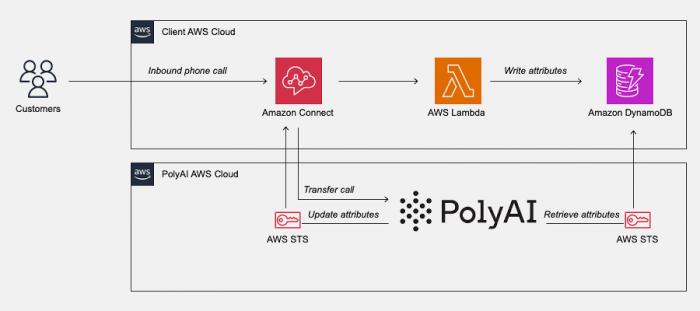
4. Data-driven budgeting: turning “per-minute” into dollars (illustrative — not official)
Important: PolyAI does not publish a numeric per-minute rate on their pricing page. Because you asked for a data-driven article while relying on the original site for pricing information, this section gives two things:
A fact: what PolyAI officially says (per-minute billing + custom quotes). (PolyAI)
A labelled illustrative budget model — not official PolyAI pricing — to help you convert minutes into monthly or annual spend when building an RFP or forecasting internal ROI.
Illustrative scenario (example budgeting logic)
Assume a mid-size enterprise contact center wants to automate 30% of its monthly inbound call volume. Sample call statistics:
Monthly inbound calls: 120,000
Average voice agent call duration: 6 minutes
Target automation rate (handled by PolyAI): 30% → 36,000 automated calls
Average automated call duration (PolyAI average handle time is often shorter; PolyAI cites reductions in handle times in case studies) — assume 2 minutes average for automated calls.
Total PolyAI minutes per month = 36,000 calls × 2 minutes = 72,000 minutes.
Now, because PolyAI publishes only the model (per-minute billing), you would request a quote by presenting these minutes and the expected integrations/SLA. The procurement team can then translate the vendor’s per-minute quote into monthly/annual spend by multiplying by expected monthly minutes. (The key advantage: the vendor’s consumption-based billing means your costs scale with usage, so pilots that reduce calls further result in lower unit cost exposure.) (PolyAI)
NOTE: The numbers above (calls, minutes, durations) are illustrative modeling inputs to convert PolyAI’s per-minute approach into a budget. Because PolyAI does not publish per-minute dollar amounts publicly, you must obtain numeric per-minute pricing directly from PolyAI’s sales team for procurement and contract modeling. (PolyAI)
5. Cost composition (visualized)
To help you present a clear budget to finance, here’s an illustrative breakdown of typical cost components you’ll see in an enterprise PolyAI deployment (percentages are for visualization only — see the downloadable pie chart). Broad categories:
Ongoing usage (per-minute) spend — covers minutes and bundled support/maintenance.
Implementation & setup — initial engineering, agent design, integration work.
Support & maintenance — account management, continuous tuning, QA.
Monitoring & analytics — dashboards, reporting, compliance checks.
Integrations & custom development — CRM connectors, payment integrations, etc.
I created a pie chart that displays an illustrative split of those components to help procurement and finance visualize the cost buckets. Download the image to include in decks:

6. Evidence of business impact (what PolyAI shows publicly)
PolyAI’s own whitepaper and case studies are where they turn cost into ROI. A few publicly-shared claims and metrics you can use during vendor evaluation:
Reduced call volumes and hiring cost: PolyAI’s ROI whitepaper includes an example where a large retailer reduced seasonal hiring plans by 50% and saved a quantified amount (the whitepaper gives a concrete example of $840k projected savings in seasonal hiring, from a $3bn retailer case study). That same document reports reductions in calls to agents and faster average handle times for the voice assistant versus live agents. Use these published ROI figures as benchmarks during vendor negotiations and for building financial case models. (PolyAI)
Speed to deploy & improvements over time: PolyAI emphasizes rapid pilots and continuous agent improvements — elements that reduce risk in the first 90 days of a deployment and improve the long-term ROI profile. Request metrics tied to your pilot (reduction in live agent transfers, ticket deflection, and cost per handled call). (PolyAI)
7. Procurement checklist (questions to ask PolyAI during demo/RFP)
When you request a demo and quote from PolyAI (their preferred route), bring this checklist to the call:
Request a numeric per-minute price and its inclusions. Ask what the per-minute includes and what would be charged separately (e.g., custom voice recordings, specialty integrations).
Get an implementation SOW (statement of work) with milestones and an itemized cost for setup and integrations.
Ask for sample SLA language and support RTE (response time estimates).
Pilot scope & measurement plan: define KPIs for a short pilot (N days / N calls) so you can baseline before a long-term commitment.
Ask about minimum contract or minimum monthly spend (many enterprise vendors have minimums even for usage-based pricing).
Data residency, security, and compliance cost implications (especially for healthcare, finance, or regulated industries). PolyAI’s enterprise pages discuss industry deployments and security — confirm what is included and what triggers an extra cost. (PolyAI)
8. Negotiation tips
Leverage a pilot. A tightly scoped pilot reduces your risk and gives you direct per-minute consumption data to use when pushing for a lower unit price.
Ask for volume tiers. Even when pricing is custom, vendors commonly offer lower unit rates at volume thresholds (e.g., >500k minutes/month).
Negotiate onboarding fees. Try to shift some implementation costs into ongoing spend or ask for a reduced initial SOW in exchange for a longer commitment.
Clarify upgrade/tuning cadence. Get a commitment on how frequently PolyAI will update the agent and whether major model improvements are included in the unit price.
9. Final checklist — what you’ll need to get a realistic quote
To obtain a granular, binding quote from PolyAI, prepare:
- Expected monthly call volumes and the share you plan to automate
- Average durations (live vs. automated) for baseline modeling
- Systems to integrate (list: CRM, payment gateway, telephony provider)
- Languages and regional support needs
- Compliance requirements (HIPAA, PCI, GDPR, etc.)
- Desired SLAs and support model (24/7, named engineers, escalation paths)
Once you hand these items to PolyAI in a demo/RFP, you should receive a per-minute quote and an implementation SOW that you can convert into monthly/annual spend using the minutes model on the PolyAI pricing page. (PolyAI)
10. Conclusion — the honest trade-off
PolyAI’s pricing approach (per-minute + custom quoting) is a trade-off: you trade price transparency for a vendor-built, enterprise-grade managed service that bundles continuous improvement, support, and advanced integrations. That can be the right choice for enterprises that value outcome guarantees and fast ROI. But if your organization needs line-item unit prices before engaging sales, expect a conversation: PolyAI’s page invites you to request a demo to get those numbers. Start with a pilot, collect real minute-usage data, and use the procurement checklist above to ensure you get an itemized quote you can budget against. (PolyAI)
Post Comments
Be the first to post comment!
Related Articles



Best Alternatives to Dopple AI
Danny Hamilton . Mar 10, 2026