Audio creation has quietly become one of the most expensive and technically gated parts of modern content production. Clean voiceovers, vocal isolation, realistic text-to-speech, and sound effects usually mean paid DAWs, monthly subscriptions, and steep learning curves.
That backdrop explains why PopPop AI has gained unusual momentum since late 2024. Developed by Nabla Mind, the platform positions itself less as a “professional studio replacement” and more as a friction-free audio utility, something closer to Canva for sound than Pro Tools for engineers.
This article takes a dive into PopPop AI: what it actually does well, where it falls short, and why it has resonated with creators across YouTube, DJ communities, classrooms, and indie development spaces.
What PopPop AI Actually Is
At its core, PopPop AI is a browser-based audio processing suite. There’s no software installation, no forced login for basic use, and no upfront payment wall.
What makes it stand out is not a single breakthrough feature, but the combination of accessibility + breadth:
- Works entirely in the browser
- Accepts both audio and video files
- Processes files server-side using AI models
- Returns downloadable outputs within seconds for small-to-medium files
Unlike tools that lock users into one narrow function (only TTS, only vocal removal, only voice changing), PopPop AI bundles multiple utilities into one interface.
Platform and Company Snapshot
| Attribute | Details |
| Developer | Nabla Mind |
| Headquarters | Hong Kong |
| Initial Launch | 2024 |
| Platform | Web-based SaaS, Android app, desktop web wrapper |
| Pricing | Free (daily usage limits for guests) |
| Core Languages | 20+ (English, Spanish, French, Hindi, more) |
| File Support | MP3, WAV, FLAC, M4A (audio); MP4, MKV, MOV (video) |
| Voice Library | 200+ synthetic voices |
Key observation: PopPop AI’s growth coincides with a wider trend, creators increasingly preferring task-based tools over heavyweight “all-in-one” software.
Feature Breakdown: What Works in Practice
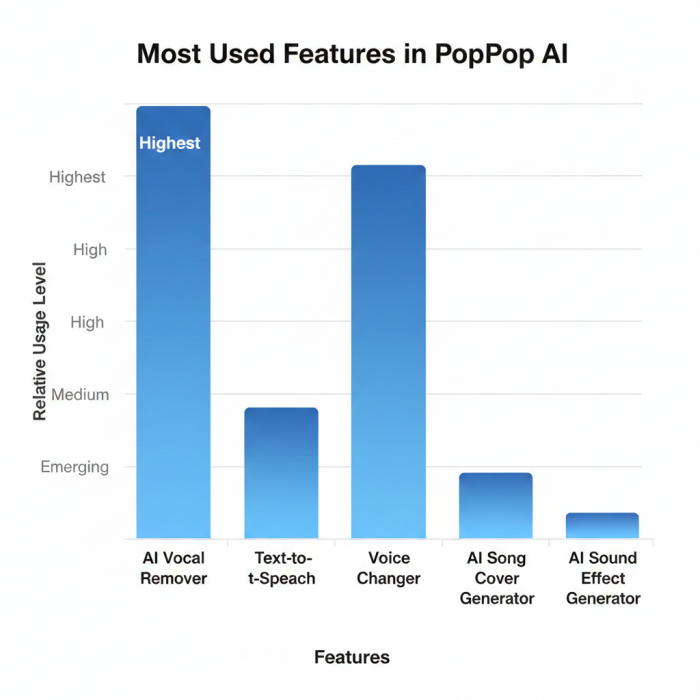
A. AI Vocal Remover & Karaoke Maker
This is the tool most users discover first, and often the reason they return.
Separates vocals vs instrumental using deep-learning stem extraction
Accepts uploads or direct links (YouTube, TikTok)
Output quality is sufficient for:
- DJ mashups
- Karaoke tracks
- Social video edits
Limitation: It’s strictly two-stem separation. You won’t get isolated drums, bass, or synths like in high-end tools such as RipX or iZotope RX.
B. Text-to-Speech (TTS): Utility Over Hype
PopPop’s TTS isn’t built to replace enterprise narration engines, but it’s far more usable than most free alternatives.
What stands out:
- Natural pacing (less robotic than typical free TTS)
- Adjustable pitch and speed
- “Smart Mode” that slightly rewrites text for smoother delivery
Best use cases:
Explainer videos, educational summaries, placeholder narration, multilingual drafts.
C. AI Song Cover Generator (The Viral Feature)
This is where PopPop AI intersects with internet culture.
Users can:
- Replace the original singer’s voice with:
- Celebrity-style models
- Fictional or character-like voices
- Custom voice clones (via short samples)
Reality check:
This is primarily entertainment and experimentation, not commercial music production. Output quality varies depending on source material and vocal range.
D. AI Sound Effect Generator
Instead of browsing endless stock libraries, users type a prompt and receive a custom audio clip.
Example:
“A futuristic laser blast echoing in a rainy forest.”
The output is:
- Original
- Context-specific
- Typically up to ~60 seconds
This feature resonates strongly with indie game developers and video editors working on tight budgets.
E. AI Voice Changer
Available for uploaded audio and near-real-time use.
Common transformations:
- Gender shifts
- Age effects
- Robotic / alien tones
It’s widely used for:
- Streaming personas
- Privacy masking
- Casual content creation
Who Actually Uses PopPop AI?
PopPop AI’s audience is broader than most AI audio tools because its cost and complexity barriers are nearly zero.
Observed user segments:
YouTubers & TikTok creators → Fast voiceovers, vocal cleanup
DJs & remixers → Acapella extraction for live sets
Educators → Audio versions of notes and lessons
Gamers & indie devs → Custom SFX and voice effects
Karaoke hobbyists → Instrumentals without buying tracks
This diversity explains why PopPop AI appears frequently in utility reviews rather than professional studio comparisons.
Pricing Reality: Free, But Not Unlimited
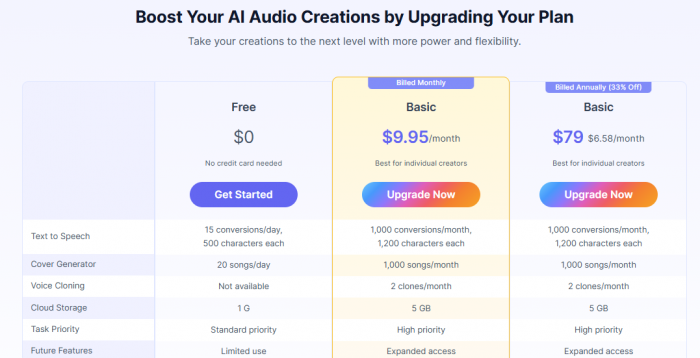
As of 2026:
Free tier:
$0
No login required
~20 processing actions per day (guest quota)
Optional Pro access:
Sometimes bundled via partner platforms
Adds batch processing and higher export quality
Importantly, core features are not paywalled, which is rare in AI audio tooling.
Audio Quality Analysis
From a technical standpoint, PopPop AI prioritizes perceptual quality over waveform perfection.
What Sounds Good
Vocals retain clarity and intelligibility
Instrumentals show minimal phase distortion
TTS avoids harsh robotic artifacts common in free tools
Where Artifacts Appear
High-reverb tracks may bleed slightly
Dense mixes (EDM, metal) reduce stem clarity
Extreme pitch shifts can introduce digital warble
Practical takeaway:
For social media, live DJ sets, explainer videos, and educational audio, these artifacts are largely irrelevant. For commercial music releases, they matter.
Strengths vs Limitations
What PopPop AI Gets Right
- No forced registration
- Fast processing speeds
- Supports video files natively
- Mobile-friendly web interface
- Broad feature set in one place
Where It Falls Short
- Requires constant internet connection
- No project history or saving without login
- Limited stem separation depth
- Not designed for mastering-grade output
Translation:
PopPop AI is a creation accelerator, not a studio replacement.
Ratings and Sentiment: What Users Actually Say
Across major aggregators, PopPop AI consistently scores well for its category:
Trustpilot: ~4.3 / 5
SourceForge: ~4.8 / 5
SoftwareSuggest: ~4.5 / 5
Recurring praise themes:
“Actually free”
“Surprisingly good vocal isolation”
“No signup nonsense”
Recurring complaints:
Usage caps
Lost work after refresh
Limited export controls
These patterns align with expectations for a browser-first AI utility, not a professional DAW.
Final Verdict
If you are:
A studio engineer needing surgical control → You’ll still need a DAW
A creator who wants results now, without friction → PopPop AI makes sense
PopPop AI succeeds not because it’s the most advanced audio technology on the market, but because it removes intimidation, cost, and complexity from audio creation.
In an ecosystem flooded with over-engineered AI tools, PopPop AI’s real innovation is simple:
It lets people use audio AI immediately, without asking them to become audio engineers first.
That alone explains its continued traction into 2026.
Post Comments
Be the first to post comment!
Related Articles

Best Alternatives to Talkie AI
Valentino Chambers . Mar 9, 2026
Best Alternatives to SpicyChat AI
Ridge Harper . Mar 7, 2026