There’s a very specific kind of curiosity that hits when you look at a photo and think, “This would be way funnier if I could just swap that face.” And then reality kicks in — opening Photoshop, figuring out layers, masking, blending — and suddenly the joke doesn’t feel worth the effort.
That’s the exact mood I was in when I decided to try Remaker AI.
I wasn’t searching for a full-blown professional editing tool or cinematic-grade manipulation. I just wanted something fast, easy, and usable without a steep learning curve. What surprised me was how quickly Remaker AI delivered on that expectation.
The process is straightforward. Upload an image, choose the feature you want, wait a few seconds, and you get your result. No tutorials. No overwhelming dashboards. No intimidating design controls. Compared to many AI image tools that bury you in technical options, Remaker AI keeps things refreshingly simple.
Of course, simplicity has trade-offs. This isn’t a powerhouse editing suite. It doesn’t attempt to outsmart you creatively, and it certainly won’t replace professional software. But if your goal is quick experimentation and playful visual edits without frustration, Remaker AI stays confidently in its lane.
Official website: https://remaker.ai/
What Is Remaker AI, Really?
At its core, Remaker AI is built for quick image transformations, particularly face swaps and visual remixes. It focuses on tasks that normally require editing skills or patience and compresses them into a few clicks.
Instead of providing endless sliders and customization tools, Remaker AI automates most decisions. It prioritizes speed over perfection. If you upload a clear, well-lit image, the results can look surprisingly convincing. If your input is low quality or poorly framed, the AI won’t magically fix it — it simply reflects what you give it.
For example, I tested it with the prompt:
“side face Indian brown girl with cute shy smile in saree”
_1771314491.webp)
The output reflected the prompt fairly closely, especially when paired with a decent input image. It wasn’t flawless, but it was fast and visually interesting.
That’s what defines Remaker AI. It isn’t trying to be a studio-grade editing tool. It’s built for experimentation, content ideas, and quick creative results. Sometimes impressive. Sometimes imperfect. But almost always entertaining.
Testing Remaker AI: What It Feels Like in Real Use
After spending time actually using Remaker AI rather than just reading about it, here’s what stood out.
- The sign-up experience was smooth. I received roughly 30 free credits, which allowed me to experiment with several face swaps and image remakes before even considering payment. That felt generous enough to properly test the platform.
- Getting started required almost no adjustment period. From uploading an image to receiving the first output took under two minutes. The interface is minimal and intuitive — you don’t need to “learn” the tool.
- Processing time was consistently quick. Most face swap or image remakes completed within 15 to 30 seconds. That speed encourages experimentation because you’re not stuck waiting between attempts.
- When it comes to output quality, results varied based on input quality. Clear, well-lit photos produced clean and surprisingly realistic edits. Lower resolution or more complex scenes led to visible imperfections.
- One noticeable limitation is the lack of manual control. There aren’t many fine-tuning options. You mostly trust the AI’s interpretation, which keeps the experience fast but restricts customization.
What I didn’t expect was how addictive it became. Because results generate quickly, it’s easy to test multiple variations just out of curiosity.
That said, I wouldn’t rely on Remaker AI for client work or professional design delivery. It feels more like a creative playground than a production tool.
Pricing: Does It Justify the Cost?
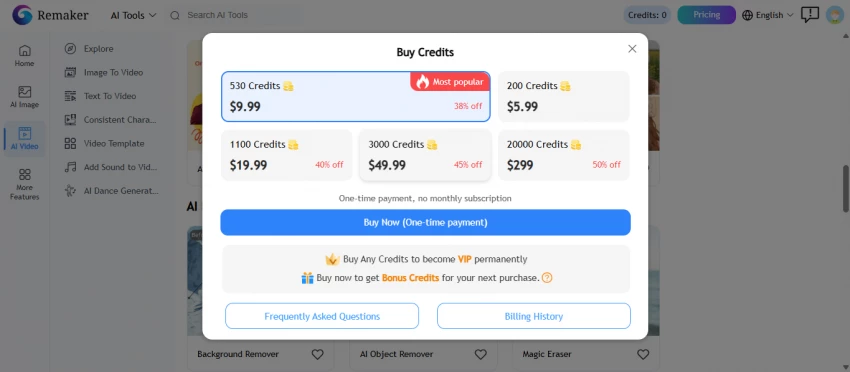
Remaker AI typically provides limited free access through credits, with paid options unlocking higher usage or extended features.
Compared to professional editing software, the pricing feels accessible. But it’s important to set expectations correctly. You’re not paying for advanced editing depth. You’re paying for convenience and speed.
If you compare it to full creative suites like Photoshop, it won’t compete in terms of precision. However, compared to other lightweight AI image tools, it sits comfortably in the middle — affordable and reasonably capable for casual users.
If you plan to use it frequently for social content or quick experiments, upgrading can make sense. If you expect studio-level consistency, it likely won’t meet those standards.
What Works Well — and Where It Struggles
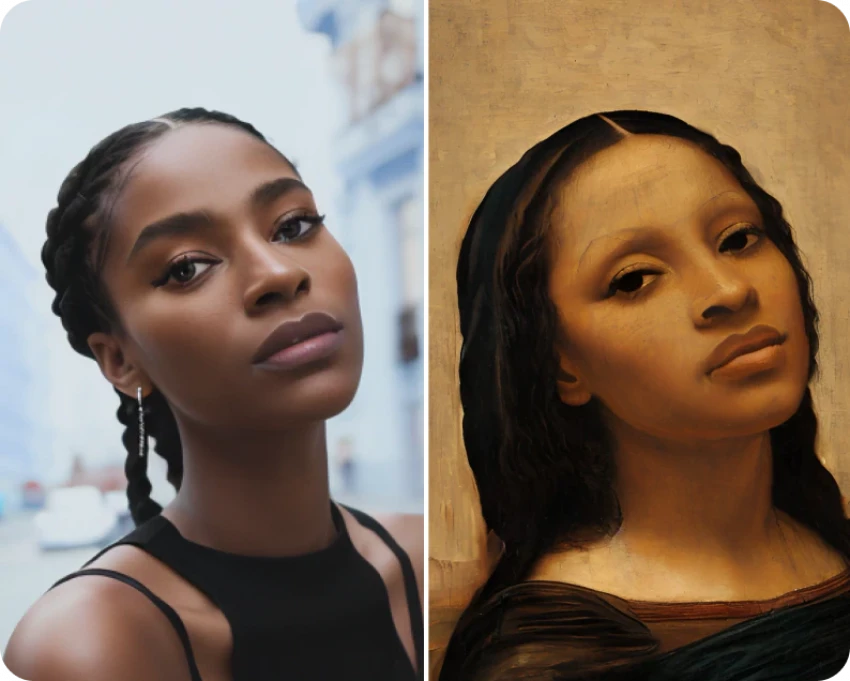
Remaker AI shines in a few key areas. The face swap feature can look impressively realistic when the source images are strong. It’s especially effective for social media content, memes, and light creative experimentation. The barrier to entry is extremely low, making it ideal for beginners.
However, there are limitations. Output quality drops noticeably when working with poor-resolution images. There’s limited control over small details, which can be frustrating if you’re chasing perfection. It’s not built for professional or commercial editing workflows. In more complex scenes, results may feel inconsistent.
In short, it’s a quick tool — not a precision instrument.
Final Verdict: A Creative Shortcut, Not a Full Studio
After testing Remaker AI across different images and scenarios, its purpose becomes clear. It prioritizes speed, simplicity, and experimentation over detailed control.
It’s excellent for beginners and casual creators who want to generate entertaining visuals without investing time in learning complex software. Face swaps can be surprisingly convincing when the input quality is strong. The platform’s ease of use lowers the barrier for anyone curious about AI image editing.
At the same time, expectations need to be realistic. Results can vary depending on image quality. There are limited advanced controls. It lacks collaboration features and professional editing depth. It’s not built for high-end production work.
Overall, Remaker AI feels like a creative shortcut rather than a comprehensive editing solution. If you’re looking for fast, playful visual content with minimal effort, it’s worth exploring. If you need consistent, high-precision output for serious design projects, more advanced tools may be a better fit.
For quick laughs, experiments, and social-ready visuals, though, it delivers exactly what it promises — speed without the headache.
Post Comments
Be the first to post comment!