Choosing between AWS Route 53 and GoDaddy is often oversimplified as a registrar vs registrar debate.
In reality, this decision sits much deeper in your infrastructure stack,affecting performance, reliability, automation, security, and long-term scalability.
Executive Summary (TL;DR)
| Dimension | AWS Route 53 | GoDaddy |
| Core Identity | Cloud-native DNS infrastructure | Retail domain & hosting provider |
| DNS Uptime SLA | 100% | 99.9% (Premium only) |
| Global Latency | Extremely low (Anycast) | Moderate, region-dependent |
| Automation | First-class (API, Terraform, CI/CD) | Limited, manual-heavy |
| Advanced Routing | Latency, Geo, Failover, Weighted | Very basic |
| DDoS Protection | Built-in (AWS Shield) | Tier-dependent |
| Pricing Model | Usage-based | Flat + add-ons |
| Best For | Scalable apps, cloud workloads | Small sites, beginners |
Bottom line:
GoDaddy is a domain retailer. Route 53 is internet infrastructure.
What Are You Really Choosing? (Registrar vs DNS Platform)
This comparison often goes wrong because people mix two different roles:
Domain Registrar → where you buy the domain
DNS Provider → how the internet finds your servers
GoDaddy
- Primary business: selling domains, hosting, email, site builders
- DNS is an included convenience, not the core product
- Designed for humans managing a few domains manually
- Requests are answered by the closest AWS edge location
- Typical global DNS resolution: ~20–30 ms
- Extremely consistent across NA, EU, APAC, Middle East
This directly improves:
- Time To First Byte (TTFB)
- Perceived page load speed
- Global SaaS performance
GoDaddy DNS Performance
Works fine for local or regional traffic
- Latency increases noticeably for international audiences
- Basic DNS users share infrastructure
- Propagation and TTL behavior is less predictable
Reality check:
For a local Indian business website → negligible difference
For a global SaaS, API, or content platform → Route 53 wins clearly
GoDaddy
- Advertised 99.9% uptime only on paid DNS tiers
- Shared DNS infrastructure for basic users
- Past incidents show slower recovery times
Translation:
99.9% uptime = ~8.7 hours of potential downtime per year
100% uptime = architectural commitment, not marketing
Pricing: Cheap on Paper vs Cheap at Scale
GoDaddy Pricing Reality
Domain: ₹800–₹1,200/year (looks cheap)
DNSSEC, advanced features → paid add-ons
Premium DNS often billed monthly
You pay even if traffic is zero
Route 53 Pricing Reality
Cost comparison example:
| Scenario | GoDaddy | Route 53 |
| Small blog (low traffic) | Cheaper | Slightly higher |
| Startup at 5–10M visits | Expensive add-ons | More efficient |
| SaaS with automation | Painful | Natural fit |
Route 53 feels “expensive” only until traffic grows or automation begins.
Routing Intelligence: Static vs Smart DNS
This is where the gap becomes architectural.
Route 53 Advanced Routing
- Latency-based routing (closest server)
- Geo-DNS (country/continent logic)
- Failover routing (automatic disaster recovery)
- Weighted routing (A/B testing, blue-green deploys)
- Health-check-driven decisions
Used for:
- Multi-region apps
- Zero-downtime deployments
- Traffic steering during outages
GoDaddy Routing
- Mostly static A / CNAME records
- No intelligent traffic decisions
- Manual intervention required
If you never plan to scale → fine
If you ever plan to scale → limiting
Automation and DevOps: Humans vs Code
GoDaddy Workflow
Login → dashboard → click → save
API exists but is restricted and inconsistent
Not CI/CD-friendly
Breaks infrastructure-as-code philosophy
Route 53 Workflow
Fully programmable via:
- AWS CLI
- Terraform
- CloudFormation
- SDKs
DNS changes can be:
- Version-controlled
- Auto-rolled back
- Triggered by scaling events
For DevOps teams, manual DNS is technical debt.
Security: DNS Is a Target
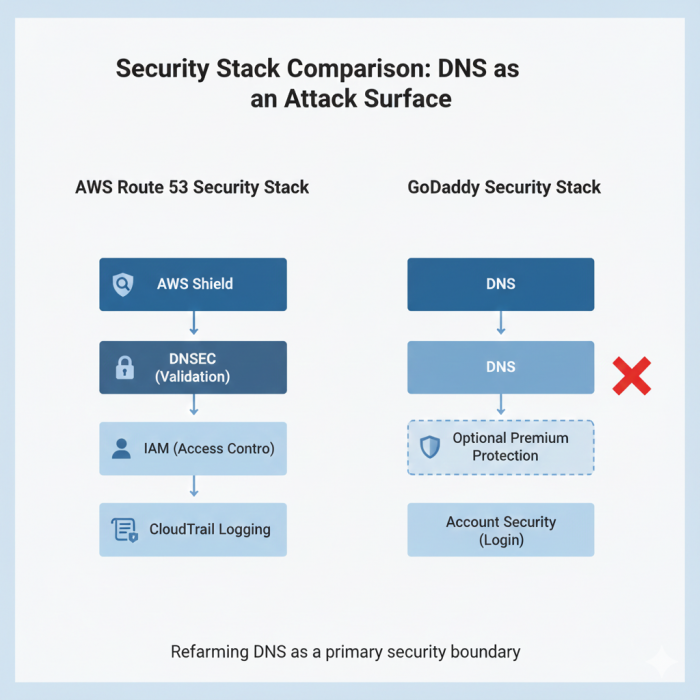
Route 53 Security Stack
Integrated AWS Shield (DDoS mitigation)
Easy DNSSEC implementation
IAM-based access control
Audit logs via CloudTrail
GoDaddy Security
DNSSEC and protection often locked behind plans
Account security depends heavily on user practices
Past reputation issues (though improving)
Final Verdict
If I strip away branding, pricing psychology, and familiarity bias, the choice becomes very clear.
GoDaddy feels like a starting point. AWS Route 53 feels like an endpoint.
If you are running a small, local website where DNS is something you set once and forget, GoDaddy does the job with minimal thinking. There’s nothing wrong with it, it’s just not designed to grow with you.
But if your site or application is part of a larger system, cloud hosting, CI/CD pipelines, global users, uptime guarantees, then 53 isn’t an upgrade, it’s a different class of infrastructure. It treats DNS as code, not configuration, and that mindset matters as soon as scale or reliability becomes non-negotiable.
My practical recommendation:
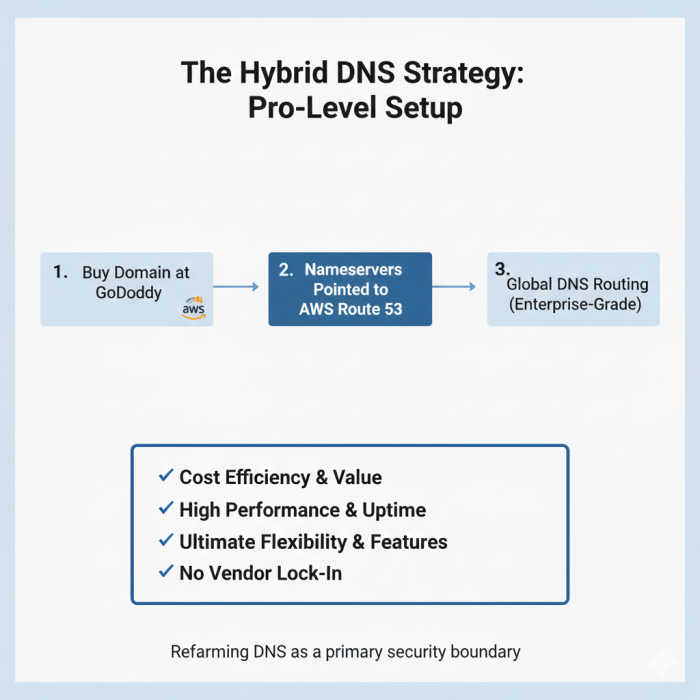
Buy the domain wherever it’s cheapest and convenient.
Run your DNS on Route 53 if performance, automation, or uptime has real business impact.
That hybrid approach reflects how professionals actually build in 2025, not how platforms market themselves.
Post Comments
Be the first to post comment!
Related Articles

Millions Still Use Softonic But Should You?
Corey Robson . Feb 27, 2026