By the second week of my test prep, my “system” usually stops looking like a system at all. I have lecture PDFs sitting in one folder, half written notes in another, screenshots from WhatsApp groups, and a few rushed pages in a physical notebook that I swear I will clean up someday. That someday often turns into a late night before an exam where I try to convert everything into flashcards and questions. This time, instead of doing the manual grind, I ran all of that chaos through SlaySchool and watched what it did with it.
SlaySchool is an AI study assistant that takes the material you already have and reshapes it into flashcards, multiple choice questions, and short summaries. It does not ask you to change how you collect notes. You keep using PDFs, videos, slides, and handwritten pages the way you always have. The difference is that the heavy lifting of turning them into revision friendly content is handled for you. After using it with real lecture notes, a YouTube lesson, and messy handwritten content, some strengths and weaknesses became very clear.
| What you are looking at | SlaySchool in this area |
| Type of tool | AI powered study assistant |
| Main job | Turns existing notes into flashcards and quizzes |
| What it can read | PDFs, lecture slides, videos, links, images |
| Where it runs | Browser and mobile app |
| Who it is built for | Students, exam takers, and teachers |
What SlaySchool Does With Your Notes
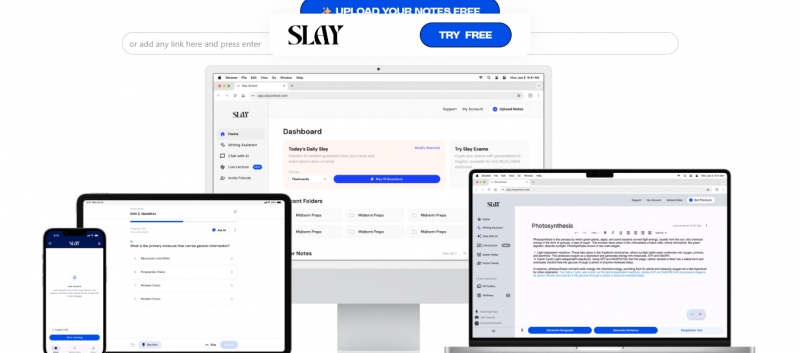
When you feed SlaySchool a PDF, a set of typed notes, or even a clear photo of handwritten pages, it tries to understand the content and extract ideas that look important. In practice, this means it picks out definitions, key points, lists, relationships between concepts, and obvious question candidates. It then turns those into flashcards, multiple choice questions, and sometimes a short summary of what the document is really about.
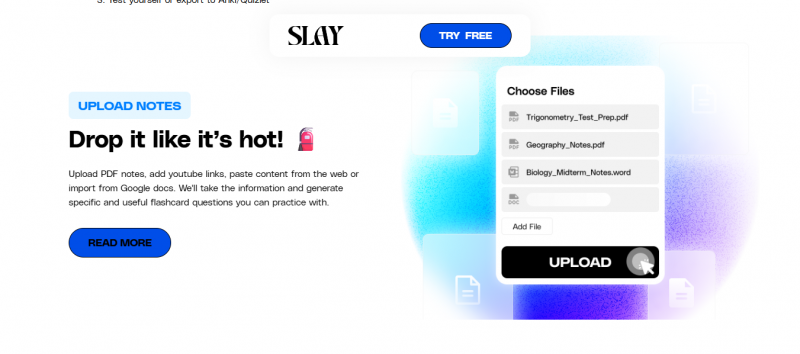
Because it accepts multiple formats, it fits into different study habits. If your course materials arrive mostly as slides, you upload those. If you follow online lectures, you use the video link. If you still prefer writing with a pen, you take photos and let the built in text recognition do its job. The common pattern is the same in every case. You stop manually scanning for “what should be a card” and you let the tool build a first draft for you.
You still have to read and think through the actual content. SlaySchool does not claim to understand the subject on your behalf. What it does very well is remove the slow, boring steps between having material and being able to test yourself on it.
Key Features in Everyday Use

AI Flashcard Generator
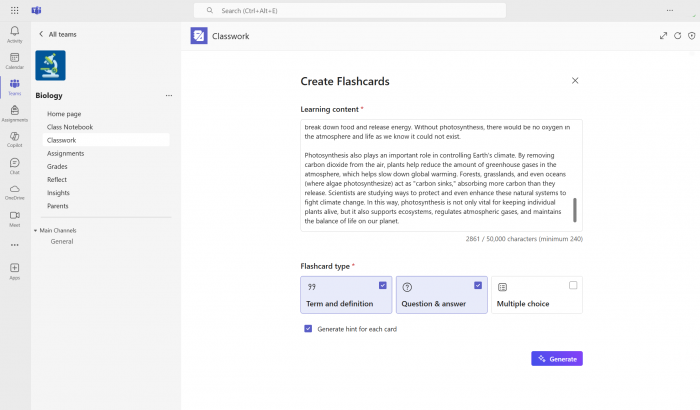
The flashcard generator is where most students will spend time. Once you drop in a document or notes, the system creates a deck of question and answer style cards. It does not just grab headings. It looks at sentences and patterns, then decides what looks like a term, a definition, a cause and effect relationship, or a list worth remembering.
In content heavy subjects, this feels like cheating in the best way. When I tested it on a set of lecture notes, I got a full deck covering definitions, small explanation type cards, and some higher level concepts that I would usually convert into questions later in the week. Not every card was perfect. A few were vague and needed either more detail or splitting into two. Even with that, the time saved compared to hand building a deck from scratch was obvious.
Turning Lectures and Online Videos Into Question Banks
A lot of modern studying happens through recorded lectures and short online lessons. The problem is that revisiting them right before exams is slow. SlaySchool lets you paste a video or lecture link and then builds questions and flashcards based on the transcript.
In a test with a short educational video, the tool produced a cluster of multiple choice questions and a compact summary. Some questions were very direct, which is useful for quick checks but not for deep understanding. Others went for slightly more applied ideas. The main value was not perfection in each question. It was the fact that within minutes I had something interactive to revise with, instead of a video timeline that I would have to scrub through again.
Quiz Mode and Multiple Choice Questions
The quiz generator sits alongside flashcards and uses the same source material. Once your notes or slides are processed, you can generate a quiz from them and start answering right away. You see immediate feedback on each question and a simple sense of how much you remembered from that particular upload.
Using this mode after building decks from two or three lectures, I found it works best as a quick check near the end of the day. It will not replace full practice tests or past papers, but it is very good at turning today’s notes into a “did I actually learn this” session. You will notice questions that feel slightly awkward or too easy, but they are fast to adjust, and you would have spent far longer writing them from scratch.
Summaries for Long Chapters and Dense PDFs
Another area where SlaySchool helps is with long, intimidating documents. When you upload a large PDF or a block of lecture notes, it can produce a summary that captures the main themes and key points. You can read this summary to refresh your memory before deciding which sections deserve a full reread.
This feature is especially useful a few weeks after a topic is first covered. Instead of trying to reenter a hundred page document cold, you glance at a short summary, remember the shape of the content, and then go straight to the parts you had trouble with earlier. It does not replace proper reading, but it makes the idea of revisiting old material far less heavy.
Input Flexibility and Exports
Support for different input and output options is what stops SlaySchool from feeling like a closed box. It accepts PDFs, slides, typed notes, images with text recognition, and links. On the output side, it lets you review in the app or export flashcards into tools like Anki.
That export link matters more than it might seem at first. Many students already rely on spaced repetition. The friction usually lies in building the cards, not in reviewing them. With SlaySchool, you can turn new material into a working deck quickly, then let your favourite spaced repetition app handle long term scheduling. In my case, this changed the shape of my workflow. I stopped thinking “I need to make cards” and started thinking “I just need to upload the notes and then review”.
What It Was Like Using SlaySchool
To see how SlaySchool behaves in real situations, I tried three different types of material.
The first was a standard lecture PDF with headings, subheadings, and text. SlaySchool created a sizeable flashcard deck in a short time. Many of the cards were exactly what I would expect to see on a quiz. Some combined several points that I would personally split, so I did a bit of editing. Even so, the time spent editing felt light compared to starting from a blank deck.
The second test used a short online lesson. After submitting the link, I received a small batch of multiple choice questions and a brief written summary of the lesson. The summary matched the main points well. A couple of questions were phrased in a very literal way that made them easy. I adjusted those to make them more challenging. The important thing for me was that I did not have to stare at a timeline again. I could run through ten questions and know quickly which ideas stuck.
The third test involved handwritten notes captured with a phone. On pages where my writing was clean, the text recognition worked surprisingly well and produced sensible cards. On messier pages, it struggled, which showed up as weaker flashcards. This made sense and confirmed that the feature is reliable when the input is decent. It is not magic when the handwriting is almost unreadable.
Across a few days, the pattern was the same. The time between finishing a class or a chapter and doing the first round of active recall shrank a lot. Instead of telling myself “I will build cards this weekend”, I could upload material on the same day and start reviewing much sooner.
Pricing and Which Plan Makes Sense
SlaySchool follows a tiered pricing model. You choose a plan based on how much content you want to process.
| Plan | Price | Key Limits | Best For |
|---|---|---|---|
| Free | $0 | 3 uploads, 15 pages/file, 15 min YouTube | Testing / light use |
| Power-Up | $7.99/mo | 10 uploads/week, 250 pages/week, 100 min video | Regular students |
| Standard Monthly | $12.99/mo | 10 uploads, 10 hrs transcripts, 100 Q-bank | Moderate usage |
| Yearly Plan | $7.99/mo (billed yearly) | Same as monthly + savings | Long-term users |
| Unlimited (Monthly) | $29.99/mo | Unlimited uploads, pages, videos | Heavy users |
| Unlimited (Yearly) | $19.99/mo | Unlimited + AI tutors | Power users |
| Lifetime | $249.99 (one-time) | Everything unlimited forever | Best value long-term |
The free version is a safe way to find out whether the workflow suits you. You can run a few lectures and notes through it and see if the cards and questions feel useful. If you are in a busy term or preparing for big exams, the chance of hitting limits is high, so a paid plan becomes more realistic. At that stage, the time you get back often matters more than the subscription cost.
Strengths and Weak Spots
Like any tool, SlaySchool is not perfect. Seeing both sides makes it easier to decide what role it should play in your study setup.
| Advantages | Limitations |
| Turns notes into flashcards and quizzes quickly | Some AI generated cards and questions need edits |
| Works with PDFs, images, videos, and links | Higher volume use sits behind paid plans |
| Cuts down on preparation time | Does not replace real reading or problem practice |
The core strength is speed and structure. You get a working set of revision materials without sacrificing hours to admin. The main weaknesses appear at the edges, where wording needs polishing or where messy inputs cause weaker output.
Who Will Get the Most Value
SlaySchool will not be the perfect match for every learning style, but for certain students it fits very well. It is especially useful if you rely on flashcards or question banks and if your subjects are dense and fact heavy. Medical students, law aspirants, engineering undergrads, and anyone taking competitive exams are likely to feel the benefit quickly.
It also suits learners who consume a lot of recorded content. If your course involves long sets of videos, being able to convert them into cards and questions can save significant time during revision. Teachers and tutors can use it as a quick way to turn their own notes and slides into quiz material for classes, as long as they are willing to review what the AI produces.
If you prefer slow, deep reading with minimal testing, or if you already have a manual system that you enjoy, SlaySchool might feel like an extra layer. If you constantly feel guilty about not having enough cards or practice questions ready, it feels more like a relief.
My Rating for SlaySchool
SlaySchool is not perfect, but it does solve a very real problem for anyone drowning in notes. After using it with real PDFs, videos, and handwritten pages, this is how I would rate it on a ten point scale.\If I had to give it a single score as a study companion, I would put SlaySchool at around 8.3 out of 10. It will not replace a good teacher or your own judgment, but it does remove enough boring work to be worth serious consideration, especially in exam season.
| Area | Rating (out of 10) | Quick comment |
| Ease of use | 8.5 | Simple to get started, most things feel intuitive |
| Flashcard quality | 8 | Strong first draft, a few cards need fine tuning |
| Quiz and MCQ generation | 7.5 | Good coverage, wording sometimes needs a polish |
| Support for file types | 9 | Handles PDFs, images, videos, and links well |
| Speed and performance | 9 | Fast enough to use in daily study sessions |
| Value for money | 8 | Free tier is fair, paid plans suit heavy users |
What Other Students Are Saying About SlaySchool
Beyond my own use, it is clear that SlaySchool is starting to build a user base among students who rely on flashcards and online lectures.
Many students appreciate that it can take a full set of lecture slides or a video playlist and turn them into something interactive to revise with, instead of just dumping a transcript. Others highlight how helpful it is during busy weeks, when there is no time to sit and build a perfect deck by hand for every subject.
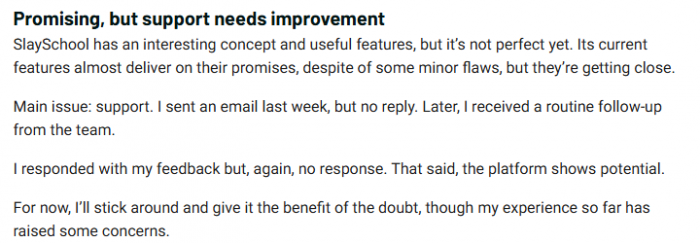
There are also recurring complaints. Some users find that the AI occasionally misses subtle points or creates questions that feel too obvious unless they are edited. A few are not happy with the limits in the free plan and feel that serious use pushes them toward a subscription faster than they expected.
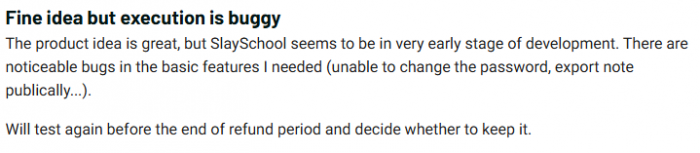
Taken together, real user feedback paints a similar picture to my experience. SlaySchool works best as a fast assistant that prepares your learning material, not as a tool you blindly trust for every card and every question. If you are willing to review and tweak what it generates, most users seem to feel they get more time back than they spend fixing small issues.
Final Verdict
SlaySchool does not promise to make studying effortless and it does not pretend to understand your course as well as you should. What it offers is a practical trade. You give it your unsorted notes, slides, and lectures, and it gives you back something you can start revising with right away.
By turning raw material into flashcards, quizzes, and summaries, it shortens the slowest part of the study process, which is preparation. You still have to put in focused work on understanding concepts and solving problems, but you do not need to spend nearly as much time just reshaping the content into a useful format.
For students who want to move into active recall sooner and keep their revision materials in better shape without burning weekends on formatting, SlaySchool feels less like a gimmick and more like a genuinely helpful assistant.
Post Comments
Be the first to post comment!
Related Articles