Table of Content
- Tensor Art AI in 2026
- Key Features: From Simple Prompts To Power Workflows
- User Experience: Web And Mobile
- Pricing, Plans & Value For Money
- Performance, Image Quality & Reliability
- Community, Ecosystem & Safety
- Pros & Cons At A Glance
- Ideal Use Cases & Who Tensor.Art Is For
- How Tensor.Art Compares To Alternatives
- Verdict: Is Tensor Art AI Worth Your Time (And Money)?
Tensor Art AI (Tensor.Art) has quietly grown from “yet another free AI image site” into a full ecosystem: image and video generation, model hosting, community galleries, and pro‑level workflows, all living in your browser and phone. This review walks through every layer of Tensor.Art from beginner‑friendly prompting to advanced pipelines so you can decide whether it deserves a permanent slot in your creative stack.
Tensor Art AI in 2026
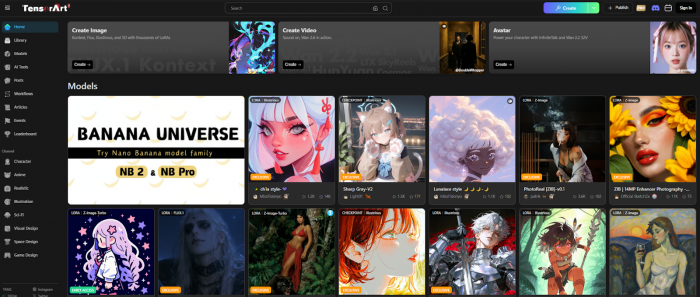
Tensor.Art is a web and mobile platform that lets you generate images and videos with models like Stable Diffusion and SDXL, while also acting as a hub where creators host and share AI models (LoRAs, checkpoints, etc.). Think of it as a blend of Midjourney’s “type a prompt, get art” simplicity and Civitai’s model marketplace, wrapped in a social gallery.
At a high level, Tensor.Art offers:
● Text‑to‑image and image‑to‑image generation with a large catalog of models.
● Text‑to‑video and image‑to‑video tools for short AI clips.
● A model hub where users upload, host, and share custom models and LoRAs.
● Built‑in utilities like upscaling, background removal, face swap, and outpainting.
● A community gallery with remix features, likes, comments, and social discovery.
It runs in the browser and via official mobile apps (Android and iOS), so you don’t need a GPU or local install to access advanced models.
Key Features: From Simple Prompts To Power Workflows
Tensor.Art’s feature set is wide, so it helps to group it by use case instead of rattling off a long list.
Core Image Generation
For everyday users, Tensor.Art works like any modern AI art tool: you type a prompt, tweak a few settings, and generate.
Core capabilities include:
● Text‑to‑image with multiple models (anime, realism, 3D, concept art, etc.).
● Image‑to‑image, letting you restyle or refine an existing image while preserving composition.
● Adjustable parameters: sampler, steps, CFG scale, resolution, aspect ratio, and seed.
● Negative prompts for steering away from unwanted traits (e.g., “blurry”, “extra fingers”).
This gives casual users enough control to experiment, while leaving room for power users to fine‑tune outputs.
Advanced Controls & Workflow Style Features
Where Tensor.Art becomes interesting for serious creators is its more technical tools.
1. ControlNet & conditioning: You can steer generations with pose references, depth maps, or edge maps, similar to what advanced Stable Diffusion setups do locally.
2. ComfyUI‑style workflows: Some parts of Tensor.Art expose node‑like workflows or complex settings, enabling more granular control for users who understand the diffusion pipeline.
3. LoRA support: Apply LoRAs for specific styles or characters, or fine‑tune your own to make the model learn a particular subject or art style.
These features make Tensor.Art much more than a “press one button, get art” toy though the learning curve is steeper for non‑technical artists.
Model Hub & Marketplace
One of Tensor.Art’s strongest differentiators is its role as a comprehensive model hub. It hosts checkpoints, LoRAs, and other model variants uploaded by creators, making a wide range of styles and capabilities easily accessible in one place. Users can quickly switch between models directly within the UI, eliminating the need to manually download and install files. The platform also highlights popular and trending models, many of which are optimized for specific subjects such as anime, portraits, or cinematic scenes, helping users discover high-performing options tailored to their creative goals.
Some sources indicate options or at least visibility benefits for popular creators, hinting at a quasi‑marketplace dynamic even where direct monetization is limited or evolving. For users who don’t want to manage local model folders, this “click to use” approach is a major convenience.
Image Refinement & Utilities
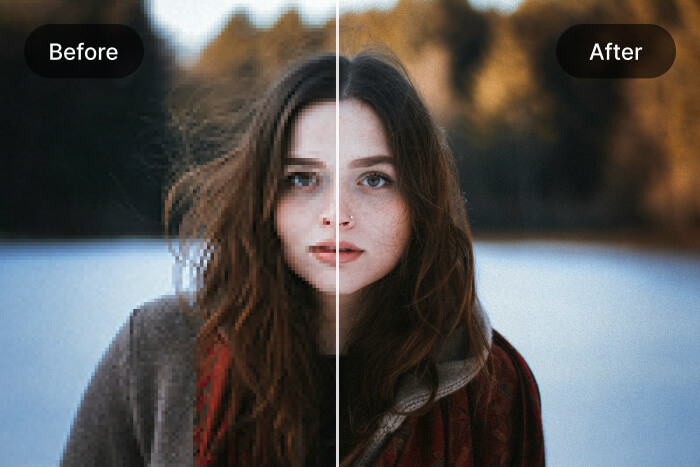
Tensor.Art wraps common post‑processing features into the same environment.
You can:
● Upscale images to higher resolutions, improving sharpness for prints or detailed crops.
● Remove backgrounds for product shots, thumbnails, and compositing.
● Use face swap tools to blend faces between images, useful for stylized portraits or meme‑style edits.
● Outpaint around an image to extend scenes beyond the original frame.
The net effect is that many simple editing tasks can stay inside Tensor.Art instead of bouncing between external tools.
Video Generation
Tensor.Art supports both text-to-video and image-to-video in certain tiers. It enables short AI clips based on a text prompt, with styles shaped by the underlying model, as well as image-to-video generation, where a static frame is animated into a short motion sequence.
While it won’t replace a full video editor, this is enough for concept snippets, social clips, and experiments—especially considering it runs entirely in the cloud.
User Experience: Web And Mobile
The UX of Tensor.Art matters as much as raw capability, particularly for beginners.
Interface & Onboarding
On web and mobile, Tensor.Art exposes a central generation panel with a prompt box, model selector, and key parameters. It also includes tabs or sections for gallery, models, and tools, making navigation relatively straightforward, along with quick access to “remix” existing images, which auto-fills prompts and settings for faster learning.
Onboarding is simple: sign up, choose a model, type a prompt, and hit generate. The first‑time experience is beginner‑friendly as long as you stay on basic controls; the advanced panels can feel dense without prior diffusion experience.
Learning Resources & Documentation
Tensor.Art benefits heavily from community‑made tutorials, YouTube walkthroughs, and third‑party guides. Official in‑app documentation and tooltips exist but can feel thin for deeper features like ControlNet or custom training.
Several reviewers note that basic prompting is easy to pick up quickly and advanced workflows require trial‑and‑error or external guides, which can slow non‑technical users.
If you enjoy exploring and reading guides, this friction is manageable; if you want “set and forget” simplicity, some parts of Tensor.Art may feel overwhelming.
Pricing, Plans & Value For Money
Tensor.Art uses a freemium model: a free tier with daily credits plus paid subscriptions and credit packs.
Current Pricing Snapshot (Approximate)
Exact numbers can change, but multiple sources paint a consistent picture:
| Plan | Price (approx) | Daily credits | Priority | Best for |
| Free | 0 | 50–100 | Low | Casual hobbyists |
| Pro 30‑day | ~$9.90 | ~300 | High | Regular creators |
| Yearly | ~$60 | ~300 | High | Heavy, consistent use |
| Credit packs | Varies | N/A | Normal | Occasional bursts |
Is The Free Plan Enough?
Most reviewers agree the free tier is genuinely usable, especially compared to tools that barely allow a handful of images per month. With ~50–100 daily credits, you can test multiple prompts and styles every day, but you’ll feel constrained if you iterate heavily on a project.
The free plan makes sense if you're exploring AI art as a hobby and you're building small moodboards or experimenting with styles.
Paid plans become better value if you generate high volumes of images weekly and you need video, higher resolutions, or consistent speed for client work.
Performance, Image Quality & Reliability
No AI art platform is just about features; quality and speed matter equally.
Image Quality
Tensor.Art leverages a large variety of models, especially around anime, fantasy, and stylized content. Overall, reviewers and benchmarks place its output quality as strong and competitive:
● Style diversity is a major strength: anime, semi‑realistic, painterly and cinematic looks are well represented.
● SDXL and advanced community models enable high‑detail outputs when you have enough credits and tweak settings.
However, limitations are consistent with most diffusion‑based tools:
● Human realism can falter, especially on hands, faces, and complex poses.
● Overly aggressive settings or poorly matched LoRAs can introduce artifacts and distortions.
Speed & Uptime
Performance is generally good, but not uniform. During off-peak times, generations are quick enough to support iterative workflows, while peak load periods can lead to significant queue slowdowns, especially for free users. Paid users typically receive higher priority and more predictable generation times.
Reported bugs include failed saves, remix issues, or stuck tasks, though these are intermittent rather than constant. For mission‑critical professional pipelines, such variability may be a concern; for most creators, it’s an occasional annoyance rather than a deal‑breaker.
Community, Ecosystem & Safety
Beyond the core toolset, Tensor.Art’s ecosystem is a big part of its appeal.
Community Gallery & Remix Culture
Tensor.Art includes a public gallery where users share their creations, attach prompts, and often expose the model and parameters used.
Key aspects:
● Discoverability: You can browse trending images, new uploads, and category‑specific collections.
● Remixing: Many images can be “remixed”—clicking them opens a generation screen pre‑filled with the original prompt and settings, letting you adapt them to your needs.
● Feedback: Likes, comments, and basic social signals help surface better content and give creators some recognition.
This remix‑first culture doubles as a learning mechanism: beginners can see what actually works instead of guessing blindly.
Model Ecosystem
On the model side, Tensor.Art’s hub resembles a curated Civitai‑style directory. Creators upload LoRAs and checkpoints, often specialized for specific characters, styles, or niches. Users can try these models directly in the browser with just a couple of clicks, with no downloads required. Popular models gain visibility, and in some cases creators benefit from increased exposure or potential monetization opportunities.
For someone who doesn’t want to maintain local model folders or worry about VRAM, this ecosystem is a huge plus.
Safety, NSFW & Governance
AI art tools inevitably intersect with sensitive content, and Tensor.Art addresses this via:
● NSFW sandboxing and opt‑in controls to separate explicit material from the general experience.
● Regional restrictions and safety filters in some territories to comply with local rules.
● Basic reporting and moderation tools on the platform, although the overall enforcement experience varies by user report.
While not perfect, these measures show the platform is at least actively thinking about governance rather than operating as a pure “anything goes” site.
Pros & Cons At A Glance
Drawing all of this together, here’s a consolidated view.
Pros
● Generous free tier compared to many competitors, with daily credits that support real experimentation instead of a token demo.
● Large variety of models, especially for stylized and anime art, plus SDXL support for high‑detail work.
● Integrated utilities such as upscaling, background removal, face swap, and outpainting, reducing the need for extra tools.
● Advanced features like ControlNet, LoRAs, and workflow‑style configurations for power users.
● Active community gallery with remix capability, making it easier to learn from other people’s prompts and settings.
● Model hub and emerging monetization/visibility options for creators who develop and share models.
● Accessible via both web and mobile apps, eliminating GPU setup and local installs.
Cons
● Occasional bugs: remix and save glitches, stuck queues, and error states that can interrupt flows.
● Performance dips during peak hours, particularly noticeable for free‑tier users.
● Human photorealism still inconsistent, with common issues around faces and hands.
● Advanced features can feel under‑documented, pushing non‑technical users toward external tutorials.
● Long‑term pricing and credit structures can shift, so heavy users need to keep an eye on plan changes.
Ideal Use Cases & Who Tensor.Art Is For
Given its strengths and weaknesses, Tensor.Art fits certain profiles extremely well.
Great Fit For
● Hobbyists and beginners who want a generous free playground to learn prompting, experiment with styles, and explore AI art without upfront cost.
● Concept artists and designers who need fast moodboards, style explorations, and stylized visuals rather than flawless photorealism.
● Prompt tinkerers and power users who appreciate ControlNet, LoRAs, and workflow‑style setups but don’t want to manage local GPUs.
● Model creators who want to share or surface their models to an active, built‑in audience.
Not The Best Fit For
It may not be ideal for ultra–time-critical production pipelines that require strict SLAs and guaranteed uptime, as queue slowdowns and occasional bugs can be show-stoppers. It’s also less suited for high-stakes photoreal advertising where every hand, face, and micro-detail must be perfect on the first try, since more specialized workflows or manual retouching may still be necessary.
How Tensor.Art Compares To Alternatives
Without going into exhaustive head‑to‑heads, it helps to place Tensor.Art next to a few familiar names.
| Tool | Strengths | Weak spots for this use case |
| Tensor.Art | Free daily credits, model hub, strong community remix, advanced controls without local setup. | Peak‑time slowdowns, some bugs, realism limits. |
| Midjourney | Polished aesthetics, strong “wow” factor, community on Discord | No model hosting, limited control vs diffusion UIs, paid‑only. |
| Leonardo / Playground / NightCafe | Different balances of credits, templates, and guided UX. | Less emphasis on user‑hosted models in one place. |
| Local Stable Diffusion | Maximum control, privacy, any model you want if your hardware can handle it | Requires setup, GPU, and ongoing maintenance. |
Verdict: Is Tensor Art AI Worth Your Time (And Money)?
Tensor.Art manages to be two things at once: a friendly playground for people just dipping their toes into AI art, and a capable hub for more technical users who want ControlNet, LoRAs, and model hosting without touching a GPU. Its generous free tier, wide model library, and remix‑driven community make it easy to recommend as a starting point or secondary tool for most creators.
That said, it isn’t perfect. If you need absolute reliability, fully photoreal results, or enterprise‑level guarantees, the occasional bugs and peak‑time slowdowns will frustrate you. But for concept art, experimentation, and learning modern diffusion workflows in a social environment, Tensor.Art is one of the more compelling platforms available right now.
Post Comments
Be the first to post comment!
Related Articles