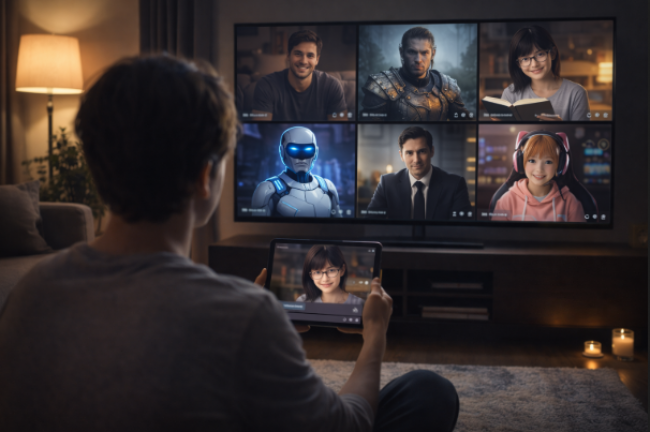
ReelCraft AI is an AI-powered short-form video tool that automates scripts, edits, and effects for TikTok, Instagram Reels, and YouTube Shorts. Discover how it works, who it’s for, and whether it’s worth using.
I still remember the first time I needed to churn out a dozen Reels for a client’s week-long Instagram blitz. I had the strategy and ideas, but the actual video creation part? That used to eat up hours—scripting, editing, adding effects, finding music. That’s when I stumbled onto ReelCraft AI.
The Promise: Can AI Really Make Short-Form Videos Easier?
ReelCraft AI claimed to handle everything—from generating scripts to adding trendy visual effects. I was skeptical. But the idea of one-click editing, AI voiceovers, and platform-ready exports sounded exactly like what I needed. I decided to test it for a week.
Spoiler: I haven’t looked back since.
Starting Out: How ReelCraft AI Works in Practice
Once logged in, the interface greeted me with templates designed for TikTok, Reels, and Shorts. I selected one, input a topic (“Morning routines for remote workers”), and watched as it drafted a script in under 30 seconds.
Then came visuals—transitions, animations, and music were added with a single click. I recorded a voiceover once, but even their AI-generated voices sounded more natural than I expected.
This isn’t a drag-and-drop editor. It’s a co-pilot for content creation.
Favorite Features
AI Script Generator: I just feed it a topic, and it writes a punchy, platform-optimized script.
One-Click Smart Editing: It automatically trims, adjusts, and adds the latest effects.
Voice & Music Syncing: Built-in AI voices and curated music eliminate the need for external tools.
Social-Specific Templates: No resizing. It knows what TikTok, Instagram, and YouTube Shorts need.
Each feature flows into the next, so I don’t feel like I’m jumping between tools. It’s fast and coherent.
A Creator’s Workflow, Simplified
Want to know how I use it for a week’s worth of content?
Batch scripting: I input 5–6 topics on Monday.
Template testing: Try different effects on each video—AI always offers fresh combos.
Preview & tweak: Captions and timing adjustments take maybe 10 minutes per video.
Export & schedule: I queue everything by Tuesday.
That’s five videos ready to go—without needing to open Premiere Pro or After Effects.
Pricing: What’s the Trade-Off?
While official ReelCraft pricing is still under wraps, based on competitor models, I expect it’ll roll out in tiers:
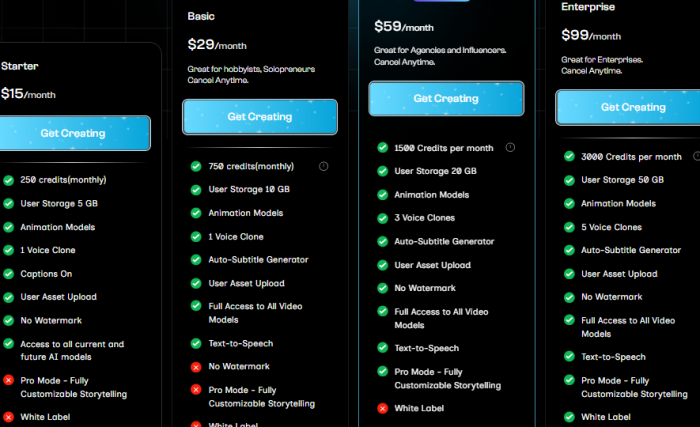
For now, I’m using the beta version. But I’d pay just to save those 6–8 hours per week.
How Does It Compare to Other Tools?
| Feature | ReelCraft AI | Runway AI | Canva Magic Studio |
| AI Scripting | Yes | No | Limited |
| One-Click Editing | Yes | Yes | Yes |
| Trendy Effects | Yes | Yes | Yes |
| Voiceover Integration | Yes | Limited | Yes |
| Social Video Focus | Strong | Moderate | Moderate |
If short-form social content is your main focus, ReelCraft feels more tailored.
Limitations? It’s Not All Perfect
To be real, it’s not a pro video editing suite. If you want frame-level color correction or advanced cinematic tools, you’ll need something else.
Also:
- Watermarked exports on the free plan
- Limited voice style customization (for now)
- No long-form video editing support
Still, for social-first creators like me, these trade-offs feel fair.
Final Thoughts: Who Should Actually Use It?
If you’re:
- A solo content creator or coach who posts 3–5 times a week
- A brand running video ads on TikTok or Instagram
- An agency building batches of Shorts for clients
Then yes, ReelCraft AI absolutely fits.
But if you’re shooting a Netflix docu-series? This isn’t your tool.
FAQs About ReelCraft AI
Q1. Can I upload my own footage?
Yes, ReelCraft lets you upload custom videos and images.
Q2. Does it support voice cloning?
Not yet, but AI voiceovers are improving rapidly. Updates are expected.
Q3. Will it post directly to social platforms?
Currently, you’ll need to download and post manually—but integration is likely on the roadmap.
Verdict:
ReelCraft AI doesn’t try to be everything. But what it does—short-form, social-ready video—it does impressively well. For me, it replaced three tools in one go.
Whether you’re building your brand or helping others build theirs, this tool is worth watching.
Post Comments
Be the first to post comment!
Related Articles



Best Alternatives to Dopple AI
Danny Hamilton . Mar 10, 2026