Table of Content
- What really is Unstuck AI?
- How Unstuck AI Works (End‑to‑End Workflow)
- Key Features in Depth
- Real‑World Use Cases (Including Reddit‑Style Experiences)
- What Real Users Like (Aggregated Sentiment)
- Where Users Are Critical or Skeptical
- Accuracy and Reliability: How Much Can You Trust It?
- Pricing and Value (Conceptual)
- Privacy, Data, and Ethical Use
- Pros and Cons from User Perspective
- How It Compares to Other AI Study Tools
- Who Should (and Shouldn’t) Use Unstuck AI?
- Final Verdict: A Strong Study Copilot, Not a Replacement for Effort
Unstuck AI is an AI‑powered study assistant that lets you upload your course materials—PDFs, slides, textbooks, YouTube lectures, recordings and then chat with them to get grounded answers, summaries, quizzes, and structured notes. It sits between a “chat with PDF” tool and a full‑fledged learning platform built specifically for students and self‑learners.
In this review, we’ll break down how Unstuck AI works, what it gets right (and wrong), how real students describe using it, who should try it, and how it compares with other AI study tools.
What really is Unstuck AI?
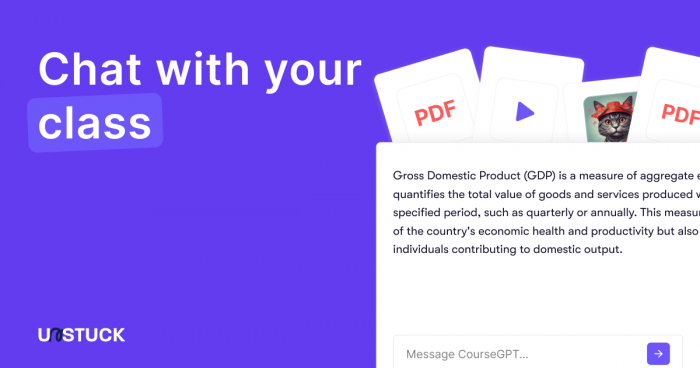
Unstuck AI is built around a simple promise: help you learn faster by turning your existing course materials into an interactive, AI‑powered study experience. Instead of asking a generic chatbot vague questions, you upload your own PDFs, slides, notes, and videos, and then ask questions grounded in that content.
Important clarification: there’s also a mental‑health app called “Unstuck: CBT Therapy Journal”, focused on CBT‑based self‑help for anxiety and mood. That’s a different product. Here, we’re only talking about Unstuck AI as a study and note‑taking assistant.
Unstuck AI is clearly targeted at:
● School and college students drowning in PDFs and lecture slides.
● Exam aspirants relying on bulky notes and coaching materials.
● Self‑learners and professionals taking online courses and certifications.
How Unstuck AI Works (End‑to‑End Workflow)
The core workflow is designed to feel natural to a student:
1. Upload your materials: You add PDFs, presentations, documents, images or handwritten notes (if digitized), plus links to YouTube videos or lecture recordings.
2. Let the AI process everything: The system ingests and indexes the content so it can later “look up” the right snippets when you ask questions.
3. Chat with your course: You get a chat interface where you can ask things like “Explain the main points from Lecture 3 in simple language” or “List the key differences between X and Y from this chapter.”
4. Generate study assets: From the content, Unstuck AI can create summaries, key takeaways, flashcards, quizzes, and sometimes basic study plans.
5. Organize and revisit: All materials and generated content live inside a dashboard, organized by subjects, folders, or classes, so you can revisit and extend your study sessions.
This “materials → AI processing → chat → study assets” loop is what differentiates it from general AI chatbots that don’t maintain a course‑centric workspace.
Key Features in Depth
1. Multi‑Format Uploads and Unified Context
Unstuck AI supports:
● PDFs, DOCs, PPTs and similar documents.
● Images or scanned notes (where text can be recognized).
● YouTube links and lecture recordings.
Multiple files can be grouped under a single subject or course, and the model can answer questions using all of them at once. For example, it can use both your textbook PDF and your professor’s slides to craft a more complete answer.
For a student juggling five subjects with multiple sources for each, this unified context is one of the biggest quality‑of‑life improvements.
2. Chat With Your Course Materials
The flagship feature is the chat interface grounded in your materials. You’re not chatting with a model that pulls from the open web; you’re chatting with a model that primarily references what you uploaded.
Example prompts you might use:
● “Explain this formula step‑by‑step using examples from my notes.”
● “Give me 10 short‑answer questions based on Chapter 4.”
● “Summarize this lecture in 10 bullet points for last‑minute revision.”
Because it’s grounded in your content, the answers feel more “on‑syllabus” and less generic.
3. Summaries, Key Points, and Structured Notes
Unstuck AI can condense:
● Long textbook chapters.
● PDF readings and research articles.
● Hour‑long lecture recordings or videos.
into structured notes, bullet‑point takeaways, or short paragraph summaries. In content‑heavy subjects, this saves hours that would otherwise go into manual summarization, allowing students to focus more on understanding and practice.
4. Flashcards, Quizzes, and Practice Questions
Unstuck AI also supports active learning by generating:
● Flashcards (terms, definitions, formulas).
● Question sets and quizzes drawn from your materials.
● Simple practice tests for quick self‑checks.
This is particularly helpful before exams, when students want to shift from passive reading to active recall.
5. Study Analytics and Progress Cues
Some implementations provide basic analytics or cues like:
● Which topics you interact with the most.
● Where you ask repeated clarification questions.
● How many generated quizzes you’ve attempted.
It’s not yet a full analytics dashboard, but it does give hints about strengths and weak spots so students can adjust their focus.
6. Organization and Class‑Style Dashboard
The dashboard groups files and AI outputs (summaries, chats, flashcards) in a class or folder structure. Instead of scattered PDFs and notes across multiple apps, Unstuck AI tries to become a lightweight “study hub” where everything related to a course lives together.
7. Mobile Note‑Taker and Lecture Recorder
The companion note‑taker app is especially important for in‑person classes. It typically lets students:
● Record lectures or discussions.
● Generate transcripts from the recordings.
● Turn those transcripts into summaries and key points.
This makes it appealing to learners who struggle to capture everything during live lectures.
Real‑World Use Cases (Including Reddit‑Style Experiences)
Heavy Course Load Student
Think of a university student juggling multiple subjects, each with:
● Lecture slides.
● A main textbook PDF.
● Past question papers.
● Problem‑set documents.
They upload all of these into Unstuck AI, then:
● Use chat to clarify tough concepts from any combination of sources.
● Ask for exam‑style questions from past papers and slides.
● Generate topic‑wise summaries right before tests.
Students in similar situations often describe the tool as the difference between “getting buried in PDFs” and actually being able to focus on understanding concepts.
ADHD / Focus‑Challenged Learners
In online discussions, neurodivergent learners and students with attention issues often talk about AI note‑takers like Unstuck AI as a kind of safety net. The recurring themes from such conversations are:
● They like being able to record a lecture, then later generate a transcript and summary when their focus inevitably drops at some point.
● They rely less on capturing every detail in the moment and more on revisiting a structured recap afterward.
● Some specifically highlight that the transcriptions feel surprisingly accurate, which builds trust in the tool as a backup.
One typical sentiment (rephrased) would be: “It doesn’t replace my notes, but it covers the gaps when my mind checks out for a few minutes.” That’s a strong value proposition for students who struggle with sustained attention. reddit
Exam Aspirants With Bulky Coaching Notes
Exam aspirants preparing for competitive exams often use multiple coaching PDFs and marathon video lectures. In those scenarios, users describe Unstuck AI as:
● A way to compress hundreds of pages into manageable topic summaries.
● A quick quiz generator for last‑minute revision.
● A tool that helps them pull out high‑yield information from long documents and lectures.
For them, the advantage is not just convenience but a sense of control over overwhelming material.
Working Professionals in Online Courses
Professionals taking online courses and certifications use Unstuck AI as a personal course assistant:
● Uploading slide decks, PDFs, and course readings.
● Summarizing multi‑hour webinars into 10–15 key bullet points.
● Extracting action items or frameworks from dense content.
The feedback pattern here is that it compresses “course overhead” and lets them focus on practical application.
What Real Users Like (Aggregated Sentiment)
Across app ratings, forums, and third‑party write‑ups, several positive themes show up repeatedly:
● Easy to get started – The interface is described as clean and beginner‑friendly, even for non‑technical students.
● Grounded answers – Many users appreciate that answers actually reference their files instead of random web content.
● Big time‑saver – Students repeatedly mention saving hours on summarizing lectures and readings.
● Lecture backup – For note‑taker usage, recorded lectures plus transcripts and summaries are seen as a powerful safety net.
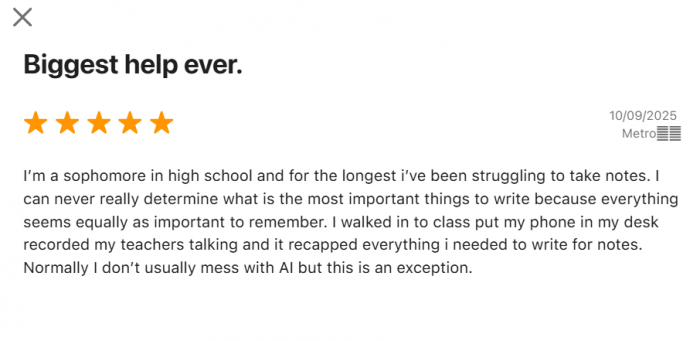
In short, students who already live inside PDFs and lecture slides tend to rate it highly for reducing friction and saving time.
Where Users Are Critical or Skeptical
Balanced coverage also means you acknowledge the complaints and reservations that appear in discussions:
● Not always better than general AI tools – A subset of users feel that a general‑purpose AI chatbot with file uploads can sometimes offer more flexibility, especially if you’re already paying for that subscription.
● Price sensitivity – For students in price‑sensitive regions, a dedicated subscription just for studying can feel expensive compared to stitching together free tools.
● Occasional shallow or incorrect answers – As with any AI system, users report instances where explanations are too surface‑level or not quite accurate, especially on complex or niche topics.
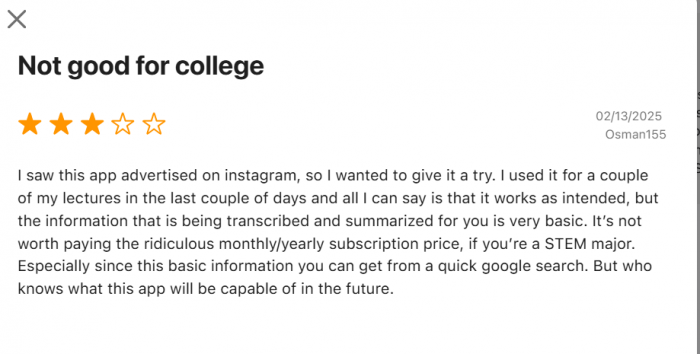
● Still demands effort – Some students go in expecting a “magic answer machine” and come away disappointed when they realize they still need to read, verify, and think.
These critical voices are important: they show that Unstuck AI is excellent for certain workflows, but not a universal solution for every learner.
Accuracy and Reliability: How Much Can You Trust It?
Unstuck AI’s biggest strength is that it tries to ground responses in your own materials. If your files are clear, well‑scanned, and well‑structured, answers tend to be relevant and on‑syllabus.
However:
● Poor scans and messy notes can dramatically degrade quality.
● Highly specialized or advanced topics may still receive oversimplified treatment.
● Diagrams, equations, and complex proofs can be weak points, depending on how well they are captured in text.
For high‑stakes content (exams, professional decisions, medical or legal subjects), it’s wise to treat Unstuck AI as a study partner, not as a final authority. Use it to clarify and summarize, then cross‑check key points with textbooks, official documents, or instructors.
Pricing and Value (Conceptual)
Exact numbers change, but the general pattern is:
● A free tier with limits on questions and uploads, enough to let you test the workflow.
● A monthly Pro plan with higher limits and advanced features like more generous uploads, better note‑taking, and richer quiz generation.
● An optional yearly plan that discounts the monthly cost.
● Institutional or team options for schools, coaching centers, or study groups.
Pricing Overview
| Plan | Features (summary) | Price* |
| Free Plan | Basic access, limited use of AI tools, capped questions/uploads, core “chat with materials” and summaries | 0 USD / month |
| Pro / Premium (Monthly) | Full access to all study features, higher limits, advanced note‑taking, personalized study plans, mental‑health style tools in some bundles | 19.99 USD / month |
| Annual Plan | Same features as Premium, billed yearly with discount (roughly 20% off monthly rate in some sources) | 119 USD / year |
| Enterprise / Team | Custom features for schools, coaching centers, and teams; collaboration and admin controls | Custom pricing |
In terms of value, Unstuck AI is positioned as:
● More specialized and feature‑rich for studying than free “chat with PDF” sites.
● More affordable and student‑friendly than heavyweight enterprise learning platforms.
● Comparable in price to other mid‑tier productivity or study subscriptions.
For a serious student using it daily, the subscription can be justified as a time‑saver and stress‑reducer; for a very casual user, the free tier or a generic AI tool may feel sufficient.
Privacy, Data, and Ethical Use
Because students upload notes, assignments, and sometimes graded content, privacy and data handling matter a lot. Before committing, you should always:
● Read the latest privacy policy and terms of use.
● Check how long files are stored and under what conditions.
● Confirm whether your data is used to train general models or kept isolated.
From an ethical standpoint, it also helps to set expectations: Unstuck AI is best used as a learning accelerator, not as a way to auto‑generate assignments or bypass genuine understanding. The students who get the most out of it use it to understand and practice, not to cheat.
Pros and Cons from User Perspective
Pros
● Purpose‑built for studying – Course‑centric design, not a generic chatbot.
● Multi‑format, multi‑file grounding – Works with PDFs, slides, notes, and videos in one place.
● Powerful summarization – Turns overwhelming material into digestible notes and bullet points.
● Active learning tools – Flashcards and quizzes from your own content.
● Strong user sentiment – Many students report saving time and feeling more in control of their study load.
Cons
● Dependent on content quality – Garbage in, garbage out: messy or low‑quality scans lead to weaker results.
● Price can be a barrier – A dedicated subscription is hard to justify for some students if they already pay for other AI tools.
● Not a magic bullet – Still makes mistakes, still needs human oversight, and still requires you to put in study time.
● Overlap with existing AI tools – Power users of general AI platforms may feel it doesn’t add enough to warrant a separate subscription.
How It Compares to Other AI Study Tools
Unstuck AI vs ChatGPT vs Notion AI vs Quizlet
| Feature / Tool | Unstuck AI | ChatGPT (with files) | Notion AI | Quizlet |
| Focus | Study assistant for your materials | General AI across all use cases | Notes/workspace with AI help | Flashcards & test practice |
| Uses your PDFs/slides | Yes, designed around it | Yes, but not study‑specific UI | Only as attachments/embedded content | No (manual input or import) |
| Grounded Q&A | Yes, tied to uploaded content | Yes, but mixed with general knowledge | Limited; more for rewriting/summaries | No |
| Auto summaries | Yes (notes, lectures, chapters) | Yes (prompt‑driven) | Yes (inside pages) | No |
| Auto flashcards | Yes, from your materials | Only via manual prompts | Manual via templates/databases | Yes, core feature |
| Auto quizzes/tests | Yes, from your materials | Prompt‑based only | No native quiz engine | Yes, very mature |
| Study dashboard | Yes, course‑style layout | No; just chats | Yes, but generic workspace | Sets/folders only |
The sweet spot for Unstuck AI is a student who wants a single place to store materials, chat with them, and generate study aids without cobbling together multiple tools.
Who Should (and Shouldn’t) Use Unstuck AI?
Unstuck AI is a strong fit for:
● Students handling multiple content‑heavy subjects with lots of PDFs and slides.
● Exam aspirants who need to compress huge syllabi into manageable revision cycles.
● Self‑learners and professionals in structured online courses.
● Learners who struggle with attention and benefit from having lectures recorded, transcribed, and summarized.
It may be less suitable for:
● Learners who mostly use physical books and don’t want to digitize them.
● Students on extremely tight budgets who can’t justify another subscription.
● Users looking for a general‑purpose AI that does everything from coding to email writing.
Final Verdict: A Strong Study Copilot, Not a Replacement for Effort
Unstuck AI earns its place as a serious study companion. It helps you turn chaotic PDFs, slides, and lectures into structured, searchable, and test‑ready materials while freeing up hours you’d otherwise spend summarizing and organizing.
Real‑world student sentiment reinforces this: many describe it as a genuine time‑saver and attention‑safety net, especially for lecture‑heavy courses and neurodivergent learners. At the same time, some power users feel they can achieve similar results with more flexible AI tools they already pay for, and cost remains a real barrier in some contexts.
If you treat Unstuck AI as a copilot, a tool that amplifies your learning instead of replacing it, it can be one of the most impactful additions to your study stack. If you expect it to do the learning for you, you will likely be disappointed.
Post Comments
Be the first to post comment!
Related Articles