Table of Content
- The problem Wava AI is really solving
- First impressions: UX, onboarding, and workflow
- Creation engine: scripts, visuals, and voices under the hood
- Pricing, limits, and real value for money
- Performance in the wild: quality, speed, and sameness
- Trust, safety, and whether Wava AI is legit
- Real user sentiment: patterns, not anecdotes
- Wava AI versus alternatives and manual editors
- Who Wava AI is really for (and who should avoid it)
- Final verdict: a factory, not a temple
Wava AI has quietly become one of the invisible engines of short‑form video: you might not recognize the brand, but you’ve almost certainly scrolled past its style of output vertical clips with bold captions, smooth AI narration, and looping background footage designed to hook you in three seconds or less. This article looks at Wava not just as “another AI video tool,” but as a faceless‑video factory: how it works, where it shines, where it cuts corners, and whether it’s a safe, sustainable backbone for your TikTok, Reels, and Shorts strategy.
The problem Wava AI is really solving
Short‑form video has a brutal equation: demand for daily content has exploded, but editing capacity has not. A single 30–60 second short can easily consume an hour when you script, record, cut, caption, and tweak inside a traditional editor. Wava AI steps directly into that gap and says: give me your idea, script, or clip, and I’ll handle the mechanics of turning it into a vertical, captioned, narrated video in a few minutes.
Crucially, Wava is not trying to be a full non‑linear editor or a cinematic text‑to‑video model. It is purpose‑built for a very specific job: high‑volume, faceless, algorithm‑friendly shorts that look native to TikTok, Instagram Reels, and YouTube Shorts. For solo creators, content farms, and agencies that live and die by consistency rather than perfect craft, that narrow focus is the real product.
First impressions: UX, onboarding, and workflow
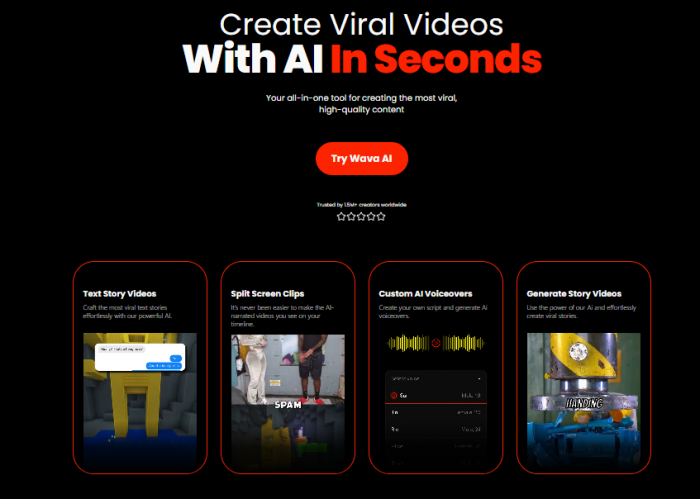
Wava AI lives entirely in the browser, so you land on a web app that feels closer to a social‑video dashboard than a traditional timeline editor. The entry points are clear: you can start a text story video, trigger an AI‑generated story, upload a long video for auto‑clipping, or build split‑screen clips; in each case, the platform funnels you into a guided flow instead of dropping you on an empty canvas.
Onboarding is built around templates and prompts rather than technical options. A first‑time user is nudged to choose the format (text‑story, split‑screen, streamer clip, etc.), paste a script or write a short prompt, pick a voice, toggle captions, and hit generate. The learning curve is therefore low: most of the complexity is hidden behind presets so you can go from idea to first draft video without understanding tracks, keyframes, or codecs. For veteran editors, that can feel restrictive, but for the audience Wava is chasing, it feels like a relief.
Once a draft is generated, you still get a simplified timeline and basic controls to adjust clip length, text blocks, caption position, colors, and a few stylistic parameters. It’s enough to fix obvious issues and impose a bit of brand consistency, but not enough to rebuild a sequence from scratch.
Creation engine: scripts, visuals, and voices under the hood
From text box to vertical timeline
At the heart of Wava is text‑driven creation. You either:
● Paste a finished script.
● Type a short prompt and let Wava generate a full narrative.
● Import longer content (like a stream or talking‑head video) to be clipped into shorts.
In the “Text Story Video” mode, Wava converts your script into the style of clips that dominate TikTok and Reels: bold line‑by‑line captions that show up in sync with an AI voiceover, running over B‑roll or game footage. The script is broken into beats, each beat becomes a caption segment, and the system aligns visual changes with those beats automatically. That’s the mechanism that makes a piece of text feel like a “story video” instead of static text on screen.
The “Create Story Video” mode goes a step further and lets Wava build the narrative from a prompt, making it a true hands‑off automation option. You describe the type of story or content you want, and the AI drafts the story, chooses visuals, applies a voice, and outputs a finished short. This is powerful for generic narratives or listicles; it is weaker for nuanced, opinionated, or highly branded content where the exact wording really matters.
Visuals: background clips, split‑screen, and auto‑clipping
For visuals, Wava leans heavily on stock‑style background clips and split‑screen layouts. You can select from a library of pre‑made video backgrounds, or let the AI match scenes to your story based on keywords and themes pulled from the script. The result is clean, on‑trend, and platform‑native, but by definition tends toward generic footage: office scenes, cityscapes, gaming clips, lifestyle B‑roll.
The split‑screen and “clip viral streamers” tools are tuned for gaming and reaction channels. You can bring in a streamer clip, apply a template that reserves space for captions in the upper area, and let Wava handle cropping, split layout, and caption synchronization. For anyone who has manually formatted gameplay clips for Shorts, this kind of templating removes several minutes of repetitive work per video.
The Auto Clipper feature addresses a different pain point: turning long‑form videos into shorts. You upload a longer video, Wava’s AI identifies high‑engagement segments, and outputs those as ready‑to‑edit or ready‑to‑publish clips. It’s not unique in the market, but having it inside the same interface as your text story generator tightens the workflow for podcast, streamer, and webinar repurposing.
Voiceovers and captions: how human does it feel?
Wava integrates with ElevenLabs for voiceover, which means you get access to high‑quality, natural‑sounding AI voices rather than the robotic TTS of earlier tools. You can feed in your script, choose a voice, and generate narration that sounds close enough to a human for most social contexts. On higher plans, you can even import and clone your own voice, giving faceless videos a consistent audio identity that still feels personal.
Captions are generated automatically once the voiceover is finalized. The system syncs text to audio, supports stylistic controls for color, font, size, and position, and aims squarely at the bold, high‑contrast caption style you see in viral shorts. For standard English content, reviewers report solid accuracy, although, like any ASR‑driven system, it can stumble with heavy accents or niche jargon.
Together, these pieces, AI narration and auto‑captions are where Wava creates most of its perceived “magic.” The user experience is simply: type, choose voice, get video.
Pricing, limits, and real value for money
Wava’s pricing is structured around the number of AI‑generated videos you can create per month, which keeps the mental model simple for creators and agencies. Publicly available information indicates three main paid tiers:
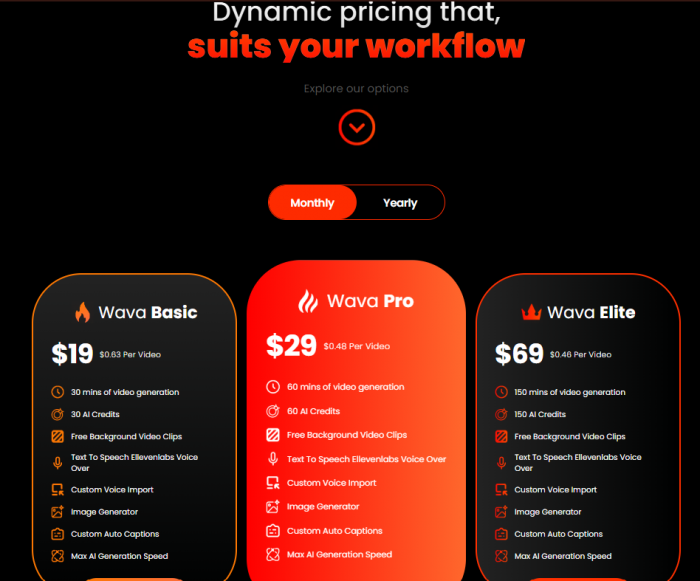
There is also a free or trial route that lets you test the core workflow with tight limits, typically enough to validate quality but not to run a full channel. Because plans are tied to video count rather than abstract “credits” or GPU minutes, it’s easier to calculate cost per piece of content and compare it to manual editing or an editor’s hourly rate.
Value depends heavily on your volume. A creator publishing a few shorts per week may find the Basic plan more than enough and relatively affordable compared to paid editors or agency‑style tools. For a shorts farm or agency producing multiple videos per day across several client channels, the Elite tier’s per‑video cost can be extremely competitive as long as clients accept the aesthetic and customization limits that come with automation.
The biggest caveat is lock‑in risk around pricing: like most SaaS products, Wava can change tiers, limits, or discounts over time, and heavy users will feel those changes more acutely. Treating Wava as one component in a broader stack, rather than your only production channel, helps mitigate that risk.
Performance in the wild: quality, speed, and sameness
Real‑world reviews tend to agree on two things: Wava is fast, and Wava is consistent. A typical 30–60 second short can go from idea to exported file in minutes once you’re familiar with the interface, especially in text story and auto‑clipper modes. That speed is a genuine strategic advantage on platforms where trends move quickly and consistency beats occasional perfection.
In terms of quality, Wava’s output looks like the current language of social video: tall aspect ratio, readable captions, dynamic background changes, and clear narration. For viewers, that translates into content that feels native to their feeds, which is exactly what most growth‑oriented channels want.
But the same characteristics that make Wava powerful also create its main weakness: sameness. Because you and thousands of other creators are pulling from similar templates, background footage pools, and caption styles, videos can start to blur into one aesthetic. For hyper‑casual or low‑stakes channels, that might be acceptable; for distinctive brands or creators trying to cultivate a unique identity, it’s a real cost.
Trust, safety, and whether Wava AI is legit
In an ecosystem full of short‑lived AI tools, “Is it legit?” is not a trivial question. Wava passes several basic legitimacy and trust checks: it runs as a functioning web app, maintains an up‑to‑date pricing page, is actively covered in independent reviews, and is discussed on AI tool directories and social platforms. That combination of signals is more typical of a real SaaS business than a throwaway landing page.
User‑facing reviews on third‑party sites and directories add more nuance. Aggregated commentary highlights the platform’s ability to produce “high‑quality, faceless viral films for social media” with AI stories, voiceovers, and streamlined editing. External analyses specifically frame Wava as an AI‑driven environment for rapid viral video creation rather than a general editor, and they emphasize its time‑saving narrative automation.

On the safety and privacy side, Wava relies on third‑party infrastructure for elements like AI voiceovers (for example, ElevenLabs). That’s good for quality and stability, but it also means your scripts and audio may pass through multiple vendors, each with their own data policies. As with any SaaS editing tool, you should avoid feeding highly sensitive or confidential material into the system and carefully review the platform’s terms, privacy policy, and data retention language, especially around uploaded media and generated voices.
The risk profile is typical for this category: acceptable for most social content and channel fodder, but not a place where you’d store unreleased campaigns, legal material, or proprietary client assets you cannot afford to leak. The smarter approach is to reserve Wava for high‑volume, low‑sensitivity content and keep critical creative work in environments where you have more control.
Real user sentiment: patterns, not anecdotes
Synthesizing feedback from AI tool directories, blog reviews, and broader discussion, a few clear themes emerge. Happy users almost always talk about speed and simplicity: they highlight how Wava “markedly decreases production time” by automating scripting, background selection, and voiceovers in one chain, allowing them to post more often without hiring editors or learning complex software. Agencies and short‑form channels in particular appreciate being able to move from brief to multiple finished clips in a single session.
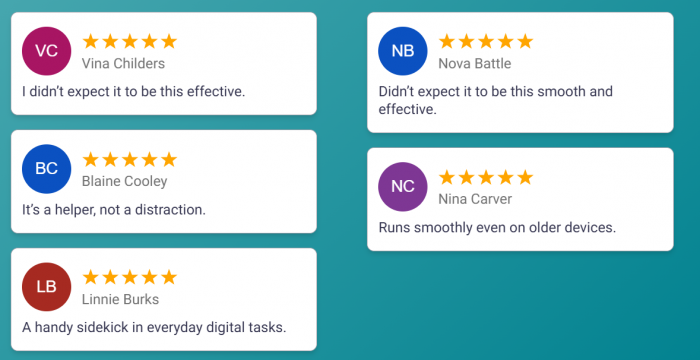
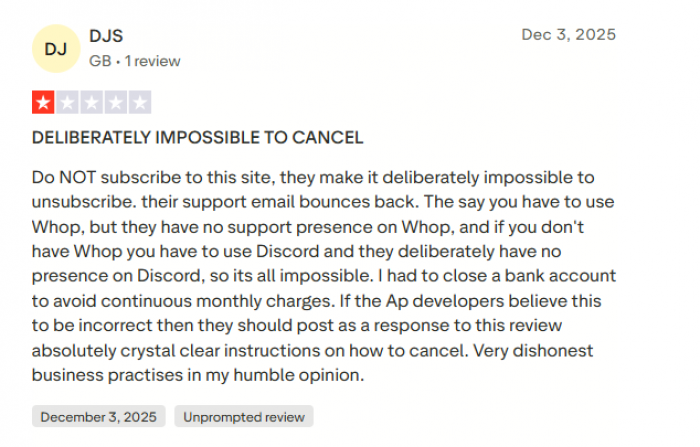
Criticism clusters around two main pain points, and both show up clearly in public reviews. The first is reliability and support: alongside positive comments calling Wava a “great AI app for editing clips,” there are harsh accounts of the service “not working as it should” with recurring errors and no effective help when things break. Some users report that emails to support bounce, that there is no real presence on Whop or Discord despite instructions to use those channels, and that resolving issues can drag on without a clear answer.
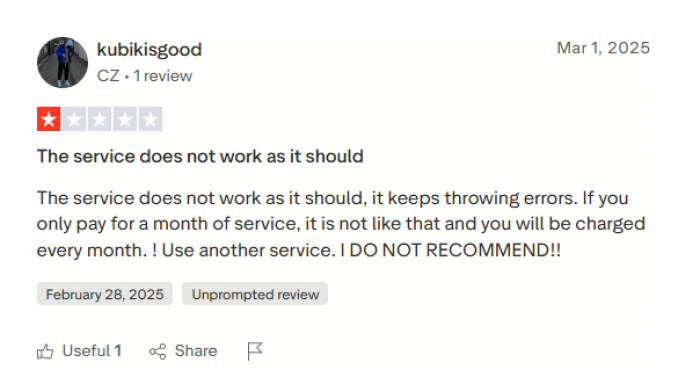
The second is billing and cancellation. Multiple Trustpilot reviewers describe being charged monthly even after intending to pay for a single month, and say they found it “deliberately impossible to unsubscribe,” in one case going as far as closing a bank account to stop continuous charges. These stories don’t mean every user will face the same problems, but they do underline a simple rule for anyone trying Wava: use a payment method you can closely monitor, learn the exact cancellation flow on day one, and be prepared to contact your bank or payment provider quickly if you see charges you did not expect.
Wava AI versus alternatives and manual editors
When you zoom out, Wava sits in a very specific slot among video tools. It is more automated than classic editors, more structured than general text‑to‑video engines, and narrower than big creative platforms. If you compare it mentally to CapCut, Pictory, or high‑end generative platforms, its identity becomes clearer.
Against manual tools like CapCut, Wava trades fine control for automation. CapCut gives you deep editing power, precise cuts, and rich effects, but demands time and skill; Wava removes much of that friction at the cost of granular control over every frame. Pictory and similar platforms lean into turning longer scripts or videos into more traditional formats, whereas Wava is consciously shorts‑first and designed around the aesthetics of TikTok and Reels.
Compared to cinematic or experimental AI video models, Wava is almost conservative. It does not try to synthesize entirely new worlds from abstract prompts; instead, it uses AI to assemble and narrate content in the styles that have already proven to work. That conservatism is a strength if your goal is channel growth and monetization rather than visual experimentation; it is a limitation if you are exploring storytelling beyond the current feed‑driven template.
Who Wava AI is really for (and who should avoid it)
Wava makes the most sense for creators and teams who care more about throughput than tinkering. Faceless YouTube Shorts channels, TikTok accounts built around stories, facts, or Reddit‑style content, gaming highlight channels, and agencies running social calendars for multiple brands can all benefit from being able to generate dozens of decent‑looking shorts per month with a predictable budget and minimal editing overhead.
It can also be a useful sketching tool: marketers and strategists can rough out concepts, sequences, and narrative structures in Wava, then rebuild or refine promising ideas in more advanced editors. In that role, it behaves like a fast storyboard engine that speaks in the visual language of current feeds.
On the other hand, if you are a filmmaker, a brand with strict visual identity, or a creator whose value proposition is aesthetic originality, Wava’s strengths become weaknesses. The templates, stock‑style visuals, and familiar caption patterns will constantly nudge your work toward the median of the algorithm, which is the opposite of what you want if you are trying to stand out. In those scenarios, Wava may be better as a background tool for secondary content rather than the core of your main channel.
Final verdict: a factory, not a temple
The cleanest way to think about Wava is as an industrial machine for short‑form content. It ingests text, prompts, or long videos, and outputs consistent, platform‑native shorts with AI narration and captions, at a speed and volume that manual editing struggles to match. For many creators and agencies, that alone will justify the subscription.
But like any factory, it optimizes for repeatability and efficiency, not for sacred, one‑off creative work. Put your daily feed‑filler and low‑stakes experiments through Wava, the listicles, storytimes, commentaries, and streamer clips that keep your channels alive. Save your most original ideas, brand‑critical campaigns, and emotionally nuanced stories for workflows where you control every frame. Used with that distinction in mind, Wava is not a risky shortcut; it is a pragmatic ally in the ongoing race to show up in people’s feeds without burning yourself out.
Post Comments
Be the first to post comment!