Sometimes you just need to sketch something out with someone immediately. Not after account creation. Not after installing software. And definitely not after navigating a complicated dashboard.
In those moments, feature-heavy tools like Miro can feel excessive.
That is exactly where Whiteboard Fox quietly earns its relevance.
Accessible at https://r2.whiteboardfox.com/, Whiteboard Fox is a browser-based collaborative whiteboard designed around instant access. No registration for guests. No downloads. Open the board, copy the link, and start drawing together.
It promotes itself as the quickest way to launch a shared whiteboard session online. But in 2026, when collaboration platforms are packed with templates, integrations, and enterprise-grade ecosystems, does stripped-down simplicity still hold value?
Let’s take a closer look.
What Exactly Is Whiteboard Fox?
Whiteboard Fox is a lightweight real-time whiteboarding tool created by Springbok Solutions LLC. It runs entirely in the browser and focuses purely on collaborative drawing and annotation.
Unlike platforms such as Miro or Mural, which include structured workspaces and prebuilt frameworks, Whiteboard Fox intentionally avoids complexity. There are no template libraries. No project dashboards. No layered management systems.
Instead, the experience revolves around:
- A blank shared canvas
- Instant link-based access
- Real-time drawing synchronization
- No mandatory login for participants
The guiding principle is simple: remove friction and let people draw immediately.
Key Features of Whiteboard Fox
Real-Time Collaboration
Multiple participants can draw, type, and edit simultaneously. Updates sync quickly, making the tool suitable for tutoring sessions, remote explanations, and spontaneous brainstorming.
Straightforward Drawing Tools
The available tools include:
- Pen
- Eraser
- Text tool
- Basic shapes
- Highlighter
- Undo and redo
- Color selection
Free users have access to seven colors, while Pro subscribers unlock 73 colors along with opacity adjustments.
- Image Upload Capability
Images can be dragged directly onto the canvas for annotation or reference, which is useful for reviewing diagrams or marking up visuals.
- Zoom and Canvas Navigation
Users can zoom in or out using scroll controls on desktop or pinch gestures on tablets, allowing better focus on specific sections of the board.
- Export Options
Boards can be downloaded as PNG or PDF files, making it easy to archive sessions or share finalized notes.
- Fully Browser-Based
Whiteboard Fox works in modern browsers on desktops, tablets, and smartphones. It also supports stylus input, including Apple Pencil and Surface Pen.
Pricing Overview (2026)
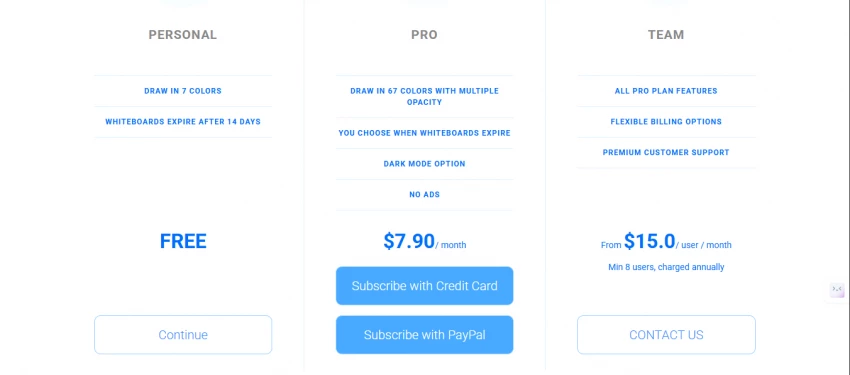
Whiteboard Fox uses a straightforward pricing structure with three tiers.
- Free Plan
$0
Includes seven colors, ads, and boards that expire after 14 days. - Pro Plan
$8 per month
Adds 73 colors, removes ads, enables dark mode, allows up to three layers, and removes board expiration. - Team Plan
$15 per user per month
Includes Pro features plus premium support options.
The free tier is sufficient for short-term use but does not support long-term board storage.
Advantages of Whiteboard Fox
Whiteboard Fox’s strongest asset is its speed. Within seconds, you can launch a board and invite collaborators.
Key benefits include:
- No account required for participants
- Fast session setup
- Very low learning curve
- Works smoothly on slower internet connections
- Ideal for educators and tutors
- Affordable Pro plan
- Positive ratings on platforms like Capterra and GetApp
For spontaneous collaboration, few tools are faster.
Where It Falls Short
The minimal approach that makes Whiteboard Fox efficient also creates limitations.
- No built-in templates or structured frameworks
- No Kanban boards or advanced planning tools
- No deep integrations with Slack, Zoom, or Jira
- Drawing precision is basic compared to professional design software
- Interface available only in English
- Limited volume of public enterprise reviews
It is not designed for large teams managing complex, ongoing projects.
Who Should Consider Whiteboard Fox?
Whiteboard Fox is particularly well-suited for:
- Online tutoring sessions
- Quick brainstorming during meetings
- Visual explanations during remote calls
- Lightweight internal discussions
- Users who prioritize speed over features
It is less appropriate for:
- Enterprise collaboration environments
- Design-intensive workflows
- Long-term project planning
- Agile or structured team processes
Comparing Whiteboard Fox to Miro and Excalidraw
A simplified comparison helps clarify positioning.
Whiteboard Fox
- No sign-up required for guests
- Real-time collaboration included
- No built-in templates
- No integrations
- Boards expire after 14 days on free tier
- Best for quick sketches and tutoring
Miro
- Sign-up required
- Real-time collaboration
- Extensive templates
Integrations with Zoom, Slack, Jira, and more - Free tier limited to three boards
- Best for enterprise collaboration
Excalidraw
- No mandatory sign-up
- Real-time collaboration
- Community template libraries
- Limited integrations
- Unlimited free boards
- Best for diagrams and wireframes
Whiteboard Fox excels in speed and simplicity.
Miro dominates in structured team workflows.
Excalidraw appeals to open-source and diagram-focused users.
Safety and Reliability Considerations

Because Whiteboard Fox operates entirely in the browser and does not require accounts for guests, access control relies heavily on link sharing. Anyone with the board link can join unless additional restrictions are implemented.
This makes the tool efficient but also means that sensitive discussions should be handled cautiously. Compared to enterprise whiteboarding platforms, Whiteboard Fox does not prominently showcase advanced access controls, compliance certifications, or audit tracking features.
Community Feedback
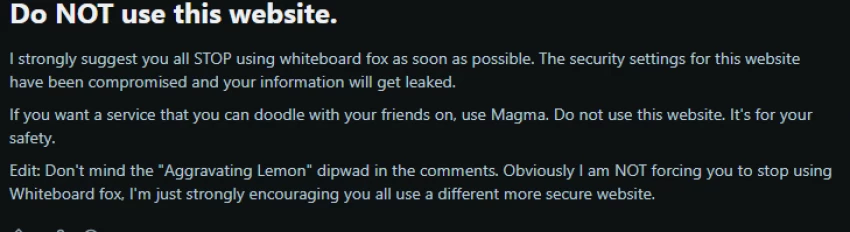
Some online discussions have raised concerns about potential security weaknesses and alleged exposure of user information. However:
- These claims were not supported by technical evidence or official breach documentation.
- No widely confirmed security incident has been publicly verified.
The concerns appear to reflect user suspicion rather than confirmed forensic findings. Still, even unverified allegations can influence perception, particularly for tools that rely on shared links.
Practical Risk Perspective
There are no widely documented security scandals associated with Whiteboard Fox. At the same time:
- Enterprise-level compliance certifications are not prominently advertised.
- The platform is not positioned as a high-security collaboration system.
- Its core use case remains informal and lightweight sessions.
For tutoring, classroom use, or casual brainstorming, the risk profile may be acceptable. For confidential corporate, legal, or financial discussions, organizations may prefer tools with more robust documented controls.
In essence, Whiteboard Fox should be viewed as a lightweight collaboration utility rather than a compliance-heavy enterprise solution.
Final Thoughts
Whiteboard Fox is not attempting to replace comprehensive whiteboard ecosystems. It is intentionally designed for immediacy.
If your goal is:
- Opening a whiteboard instantly
- Running a quick tutoring session
- Sketching ideas during a call
- Avoiding setup friction
Whiteboard Fox performs reliably.
If you require:
- Structured templates
- Integration with other tools
- Persistent workspaces
- Advanced permission systems
More feature-rich alternatives may be better suited.
In 2026, Whiteboard Fox continues to stand out for one simple reason: it lets you start drawing immediately. And sometimes, that simplicity is exactly what the moment demands.
Post Comments
Be the first to post comment!
Related Articles