
Animaker is a browser-based video and animation creation platform designed to help users produce animated and live-action videos without design skills. It offers a suite of tools including character builders, prebuilt templates, extensive asset libraries, and AI-enhanced editing elements. The platform works for a range of audiences—content creators, marketers, HR teams, educators, and startups—by simplifying complex video projects into an intuitive drag-and-drop experience. It stands out for its all-in-one workflow that supports storyboard creation, visual effects, media importing, and exports in multiple resolutions.
All-In-One Video Creation Suite
At its core, Animaker combines animation, video editing, and AI-enhanced tools into a single web-based platform. Users can start with ready-made templates or build videos from scratch using a drag-and-drop editor. The interface supports scene-based editing, which lets creators structure their videos visually and intuitively, similar to working with slides or storyboards.
AI Integration and Smart Tools
One of Animaker’s defining strengths is its inclusion of AI-powered capabilities:
Text-to-Video Generation — Users can enter a script or prompt and instantly create animations or short clips based on that text.
AI Voiceovers & Lip Sync — Unlimited scripts can be converted into natural-sounding voiceovers in multiple languages, and character lip movements can sync automatically to audio.
Auto-Generated Assets and Subtitles — Backgrounds, props, and subtitles can be generated or translated into 100+ languages, making it easier to localize content for global audiences
These advanced features aim to reduce manual work and accelerate production, especially for creators without animation expertise.
Overall, Animaker is best suited for users who want to create engaging animated videos quickly and without deep animation knowledge. Its blend of AI features, rich libraries, and straightforward editor makes it a strong choice for small teams and solo creators who need versatility without complexity
Intuitive interface that’s easy for beginners to use without steep learning curves.
Responsive customer support cited frequently for quick and helpful assistance.
Rich library of templates and assets that speeds up video projects.
Good for creating animated explainer videos and social content.
Some users report it can be expensive for occasional creators relative to value.
Occasional complaints about glitches, project crashes, or lost scenes.
Free version limitations (watermarks, export counts) noted by users.
Exports and asset limits may be restrictive for large teams or frequent use.
Mixed feedback on support effectiveness—great experiences for many, but some unresolved issues reported.
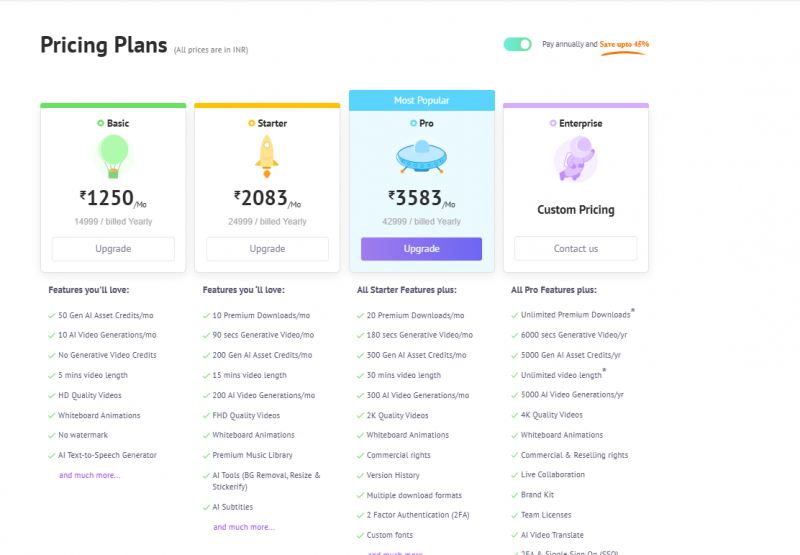
*Price last updated on Dec 23, 2025. Visit animaker.com's pricing page for the latest pricing.