Home > Category > FinePixel
FinePixel

FinePixel

Increase the resolution and quality of your photos up to 10 times

FinePixel Overview

Fine Pixel enhances image resolution and quality while preserving detail, making it suitable for upgrading old photos, refining product images, logos, real estate visuals, and landscapes. The platform includes the DaVinci module for generating visuals from text descriptions. It supports variable output formats, scales to different user needs, and includes specialized enhancement for anime images and illustrations. The interface requires no design or technical skills.

More About FinePixel

How It Works:

  • Upload Image – User supplies a low‑resolution photo.
  • Select Task – Choose between upscale or text‑to‑image creation.
  • AI Processing – Fine Pixel trains models to enhance detail or generate visuals.
  • Preview Output – Platform shows results before download.
  • Download – Users save final files in chosen format.

Pros & Cons

Pros:

Noticeably boosts resolution and clarity

Handles niche use cases really well

DaVinci mode gives stylish art look

Good value versus similar AI upscalers

Interface feels simple for non‑experts

Cons:

Works best only on listed niches

Weak results on random everyday photos​

High‑res upscales can strain hardware​

Company

FinePixel

Contact

Email

Headquarter

FinePixel Features

Upscales images up to 10× higher resolution using AI. Generates visuals from text prompts with the DaVinci module. Delivers detailed image enhancements while preserving fine textures. Supports image adjustment with inpainting and diffusion tools.

FinePixel Demo & Screenshots

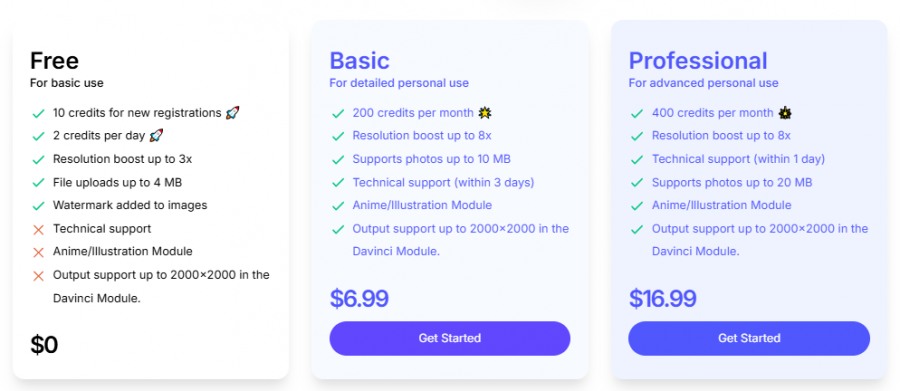
FinePixel Pricing

FinePixel Pricing Screenshot

*Price last updated on Mar 3, 2026. Visit finepixel.lusion.ai's pricing page for the latest pricing.


FinePixel Reviews

FinePixel Category

FinePixel Alternatives