
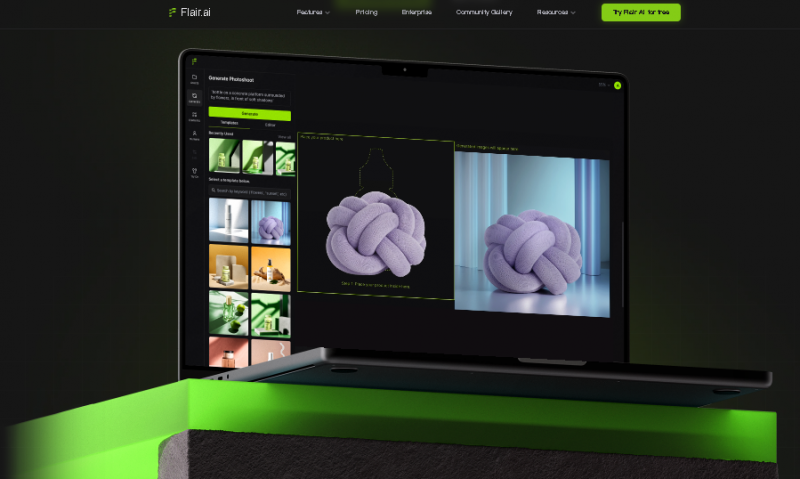
Flair AI works entirely through a browser interface. Users start with templates or blank scenes, upload product assets, and describe desired visual setups. The AI generates visuals based on prompts and available models. A drag-and-drop canvas allows placement of props, backgrounds, and elements to build custom scenes. Custom models trained on brand assets help maintain visual consistency across outputs.
Core Use Cases
Notable Features and Differentiators
Enables significant cost savings compared to traditional product photography, especially for small and growing e-commerce brands
Allows rapid creation of multiple product and ad image variations, supporting faster campaign iteration
Drag-and-drop scene building and live editing features are frequently highlighted as practical and flexible
Effective for basic to moderately complex product visuals when prompts and training images are well prepared
Several users report positive experiences with customer support in cases involving plan changes or billing errors
Helps reduce reliance on external designers or studios for routine marketing visuals
Output quality can be inconsistent, with reported issues around product fidelity, reflections, textures, and distortion
Custom model training may require significant trial and credit usage before acceptable results are achieved
Subscription management and cancellation have caused frustration for some users
Multiple reports of slow or delayed customer support responses, especially for billing and refund issues
Platform performance issues have been noted, including long rendering times, failed generations, and unreturned credits
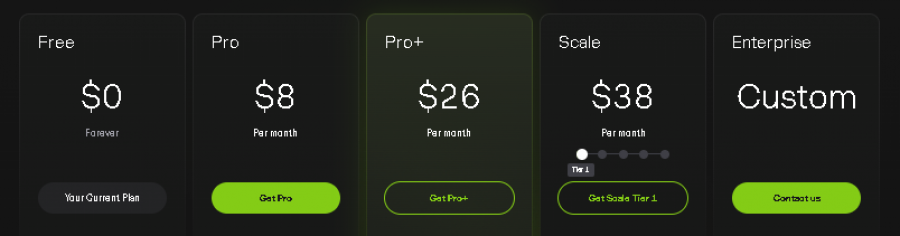
*Price last updated on Jan 6, 2026. Visit flair.ai's pricing page for the latest pricing.