
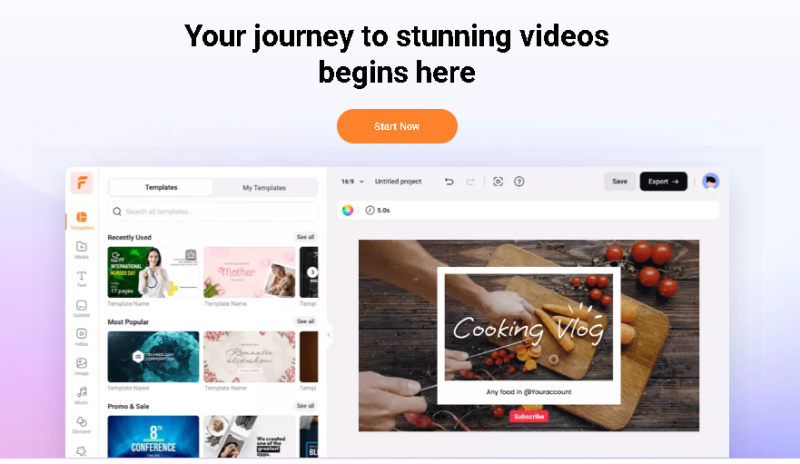
FlexClip is an online video editor and maker that blends simplicity with capable tools. It enables users to trim, merge, add text, music, and effects, and even apply AI tools like text‑to‑video and auto subtitles. The platform suits beginners and small teams seeking to create social, promo, or personal videos without a steep learning curve.
Key Features & Their Value
Problem‑Solving
FlexClip cuts effort by offering AI tools that automate video assembly and subtitle creation. Users save time and produce consistent results, even with little editing knowledge.
Industry‑Specific Use
Great for social media content, business promos, education clips, and quick event videos. Marketers and educators can make polished videos rapidly with templates and AI helpers.
Pricing Overview
Intuitive editor with a low learning curve — you can start creating videos without a tutorial.
Smart scene templates tailored for marketing, social content, and presentations that save setup time.
Flexible drag-and-drop timeline lets you fine-tune clips without confusion.
Strong text and title tools with customizable animations that elevate storytelling.
Built-in stock media and music library reduces the need for separate asset sourcing.
Cloud-based workflow means your projects are accessible from anywhere and auto-saved.
Good balance of creative control and simplicity — not too basic, yet not overwhelming.
Useful export presets optimized for Instagram, YouTube, and other platforms.
Not ideal for professional post-production — lacks advanced grading, masking, and motion graphics.
Some features are gated behind higher-tier plans, which can feel limiting if you need more capability on a budget.
Export resolution and quality depend on subscription level — lower tiers may restrict full HD.
Audio tools are functional but basic — limited options for detailed sound design.
Occasionally feels constrained for complex multi-layer edits compared to desktop editors.
Template-driven approach can lead to similar-looking outputs if over-relied upon.
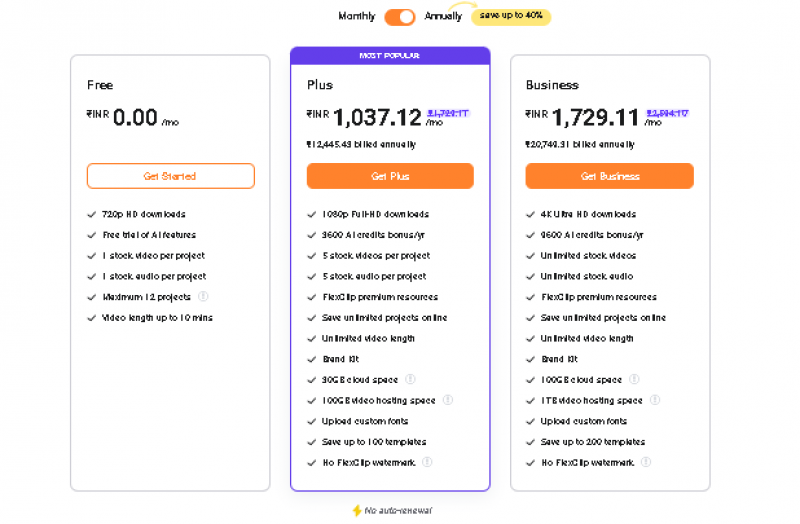
*Price last updated on Jan 9, 2026. Visit flexclip.com's pricing page for the latest pricing.