Home > Category > Flowstep
Flowstep

Flowstep

Your AI Design Assistant

Flowstep Overview

Flowstep turns a written description into fully editable UI screens on an infinite canvas, then carries that design through to Figma or clean exported code. It targets product managers, designers, founders, and engineers who need to move from a vague idea to something shippable without starting at a blank artboard. The distinguishing bet is continuity: one prompt yields a multi-screen flow that stays editable and maps directly to React, TypeScript, and Tailwind.

More About Flowstep

Core Capabilities:

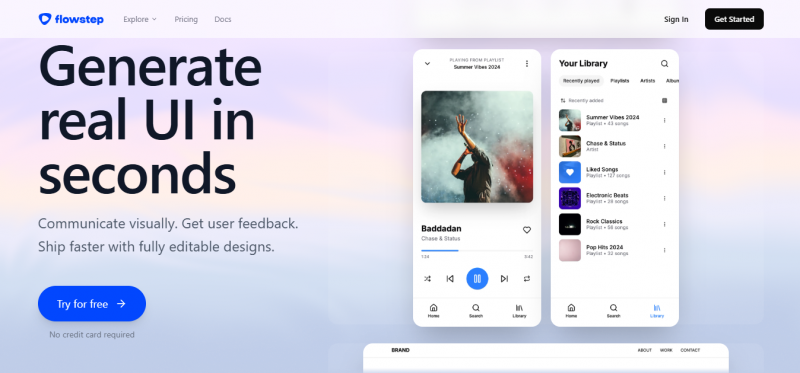
  • Prompt-to-UI generation. A natural-language description produces real, structured interface screens rather than static mockup images, rendered on an infinite canvas.
  • Multi-screen flows in one pass. A single prompt can generate a full experience such as login, dashboard, profile, and settings together instead of one isolated screen at a time.
  • Conversational and manual editing, where designs are refined by chatting with the tool or by adjusting elements directly without learning complex software.
  • Instant Figma transfer. Selecting a design and using copy-paste moves it straight into a Figma file with structure preserved, requiring no plugin or extension.
  • Code export that mirrors the design. Output ships as clean React, TypeScript, and Tailwind CSS intended to be 1-to-1 with what was designed.
  • Reference-driven design, accepting an attached PRD, an uploaded inspiration image, or a pasted link for added context.
  • Real-time team collaboration with live cursors, synced edits, and shared feedback.
  • IDE connection through MCP, linking generated designs into a developer's environment.

Who Benefits Most:

  • Product managers who need to show, not describe, an idea to their team.
  • Founders and non-designers who lack Figma skills but need usable screens.
  • Designers wanting a fast first draft to refine rather than build from scratch.
  • Engineers who value production-ready code output over flat design files.

Where It Shines:

  • Escaping the blank canvas at the start of a product design cycle.
  • Rapid prototyping for validation. Founders and PMs turn an idea into a clickable-feeling UI to gather feedback fast.
  • Designer-to-engineer handoff, where the code export narrows the gap between mockup and build.
  • Visual communication in cross-functional teams that need something concrete to react to.
  • Spinning up full flows for app concepts rather than piecing screens together manually.

Workflow, Privacy, And Output

  • Browser-based with no installation, working across modern browsers.
  • Stated policy of not using personal data to train AI models, nor permitting its LLM providers to do so.
  • Unlimited collaborators positioned as available across plans rather than charged per seat.
  • Output framed as a strong first draft and handoff asset rather than a full replacement for a mature design system.

Pros & Cons

Pros:

Generate complete multi-screen flows in one cohesive prompt

Get fully editable UI instead of static image mockups

Paste directly into Figma without plugins or friction

Export production-ready React, TypeScript, and Tailwind code instantly

Protect data privacy while supporting unlimited team collaboration

Cons:

Not suitable for full production design systems, requiring Figma for advanced work.

Free plan limits restrict meaningful testing before upgrading becomes necessary.
Company

Flowstep

Contact

N/A

Email

Headquarter

N/A

Follow Us

Flowstep Demo & Screenshots

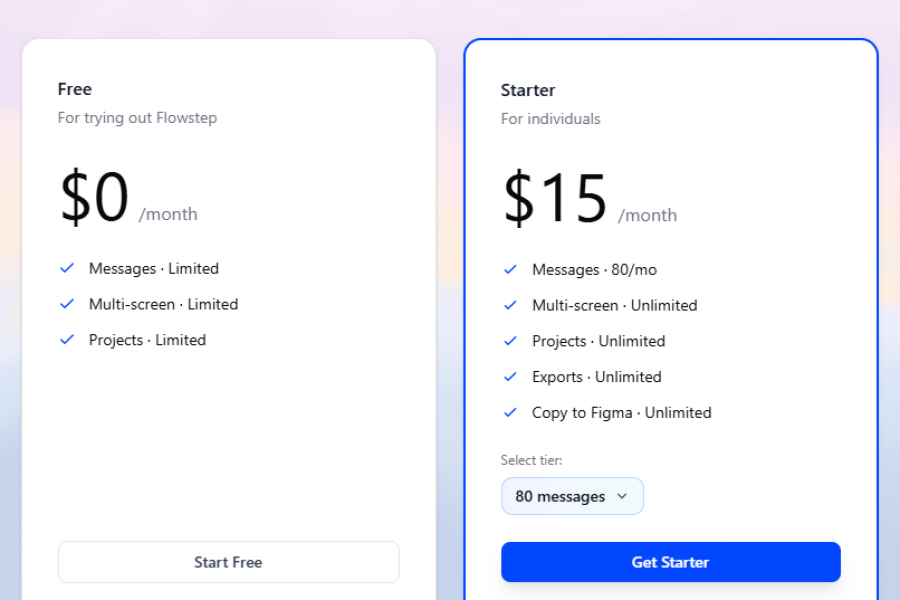
Flowstep Pricing

Flowstep Pricing Screenshot

*Price last updated on May 30, 2026. Visit flowstep.ai's pricing page for the latest pricing.

Flowstep Reviews

Flowstep Category

Flowstep Alternatives