Piktochart offers an AI-powered tool for generating social media posts. It creates visuals and graphics quickly for marketers and content creators. Users input ideas, and the tool produces customizable templates. This stands out for its focus on infographics and professional designs without design skills. The platform integrates AI to speed up content creation for platforms like Instagram and LinkedIn. It serves small businesses, social media managers, and educators needing eye-catching posts.
Starting off, SocialBee’s user interface was fairly easy to navigate. The dashboard for creating a new post includes several practical features, such as scheduling options, setting expiration times, categorization for future reference, and the ability to requeue posts for ongoing engagement.
You can create your own posts from scratch, or ask the AI assistant to help you out. However, the AI assistant wasn’t that easy to find, and I wish the buttons on the interface was somewhat bigger or more obvious.
When you click on the small AI button on the “create new post” page, you can either select from pre-made templates for various social media platforms or enter my own prompts for customized posts.
For an accurate assessment of how the posts would appear, you have to connect your social media profiles.
The quality of the content produced, whether based on my prompts or selected templates, met my expectations. Using an Unsplash photo and seeing the original photographer credited was a respectful feature.
The option to upload my own images or import designs from Canva introduced further customization. The hashtags suggested by the tool were relevant and likely to increase post visibility.
The post-scheduling feature of SocialBee suggests the best times for posting to achieve high engagement. For a social media dunce like myself, I appreciated the suggestions and made it easier to decide on optimal posting times.
Easy and intuitive for beginners and non-designers. Reviews frequently comment on how quickly users produce visuals with minimal effort.
Strong AI features help generate infographics, reports, and visuals fast.
Large template and media library reduces the need for external assets.
Valuable for educators and teams collaborating on data visuals. Reddit threads note its usefulness in classroom settings
Good range of export options (PNG, PDF, PPT).
The free plan is very limited (few downloads, time-limited features), leading some users to call it more like a trial.
Some reviewers feel the subscription is expensive relative to the limitations unlocked.
Certain design controls and customization options aren’t as granular as in full-featured design apps.
A minority of users have reported technical issues or buggy links
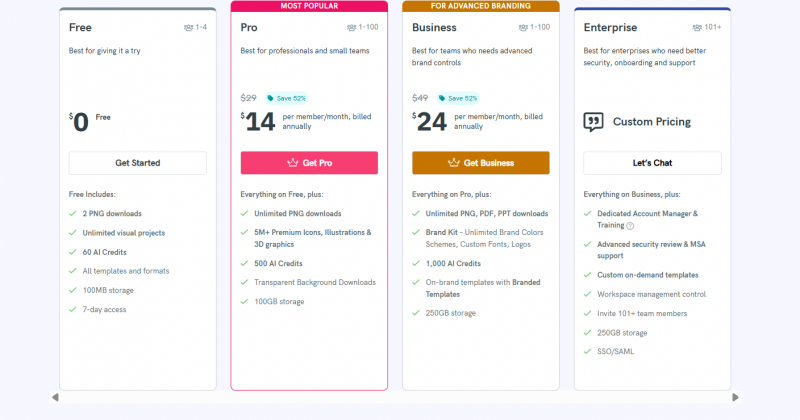
*Price last updated on Dec 22, 2025. Visit piktochart.com's pricing page for the latest pricing.