Home > Category > Retool
Retool

Retool

Build internal software better, with AI.

Retool Overview

Retool enables building, deploying, and managing internal tools through a unified engine. It connects to databases, APIs, vector stores, and LLMs. AI features assist in generating and editing apps, writing queries, and automating workflows. Users prompt full-stack apps on production data like Postgres or Salesforce, with edits grounded in app context. The platform supports web and mobile apps, forms, agents, and self-hosted deployment. It integrates with developer workflows for version control and CI/CD, while providing enterprise-grade security and hosting options.

More About Retool

How It Works:

  • Start a project: Sign up and create a workspace in Retool.
  • Connect data: Link databases, APIs, or vector stores for live data access.
  • Build UI: Use drag‑and‑drop components to craft interfaces.
  • Add logic: Define workflows, triggers, and custom code where needed.
  • Integrate AI: Add agents and models to automate reasoning and tasks.
  • Deploy & maintain: Publish apps and workflows with monitoring and governance.

Pros & Cons

Pros:

Speeds up development of internal tools without extensive coding[

Connects directly to datasources for quick drag-and-drop building

Cons:

Requires developer familiarity, taking time to learn despite quickstart claims

Company

Retool

Contact

Email

Headquarter

San Francisco, California, USA

Follow Us

Retool Features

Builds custom web & mobile apps with data and logic. Generates AI agents and workflows to automate business tasks. Connects to any database API Visual canvas for drag‑and‑drop UI and logic building. Includes enterprise‑grade security & compliance features. Tracks automation with audit logs and monitoring tools.

Retool Demo & Screenshots

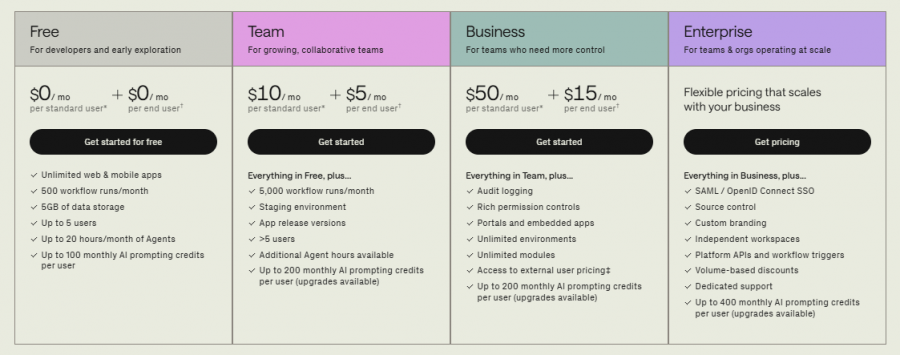
Retool Pricing

Retool Pricing Screenshot

*Price last updated on Feb 23, 2026. Visit retool.com's pricing page for the latest pricing.

Retool Reviews

Retool Category

Retool Alternatives