Home > Category > SlideDog AI
SlideDog AI

SlideDog AI

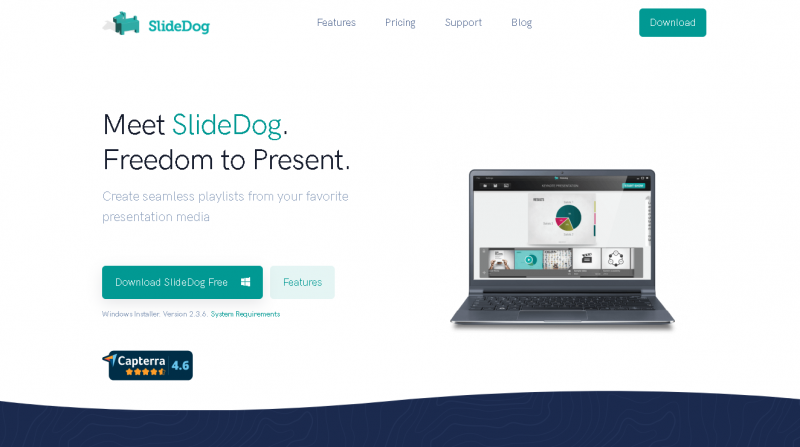
Freedom to present.

SlideDog AI Overview

SlideDog is a multimedia presentation platform that allows presenters to combine and deliver professional presentations using diverse media types without interruption. It supports integrated playback of files such as PowerPoint, PDF, Prezi, videos, web pages, and images within a single playlist, while enabling interactive features like audience feedback and remote control. SlideDog is intended for business meetings, events, sales presentations, education, and conferences where seamless media transitions and audience engagement are prioritized.

More About SlideDog AI

How SlideDog Streamlines Presentations

SlideDog is a Windows based presentation launcher designed to give presenters full control over mixed media content. It automatically detects installed software such as PowerPoint or Acrobat Reader to ensure all media files render correctly. Users can create playlists of slides, videos, PDFs, and other content, which SlideDog plays seamlessly while remembering the last viewed positions and supporting interactive elements.

Competitive Advantages and Unique Features

  • Seamless switching between diverse media files without conversion
  • Interactive elements such as polls, live chat, and audience feedback
  • Remote control and live sharing across multiple devices
  • Cross‑fade transitions and playlist state retention for smooth flow
  • Wide format support including slides, videos, web pages, and documents

Pros & Cons

Pros:

SlideDog AI blends multiple presentation formats (slides, videos, PDFs, web content) into one seamless experience, eliminating the need to switch between apps.

AI enhancements can help automatically organize content and suggest layout improvements, saving time in presentation preparation.

The platform supports real‑time audience interaction features, making it easier to engage participants during live sessions.

SlideDog AI offers tools that help presenters rehearse and refine delivery, boosting confidence and performance quality.

Cons:

Handling large media files within a single session can occasionally cause performance slowdowns.

Real‑time interaction tools depend on stable internet connectivity, which may limit reliability in low‑bandwidth settings.

Presenters who prefer strict control over every detail might find automated content organization less predictable.

The richness of features may require an initial learning curve for users new to AI‑assisted presentation tools.

Company

SlideDog AI

Contact

Not publicly listed

Headquarter

Not publicly listed

Follow Us

SlideDog AI Features

Conferences and events with multiple presenters or file types Educational lectures incorporating video PDF and slide decks Workshops and interactive sessions using polls and audience feedback Meetings where presenters use remote control or live audience sharing

SlideDog AI Demo & Screenshots

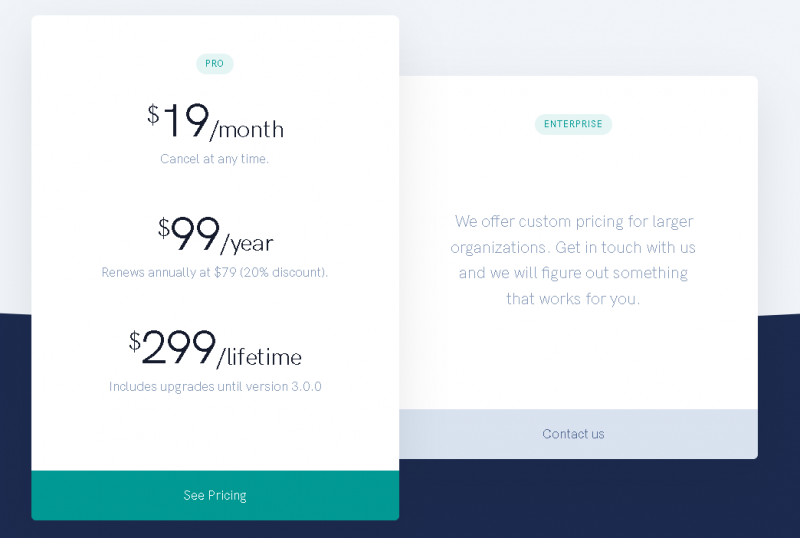
SlideDog AI Pricing

SlideDog AI Pricing Screenshot

*Price last updated on Jan 10, 2026. Visit slidedog.com's pricing page for the latest pricing.

SlideDog AI Reviews

SlideDog AI Category

SlideDog AI Alternatives