Table of Content
- Why Anonymous Viewing on Instagram Is Trending
- The MollyGram Platform at a Glance
- Key Capabilities of MollyGram for Instagram Content
- Typical Use Scenarios Where MollyGram Fits
- Free vs Feature-Rich Versions: Access and Limits
- Users’ Experience: What Reports Suggest
- Privacy, Legal and Ethical Considerations
- Head-to-Head Comparison With Other Viewers
- Known Limitations and User-Reported Challenges
- Ideal Audience Profiles for MollyGram
- Frequently Asked Questions
- Final Thoughts on MollyGram’s Role in Instagram Browsing
In a world where digital curiosity meets privacy concerns, platforms like MollyGram have drawn attention for making it possible to view and download public Instagram content quietly and anonymously.
Suppose you want to revisit a public reel, save a highlight, or simply browse someone’s story without logging in. MollyGram claims to offer precisely that, but as with any third-party viewer, it’s worth looking beneath the surface before deciding whether it’s a practical, ethical, or even safe tool to use.
Why Anonymous Viewing on Instagram Is Trending
Over the past few years, anonymous Instagram viewing has become a subtle digital habit.
Creators, marketers, and everyday users are increasingly interested in ways to see public content without alerting the poster.
The idea seems harmless, after all, public stories are meant to be seen, yet anonymity introduces privacy trade-offs. Tools like MollyGram position themselves as “neutral viewers,” a trend mirrored by others such as AnonyIG and StoriesIG.me.
This rise in demand also reflects a larger shift toward private exploration in public platforms, where users want freedom to observe without leaving digital footprints.
The MollyGram Platform at a Glance
MollyGram.com functions as a browser-based Instagram viewer and downloader.
Its key promise: access to public Instagram stories, highlights, profile photos, reels, and posts — without the need to log in.
No app installation is required, and according to the site, the tool works across devices, mobile, tablet, and desktop alike.
The homepage layout directs users to six main utilities:
- Profile Photo Downloader
- Story Viewer & Downloader
- Photo Downloader
- Reel Downloader
- Highlights Downloader
- “Anonymous Instagram Browser” section for quick viewing.
It appears designed for one-click access, avoiding clutter and account connections, something that appeals to users cautious about login-based viewers.
Key Capabilities of MollyGram for Instagram Content
1. Story and Highlight Retrieval
MollyGram’s core strength lies in viewing and saving Instagram Stories and Highlights anonymously.
You simply enter the public username, and the platform retrieves recent stories and archived highlights.
This feature resembles the structure of tools discussed in HaloDigital’s MollyGram breakdown, which notes that content remains visible as long as it’s publicly available on Instagram.
2. Reel and Photo Downloads
Another popular module is the Reel Downloader.
It allows saving short videos directly to a device, convenient for marketers researching trends or users compiling content for inspiration.
Still, redistribution or reposting could infringe on Instagram’s copyright policies, so personal use is key.
The Photo Downloader works similarly, enabling high-quality image access from public accounts.
3. Device Compatibility & Simplicity
No login, app, or subscription required, the site loads directly in browsers like Chrome, Safari, or Edge.
This lightweight approach is part of what’s made MollyGram appear attractive to casual users who prefer convenience over complex tools.
Typical Use Scenarios Where MollyGram Fits
Anonymous Instagram tools generally appeal to a few broad categories of users:
- Content researchers analyzing visual trends or storytelling formats.
- Marketers monitoring competitor reels or product visuals.
- Educators and journalists referencing case studies or campaigns.
- Privacy-conscious individuals exploring content without exposing their accounts.
These cases overlap with the use patterns seen on platforms such as Inflact or AnonyIG, showing that the audience for such tools isn’t just voyeuristic; it’s practical and research-oriented too.
Free vs Feature-Rich Versions: Access and Limits
Unlike subscription-driven platforms like Inflact, MollyGram remains completely free to use as of 2025.
There’s no sign-up or premium tier — though some third-party clones may inject ads or redirect traffic.
Its simplicity comes with limits:
- No batch downloads or analytics.
- No access to private profiles.
- Possible speed delays during high traffic hours.
For most casual users, this minimalism is acceptable. But for professionals seeking automation, tools with API access, such as Qoob Stories, may offer more flexibility.
Users’ Experience: What Reports Suggest
According to analyses by HaloDigital and ScribeHow, MollyGram seems to deliver on its claims for story viewing and content download, but some users note occasional loading issues during heavy media retrieval.
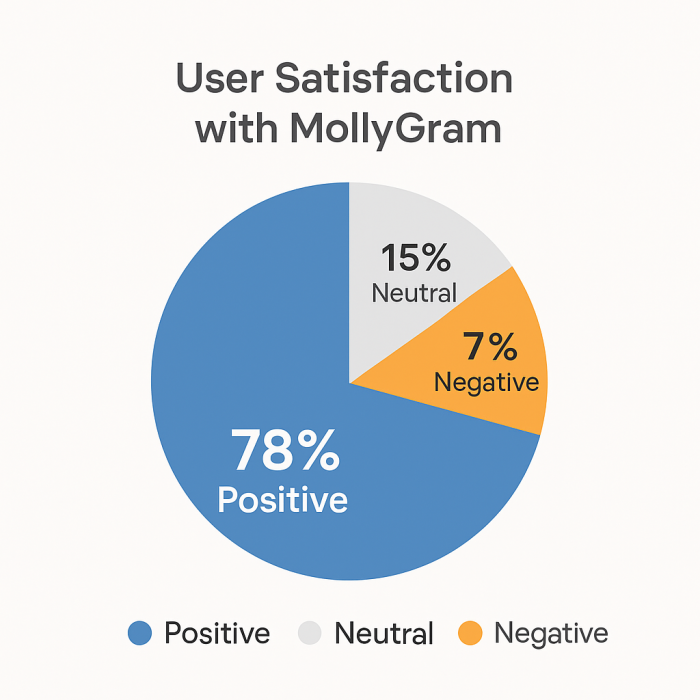
Feedback on forums often describes it as “fast when it works” but inconsistent under server load.
That variability isn’t unusual for non-official Instagram viewers, which rely on public content scraping within acceptable boundaries.
Privacy, Legal and Ethical Considerations
MollyGram’s homepage doesn’t explicitly outline its data-handling practices, which makes it essential for users to stay cautious.
Since the platform doesn’t require login credentials, the immediate risk of account compromise is low.
However, legal boundaries exist.
According to ScribeHow’s detailed guide, any reuse or redistribution of downloaded content can breach Instagram’s intellectual property terms.
A safe approach: treat MollyGram as a viewer and archiver for personal reference only, not a content redistribution channel.
Head-to-Head Comparison With Other Viewers
| Tool | Login Needed | Story Viewer | Reels & Photos | Highlight Access | Private Profiles | Cost |
| MollyGram | No | Yes | Yes | Yes | No | Free |
| AnonyIG | No | Yes | Yes | Yes | No | Free |
| Inflact | Yes | Yes | Yes | Yes | No | Paid |
| Qoob Stories | Yes | Yes | Yes | Yes | Yes | Paid |
| StoriesIG.me | No | Yes | No | Yes | No | Free |
The table shows how MollyGram stands out for being entirely browser-based and no-login dependent, making it lighter but less feature-rich than paid automation platforms.
Known Limitations and User-Reported Challenges
- Occasional slow response or “user not found” errors.
- Does not support private profiles.
- May experience downtime during Instagram API updates.
- Lack of official transparency around data logs.
These limitations are consistent with other third-party Instagram viewers.
Users should access it through direct links (never unofficial mirrors) to avoid cloned phishing sites mimicking MollyGram.com.
Ideal Audience Profiles for MollyGram
Based on its structure, MollyGram seems most useful for:
- Content strategists compiling visual moodboards.
- Journalists and researchers referencing brand stories.
- Social media managers tracking campaign visuals.
- Casual users curious about public content browsing.
For marketers seeking automation or analytics, however, hybrid platforms like Inflact may offer deeper integration.
Frequently Asked Questions
Q1. Does MollyGram really keep my viewing anonymous?
Yes, for public content only. It doesn’t log you into Instagram, so your username doesn’t appear in story viewers.
Q2. Can I download private stories or reels?
No. Private profiles remain inaccessible. The site itself clarifies this restriction.
Q3. Is MollyGram safe?
Appears safe to browse, but always use direct links to avoid clones.
Q4. Can I use MollyGram on mobile?
Yes. It supports all browsers on Android and iOS.
Q5. Is it legal to download Instagram content anonymously?
Viewing public content is legal, but saving or reposting it for distribution can breach Instagram’s copyright rules.
Final Thoughts on MollyGram’s Role in Instagram Browsing
In the growing field of anonymous Instagram viewers, MollyGram positions itself as a simple, no-login tool for quick access to public media.
It performs well for light, research-oriented use, though with limited guarantees on uptime or security transparency.
Suppose you’re a journalist collecting public visuals or a marketer tracking campaign styles; MollyGram can serve as a convenient reference viewer.
But for heavy-duty automation or professional insights, more structured tools like Inflact or Later would be a better fit.
In short, MollyGram delivers basic functionality without friction, ideal for those who value anonymity and minimalism over extra features.
Post Comments
Be the first to post comment!
Related Articles