This article was supplied by AccsZone as a paid contribution. Sources are linked in the text; the publisher was not asked to remove caveats or citations.
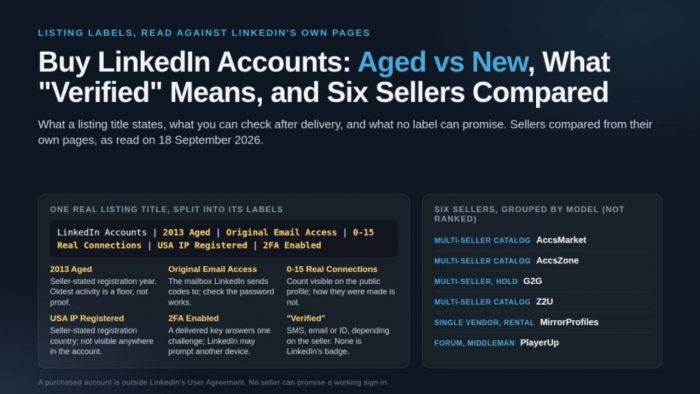
An outreach team looking to buy LinkedIn accounts is shopping for one of three things: fresh accounts, aged accounts with a stated registration year, or accounts that already carry connections. Sellers describe them in titles such as "LinkedIn Accounts | 2013 Aged | Original Email Access | 0-15 Real Connections | USA IP Registered | 2FA Enabled". This article compares six sellers from their own pages, reads the labels against what can be checked, and sets both against LinkedIn's documentation.
The starting point is the contract every member has accepted. LinkedIn's User Agreement says a member agrees that "you will only have one LinkedIn account, which must be in your real name" and will "not share or transfer your account or any part of it". Its Dos and Don'ts add that a member will not "use or attempt to use another's account (such as sharing log-in credentials or copying cookies)". A purchased account is outside those terms from the moment it changes hands. No label, whether "aged", "verified" or "with connections", guarantees ownership, a working sign-in or freedom from LinkedIn's checks, and buying is not a route around a restriction.
Where to buy LinkedIn accounts: six sellers compared
Four multi-seller marketplaces with a LinkedIn category, one single vendor that rents rather than sells, and one forum with a staff-run middleman, ordered by model type and then alphabetically, not ranked. Every cell summarizes the seller's own page as read on 18 September 2026; "not stated" means the pages we could read did not say. PlayerUp blocks automated reading, so its row uses archived copies.
| Seller (model) | What it lists for LinkedIn | Payment methods stated | Delivery | Refund or dispute policy as written | Seller verification stated | Not stated |
| AccsMarket (multi-seller catalog) | Softreg and Aged subcategories; rows state year, contacts, SMS check, email, 2FA, IP country | Shown inside the account; refunds paid to four named systems | Download "immediately after successful payment" | 48-hour warranty from receipt; void if forbidden-use rules are broken | Not stated | Seller vetting; buyer fees |
| AccsZone (catalog; suppliers and administrators) | Five subcategories; titles disclose age, email, connections, IP country, 2FA | Cryptocurrency only (FAQ); terms also name PayPal | Automated to the dashboard as a text file | Only accounts failing "before initial login"; claim within 24 hours; store credit | Identity verification before seller approval | Buyer fees; pre-listing checks |
| G2G (multi-seller, payment hold) | Two offer groups, old and new; descriptions state age, email access, "0+ Connections", Premium not included | Cards, e-wallets, crypto, online banking; processing fee per method | Funds held until delivery is verified and inspection closes | 72-hour inspection; 14-day warranty on account services | "We vet our sellers" | The vetting process; platform fee |
| Z2U (multi-seller, game-focused) | Free-form titles stating age, connections, 2FA, email, IP; "Free Insurance for 7 days" badge | Cards, Skrill, Neteller, Google Pay, Apple Pay, Alipay and more; processing fee | Seller delivers; buyer confirms; auto-confirms after 3 days | "All sales are final" with exceptions; claim within 72 hours; credits balance | Discretionary background check (terms) | Insurance terms; platform fee |
| MirrorProfiles (single vendor, rental) | Rented profiles "warmed up for 4 months", "over 500 real connections", Europe or North America | Credit cards and SEPA direct debit | Customer dashboard | No refund once accessed unless the vendor erred; replacement within 48 hours | Not applicable | Who created the profiles; what warm-up means |
| PlayerUp (forum, optional middleman; archived pages) | Sub-forums for accounts, connections, followers, premium plans; thread titles state age, connections, country | "Over 50+ payment providers" | Staff-run three-way chat; "around 1 to 48 hours" | Refund for non-delivery, fee 0% to 12.5%; "partially guaranteed" after completion | "We verify the seller" | Current listings and prices; what "partially" covers |
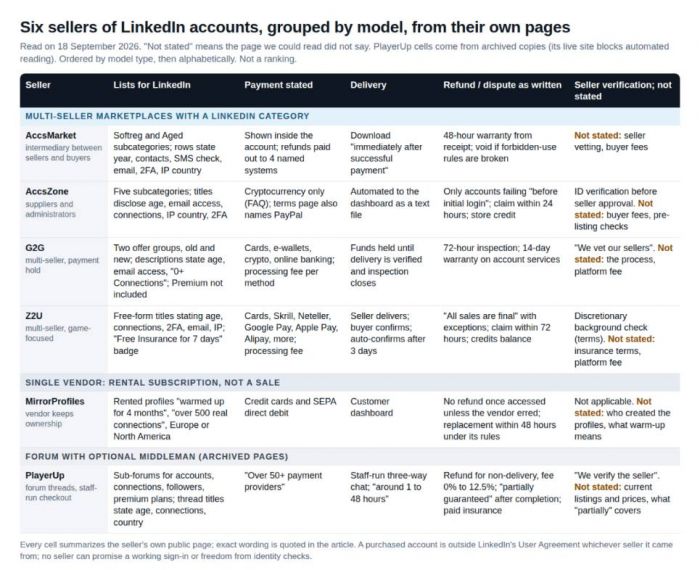
Six sellers of LinkedIn accounts in one view, grouped by model rather than ranked. Every cell comes from the seller's own public pages as read on 18 September 2026; PlayerUp cells come from archived copies because its live site blocks automated reading. "Not stated" means the pages we could read did not say.
AccsMarket
AccsMarket calls itself "an intermediary between account sellers and buyers". Its LinkedIn catalog is split into Softreg and Aged, and each row is a short sentence: "The accounts are registered in 2017. Sex can be both male and female. From 500 contacts. From 500 subscribers. The accounts are verified by SMS." Payment methods appear only inside the account; refunds are paid out only to Perfect Money, Advcash, WebMoney and Litecoin. Delivery is a download in the personal cabinet; the warranty is "exactly 48 hours from the moment you receive the order" and is cancelled if the buyer breaks the forbidden-use rules. Rows with a stated registration year were listed from $0.56 per account on 18 September 2026; prices change daily.
AccsZone
AccsZone has operated since 2023 as a marketplace for ready-made accounts. Its inventory is uploaded by suppliers as well as by the site's administrators, so wording and quality vary by listing; suppliers pass identity verification before approval. The 90 titles sampled below come from its LinkedIn category, and AccsZone's LinkedIn accounts category sorts them into subcategories for aged with connections, with connections, Europe, new and verified accounts. Delivery is automated to the buyer's dashboard after payment, as a text file. The limits matter as much as the features. Payment is cryptocurrency only per the FAQ, though the terms page also names PayPal. Replacement or refund applies only to accounts that fail before the first login, claimed within 24 hours, as store credit; its LinkedIn help page lists a password change, mass connection requests and automation tools as reasons a claim is not covered. Support is live chat and Telegram, by the site's own account. Listings with a stated age were listed from $1.20 per account on 18 September 2026; prices change daily, and no account was bought or opened for this article.
G2G
G2G is a game-goods marketplace with a social section; its LinkedIn category held two seller-written offer groups, one old and one new. One states "1–3 Month Aged LinkedIn Accounts", "Verified Email Included" and "0+ Connections", and adds that "LinkedIn Premium Subscription is NOT included". Funds are released "only after delivery is verified and the inspection period closes": a 72-hour inspection, and a 14-day warranty on account services. The payment guide lists cards, e-wallets, cryptocurrency and online banking with a processing fee per method; G2G says it vets sellers but not how. The old-account group was listed from $1.70 on 18 September 2026; prices change daily.
Z2U
Z2U is also game-focused; its terms say goods "are offered by the relevant third party Seller and Z2U is merely the facilitator". Its LinkedIn category is a page of free-form titles such as "Aged LinkedIn Accounts (2019–2022) – USA IP | Random Connections | 2FA Enabled", several worded like rows on the two catalogs above. Each card carries a "Free Insurance for 7 days" badge whose terms we could not find. The refund policy opens with "All sales are final" and then lists exceptions; a claim must be raised within 72 hours, and refunds go to a credits balance. Offers with a stated age were listed from $2.18 on 18 September 2026; prices change daily.
MirrorProfiles
MirrorProfiles is a rental, not a sale. Its terms say it "remains the sole owner of the Profiles, while the Client has exclusive usage rights for the duration of the rental period", and that the profile photos are AI-generated. The offer is a subscription per profile, in Europe or North America, described as warmed up by hand for four months with over 500 connections. The pricing page showed 100 € per profile per month for Europe and 150 $ for North America on 18 September 2026; prices change. Payment is by card or SEPA debit. There is no refund once an account has been accessed unless the error was the vendor's; a restricted profile is replaced within 48 hours under the vendor's rules. Who created the profiles is not stated, and access ends with the subscription.
PlayerUp
PlayerUp's live pages refused every request we made, so this section relies on archived copies: its "LinkedIn Accounts for Sale" forum as archived on 28 November 2025 and its middleman buyers' guide as archived on 17 June 2026. Listings are forum threads with titles such as "Aged LinkedIn Accounts (5–10 Yrs) | Verified with Email & # | 500–1K+ Real Connections". The guide describes an "optional Middleman Service": staff open a three-way conversation, the seller does not send details directly, and receipt "typically takes around 1 to 48 hours". Refunds for non-delivery carry a fee of 0% to 12.5%; products are "partially guaranteed" after completion, with paid insurance for full cover. The same page says both that buyers pay no middleman fee and that middleman buyers pay 2% to 4%. Aged threads carried asking prices from $5.50 in the archived copy.
Aged, new, verified, with connections: what the labels state
The sample, read on 18 September 2026: 90 distinct titles across AccsZone's LinkedIn category and subcategories, 485 rows in AccsMarket's LinkedIn catalog, 40 offers on Z2U's first page, and G2G's two group descriptions. The counts describe those stores on that day.
On AccsZone, 70 of the 90 titles carry the word "Aged", 62 state a registration year from 2009 to 2026, and ten give an age in days or months, from "30+ days Aged" to "4-6 Month Aged". Two say "Fresh". A connection figure appears in 42 titles, as a range ("0-15", "100-200") or a floor ("50+", "3650+"), and 37 of those add the word "Real". Email access is stated in 87 titles under a dozen spellings, naming Gmail in 28 and Outlook or Hotmail in 15. "2FA" appears in 45. A registration IP appears in almost every title: USA in 38, "Mix" in 40, a named country in 11. "Verified" is rare: one title says "ID Verified", one "Email verified (Email Not Included)", and "PVA", "Premium" and "Sales Navigator" appear in no title.
AccsMarket writes the same ideas as sentences and grades them more finely. A registration year or month appears in 297 of 485 rows and "From N contacts" in 174, with N always 50, 100, 250, 300 or 500. "Verified by SMS" appears in 127, with 18 hedging "may require confirmation by SMS". Email is included in 372 rows (two "without passwords", one "not working") and 2FA in 193. On Z2U, 15 of 40 titles state an age and five state connections.
So "verified" means three things across these listings, and none is LinkedIn's badge. On AccsMarket it means a phone passed an SMS check at sign-up. On AccsZone and Z2U it usually means an email address was confirmed or a 2FA key is delivered. One AccsZone listing claims "ID Verified", the badge LinkedIn issues after a partner checks a government ID; the product page offers no evidence beyond the statement, and the badge is visible on the profile if it exists. A buyer should read which of the three a listing means.
| Listing label | What the seller states | What you can check after delivery | What the label does not establish |
| Aged / 2013 Aged / 700+ Days Aged; Fresh / Softreg / New | Created in the stated year, month or age; a range such as "2015-2018 Aged" leaves the year open. "Fresh" and "Softreg" mean a recent account. | The oldest dated activity: message, connection, post. Activity cannot predate the account, so the earliest date is a floor on its age. | That the account has been used since creation, or that age changes what LinkedIn asks at sign-in. "Ready to Use" and "Long Life" are undefined. |
| 0-15 Real Connections / From 250 contacts / 500+ Connections | A count or range of first-degree connections at listing time. AccsZone's product pages define "Real Connections" as "authentic connections for a natural look". | The connection count on the public profile, visible before you sign in. | How the connections were made. LinkedIn caps networks at 30,000 and applies invitation limits to every account. |
| Verified by SMS / Email verified / ID Verified | Which sign-up check the seller says was passed: a phone once received a code, an address was confirmed, or the listing claims LinkedIn's identity badge. | The addresses and numbers in Sign in & security, and whether a badge appears next to the name. | That you can receive anything on that phone, or that LinkedIn will not ask for identity verification. The badge follows a government ID check by CLEAR, Persona or DigiLocker. |
| Original Email Access / Email Included / Additional email included without password | The file contains the mailbox LinkedIn sends codes to, with or without its password. AccsMarket says when the password is missing. | Whether the mailbox password works and whether LinkedIn's new-device email arrives there. | Who else can open that mailbox. Whoever holds it holds the password-reset path. |
| 2FA Included / 2FA Enabled / 2fa is included in set | Two-factor authentication is on and the authenticator secret is delivered. | The two-factor setting and whether a code from the delivered key is accepted. | Which challenge LinkedIn will present; a push prompt to an already signed-in phone may replace the code. |
| USA IP Registered / Mix IP / Italy IP Registered; Cookies / Auth Token included | The country of the IP the seller says was used at registration, "Mix" meaning none; in some formats, session cookies from the seller's browser. | Nothing directly. LinkedIn shows the IP of current sessions, not the registration IP. | That LinkedIn treats the stated country differently; its pages describe unrecognized devices, not countries. The User Agreement names "copying cookies" as using another's account. |
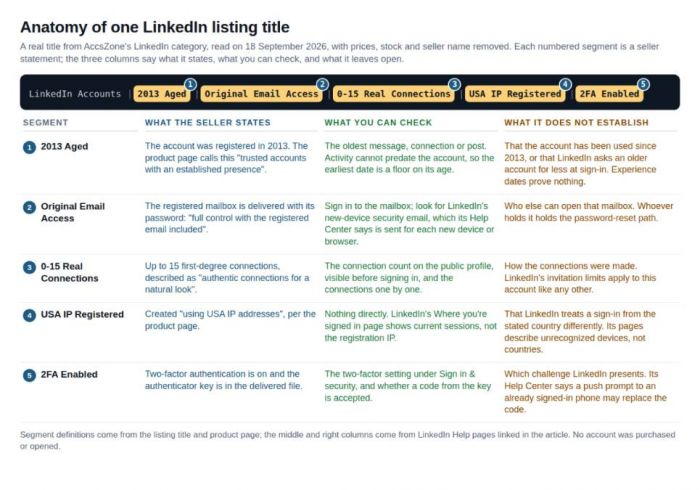
One listing title read on 18 September 2026, segment by segment. The middle row of each note is the only one a buyer can act on; the last row is what the label leaves open.
What LinkedIn documents about new sign-ins, identity checks and restrictions
Sellers describe LinkedIn's behaviour from experience; its Help Center describes what the system is designed to do. The points below bear on an account changing hands and describe what may be asked, not how to answer it.
• One account, real name, no transfer. The User Agreement reserves the right "to restrict, suspend, or terminate your account if you breach this Contract". The Professional Community Policies add "do not share your LinkedIn account with anyone else"; the names policy allows only "your real or preferred professional name".
• A new device can trigger a prompt on the old one. With two-factor authentication on, LinkedIn asks for "a numerical code" when it "does not recognize the device", or sends "a push notification prompt on your signed-in device" (two-factor overview, sign-in security prompt). It also sends "a security email every time you attempt to access your account from a new device or browser" (notification emails). A delivered key answers one challenge; a prompt on the seller's phone is another.
• Identity verification is for the account owner. When access is lost or the account is restricted, the recovery path is Persona. The member must "upload a digital ID or a clear photo of your valid government issued ID card, driver's license, or passport" so LinkedIn can "confirm that you're the rightful account owner" (verify your identity to recover access). A buyer cannot supply the holder's ID. The optional verification badge is separate.
• Restrictions have named triggers. The account restrictions page says that "if we find signs that your account has been compromised or taken over by another person or entity, we may take proactive measures to restrict your account". A permanent restriction means "you will not be able to use your account". Automated activity through third-party software "can result in temporary or permanent restriction".
• Invitation limits apply to every account. LinkedIn may restrict an account that sends "many invitations within a short amount of time" or whose invitations are "ignored, left pending, or marked as spam". It "won't be able to remove invitation restrictions upon request", and "you can't buy or acquire more invitations" (types of invitation restrictions, invitation limit reached). An account bought for its connection count is subject to the same limits.
• Support acts only for the owner. LinkedIn needs "direct contact from account owners to make any changes to their accounts" (on behalf of someone else). If the mailbox is unreachable, the route is a government ID (no access to email address), and merging requires an owner who can sign in to both accounts (duplicate accounts). The Where you're signed in page lists active sessions with "location, IP Address, and device type" (see where you're signed in).
One absence matters. Nothing in these pages says a sign-in must come from the registration country, or that a matching country prevents a challenge. What is documented is that an unrecognized device may be asked for a code or trigger a prompt elsewhere, and that a suspected takeover leads to identity verification. Sellers' advice about countries and proxies belongs to their guarantee conditions, not to LinkedIn's rules.
What to check in the first session, and when to stop
Every seller's window is short: AccsZone's 24 hours from purchase, AccsMarket's 48 hours from receipt, G2G's 72-hour inspection, Z2U's 72 hours for a claim. The checks below fit one session, each produces something to attach to a claim, and each stops where the original holder would have to take over.
1. Reconcile the file with the title before signing in. Formats in the sample ran from "Email | Password | Cookies | Auth Token" to "Country Code : Login Email : Login Password : Email Password : Recovery Email : Recovery Email Password : 2FA Key : Profile Link". A "2FA Included" listing delivered without a key, or "Original Email Access" without a mailbox password, is a discrepancy to raise now.
2. Open the profile link without signing in. The profile URL is public. Compare the name, the connection count, the badge area and the activity section with the title. A "500+ Connections" listing whose public profile shows a small network is a mismatch you can screenshot.
3. Sign in once and read what LinkedIn asks. If the password and, where supplied, a code from the delivered key complete the sign-in, continue. If LinkedIn asks for a code sent to a phone you do not hold, a prompt on a device you do not have, or a government ID, stop: those requests are addressed to the holder. Screenshot it, address redacted, and file the claim.
4. Open Sign in & security, then Where you're signed in. Compare the addresses and phone numbers on the account with the file; a phone number you do not control, listed as the two-factor method, means a future challenge may go to it. Note whether earlier sessions are still active.
5. Open the delivered mailbox. Look for LinkedIn's new-device security email; its arrival confirms that the mailbox on the account is the one you were given. If the password fails, the reset path runs through a mailbox you cannot open: a claim, not a workaround.
6. Look for age evidence. The oldest message, connection or post is a floor on the account's age, not proof of the year in the title. A "2012 Aged" listing with nothing older than this year is worth raising.
What this list leaves out is deliberate: how to answer a challenge meant for the original holder, how to remove a phone number you do not control, how to run more than one account, or how to send more invitations than LinkedIn allows. Where a check ends at an identity request, the answer is a claim under the seller's policy; LinkedIn's pages promise nothing to a buyer.
Frequently asked questions
Is it possible to buy a LinkedIn account?
Sellers list them, as the six above show, and deliver a file of credentials. Whether it works as hoped is a separate question: the User Agreement requires one account per member in a real name and prohibits transferring it, and a suspected takeover can lead to a restriction that only identity verification by the owner lifts. A sale can take place; it is outside LinkedIn's terms from the start.
Can I buy a LinkedIn account with 500+ connections?
Listings with a stated connection floor exist on every store sampled: AccsZone titles run from "0-15 Real Connections" to "3650+", AccsMarket rows up to "From 500 contacts", and MirrorProfiles rents profiles it describes as having over 500. The count is visible on the public profile before you sign in, one of the few label claims you can check without a password; it does not say how the connections were made.
How much do LinkedIn accounts cost?
It depends on the stated age, the connection count and the store. The seller sections above give each store's observed starting figure for an aged listing on 18 September 2026 and MirrorProfiles' monthly rental; those figures change daily and were not verified by purchase.
What does "verified" mean on a LinkedIn account listing?
It depends on the seller. On AccsMarket it usually means "verified by SMS", a phone check at sign-up; on AccsZone and Z2U, an email address confirmed or a two-factor key delivered. "ID Verified" claims LinkedIn's identity badge, which appears next to the name on the profile. None of these means LinkedIn has verified the buyer.
Sources and method
Listing sample: AccsZone's LinkedIn category and subcategories (90 distinct titles), AccsMarket's LinkedIn catalog (485 rows), Z2U's first page (40 offers) and G2G's two offer groups, read on 18 September 2026 as titles only. Seller policies from each seller's own pages; PlayerUp from archived copies. LinkedIn documentation: the pages below, read in full on the same date. No accounts were purchased, opened or tested, and no seller's login instructions are reproduced.
Post Comments
Be the first to post comment!