Table of Content
- 1. Kling AI : Cinematic video beyond meme motion
- 2. Krikey AI : 3D animation studio instead of a motion toy
- 3. DomoAI : Anime‑centric motion and visual style
- 4. Runway : End‑to‑end AI video for serious production
- 5. MoveAs : Motion swap that lives on your iPhone
- 6. MyEdit : Easy motion effects for beginners
- Final thoughts: choosing the right Viggle alternative
Viggle AI made motion‑swap memes and character animations mainstream, but its rigid templates, queue times and quality limits mean it’s no longer the only game in town. If you want more control, better realism or smoother workflows, there are now several tools that beat Viggle for specific use cases.
Below are six strong Viggle AI alternatives, with features, pros and cons, pricing, and where each one clearly pulls ahead of Viggle.
1. Kling AI : Cinematic video beyond meme motion
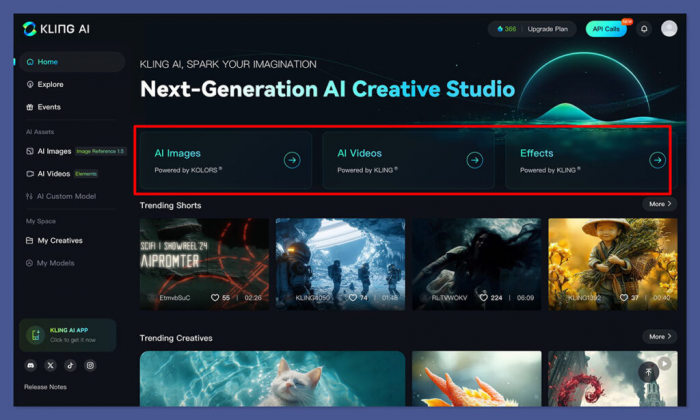
Kling AI is designed to generate cinematic videos, physically believable video from text or images. It goes far beyond Viggle’s “put this character in that motion” approach and behaves more like a serious AI camera for creators who want high‑end visuals.
Key features of Kling AI
Kling specialises in realism. It can create complex shots with proper depth, motion and lighting instead of just simple motion overlays.
● Text‑to‑video and image‑to‑video generation for full scenes, not just motion transfers.
● Strong motion physics: characters walk, run and interact in ways that feel grounded.
● Detailed facial animation with expressive eyes, subtle expressions and decent lip‑sync.
● Cinematic camera moves (push‑ins, pans, tracking shots) with more control than template‑based tools.
● Support for longer clips compared to short meme‑length outputs.
Kling AI: pros and cons
| Kling AI – Pros | Kling AI – Cons |
| Very realistic motion and physics | Slower render times on complex, HD clips |
| Strong facial nuance and lip‑sync | Interface assumes some video/AI familiarity |
| Good for narrative and “hero” shots | Best used with an external editor for final polish |
| Handles longer, continuous clips | Less “plug and play” than light meme generators |
Kling AI: pricing and plans
| Plan | Approx. Price (USD/month) | What you get (typical) |
| Free | 0 | Limited daily credits; a few short 1080p test clips |
| Starter/Basic | 10–15 | Hundreds of credits; enough for regular short projects |
| Pro | 39–49 | 2,000+ credits, longer clips, priority processing |
Where Kling clearly surpasses Viggle AI
Viggle excels at motion‑swap templates: fun, fast animated edits where you drop a character into a dance or short motion loop. That’s perfect for memes, but it offers minimal camera control, limited realism and very short clips. Kling, on the other hand, is built for video that looks like it could have been shot with a real camera. If the goal is to replace stock footage, create cinematic B‑roll, or build realistic narrative moments, Kling’s motion, lighting and scene coherence put it in a different league.
2. Krikey AI : 3D animation studio instead of a motion toy
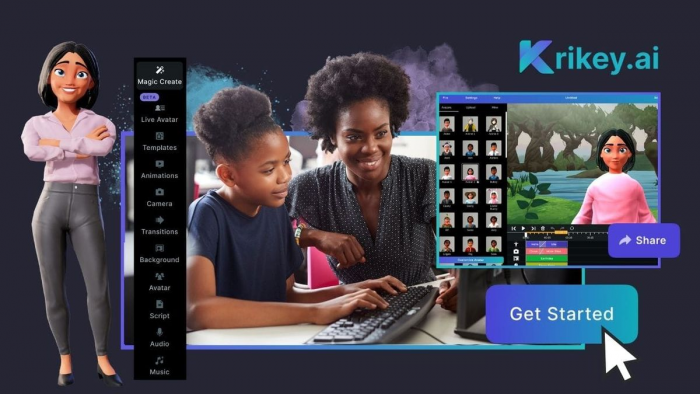
Krikey AI is aimed at users who want full 3D animated characters, not just motion transferred onto a flat design. It behaves more like a compact 3D animation studio powered by AI.
Key features of Krikey AI
Krikey gives you tools to direct a fully animated character performance.
● 3D character rigs with customisable movements and expressions.
● Camera controls for framing shots inside a 3D scene.
● AI text‑to‑speech with automatic lip‑sync across multiple languages.
● Pose and gesture control for hands and body, rather than generic motion.
● Export options suitable for educational content, games, and marketing videos.
Krikey AI: pros and cons
| Krikey AI – Pros | Krikey AI – Cons |
| Full 3D character animation, not just swaps | More complex than a simple template‑based tool |
| TTS + lip‑sync built in | Best for 3D/animated styles, not photorealistic video |
| Camera and performance direction in one place | Can feel heavy for quick meme‑style content |
| Good for explainers, training, storytelling | Requires more time to learn than Viggle‑style “click & go” |
Krikey AI: pricing and plans
| Plan | Approx. Price (USD/month) | What you get (typical) |
| Free/Trial | 0 | Limited projects, watermarks or capped exports |
| Creator | 20–30 | Access to core 3D tools, TTS, and regular exports |
| Studio | 50+ | Higher limits, priority rendering, team features |
How Krikey moves beyond Viggle AI
Viggle is narrowly focused on motion swap: you supply motion and a character image, it fuses them. There is no real sense of directing performance or working inside a 3D scene. Krikey gives full control over a 3D character’s acting, camera angles and voice. For educators, studios or brands wanting animated characters to host shows, explain products or play roles in stories, Krikey offers a complete animation environment that Viggle simply doesn’t provide.
3. DomoAI : Anime‑centric motion and visual style
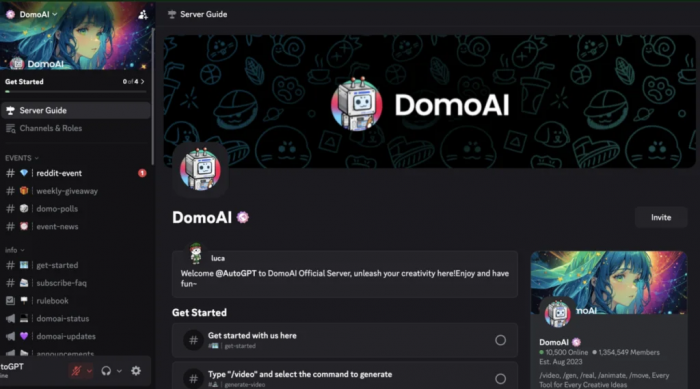
DomoAI is a strong choice for anyone who lives in anime edits, AMVs and stylised music videos. It combines motion transfer with vivid anime aesthetics.
Key features of DomoAI
DomoAI leans heavily into style and anime‑inspired visuals.
● Motion‑swap and style transfer optimised for anime and stylised 2D/3D looks.
● Converts live‑action or basic footage into anime‑like animation.
● Popular presets for dances, fight scenes and music‑driven motion.
● Community and examples heavily focused on anime content.
DomoAI: pros and cons
| DomoAI – Pros | DomoAI – Cons |
| Excellent anime and stylised outputs | Not ideal for realistic, live‑action‑style footage |
| Great for music videos and fan edits | Discord/web workflows can feel fragmented to newcomers |
| Strong style transfer on motion | Less suited to long narrative clips or professional ads |
| Community around anime edits | Quality depends heavily on chosen motion and style |
DomoAI: pricing and plans
| Plan | Approx. Price (USD/month) | What you get (typical) |
| Free/Community | 0 | Limited generations via web/Discord; watermarks or caps |
| Basic | 15–20 | Enough renders for regular anime edits each month |
| Pro | 25–30+ | Higher limits, faster queues, better quality settings |
Why DomoAI is stronger than Viggle for anime lovers
Viggle can produce stylised outputs, but it’s not specialised for anime. Its presets are more general “3D cartoon” than specific anime aesthetics, and its community is more meme‑oriented. DomoAI is tuned from the ground up to produce anime‑style movement, colour, and framing. For creators whose timelines are full of AMVs, anime‑inspired TikToks and stylised fan content, DomoAI delivers more on‑style results with less trial and error than Viggle.
4. Runway : End‑to‑end AI video for serious production
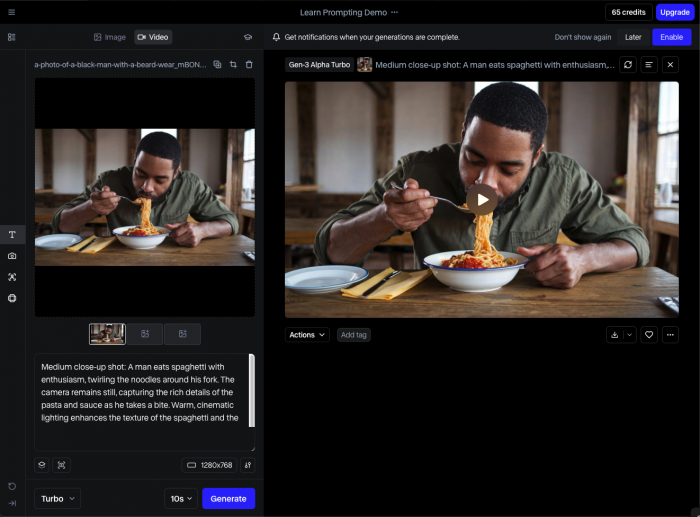
Runway (Runway ML) is a full AI video environment, not a single trick. It is widely used by agencies, indie studios and in‑house content teams.
Key features of Runway
Runway wraps advanced video models inside a collaborative, browser‑based production space.
● Text‑to‑video, image‑to‑video and video‑to‑video generation.
● Project‑based interface where multiple clips and versions are organised.
● Lightweight timeline for trimming, sequencing and compositing.
● Tools for restyling and refining clips without leaving the platform.
● Team features so multiple people can work in the same space.
Runway: pros and cons
| Runway – Pros | Runway – Cons |
| Strong, cinematic video models | Clip durations shorter than some dedicated generators |
| Integrated project and editing workspace | Pricier than simple motion‑swap tools |
| Good fit for agency and client work | Audio handled via separate tools and workflows |
| Collaboration and organisation inside the browser | May feel overkill for quick meme clips |
Runway: pricing and plans
| Plan | Approx. Price (USD/month) | What you get (typical) |
| Free | 0 | Limited, watermarked exports; basic testing |
| Standard | 12–15 | Modest credit pool for regular HD clips and experiments |
| Pro | 35–45 | Larger credit pool, faster modes, higher quality and 4K options |
Where Runway offers more than Viggle AI
Viggle generates isolated, template‑driven clips. It doesn’t help you manage a campaign, organise scenes or assemble a full piece. Runway lets AI video sit inside a complete workflow: you can generate a motion‑swap‑style idea, then immediately trim it, combine it with other shots, add overlays and prepare it for export inside the same project. For commercial work and larger projects, that integrated environment makes Runway a far more practical tool than Viggle.
5. MoveAs : Motion swap that lives on your iPhone
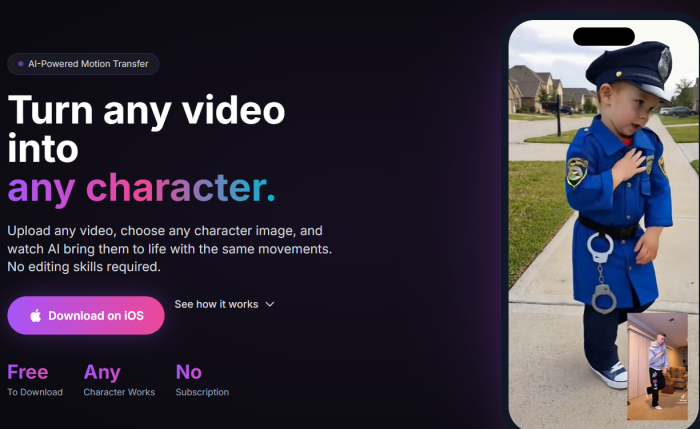
MoveAs is an iOS app built around the same core idea as Viggle—motion swap and character inserts but optimised for mobile.
Key features of MoveAs
MoveAs keeps the entire flow on the phone.
● Capture motion directly with your iPhone camera.
● Choose any character image from your gallery to animate.
● Generate motion‑swap videos within the app and export straight to Reels/TikTok/Shorts.
● Simple interface tailored to fast, on‑the‑go content creation.
MoveAs: pros and cons
| MoveAs – Pros | MoveAs – Cons |
| Native iOS experience, no desktop required | iOS‑only; no native Android or desktop version |
| Very fast record‑to‑post workflow | Token/credit model can get expensive with heavy use |
| Perfect for TikTok, Reels and Shorts creators | Less depth for complex or longer projects |
| Uses your own motion for more personalised clips | Limited advanced controls compared to pro tools |
MoveAs: pricing and plans
| Plan | Approx. Price (USD) | What you get (typical) |
| App download | 0 | Free to install; some free trials or basic exports |
| Token packs | 5–10 | Small bundles for a set number of AI video generations |
| Larger bundles | 15–20+ | More tokens for heavy users and frequent posting |
How MoveAs improves on Viggle’s experience
Viggle is web‑based and feels like a separate lab. You visit, upload, wait, download, and then move content onto your phone. MoveAs collapses that distance. It starts from the phone camera, lets you pick characters from your gallery, and ends with finished content ready to publish in the same environment. For creators who live on mobile, MoveAs’s native, streamlined experience is simply more practical than Viggle’s web‑only, queue‑dependent workflow.
6. MyEdit : Easy motion effects for beginners
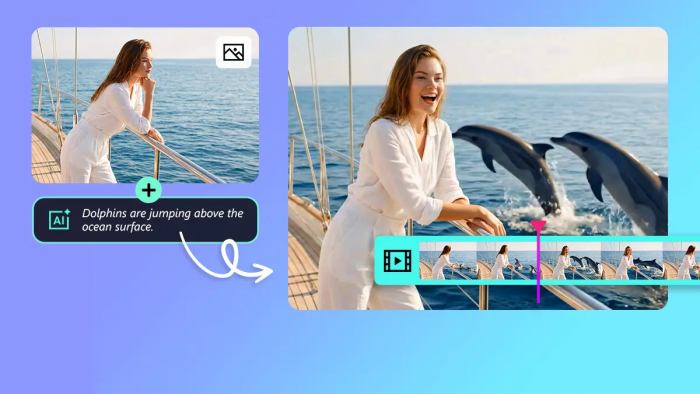
MyEdit, from CyberLink, is a more guided alternative for people who want motion‑swap‑style effects without dealing with complex AI controls.
Key features of MyEdit
MyEdit focuses on ease of use and tight integration with existing editing tools.
● Ready‑made motion templates (dances, poses, simple action loops).
● Upload‑and‑apply workflow with minimal configuration.
● Connection to CyberLink editing software for further refinement.
● Designed with beginners and casual creators in mind.
MyEdit: pros and cons
| MyEdit – Pros | MyEdit – Cons |
| Very approachable for first‑time users | Less deep control than high‑end AI video tools |
| Template‑driven, fast results | Results skew toward “fun” rather than cinematic |
| Integrates into traditional editing software | Not ideal for long or complex sequences |
| Good stepping stone into AI video effects | Limited appeal for advanced users |
MyEdit: pricing and plans (illustrative)
| Plan | Approx. Price (USD/month) | What you get (typical) |
| Free | 0 | Limited templates/effects; basic exports |
| Premium / Suite | 7–15 (often bundled) | Full template library, higher quality, integration unlocks |
Why MyEdit is more forgiving than Viggle for new users
Viggle’s simple UI still expects users to understand which motions and characters will work, and its outputs can be hit‑or‑miss without context. MyEdit leans harder into curated templates and a more guided flow. That makes it easier for someone with no editing or AI background to produce playful motion clips and then refine them inside a familiar editing environment, without wading through Discords, queues or complex settings.
Final thoughts: choosing the right Viggle alternative
Viggle AI is still excellent for fast, viral motion‑swap clips, but its narrow focus and basic workflow mean many creators quickly run into limits. Kling AI is the natural upgrade when cinematic realism is the priority. Krikey AI is the choice when full 3D character performances and camera direction matter. DomoAI becomes the best friend of anime‑obsessed editors. Runway steps in when AI video needs to live inside client‑ready production pipelines. MoveAs brings Viggle‑style fun to mobile creators who live on their phones. MyEdit makes motion effects accessible to beginners who want a gentle entry into AI‑powered video.
Choosing among them isn’t about which tool is “better” in the abstract. It’s about matching the tool to the kind of video you actually make next.
Post Comments
Be the first to post comment!
Related Articles




Grubby AI vs WriteHuman: Which One Should You Use?
Ridge Harper . Jun 30, 2026