I wasn’t planning to write a review. I was just hunting for a free AI image generator, something quick that could turn a text prompt into a decent picture without making me install software or pay before I’d even seen a result. The same name kept surfacing in my searches: Frosting AI. And the reviews I found were glowing, almost suspiciously so. Fast, free, no watermark, makes anything you can describe. I’ve been burned by that kind of hype before, so I decided the only honest way to settle it was to stop reading other people’s takes and just try the thing myself.
That’s what this is. Not a rehash of marketing copy, and not one of those write-ups that clearly never clicked the generate button. I opened Frosting AI cold, with no account, ran real prompts, poked at every feature, and wrote down exactly what happened: what genuinely impressed me, the bugs I ran into, the surprise paywalls, and whether it lives up to all those five-star reviews. Here’s the honest result.
The short version
Frosting AI is a genuinely free, browser-based image generator built on Stable Diffusion. You can start making images in about ten seconds without an account, and the free tier (around 100 generations a day) is one of the most generous out there. For quick, casual, social-media-grade visuals, it punches well above its price of $0.
But it isn’t magic. Faces, and especially hands, come out distorted more often than the marketing suggests. Video generation is locked behind a separate paid token system. And the moment you touch the advanced settings, you get nudged toward a subscription. It’s a fast, fun, free toy that turns into a real cost decision the second you want pro-level control.
My rating: 3.7 / 5. Excellent free tier, real limitations, and at least honest about what it is.
What is Frosting AI?
Frosting AI (at frosting.ai) is a text-to-image generator that turns a written prompt into AI artwork in your browser. Under the hood it runs on Stable Diffusion and SDXL, plus a rotating set of community-tuned checkpoints (the kind of models you would recognize from the open-source scene, like Dreamshaper XL). In plain terms, anything a mid-tier Stable Diffusion setup can make, Frosting can make, without you installing anything, wiring up node graphs, or touching a command line.
A few things are worth knowing about who is behind it, because the competing reviews tend to skip this. The domain has been around since early 2023, it operates under a registered company, and the product runs as a fairly lean, indie operation with an active Discord rather than a big VC-backed launch. There is no Product Hunt fanfare or press tour. It grew mostly through word of mouth, which is exactly why you keep seeing it recommended in random comment sections.
The platform leans into three art “lanes” right from the front door: Anime, Furry, and Photorealistic. That alone tells you a lot about its core audience.
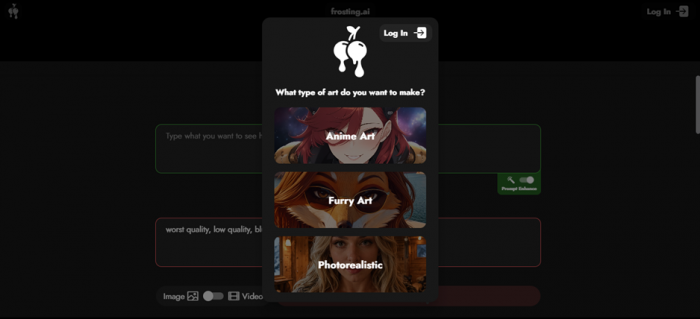
The first thing you see: pick your lane. Anime, Furry, or Photorealistic.
How I tested it
I wanted this to reflect a normal person’s first hour with the tool, not a sponsored highlight reel. So I:
• Opened frosting.ai with no account and no payment info.
• Ran several photorealistic prompts to judge real-world output quality.
• Pushed into video, advanced settings, and the pricing flow to find the friction points.
• Timed generations and noted every place the tool tried to upsell me.
Everything below, including the screenshots, comes from that session.
Getting started: a real step-by-step walkthrough
Here is the actual flow from landing on the site to a finished image. You can follow this exactly.
1. Go to frosting.ai. No download, no app, and no signup wall just to start. That was my first pleasant surprise, since most “free” generators make you create an account before you can even see the canvas.
2. Pick an art style. A popup asks what you want to make: Anime, Furry, or Photorealistic. I chose Photorealistic.
3. Check your free generations. Without logging in at all, I had a counter showing free “gens” remaining. I had already burned a few testing prompts and still had 96 of 100 left. You also pick a model here (mine defaulted to Lite Dreamshaper XL) and an aspect ratio: portrait, square, or landscape.
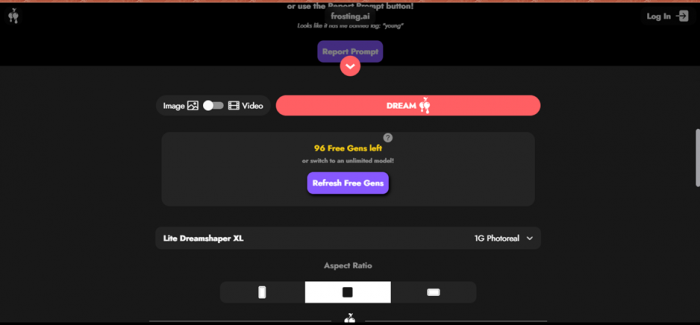
96 free generations left with no account. Notice the small warning flagging a “banned tag,” which I will come back to under content rules.
4. Write your prompt and a negative prompt. The main box is your positive prompt. Below it is a negative prompt field for things you want to exclude, and there is a Prompt Enhance toggle that auto-expands your description. Here is the prompt I used:
Photorealistic portrait of an adult Indian woman with a simple, natural look, warm gentle smile, casual traditional-modern outfit such as a plain kurti or simple t-shirt, minimal makeup, dark hair, kind expressive eyes, relaxed posture, soft natural daylight, clean background, realistic skin texture, candid photography style, high detail, DSLR quality, shallow depth of field.
And the negative prompt: cartoon, anime, overly glamorous, heavy makeup, exaggerated smile, distorted face.
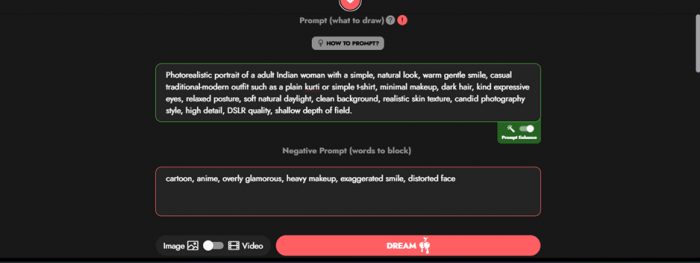
The positive prompt, the negative prompt, and Prompt Enhance turned on.
5. Set the quality and hit Dream. Choose a quality or step level, pick your aspect ratio, and press the big Dream button.
6. Wait around 5 to 10 seconds. That is it. The speed is real, and it is the single best thing about the tool.
My results: the output quality
(the honest part)
Let me start with the good. The first photorealistic portrait came back in roughly five to ten seconds, and at a glance it is genuinely impressive. Natural lighting, believable skin texture, a soft window-lit background, and an expression that actually matches “warm and candid.” For a free render with zero tweaking, this is the kind of result that makes people leave five-star reviews.
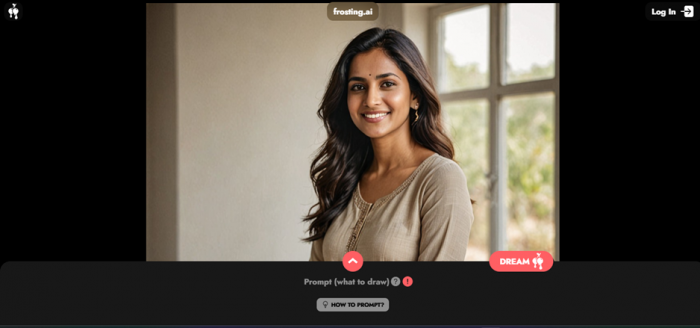
The headshot crop looks great: natural light, realistic skin, a candid feel. This is Frosting AI at its best.
Now the catch, and it is the one almost no glowing review will show you. The moment the frame includes more of the body, specifically the hands, the illusion breaks. In my full-length output the face and outfit held up well, but the hands were warped and anatomically wrong, with that classic AI “melted hand” look where digits blend together and bend the wrong way.
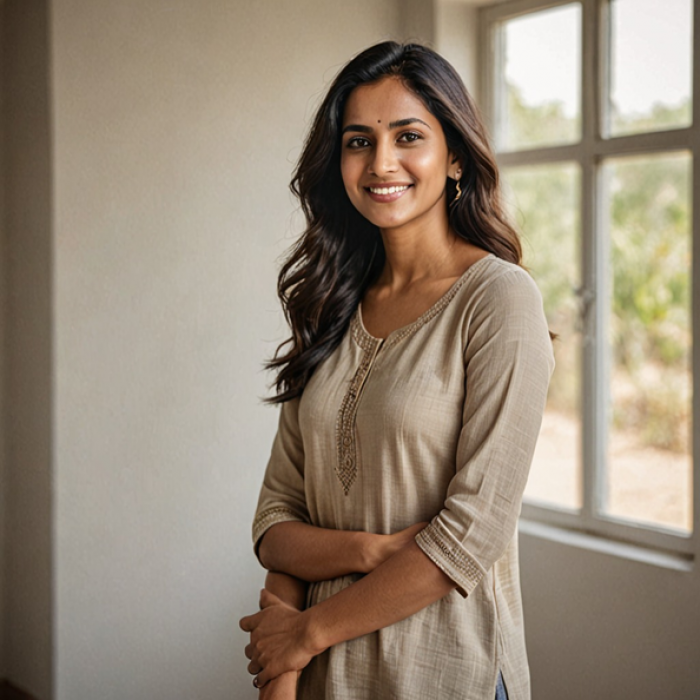
Look closely at the hands. This is the recurring weak spot: hands come out malformed, exactly the Stable Diffusion failure mode Frosting inherits.
This is not a Frosting-specific bug. It is a known limitation of the Stable Diffusion family it is built on. But it matters for your expectations. Frosting AI is excellent for headshots, scenery, concept art, and stylized work, and unreliable for full-body shots, hands, and any image where small anatomy or readable text has to be perfect. Plan to generate several times and cherry-pick, or simply crop around the problem areas.
The video catch
You can’t really test it for free
Frosting AI advertises video generation, and there is a clean Image and Video toggle right next to the Dream button. I flipped it expecting to try a clip, and ran straight into a wall.
Video does not use the free image credits. It runs on a completely separate currency called “Stardust,” and I had zero of it. The interface offered a “Get Stardust” button and a “Get 500 free stardust” button, with a video model called Lynx One priced at 300 Stardust per use. Stardust is the platform’s universal paid token (it is also tied to sponsoring the models they train), and the packs are not cheap.
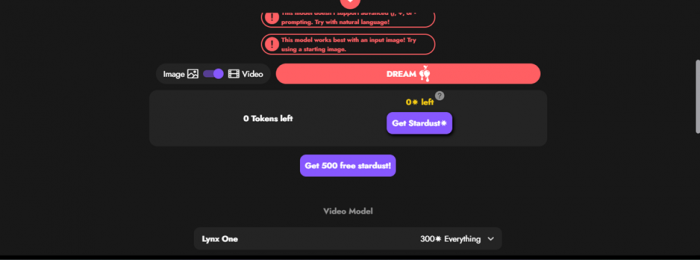
Switch to Video and you hit a different paywall entirely: 0 tokens, and the model wants 300 Stardust per generation.
Bottom line on video: for free, you are effectively an image-only user. The feature exists, but you cannot meaningfully evaluate it without paying, and several hands-on reviews describe the output as basic compared to dedicated AI video tools. Treat video as a “maybe later,” not a reason to choose Frosting today.
The settings catch
free until you change anything
Frosting AI looks surprisingly powerful once you scroll into the settings panel. You get Quality (number of steps) with Quick, High, and Insane options, a Seed number for reproducible results, CLIP Skip, weighted and unlimited prompts, ControlNet (Depth and Canny) for pose and composition control, and LoRA support. On paper that is the toolkit power users actually want, and it is more than most free generators expose.
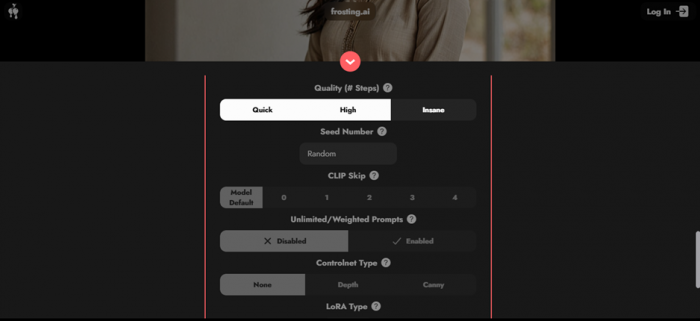
A genuinely deep settings panel: Quality, Seed, CLIP Skip, ControlNet, LoRA. Tempting, until you try to use it.
Here is the friction I hit. These are shown at their defaults, and the moment I tried to switch most of them to a non-default option, the app pushed me toward the subscription page. So the advanced controls are best understood as a preview of what you would unlock by paying, not a free playground. It is a smart conversion tactic, but it is worth knowing before you assume all those pro features come free.
Content rules, banned tags, and the adult-content heads-up
Two things are worth knowing before you sign up, stated plainly.
First, Frosting AI does enforce content guardrails. During my test I saw a warning flag a banned tag (“young”) and offer a “Report Prompt” button. That is the platform’s child-safety filtering working as intended, and it is a good sign. It also blocks copyrighted characters such as Batman, Spider-Man, and Disney or Marvel properties. Try to generate them and it refuses, which is a positive for keeping you out of legal trouble.
Second, and this is the context the polished reviews tend to bury, Frosting AI runs a permissive adult-content policy within legal limits. The site carries the kind of compliance notices (age verification, 2257-style records, an anti-trafficking policy) that signal a meaningful chunk of its user base is there for NSFW generation. This does not affect normal image generation at all, and you will never stumble into anything if you do not go looking. But if you are choosing a tool for a workplace, a classroom, or a brand, it is simply useful to know what neighborhood you are in before signing up expecting a buttoned-up, family-friendly product.
Frosting AI pricing (2026)
Here is where I have to add a real caveat. Frosting AI’s pricing has changed more than once, tiers have been renamed, and what you see can differ depending on the day and the page. So treat the numbers below as a snapshot, and always confirm on the live Subscribe page before paying.
When I checked the Subscribe page, the tiers on display were these:
| Plan | Price | Best for |
|---|---|---|
| Free | $0 | Around 100 generations a day, core models, images only. Genuinely usable. |
| Planet (in pricing history) | About $7/mo | More daily credits plus upscaling. The cheapest paid entry. |
| Star | $25/mo | Batch generation and higher resolution. Aimed at content creators. |
| Nebula | $55/mo | Reference images, ControlNet, inpainting, video beta, and a big credit bump. |
| Galaxy | $120/mo | Everything: maximum credits, fastest priority queue, and support. |
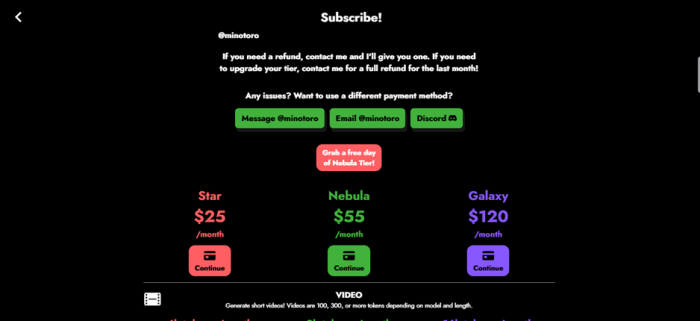
The Subscribe page during my visit: Star $25, Nebula $55, Galaxy $120, plus a free-trial-day offer for Nebula.
A few money notes from my research:
• Annual billing knocks around 20% off every paid plan, and nonprofits and schools can get up to 50% off, a discount you rarely see elsewhere.
• Video runs on separate Stardust tokens, bought in packs through PayPal, so a subscription does not automatically give you unlimited video.
• Nebula usually offers a one-day trial so you can sample the premium features.
• Refunds are handled directly by the operator, and annual plans auto-renew, so cancel before the renewal date.
Value verdict: the free tier is the real product for most people. Planet, if it is available, is a fair upgrade for regulars. Nebula and Galaxy get expensive fast, and at that spend you should genuinely compare against Midjourney or Leonardo before committing.
Pros and cons
What I liked
• Truly free to start. No signup, no card, and around 100 generations a day.
• Fast. Five to ten second images in my test, which is great for rapid iteration.
• Clean, beginner-friendly interface with a real settings panel underneath.
• Multiple art styles and models, plus negative prompts, ControlNet, and LoRA.
• No watermark on current tiers (this was not always true historically, so verify).
• Sensible guardrails that block copyrighted IP and child-safety tags.
What held it back
• Hands and fine anatomy distort regularly. Not reliable for full-body shots or text inside images.
• Video is paywalled behind a separate Stardust token economy.
• Advanced settings nudge you to subscribe the moment you change a default.
• Pricing is inconsistent and has shifted over time.
• Thin public community and no exact model disclosure, so reliability is a bit of a leap of faith.
• The free-tier queue can lag during busy hours, since priority goes to paid users.
Who should use Frosting AI, and who shouldn’t
Use it if you are a hobbyist, student, blogger, or social-media creator who wants attractive visuals fast and free, you are comfortable generating a few times to land a keeper, and you do not need flawless hands or readable text.
Look elsewhere if you need consistent, production-grade output for a brand, you require perfect anatomy or typography, you want serious AI video, or you need a tool with a large, well-documented community and support behind it.
Frosting AI vs the alternatives
| Tool | Strength vs Frosting AI | Trade-off |
|---|---|---|
| Midjourney | Top-tier image quality and coherence | Paid only, Discord-centric, less granular control |
| Leonardo AI | Balanced toolkit, strong free tier, polished | Slightly steeper learning curve |
| Krea AI | Real-time generation, access to newer FLUX-family models | Can cost more for heavy use |
| Civitai | Massive open-source model library | More technical, closer to DIY Stable Diffusion |
| NightCafe | Big, active community and prompt-sharing | Credit system can feel limiting |
The honest summary: Frosting AI wins on being free, fast, and frictionless. It loses on polish, consistency, and ecosystem. If quality is the priority and the budget exists, Midjourney or Leonardo are safer bets. If “free and right now” is the priority, Frosting is hard to beat.
Is Frosting AI worth it?
For zero dollars? Absolutely. Go try it today. It is one of the most generous free image generators out there, it is fast, and it is genuinely fun. As a free tool, I would happily recommend it for casual and creative use.
As a paid subscription, the calculus gets harder. The hands problem, the separate Stardust economy for video, and the fact that the best controls live behind a paywall all mean you should treat the paid tiers as a real comparison-shopping decision, not an automatic upgrade. Use the free tier, and Nebula’s trial day, to test thoroughly first. That, conveniently, is exactly what the generous free plan lets you do.
Final rating: 3.7 / 5. A brilliant free toy and a solid casual tool, held back by the same anatomy quirks and aggressive upsells that keep it from being a no-brainer for professionals.
Final thoughts
The hype around Frosting AI is mostly earned, just not for the reasons the recommendation videos imply. It is not a secret pro-grade powerhouse. It is a fast, free, and refreshingly low-friction way to make AI images, with real limitations around hands, video, and paywalled controls. Go in expecting a great free generator with a few catches, rather than everything for nothing, and you will come away happy. Open it, run a few prompts, and let your own results decide. That part, at least, costs you nothing.
Post Comments
Be the first to post comment!
Related Articles