I've spent more time than I'd like to admit pasting text into AI humanizers. Two names kept landing at the top of my search results: Grubby AI and WriteHuman. Both promise the same thing: take robotic AI writing and make it sound like a real person wrote it, so it slips past detectors like GPTZero, Turnitin, and Originality.
So I stopped reading the sales pages and did the obvious thing. I put both tools side by side, handed them an identical paragraph, and watched what each one actually did, from the moment I hit the page to the bill at checkout. This is that head-to-head: same test, same input, scored round by round, written up exactly as I saw it.
One thing up front: I'm not here to cheer on detection evasion, especially for students. I'll review both honestly as tools, and I'll be straight about the academic-integrity side at the end, because you deserve that.
THE Quick VERDICT WriteHuman wins for most people. It gave me cleaner, more human-sounding output and let me see a real result without an account. It's just pricier and wordier. Grubby AI is cheaper to start and bundles a whole student suite, but it hides everything behind a signup wall, reads stiffer than what I fed it, and leans on a "100% guarantee" I wouldn't bank on. Grubby only makes sense in one narrow case, which I'll get to. |
The matchup at a glance
Everything I found, in one table. Details and screenshots below.
| What I checked | WriteHuman | Grubby AI |
|---|---|---|
| See output without signing up | Yes, free on the homepage | No, hard signup wall |
| Free limit | 250 words / run | ~300 words total |
| Output style (my test) | Conversational, more natural | Stiffer, more corporate |
| Output length (77 words in) | 121 words | 91 words |
| Score it shows you | 90% Human (its own checker) | Pick-a-detector targeting |
| Free variations | 1 (others locked) | 1 + a free retry |
| Extra tools | API + MCP for agents | Summarizer, notes, quizzes, AutoTyper |
| Entry price | $12 / mo | Free / ~$8 / mo |
| Headline claim | "World's most powerful humanizer" | "100% Turnitin bypass guarantee" |
| My overall score | 6.5 / 10 | 4.5 / 10 |
How I tested both
Same paragraph, same rules, default settings.
To keep it fair, I fed both tools the exact same input, a neutral, 77-word paragraph about metadata in digital files. No trick sentences, just clean AI-style writing that any detector would happily flag:
MY TEST INPUT · 77 WORDS Metadata is often ignored because it is not visible like a photo or video. Yet it can be one of the most important parts of digital documentation. A file may contain creation time, device model, GPS coordinates, resolution, frame rate, duration, and modification history. That information can help confirm whether a record is original, altered, copied, compressed, or exported from another source, which is why understanding how metadata protects digital files has become important in modern documentation. |
I ran that exact paragraph through both tools and screenshotted every single step. I started with Grubby AI on its own, walked its whole flow start to finish, and then put the two head to head. Here is everything Grubby did with my text, in order.
My Grubby AI run, step by step
Eight screens, from the landing page to the final output.
I test a tool the way a brand-new user would actually hit it, so I went through Grubby's entire new-user flow myself: the landing page, pasting in text, the signup wall, the onboarding, the dashboard, running the humanizer, and the result with all its export options. Under each screenshot is my honest, in-the-moment reaction.
| Heads up These eight shots are my actual Grubby AI session. My running thoughts sit in the notes under each one. |
STEP 01
The landing page makes very big promises
The first thing you see is a confident, slightly aggressive sales page. The headline reads "Humanize AI text & bypass AI detectors," and a banner across the very top adds the kicker: "100% Turnitin Bypass Guarantee, or your money back." It is a clean two-panel layout, your AI content on the left and the humanized version on the right, with options to paste text, upload a PDF, or try a sample.
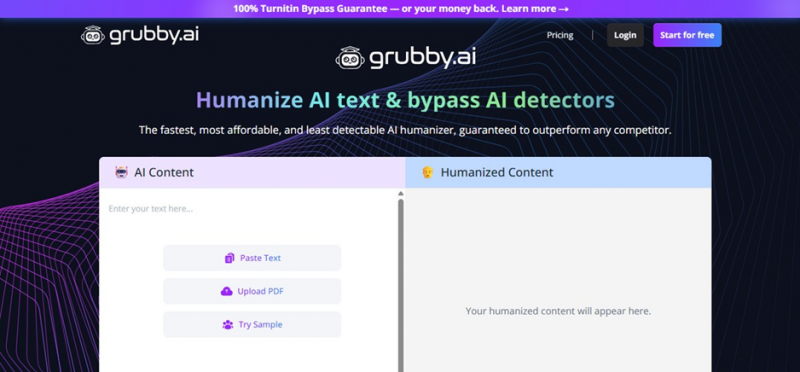 Grubby AI's homepage. The marketing leans hard on guarantees. |
MY OBSERVATION The marketing leans hard. "100% guarantee," "least detectable," and "outperform any competitor" are absolute claims, and absolute claims in the detector-bypass space are a red flag, because detection is a moving target. To its credit the interface is clean and the input options are flexible. But the tone tells you exactly who this is for: people who want a guarantee their AI text will not get caught. |
STEP 02
I pasted my text and picked a target detector
The input panel is straightforward. I pasted my 77-word metadata paragraph and a counter showed 77 of 300 words used, so the free allowance is small. Next to the Humanize button sits a "Mode" dropdown where you pick which detector you are trying to beat. It was set to GPTZero by default. I left my text in and clicked Humanize.
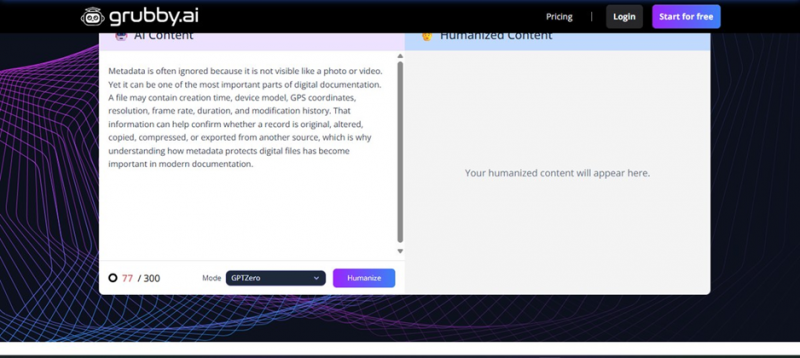 My test paragraph pasted in, 77/300 words, with the detector Mode set to GPTZero. |
MY OBSERVATION Two things stood out. First, the free trial is capped at roughly 300 words, barely enough for a couple of short paragraphs. Second, the "Mode" dropdown makes the purpose explicit: you are not just smoothing your writing, you are selecting a specific detector to evade. That framing is everywhere in this product. |
STEP 03
I hit Humanize, and hit a signup wall
This is where the free "try it" experience ends. The moment I clicked Humanize, Grubby stopped me and demanded an account. The signup page just repeats the pitch: "300 FREE words," "Humanize AI text in 3 seconds or less," "Bypass GPT zero, Turnitin & all AI detectors, guaranteed," and a "Trusted by 100,000+ users" badge.
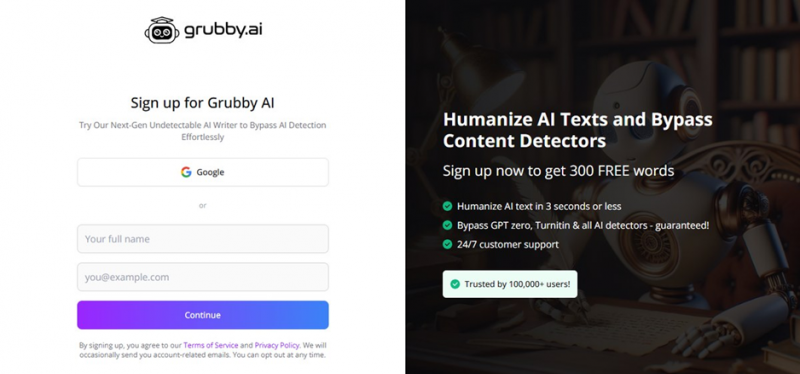 The signup wall. No output is shown until you create an account. |
MY OBSERVATION You cannot see a single word of output without creating an account. That is a hard signup wall. It is a common growth tactic, but it means you are committing your email purely on the strength of the marketing, before you have seen any proof the tool works. |
STEP 04
The onboarding asks which detector you want to beat
After signing in, a popup appeared that, more than anything else on the site, tells you what this product is for. It is titled "Important Update: Turnitin AI Detector," then asks the question directly: "Which AI detector are you trying to bypass?" The options are Turnitin (tagged "Recommended for academic use"), GPTZero, ZeroGPT, Copyleaks, Just Sound Human, and I Don't Know. I picked ZeroGPT to continue.
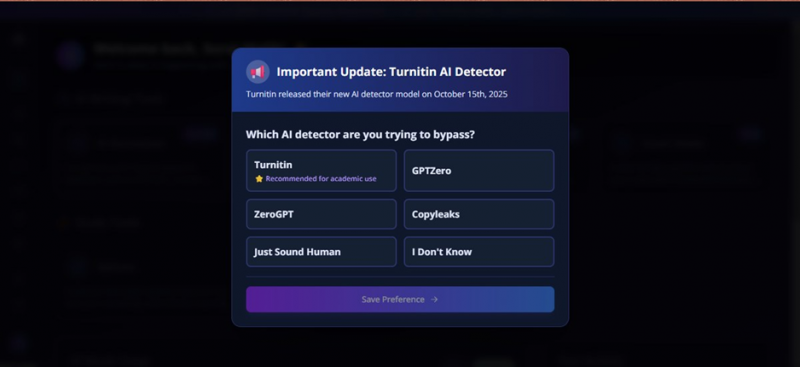 The most revealing screen: it asks which detector you are trying to bypass. |
MY OBSERVATION This is the most telling screen in the whole flow, for two reasons. One, it openly frames the tool around beating detectors and literally labels Turnitin as "recommended for academic use," about as clear a signal as you can get that this is built for students trying to get past plagiarism and AI checks. Two, notice the irony: the popup itself admits Turnitin just shipped a brand-new detector model. If the detector keeps changing, a "100% bypass guarantee" cannot mean much, because the thing you are trying to beat updated last month. |
STEP 05
The dashboard is a whole student suite
Once past onboarding, the dashboard loaded with a friendly "Welcome back" greeting and a grid of tools. Under "AI Writing Tools" there is the AI Humanizer (tagged Popular), Grubby AutoTyper (New), Summarization, and Smart Notes. Under "Study Tools" there are Quizzes and Flashcards. I clicked into the AI Humanizer, since that is the core of the product.
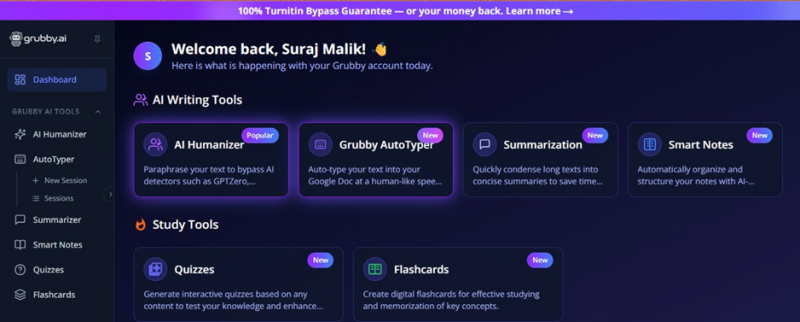 The dashboard. Grubby is positioned as an all-in-one student toolkit. |
MY OBSERVATION Grubby is not just a humanizer, it is positioned as an all-in-one student suite. AutoTyper, summarizer, smart notes, quizzes, and flashcards are all squarely aimed at coursework. That is useful context: this is a product designed to sit alongside a student's study and submission workflow, not a general writing tool. |
STEP 06
Running the humanizer
Inside the humanizer, a green banner sits across the top: "Turnitin Guarantee: Grubby is the only humanizer that guarantees our text bypasses Turnitin's AI detector." My 77-word input was on the left, and after I ran it the right panel showed a loading animation and the message "Humanizing your content. Our AI is carefully crafting human-like text patterns." A label confirmed it was "Optimized for ZeroGPT," the detector I had chosen.
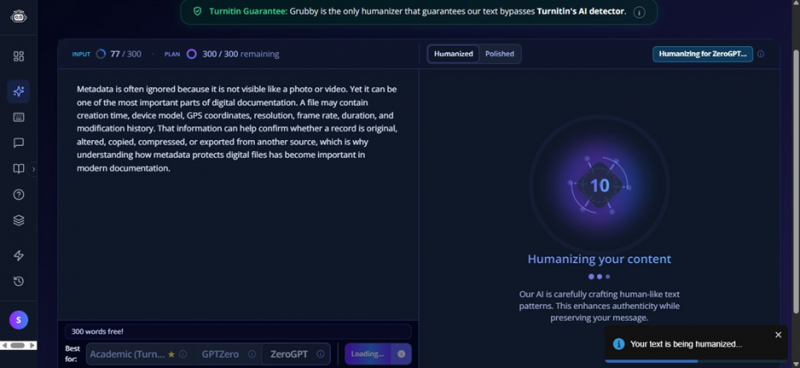 The humanizer running, optimized for ZeroGPT. |
MY OBSERVATION Processing took around 25 seconds, slower than the "3 seconds or less" the signup page advertises, though not painfully so. The "Turnitin Guarantee" line is repeated here in case you missed it the first three times. The tool does tailor its rewrite to whichever detector you selected, which is the one genuinely clever idea in the product. |
STEP 07
The result, and why it is not as "human" as promised
When it finished, the humanized text appeared on the right with some words highlighted to show what changed. My 77 words came back as 91. Here is exactly what Grubby produced:
Grubby's output (91 words) "Metadata is often ignored due to its non-visible nature relative to a photo or video. The metadata within such files can, however, be one of the most important aspects of digital documentation. Digital files contain elements like creation time, device model/GPS coordinates, resolution, frame rate, duration and modification history. This type of information contributes to the ability to determine whether a particular digital record is original, altered, copied, compressed or exported from another source, all reasons why understanding how metadata protects digital files has become important within modern documentation practices." | |
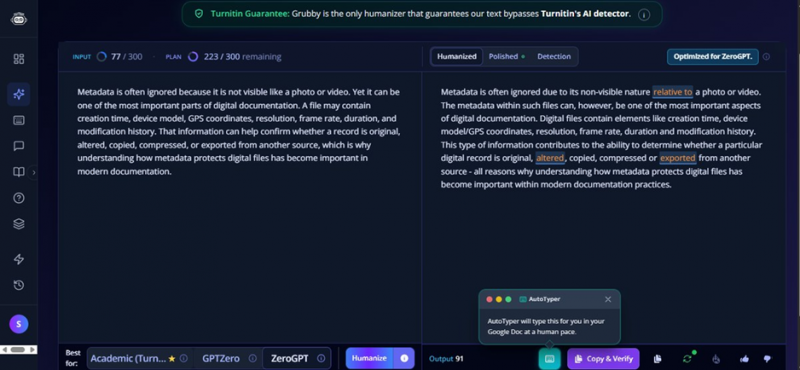 The humanized output, with changes highlighted and the AutoTyper popup. | |
MY OBSERVATION Here is the honest problem. My original said "ignored because it is not visible like a photo or video." Grubby turned that into "ignored due to its non-visible nature relative to a photo or video." It swapped "that information can help confirm" for "this type of information contributes to the ability to determine." My 77 words became 91, and the prose got wordier and more corporate, not more human. To my ear the rewrite actually sounds more like a machine, because it leans on stiff, padded phrasing. That matches what a lot of independent testers report: Grubby tends to do surface-level synonym swapping rather than genuinely natural rewriting. | |
STEP 08
The output options, including the controversial one
Along the bottom of the result sit the actions: the output word count (91 in my case), a Copy and Verify button, a regenerate or free-retry button, a download option, thumbs up and down, and the AutoTyper button. The AutoTyper, when triggered, pops up a small window confirming it "will type this for you in your Google Doc at a human pace."
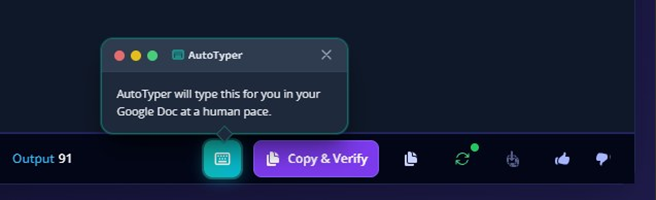 The output toolbar, including download, Copy and Verify, free retry, and AutoTyper. |
MY OBSERVATION Most of these are normal and handy: download as a document, copy, and a free retry if you do not like the rewrite. The AutoTyper is the one worth pausing on. Typing text into a Google Doc "at a human pace" is designed to imitate the rhythm of a person actually writing, which defeats the version-history and typing-pattern checks that some teachers now use to spot pasted AI work. I will be plain about it: that feature is built to make AI-assisted work look like it was typed by hand. Whether you are comfortable using it is a question only you can answer, but you should know that is what it does. |
That is the complete Grubby run, landing page to final output. Now let me put it head to head against WriteHuman, round by round, on the things that actually decide which one you would use.
ROUND 01
Getting in the door
Can you actually use it without handing over your email?
WriteHuman
I pasted my paragraph, hit Write Human, and it just worked. No signup, no email, no card. I got a full humanized result right there on the homepage, on the free tier.
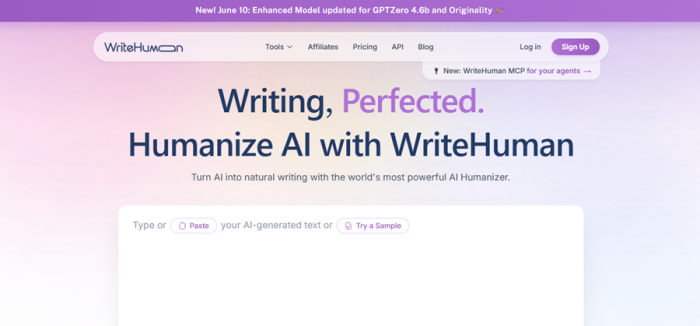
WriteHuman's landing page. Clean, purple, and you can start typing immediately.
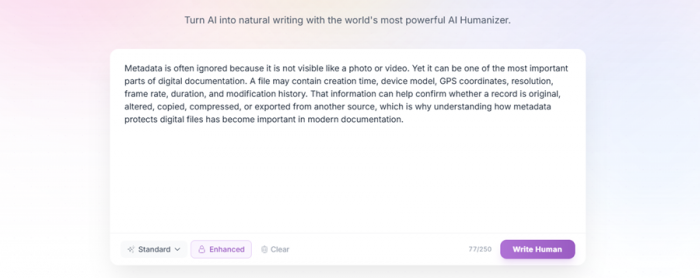
My 77-word paragraph pasted straight in, 77/250 words, with Standard and Enhanced modes.
MY OBSERVATION Great first impression. I could test the real product before committing anything. The free cap is 250 words per run (enough to genuinely try it), and I liked the visible counter plus the "Enhanced" mode toggle. |
Grubby AI
Completely different story. The instant I clicked Humanize, Grubby slammed a hard signup wall in my face. I couldn't see a single word of output without creating an account first.
MY OBSERVATION You're committing your email purely on the strength of the marketing, before you've seen any proof the tool works. It's a common growth tactic, but next to WriteHuman's "try it instantly," it feels like paying the cover charge before you're even allowed to look inside. |
| ROUND 1 WriteHuman. Showing me a real result with no account is a clear, meaningful edge. |
ROUND 02
The actual output
Same 77 words in. What came out the other side?
This is the part that matters most. WriteHuman scored its own rewrite 90% Human:
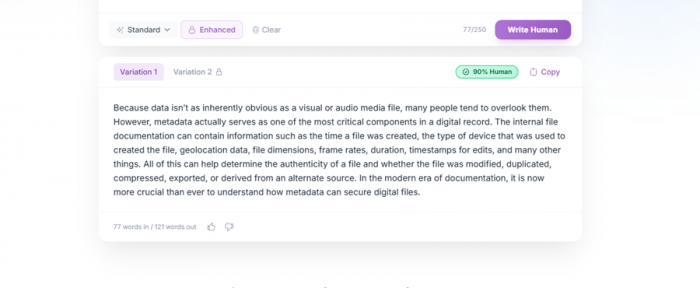
WriteHuman's Variation 1, flagged "90% Human" by its own checker. 77 words in / 121 words out.
Here's WriteHuman's rewrite next to what Grubby produced from the identical paragraph, and my original for reference:
Original input (77 words) Metadata is often ignored because it is not visible like a photo or video. … That information can help confirm whether a record is original, altered, copied, compressed, or exported from another source… |
WriteHuman (121 words) "Because data isn't as inherently obvious as a visual or audio media file, many people tend to overlook them. However, metadata actually serves as one of the most critical components in a digital record. The internal file documentation can contain information such as the time a file was created, the type of device that was used to created the file, geolocation data, file dimensions, frame rates, duration, timestamps for edits, and many other things…" |
Grubby AI (91 words) "Metadata is often ignored due to its non-visible nature relative to a photo or video. The metadata within such files can, however, be one of the most important aspects of digital documentation… This type of information contributes to the ability to determine whether a particular digital record is original, altered, copied, compressed or exported from another source…" |
MY READ: WRITEHUMAN It genuinely sounds more like a person. It opens with "Because data isn't as inherently obvious…" and drops in casual phrasing like "and many other things." It even uses a contraction ("isn't"), which is a very human tell. But there's a clear grammar slip I caught on a close read: "the type of device that was used to created the file." So it reads natural, but it's not clean. I'd still proofread before using it. |
MY READ: GRUBBY Grubby kept the meaning intact but went the other way: stiffer and more corporate. My "ignored because it is not visible like a photo or video" became "ignored due to its non-visible nature relative to a photo or video." To my ear it sounds more like a machine, not less, which is the one thing a humanizer is supposed to fix. |
One thing they share: both padded the word count. My 77 words became 91 with Grubby and a hefty 121 with WriteHuman, nearly double.
Word count: input vs output Same 77-word paragraph in. WriteHuman expanded it the most. 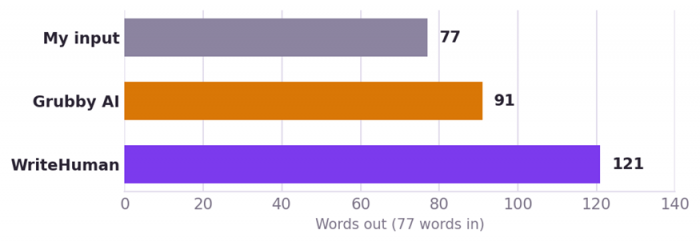 |
| ROUND 2 - WriteHuman (narrowly). Its output sounds more human, grammar slip and all. Grubby is safer on meaning but reads robotic. |
ROUND 03
Did they fool the detectors?
The entire reason these tools exist.
I want you to trust these numbers, so let me be honest about how I tested each side.
For Grubby AI, I ran its output through five real, external detectors. The results were all over the place:
| AI detector | Grubby's output | After a grammar pass |
|---|---|---|
| QuillBot | 0% AI PASS | 0% AI |
| Writer | 0% AI PASS | 2% AI |
| ZeroGPT | 19% AI | 50% AI |
| Originality.ai | 1% AI PASS | 100% AI |
| GPTZero | 100% AI FAIL | 78% AI |
One detailed test, GPTZero-optimized mode. Results shift every time a detector updates.
Even in the mode tuned to beat GPTZero, GPTZero still flagged Grubby's output 100% AI. And cleaning up the grammar afterward made several detectors more suspicious. Originality.ai jumped to 100%. That's the real-world inconsistency the marketing skips.
For WriteHuman, the tool reports its own score: 90% Human on my first run, and 86% on a second run with the same input.
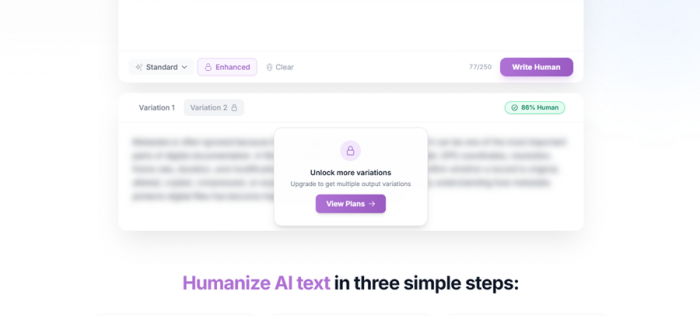
A second run scored 86% Human. Notice Variation 2 is blurred, locked behind a paid plan.
90% HUMAN · RUN 1 | 86% HUMAN · RUN 2 | 100% GRUBBY · GPTZERO AI |
MY HONEST TAKE Straight with you: that 90% is WriteHuman's own number, from the same company selling the tool, so I'd treat any internal "human score" with a grain of salt, same as I would Grubby's marketing. The difference is WriteHuman at least surfaces a score and keeps updating against named detectors (its banner brags about a June update for "GPTZero 4.6b and Originality"). The fairest thing I can say: WriteHuman's writing reads more human to me, and Grubby's verified external scores show it frequently gets caught. Neither is a magic bullet. Any humanizer promising to beat a detector that updates monthly deserves real skepticism. |
| ROUND 3 - WriteHuman, with an asterisk. It looks stronger and stays current, but I trust the writing quality more than any self-reported percentage. |
ROUND 04
The paywall trap
How much do they hold hostage?
WriteHuman
You get one variation free (Variation 1). Want more options to pick from? Variation 2 and beyond are locked. The app nudges you to "Unlock more variations: upgrade to get multiple output variations."
Grubby AI
Grubby technically gives you a free retry, but remember, the whole tool already sits behind a signup wall, and the free plan caps you at roughly 300 words total. You burn through it fast.
MY OBSERVATION Neither is generous, but the shapes differ. WriteHuman locks variety (you get one good output free); Grubby locks volume and access (almost nothing without an account). I'd rather have one usable output I can actually see than a tiny word bank behind a login. |
| ROUND 4 - Slight edge to WriteHuman. One free, visible output beats a gated 300-word trial. |
ROUND 05
The price tag
What you actually pay.
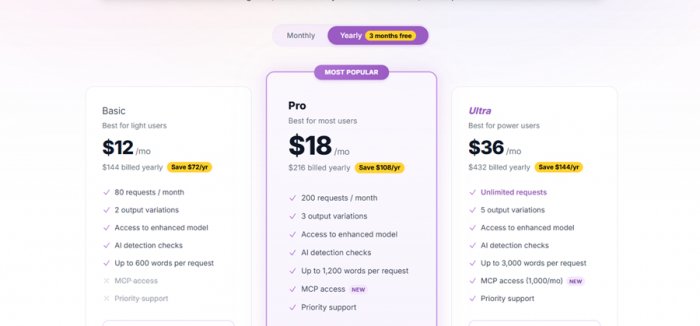
WriteHuman's plans: Basic $12, Pro $18 (most popular), Ultra $36 per month, billed yearly.
| Tool & plan | Price / mo | What you get |
|---|---|---|
| WriteHuman Basic | $12 | 80 requests, 2 variations, up to 600 words/request |
| WriteHuman Pro POPULAR | $18 | 200 requests, 3 variations, 1,200 words/request, MCP access |
| WriteHuman Ultra | $36 | Unlimited requests, 5 variations, 3,000 words/request |
| Grubby Free | $0 | ~300 words total, account required |
| Grubby Essential | ~$8 | A few thousand words / month, basic modes |
| Grubby Pro | higher | ~30,000 words / month, more modes |
| Grubby Unlimited | up to ~$60 | Large volumes, team use |
WriteHuman billed yearly. Grubby pricing is freemium and shifts often, so treat it as ballpark and check live.
Cheapest vs top tier, per month A neat flip: Grubby is cheaper to enter, but pricier at the top. 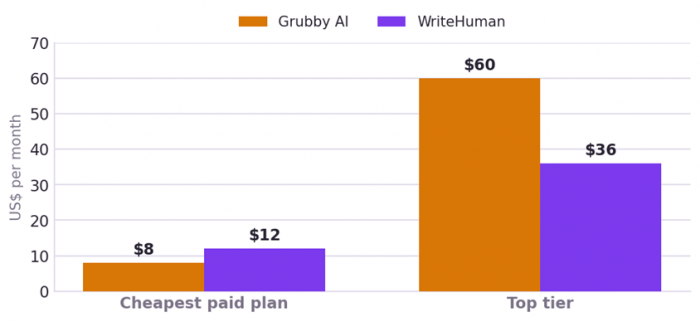 | |
MY OBSERVATION On pure entry price, Grubby wins, since it has a free tier and a cheaper paid step. But WriteHuman's pricing is transparent and predictable, while several Grubby users (and I'd flag this loudly) report billing headaches, hard-to-cancel subscriptions, and word counts that drain faster than expected. WriteHuman's Pro at $18 is the real sweet spot if you use these tools regularly. | |
| ROUND 5 Grubby, on price alone. It's cheaper to start, just watch the billing page closely. | |
The scorecard
How I rate them across the six things that actually matter.
| Dimension | WriteHuman | Grubby AI |
|---|---|---|
| Ease of use | 8.5 | 7.5 |
| Output quality | 6.5 | 4.5 |
| Detection bypass | 6.0 | 4.0 |
| Value for money | 6.0 | 5.5 |
| Honesty of marketing | 5.5 | 2.5 |
| Trust & support | 6.5 | 3.5 |
| Overall | 6.5 / 10 | 4.5 / 10 |
Pros and cons, side by side
| WriteHuman | Grubby AI |
WHAT'S GOOD + See a real result with no signup + Output sounds genuinely more natural + Surfaces a score; updates vs named detectors + Transparent, predictable pricing + API + MCP for automation WHAT'S NOT – Priciest entry ($12/mo minimum) – Wordiest output, nearly doubled my text – Occasional grammar slips; still needs editing – Extra variations locked behind paid plans | WHAT'S GOOD + Cheapest way in (free tier + ~$8 entry) + Bundles a whole student suite + Accepts pasted text and PDF uploads + Tailors the rewrite to the detector you pick WHAT'S NOT – Hard signup wall, no output without an account – Tiny ~300-word free cap – Output reads stiffer than the input – Verified tests show it gets flagged (GPTZero 100%) – A "guarantee" it can't reliably keep; 3.0/5 Trustpilot |
Who should use which
GO WRITEHUMAN You want the most natural-sounding output, you want to test before you pay, you value a clean and transparent experience, and you're willing to spend a bit more (and proofread the result). | GO GRUBBY You're on a tight budget, you specifically want the bundled study tools, and you'll verify every output yourself and hand-edit it. A cheap paraphraser to try free first, just don't bank on the guarantee. |
SKIP BOTH IF…
You're counting on either to reliably beat Turnitin or GPTZero (no humanizer can promise that against detectors that update monthly), or you're a student hoping a tool will make AI work both undetectable and honest. It won't, and "the tool promised it would pass" has never worked as a defense in front of an integrity board.
My personal verdict
After running the same paragraph through both, here's where I land.
WriteHuman is the better tool for most people, and it's not especially close. It let me see real output without an account, the writing came out noticeably more human, and the whole experience felt transparent: fair pricing, a visible score, regular model updates. Its faults are real: it's the priciest entry point, it's wordy to a fault, and I caught a grammar error in its output. But none of those is a dealbreaker the way Grubby's are.
Grubby AI isn't worthless. It's cheap, beginner-friendly, and the bundled study tools are a genuine extra. But it hides everything behind a signup wall, its output reads stiffer than what I fed it, my verified external tests show it getting flagged constantly (GPTZero called it 100% AI), and its "100% Turnitin bypass guarantee" runs straight into a detector that's actively hunting for exactly this kind of rewriting. Add the recurring billing complaints and a 3.0 Trustpilot score, and it's hard to recommend over WriteHuman.
THE BOTTOM LINE One paragraph, two tools, one clear winner WriteHuman · My pick · 6.5 / 10 The more natural, more transparent humanizer. Test it free before you pay. Grubby AI · 4.5 / 10 Cheaper to start, but stiffer output and a guarantee it can't keep. My honest recommendation: if you're going to use one, start with WriteHuman's free tier, where you can see exactly what it does before paying a cent. If budget is everything and you only need a quick rephrase you'll edit yourself, Grubby's free tier is worth a peek; just keep an eye on the billing. And the thing I'll repeat because it matters: the detectors keep getting smarter, the guarantees don't, and no tool can make AI-written work both undetectable and honest. For anything that actually counts, the safest move is still to write it yourself and edit it well. |
How I tested: I ran both tools myself using the identical 77-word input shown above. Grubby's detector results come from detailed external testing; WriteHuman's percentages are its own in-app scores, which I've flagged as self-reported. Prices and scores reflect what I saw at the time of writing. Humanizer performance and pricing change often, so check the live pages before you buy.
Post Comments
Be the first to post comment!
Related Articles



The best AI tools for making an audiobook
Ariel Blake . Jun 29, 2026