Genspark AI has the kind of pitch that makes you suspicious. One prompt box. An agent that plans the work, picks the models, runs the research, and hands you a finished thing. Slides, docs, sheets, apps, even phone calls. A 2.6 billion dollar valuation says investors believe it. More than 6,000 businesses apparently use it. So I did the only honest thing: I signed up for nothing, gave it one real task, and watched where it shines and where it reaches for my wallet.
The run, in ten screens
I kept a trust meter running as I went. It starts neutral at 50 and moves with every step, so you can see exactly when it climbed and when it dropped.
Screen 01: a front door that shows you the whole house
The landing page is one wide prompt box and a row of tool groups underneath: AI Team, Office Suite, Build Suite, Content Creation, Tools. I clicked the Connectors and the Standard model picker before typing anything, and that is where it stopped me and asked me to sign in. Free signup, no card, thirty seconds.
_1791445347.png)
First impression: confident and clean, but it leads with breadth. Depending on your mood that reads as exciting or as a lot to take in at once.
Trust meter: 50
Screen 02: it thinks out loud before it writes
I typed a plain request to write an article and handed it to the Super Agent. It did not start spitting text. A line appeared saying it was analyzing the request and planning the approach. At the same moment, a Get started tray slid in offering credits for trying other features, like building a deck or following them on X.
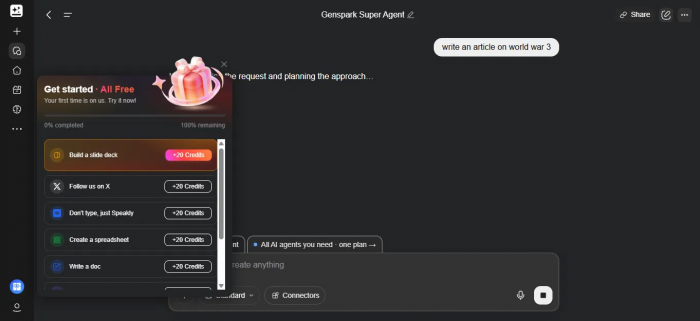
What jumped out: the visible planning step is a small thing that builds real trust. You are told it is thinking before it commits to words.
Trust meter: 58, up
Screen 03: the draft comes back with its homework stapled on
A short wait later, a finished article with a headline and a standfirst. The part I cared about sat above the prose: a log of every research move it made. A timestamp pull. Two parallel web searches, each with a View button that opens the source.
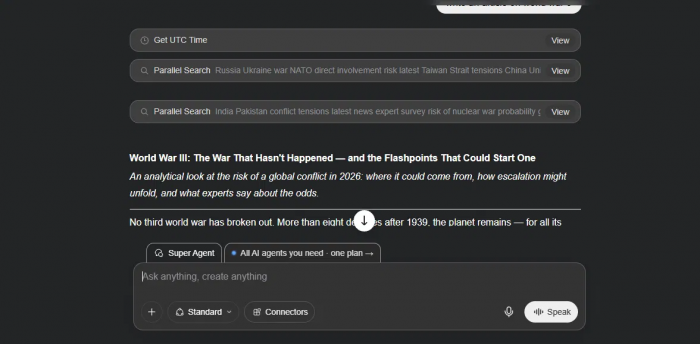
What caught my eye: showing its searches turns a confident draft into a checkable one. This is the single feature that made me take the product seriously.
Trust meter: 72, up
Plenty of tools write confident prose. Far fewer show you the searches they ran to get there.
Screen 04: the tab that never goes away
The entire time, a small tab sat beside the prompt box: All AI agents you need, one plan, with an arrow. It is not loud. It is just always there. I clicked it and landed on the pricing page.

Worth flagging: not aggressive, but constant. It quietly frames the free tier as a preview rather than a product.
Trust meter: 66, down
Screens 05 and 06: reading the price tag two ways
Two paid tiers, plus free. On monthly billing Plus is 24.99 dollars and Pro is 249.99 dollars. Flip the toggle to annual and Plus drops to 19.99 a month, billed 239.99 a year, while Pro falls to 199.99 a month, billed 2,399.99 a year. Plus is tagged Most popular, which tells you where most people land.
| Plan | Monthly | Annual, per month | Billed yearly |
|---|---|---|---|
| Free | 0 dollars | 0 dollars | 0 dollars |
| Plus | 24.99 dollars | 19.99 dollars | 239.99 dollars |
| Pro | 249.99 dollars | 199.99 dollars | 2,399.99 dollars |
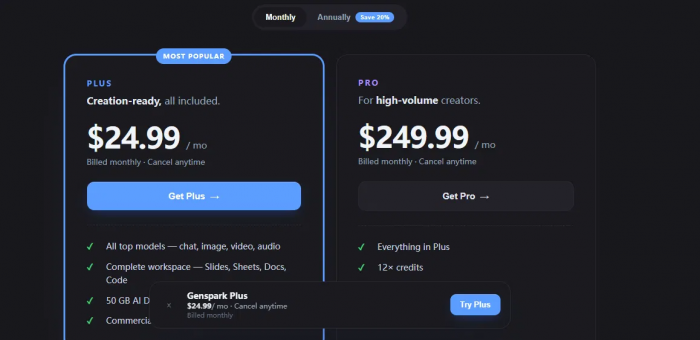
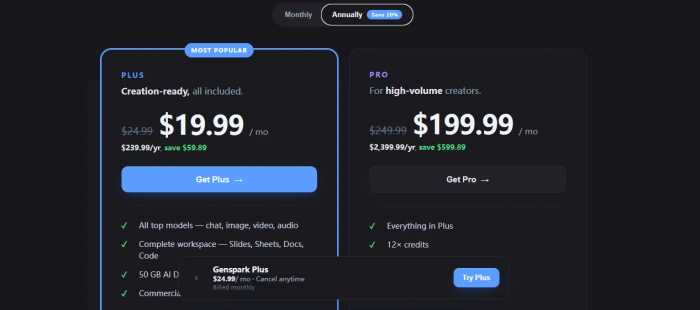
The part that stung: the jump from Plus to Pro is a cliff, not a step. Pro only makes sense if you are burning credits all day.
Trust meter: 62, down
Screen 07: everything under one roof
The side menu is where the all-in-one claim becomes literal. AI Team holds GenTeam, Claw, and Super Agent. Office Suite covers Slides, Sheets, Docs, GenMail, and plugins for Google Workspace, PowerPoint, Excel, and Word. Then a build suite and a content stack beneath that.
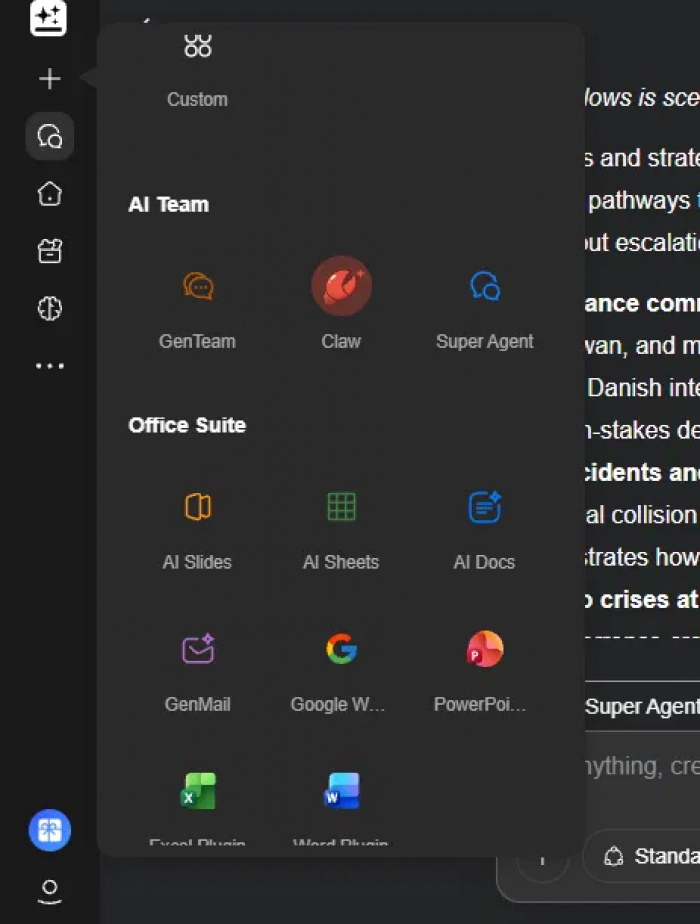
Quick gut check: impressive on paper. The only question that matters is whether each tool holds up on its own, so I picked the one everyone talks about: Slides.
Trust meter: 64, flat
Screen 08: slides that ask before they build
I opened AI Slides and gave it the same topic. After a longer processing pause than the article, it did something most generators skip: it asked who the deck was for. Students, a general talk, a policy briefing, a read-only explainer, or other. A progress bar showed it was a quarter of the way through its questions.
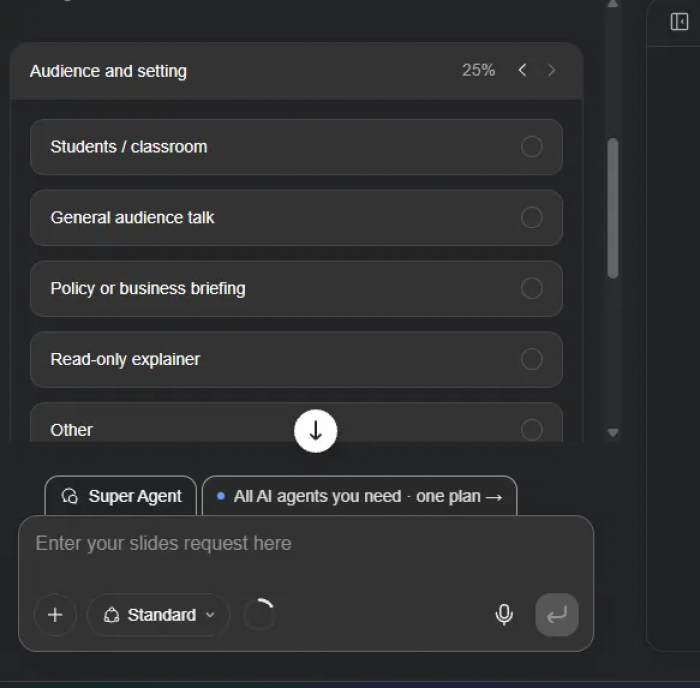
Nice touch: setting the tone before a single slide exists beats generating a generic deck and rewriting it. It costs you thirty seconds and saves you ten minutes.
Trust meter: 74, up
Screen 09: eight slides, and they looked like a real deck
I asked for eight. It delivered eight. A bold cover with a stat callout, a flashpoints slide, a data slide with a big number, a chart slide, all with an outline rail on the left and Present, Export, History, Notes, and Verify controls on top. Every slide was editable in place.
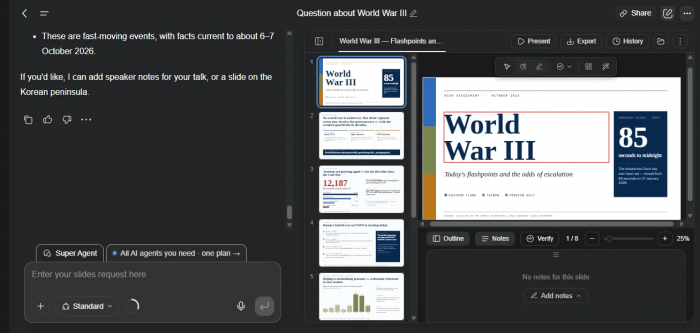
What stood out: design quality was higher than I expected from a general agent. It even tagged the facts as current to early October 2026 and offered to add speaker notes.
Trust meter: 82, up. The high point of the test.
Screen 10: the export button that wants your card
Happy with the deck, I hit Export. The format choices were all there: PDF, PPTX, Google Slides, with a page-range option. The second I picked one, a yellow notice appeared. Export features are available for Plus, Pro, and Team members. Underneath it, a single button: Upgrade to Plus.
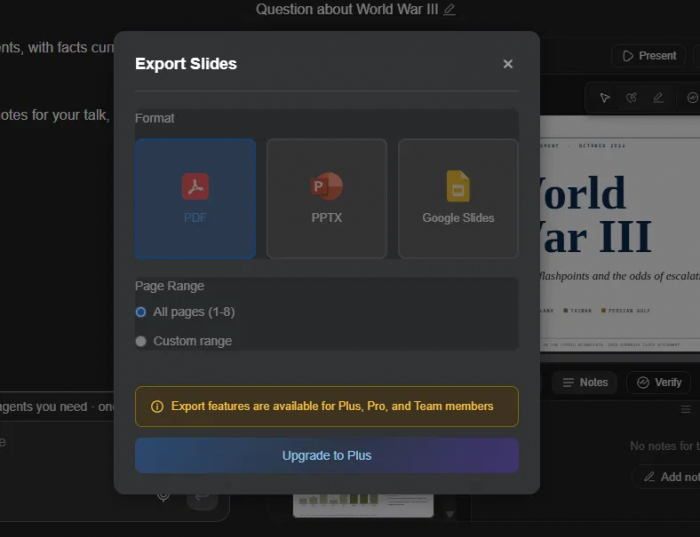
The catch: if you plan to actually use what it makes, budget for a plan before you start a long task. Otherwise you end up with a great deck trapped in a browser tab.
Trust meter: 70, down
Where the money actually goes
Genspark bills on credits, and this is where public opinion splits hardest. Chat and standard image generation are promoted as free through the end of 2026. The expensive moves are the agentic ones: a full slide deck runs roughly 100 credits or more, and video generation costs the most of all. The complaint that keeps surfacing is that a failed or retried task still spends credits, so an agent that gets stuck can eat your balance while producing nothing you can use.
That is the whole tension in one sentence. The product is at its best when it does a lot for you, and credits are charged for doing a lot, whether or not the result lands.
Stacked against the tools people compare it to
| Tool | Where it wins | Where Genspark wins instead |
|---|---|---|
| Manus | Harder, more exploratory technical agent work | Price. Genspark is far cheaper for similar breadth |
| Perplexity | Steadier cited search and plain answers | Finishing. It builds the deck, not just the answer |
| Gamma | Polished, presentation-first decks | Scope. Research, docs, sheets, and apps in one place |
| ChatGPT | Consistent chat and broad general use | Execution. One prompt runs a multi-step task end to end |
If you want one thing done beautifully, a specialist usually beats it. If you want to go from idea to research to finished deliverable without switching apps, nothing else here does that as broadly.
What people who paid are saying
I read through the public reviews so you do not have to. On Trustpilot the score hovers around 3 out of 5, and the reviews split cleanly into two camps that are both telling the truth.
| Rating | What they said | Source |
|---|---|---|
| 5 stars | "Genspark.ai is fabulous." Another called it the "best AI suite I found so far." | Positive Trustpilot reviewers |
| 4 stars | After dozens of disappointing slide generators, this one "finally blew me away." Not sponsored. | Creator review of AI Slides |
| 2 stars | "Credit system makes the AI platform unusable." Credits run out fast and the tool keeps stopping you. | Trustpilot, credit complaint |
| 1 star | An annual subscriber warned others not to hand over a card, calling it a "credit-draining trap" with slow support. | Trustpilot, billing complaint |
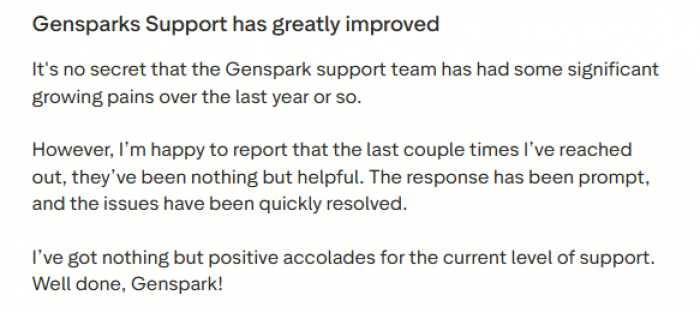
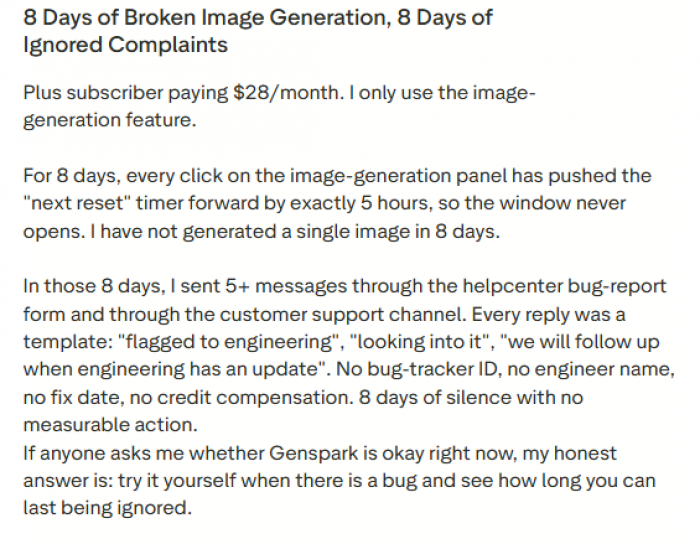
Read them together and the picture is consistent. The deliverables are good when they land. The frustration is about paying for the ones that do not, and about waiting on support when that happens.
The verdict: 3.7 out of 5
Good enough to use. Not yet good enough to trust blindly.
Genspark is a capable all-in-one agent with excellent sourced research and first-draft slides that look like real work. It is held back by a credit system that needs more transparency and by support that too many paying users describe as slow. Start free, run your own real task, and pay only once the output has earned it.
| Category | Score |
|---|---|
| Research quality | 4.5 |
| Slide output | 4.3 |
| Ease of use | 4.0 |
| Pricing clarity | 2.8 |
| Credit fairness | 2.5 |
| Support | 2.7 |
Post Comments
Be the first to post comment!