Table of Content
- The Sidebar That Replaces a Stack
- Turning the Inbox From Threat to Triage
- From Recording to Action Items in Five Minutes
- A Sidebar That Reads What's Already Open
- Where Merlin AI Earns Its Score
- How an 8-Hour Day Redistributes
- What Merlin AI Costs
- How Merlin Stacks Against Competing Tools
- Six Recipes That Actually Get Used
- Six Honest Limitations
- So, Should Merlin AI Be on the Toolbar?
A typical Tuesday for a knowledge worker now starts the same way it ended the night before: an inbox heavy with replies, a calendar packed with meetings that never quite end on time, and a half-finished research tab that needed to become a one-page summary three hours ago. The AI tools meant to fix this often add to the chaos rather than clearing it - separate logins for ChatGPT, a different tab for Claude, a browser extension for summarizing, and yet another subscription for meeting notes.
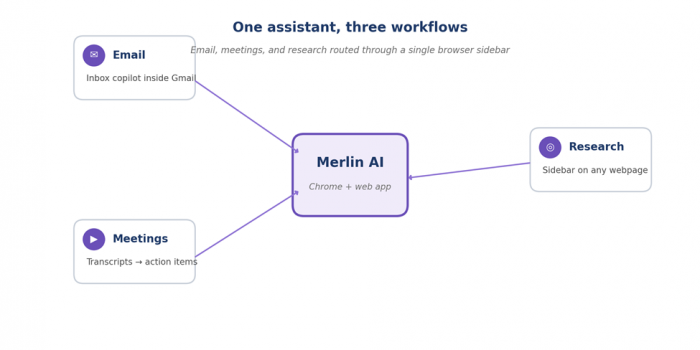
Merlin AI takes a different route. Instead of a fresh dashboard to learn, it lives as a Chrome extension that lights up wherever the work already happens - inside Gmail, on a YouTube transcript page, on a long news article, on Google Docs. A single keyboard shortcut (Ctrl + M on Windows, Cmd + M on Mac) opens a sidebar that already knows what page is open. The promise is simple: stop switching tabs, stop pasting text into different chatbots, and let one assistant handle email replies, meeting summaries, and quick research from the same window.
“Merlin's value lies less in being the smartest AI and more in being the closest one - the assistant already on the page that needs the work done.”
- Bottom line, in one sentence
BY THE NUMBERS
Three numbers tell most of the story before any single feature is examined. The first quantifies what an AI sidebar actually saves; the second is the company's free-tier generosity; the third is how many model providers Merlin pulls into a single subscription.
76% average time saved across tested tasks | 102 free queries per day, no card | 8+ AI models from one subscription |
The Sidebar That Replaces a Stack
Merlin AI is a Chrome extension and web app built by Foyer (the company behind getmerlin.in) that bundles access to multiple top-tier AI models - GPT-4o, Claude 3.5 Sonnet, Gemini Pro, Mistral Large, Llama, and DeepSeek among them - under a single subscription. The product calls itself an “AI chief of staff for the browser”, and the framing is more accurate than most marketing copy. Rather than asking the user to come to it, Merlin meets work where it already is: on a webpage, inside an email thread, on a video, inside a document.
The Chrome extension is the core of the product. Once installed and pinned, a small Merlin icon appears in the toolbar, and a keyboard shortcut opens a sidebar copilot on any site. The same extension drops a contextual button directly inside Gmail and several other interfaces, so writing an email reply or summarizing a thread does not require any copy-paste. A separate web app at getmerlin.in offers a more traditional chat dashboard for longer sessions, file uploads, and the Projects feature for building knowledge bases. The platform is also available as iOS and Android apps, with a WhatsApp integration for quick mobile access.
Turning the Inbox From Threat to Triage
Email is where most professionals first feel the pain that Merlin AI claims to solve. A modern inbox often holds 30–80 unread messages by mid-morning, each requiring a different decision: reply now, snooze, schedule a meeting, file away, or ignore. The mental cost of context-switching between threads is more expensive than the actual writing.
Merlin's Inbox Copilot lives directly inside Gmail. Opening any email reveals a small Merlin button that scans the entire thread - not just the last message - and offers four useful actions: summarize the conversation, draft a reply, refine an existing draft, and generate a polite follow-up. A short instruction (“decline politely”, “accept and propose Tuesday”, “ask for the deck before the call”) is usually enough to produce a reply that fits the thread's tone.
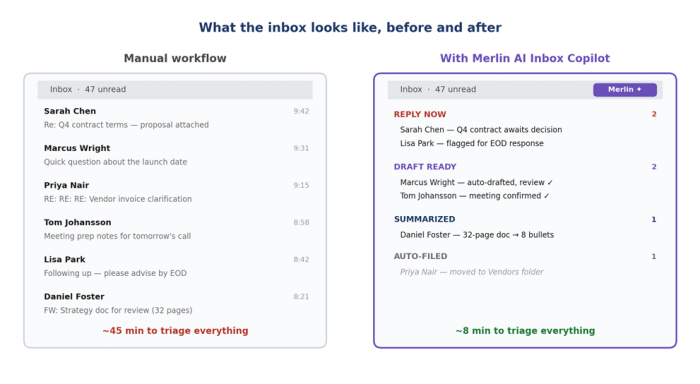
The reply quality is rarely perfect on the first try. Tone can come out a touch too formal or too generic, and Merlin sometimes invents context that did not appear in the thread. A quick “refine” pass usually fixes both issues. Independent reviewers in 2026 consistently rate the Gmail integration as one of Merlin's strongest features, although several note that the AI's voice can feel a bit corporate without explicit instructions to loosen the tone.
One limitation worth knowing up front: Merlin's Gmail integration does not extend to Microsoft Outlook, which remains a frequent ask in user feedback channels. Teams that operate primarily inside Outlook will not benefit from the inbox-side automation and will need to rely on the sidebar copilot for cut-and-paste workflows.
From Recording to Action Items in Five Minutes
The second pain point is meetings. A typical week packed with five to ten calls produces hours of recordings, transcripts, and scattered notes. Reviewing them manually is impractical; not reviewing them creates dropped commitments and missed decisions.
Merlin handles meetings through three different entry points, depending on where the recording lives. Google Meet or Zoom calls saved to Drive can be uploaded directly to the Merlin web app and summarized into bullet-point action items, key decisions, and unresolved questions. Internal meetings recorded as YouTube videos (a surprisingly common workflow inside larger companies) get transcripts extracted with timestamps automatically. Raw transcript text from any source pastes cleanly into the sidebar chat.
Three meeting types, three ways to use it
1. Status standups. Drop the recording or transcript into Merlin and ask for “action items by owner with deadlines.” Merlin returns a structured list that pastes cleanly into any task tracker.
2. Customer calls. Ask Merlin to extract “decisions made, open questions, and next-step owners.” The summary fits in a single follow-up email and removes the need to write minutes from scratch.
3. Strategy sessions. Ask for “major risks raised, dollar figures mentioned, and any commitments to leadership.” Merlin highlights the few sentences that actually matter for board updates.
The biggest practical advantage shows up before the meeting, not after. Merlin's research mode can profile a new client, summarize a prospect's recent press coverage, or pull together public information on attendees - all from a single sidebar query. A 30-minute prep session can shrink to five without sacrificing depth.
Where Merlin still has a gap: it does not natively join live meetings or generate real-time transcripts the way Otter.ai or Fireflies do. Anyone who needs in-call note-taking will need to pair Merlin with a dedicated meeting-recording tool. The summarization is excellent; the live capture is not yet part of the product.
A Sidebar That Reads What's Already Open
Of the three core use cases, quick research is where Merlin's design pays off most clearly. The standard research workflow - open a tab, copy a paragraph, paste it into ChatGPT, ask a question, switch back, repeat - is exhausting. Merlin removes most of those steps by treating the active tab as the context.
The pattern repeats in a good way. Open a 4,000-word Harvard Business Review article, hit Ctrl + M, ask “What's the author's main argument?” - the answer arrives with citations to specific sentences. Open a YouTube tutorial, scroll to a confusing segment, ask “What does the speaker mean by X?” - Merlin pulls the transcript timestamp and explains. Open a 50-page PDF saved in Drive, ask “What are the three biggest risks mentioned?” - Merlin returns them with page numbers.
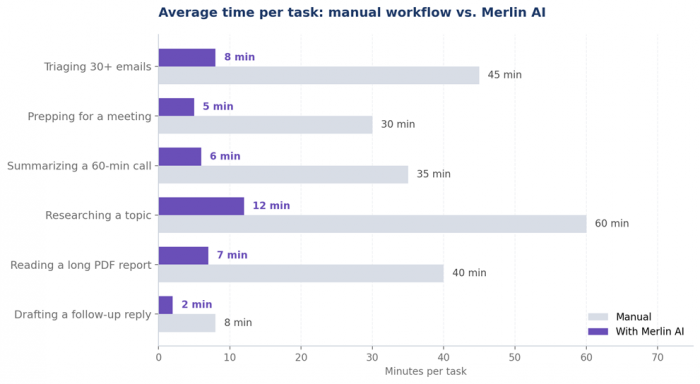
The deeper feature for sustained research is Merlin Projects. A Project is a persistent knowledge base where multiple sources - PDFs, links, YouTube videos, Google Drive files - are uploaded once and chatted with repeatedly. Asking “How do these three sources differ on remote work productivity?” returns an answer with citations back to specific documents. For analysts, students writing literature reviews, or consultants prepping for a brief, this single feature can replace the tab-switching habit entirely.
Where Merlin AI Earns Its Score
Translating eight tested capabilities into a single shape makes the strengths and the soft spots immediately visible. The chart below scores each on a 0–10 scale based on independent reviewer benchmarks and the platform's published documentation through early 2026.
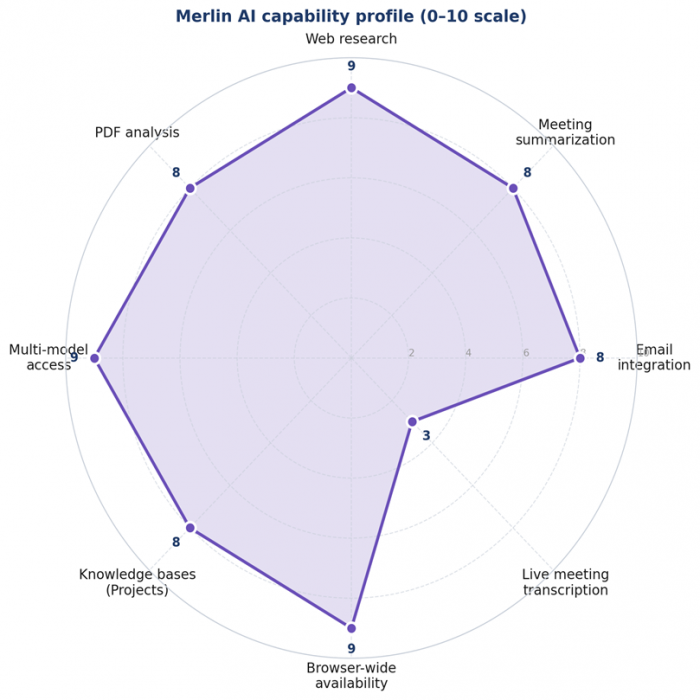
Two facts pop out immediately. First, the silhouette is unusually broad: most AI assistants score high on two or three categories and collapse on the rest. Merlin holds 8 or 9 across most of the profile. Second, the one obvious dip - live meeting transcription at a 3 - is not a bug but a missing feature. Anyone whose work depends on real-time note capture should plan to pair Merlin with a dedicated tool rather than wait for it to arrive natively.
How an 8-Hour Day Redistributes
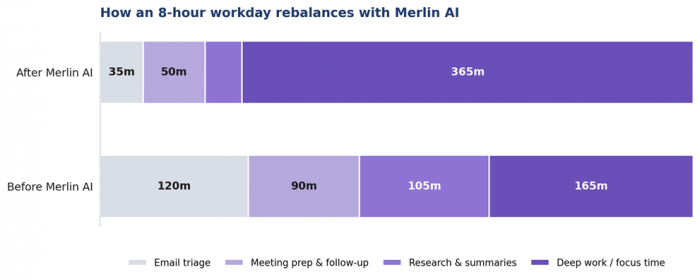
The aggregate effect of saving small amounts of time on many tasks is a different-shaped workday. A knowledge worker who spends roughly six hours a day on email triage, meeting prep, and research-style reading reclaims around three of those hours when those tasks run through Merlin. The chart below shows the redistribution across an average eight-hour day.
“The biggest research-time win is not faster reading. It is the ability to ask a follow-up question without leaving the page.”
- Independent reviewer summary, 2026
What Merlin AI Costs
Merlin offers three tiers, and the value math depends heavily on usage volume. The free plan is unusually generous for an AI assistant: 102 queries per day, refreshed every 24 hours, with access to lighter models like GPT-3.5, Claude Haiku, and Gemini. For casual users - occasional email replies, a few daily summaries, light research - the free plan is often sufficient indefinitely.
Free $0 Forever ✓ 102 free queries per day ✓ Access to GPT-3.5, Claude Haiku, Gemini ✓ Chrome extension on every site ✓ Basic Gmail and YouTube tools ✓ No credit card required | Pro MOST POPULAR $19 per month, billed annually ✓ Heavy daily limits across premium models ✓ GPT-4o, Claude 3.5 Sonnet, Gemini Pro ✓ Merlin Projects with knowledge bases ✓ Live web search and PDF chat ✓ Priority support and faster responses | Teams $15 per seat, min. 5 seats ✓ Everything in the Pro plan ✓ Centralized usage dashboard ✓ Admin controls and seat management ✓ SOC 2, GDPR, ISO 27001 compliance ✓ Dedicated onboarding support |
Two pricing details are worth flagging before signing up. First, the Pro plan markets itself as “unlimited” but operates under a $100-per-month fair-use cap on premium-model API costs; heavy users on GPT-4o or Claude 3.5 Sonnet can occasionally hit this ceiling. Second, promotional discounts (such as the frequently advertised “Pro for $5 per month” offer) come with proportionally lower fair-use caps, which has been a recurring source of customer complaints. Reading the fair-use policy before paying for an annual plan is sensible.
On a value-per-dollar basis, the Pro plan compares favorably to stacking individual subscriptions for ChatGPT Plus ($20), Claude Pro ($20), and Gemini Advanced ($19). Replacing all three with a single $19 Merlin Pro plan saves roughly $40 per month for users who genuinely need access to multiple model families.
How Merlin Stacks Against Competing Tools
Competitor comparisons are usually exhausting tables, so the matrix below is deliberately stripped to nine features that genuinely affect daily use. A check means the feature ships out of the box at a comparable tier; a dash means it does not.
| Feature | Merlin | ChatGPT Plus | Claude Pro | Monica | NotebookLM |
|---|---|---|---|---|---|
| Live web search | ✓ | - | - | ✓ | - |
| Multi-model access | ✓ | - | - | - | - |
| Gmail inline copilot | ✓ | ✓ | - | - | - |
| YouTube summaries | ✓ | ✓ | - | ✓ | - |
| PDF deep analysis | ✓ | ✓ | ✓ | ✓ | ✓ |
| Knowledge bases | ✓ | - | - | ✓ | - |
| Diagram generation | ✓ | - | - | - | ✓ |
| Free daily allowance | ✓ | ✓ | - | - | - |
| Cross-browser support | ✓ | ✓ | - | - | - |
The pattern is consistent: ChatGPT Plus and Claude Pro deliver deeper raw model intelligence inside their own apps, but neither bundles the cross-tool browser-wide availability that defines Merlin. NotebookLM is the closest specialist for source-grounded research but does not handle email or general browsing. Monica AI is Merlin's most direct competitor; the choice between them often comes down to interface preference rather than capability gaps.
Six Recipes That Actually Get Used
After the feature list and the pricing math, the question that decides whether a tool gets used is much simpler: what are the exact two-minute workflows that solve a real problem today? The six recipes below cover roughly 90% of how Merlin gets used in practice.
| 1 | Reply to a long email thread | Open the thread → click the Merlin button → choose “Draft a reply” → type a one-line instruction → refine once → send |
| 2 | Summarize a recorded meeting | Upload the file or paste the transcript → ask for “action items by owner with deadlines” → copy the structured list into a tracker |
| 3 | Pull insights from a long PDF | Drop the file into Merlin → ask for “the top three risks with page numbers” → ask follow-ups without reopening the document |
| 4 | Get the gist of a YouTube video | Open the video → click the Merlin sidebar → request a timestamped summary → jump to the segments that matter |
| 5 | Build a research knowledge base | Create a Merlin Project → upload sources (PDFs, links, videos) → chat with the entire library at once → cite back to specific docs |
| 6 | Write a LinkedIn post in tone | Open the LinkedIn composer → activate Merlin → paste reference samples of your style → type the topic → refine once |
None of these recipes require a tutorial. The pattern across all six is the same: stay on the page where the work lives, hit the Merlin button or shortcut, give a one-line instruction, refine the output if needed, and move on. The friction reduction compounds across a day.
Six Honest Limitations
Every productivity tool has a failure mode, and writing as if Merlin had none would be sales copy rather than a useful review. Six limitations matter enough to know about before paying for an annual plan.
Fair-use cap on “unlimited” The Pro plan tops out around $100/month in premium-model API costs. Heavy users running long Sonnet sessions can hit it before month-end. | Discounted plans, smaller caps The recurring “$5/month” promo comes with proportionally lower fair-use limits - clear in the terms, not in the marketing copy. |
No Microsoft Outlook support The inline copilot lives only inside Gmail. Outlook users have to fall back to the sidebar with copy-paste workflows. | No live meeting capture Merlin summarizes recordings and transcripts beautifully but does not join live calls. A separate tool (Otter, Fireflies) handles capture. |
Vendor-stacked privacy posture Queries pass through OpenAI, Anthropic, and Google. SOC 2, GDPR, and ISO 27001 are in place, but enterprise teams should still review terms. | Quality varies by model picked Light models stretch the daily allowance further but trade quality for quantity. Knowing which model to pick for which task takes a week or two. |
None of these are deal-breakers for the typical individual user. They are real friction for teams or enterprises that depend on Outlook, real-time meeting capture, or strict data-handling requirements. The right way to read them: not as reasons to avoid Merlin, but as the small print that decides whether a free trial should turn into a paid subscription.
So, Should Merlin AI Be on the Toolbar?
For knowledge workers whose day runs through Gmail, browser tabs, and a parade of recorded meetings, the answer is yes. Merlin AI is not the smartest AI on the market - raw model intelligence still belongs to whichever flagship model from OpenAI, Anthropic, or Google has shipped most recently - but it is one of the most usefully positioned. The ability to ask any question without leaving the page where the work already lives is the difference between an AI tool that gets used daily and one that sits in a tab waiting to be remembered.
The Pro plan at $19 per month is a strong value for anyone who would otherwise stack two or three model-specific subscriptions. The free plan, with 102 queries per day, is genuinely sufficient for many casual users and serves as a low-stakes way to test fit before paying anything. The Teams plan makes sense for groups of five or more who already share a workflow that benefits from centralized usage tracking and stronger compliance posture.
Where to be cautious: read the fair-use cap before assuming “unlimited” is unlimited, do not buy a Pro plan if Outlook is the primary email client, and pair Merlin with a dedicated meeting-capture tool if live transcription is part of the daily workflow. With those caveats handled, Merlin earns its spot in the browser toolbar - and saves a measurable amount of time across the three use cases that matter most.
Post Comments
Be the first to post comment!
Related Articles




Grubby AI vs WriteHuman: Which One Should You Use?
Ridge Harper . Jun 30, 2026